

Are your legacy systems holding your business back? Outdated applications, slow performance, cybersecurity vulnerabilities, and complex integrations can silently drain productivity and increase operational risks. In fact, only 46 % of data migration projects finish on schedule—and just 36 % remain within budget, highlighting how easily such transitions derail.
Migrating to modern platforms promises efficiency, scalability, and security, but the process can feel daunting.
The good news is, with a structured approach, you don’t have to gamble with downtime or data loss. In this guide, we’ll walk you through a 7-step process to migrate your legacy systems safely and effectively, helping you maintain business continuity while upgrading your IT environment.
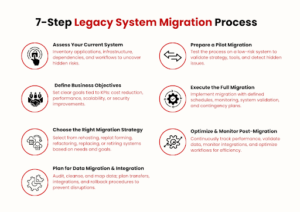
Step 1 – Assess Your Current System
Before you even think about migration, you need a complete understanding of your current IT environment. This means going beyond a surface check. Start by identifying:
- Applications in use – Which ones are business-critical, and which can be retired or replaced?
- Infrastructure setup – Servers, databases, integrations, and how they connect.
- Dependencies and workflows – How different systems rely on each other, including third-party tools.
A clear system assessment helps you uncover hidden risks. For example, you may find that an old payroll module depends on a database that isn’t compatible with modern cloud platforms. If you skip this stage, such issues can cause downtime later.
To keep this manageable, create an inventory report that maps out all systems, users, and dependencies. This document becomes your baseline reference for planning the rest of the migration.
Step 2 – Define Business Objectives for Migration
Once you know what you’re working with, the next step is to define why you’re migrating in the first place. Without clear objectives, even the best technical plan can go off-track.
Start by asking:
- What outcomes do we want? – Is the goal to cut infrastructure costs, improve system performance, enable scalability, or strengthen security?
- Which processes need improvement? – For example, faster reporting for finance, better uptime for customer-facing apps, or smoother integrations for supply chain systems.
- What risks must we minimize? – Think compliance, downtime, and data loss.
Document these goals and tie them directly to business KPIs. For instance, if your objective is to reduce operational costs, you might target a 25% drop in IT spend over the next two years. If it’s about performance, you may aim for response times under one second for customer transactions. For example, organizations pursuing modernization commonly realize cost savings of 13 % to 18 % as inefficiencies, architectural debt, and maintenance overhead are reduced.
This clarity ensures that every decision, from choosing the migration strategy to monitoring post-migration performance, is aligned with measurable business value.
Step 3 – Choose the Right Migration Strategy
With your current system assessed and objectives defined, it’s time to select the migration strategy that best fits your business. There’s no one-size-fits-all approach, the right choice depends on your legacy setup, budget, and long-term goals.
The most common strategies include:
- Rehosting (“Lift and Shift”) – Move applications as they are, with minimal changes. This is often the fastest route but may not unlock the full benefits of modernization.
- Replatforming – Make limited adjustments (like moving databases to managed services) without a full rewrite. This balances speed and optimization.
- Refactoring/Re-architecting – Redesign applications to fully leverage cloud-native capabilities. This option is resource-heavy but future-proofs your system.
- Replacing – Retire outdated applications and replace them with new SaaS or off-the-shelf solutions.
- Retiring – Eliminate redundant systems that no longer add value.
To decide, weigh factors such as:
- Compatibility with existing workflows
- Projected costs vs. long-term savings
- Security and compliance needs
- User adoption and training requirements
By matching the strategy to your business objectives, you avoid unnecessary complexity and ensure the migration delivers real value, not just a technical upgrade.
Step 4 – Plan for Data Migration and Integration
Data is at the core of any legacy system, and moving it safely is often the most challenging part of migration. If you don’t plan this step carefully, you risk losing critical information or facing inconsistencies that disrupt business operations.
Start with a data audit. Identify what data is relevant, what can be archived, and what needs cleansing before migration. Outdated, duplicated, or corrupted records only add complexity; cleaning them now prevents issues later.
Next, map out data dependencies. For example, if your HR system pulls employee data from a central database that also serves payroll, both need to move in sync. Skipping this detail can break processes that employees rely on daily.
For integration, establish how your new environment will interact with:
- Existing applications that won’t migrate immediately
- Third-party tools used by different teams
- APIs and middleware that handle real-time transactions
Finally, decide on a migration method:
- Big Bang – Move all data in one go, usually over a planned downtime window.
- Phased – Transfer data in stages to minimize disruption.
Whichever you choose, always back it up with a rollback plan. If something goes wrong, you need a reliable way to restore systems without losing business continuity.
Step 5 – Prepare a Pilot Migration
Jumping straight into a full migration is risky. A pilot migration helps you test your approach in a controlled environment before scaling it across the entire organization.
Here’s how to structure it:
- Select a low-risk system or module – Choose something non-critical but still representative of your larger environment. For example, a reporting tool or internal dashboard.
- Replicate the migration process – Apply the same steps you plan for the full migration, including data transfer, integration, and security checks.
- Measure outcomes against your objectives – Look at performance benchmarks, system compatibility, user experience, and downtime. Did the pilot meet the KPIs you defined in Step 2?
- Identify issues early – This stage is where hidden dependencies, data integrity gaps, or integration failures usually show up. Catching them now avoids major disruptions later.
A pilot isn’t just a “test run”, it’s a validation exercise. It gives your team the confidence that the chosen strategy, tools, and processes will scale effectively when it’s time for the real migration.
Step 6 – Execute the Full Migration
With lessons learned from the pilot, you’re ready to carry out the full migration. This step requires tight coordination between IT teams, business units, and external partners to ensure minimal disruption.
A strong execution plan should cover:
- Timeline and scheduling – Define clear migration windows, ideally during off-peak hours, to reduce impact on daily operations.
- Communication plan – Keep stakeholders and end-users informed about expected downtime, system changes, and fallback options.
- Data transfer process – Use the validated method (big bang or phased) from Step 4, ensuring continuous monitoring for errors or mismatches.
- System validation – Run functional and performance tests immediately after each migration batch. Confirm that applications, integrations, and security policies work as expected.
- Contingency measures – Have a rollback procedure and dedicated support team on standby in case critical issues arise.
Remember, success here isn’t just about “moving everything over.” It’s about doing it with zero data loss, minimal downtime, and full business continuity. If executed properly, users should notice improvements rather than disruptions.
Step 7 – Optimize and Monitor Post-Migration
The migration itself is only half the journey. Once your systems live in the new environment, continuous monitoring and optimization are crucial to realize the full benefits.
Start by:
- Tracking performance metrics – Measure application response times, system uptime, transaction success rates, and other KPIs defined in Step 2.
- Validating data integrity – Ensure all records migrated correctly, with no missing or corrupted entries.
- Monitoring integrations – Confirm that workflows across connected systems operate seamlessly.
- Collecting user feedback – Users often spot issues that automated monitoring misses. Document their experience to identify friction points.
After initial validation, focus on optimization:
- Fine-tune configurations to improve performance.
- Automate routine tasks where possible.
- Plan periodic audits to maintain compliance and security.
Continuous monitoring helps you proactively address issues before they escalate, ensuring your migrated systems are not just functional, but efficient, reliable, and scalable for future business needs.
Conclusion
As companies increasingly modernize, 76 % of organizations are now actively engaged in legacy system modernization initiatives, underlining how mainstream this challenge has become.
With the right digital transformation solutions, from assessing your current environment to optimizing post-migration performance, each stage ensures your systems stay reliable while unlocking efficiency, scalability, and security.
At SCSTech, we specialize in guiding businesses through complex migrations with minimal risk. Our experts can help you choose the right strategy, manage data integrity, and monitor performance so you get measurable results. Contact our team today to discuss a migration plan tailored to your business objectives.