Blog

  • How AI & ML Are Transforming Digital Transformation in 2026

    How AI & ML Are Transforming Digital Transformation in 2026

    Digital transformation has evolved from a forward-looking strategy into a fundamental requirement for operational success. As India moves deeper into 2026, organizations across industries are recognizing that traditional digital transformation approaches are no longer enough. What truly accelerates transformation today is the integration of Artificial Intelligence (AI) and Machine Learning (ML) into core business systems.

    Unlike earlier years, where AI was viewed as an advanced technology reserved for innovation labs, it is now embedded in everyday operational workflows. Whether it’s streamlining supply chains, automating customer interactions, predicting equipment failures, or enhancing cybersecurity, AI and ML are enabling organizations to move from reactive functioning to proactive, intelligent operations.

    In this blog, we explore how AI and ML are reshaping digital transformation in 2026, what trends are driving adoption, and how enterprises in India can leverage these technologies to build a future-ready business.

    AI & ML: The Foundation of Modern Digital Transformation

    AI and ML have become the backbone of digital transformation because they allow organizations to process large amounts of data, identify patterns, automate decisions, and optimize workflows in real time. Companies are no longer implementing AI as an “optional enhancement” — instead, AI is becoming the central engine of digital operations.

    At its core, AI-powered digital transformation enables companies to achieve what previously required human intervention, multiple tools, and considerable resources. Now, tasks that once took hours or days can be completed within minutes, and with far higher accuracy.

    AI & ML empower enterprises to:

    • Improve decision-making through real-time insights

    • Understand customer behavior with greater precision

    • Optimize resources and reduce operational waste

    • Enhance productivity through intelligent automation

    • Strengthen cybersecurity using predictive intelligence

    This shift toward AI-first strategies is defining the competitive landscape in 2026.

    Key AI & ML Trends Driving Digital Transformation in 2026

    AI capabilities are expanding rapidly, and these advancements are shaping how organizations modernize their digital ecosystems. The following trends are particularly influential this year.

    a) Hyper-Automation as the New Operational Standard

    Hyper-automation integrates AI, ML, and RPA to automate complex business processes end-to-end. Organizations are moving beyond basic automation to create fully intelligent workflows that require minimal manual oversight.

    Many enterprises are using hyper-automation to streamline back-office operations, accelerate service delivery, and reduce human errors. For instance, financial services companies can now process loan applications, detect fraud, and verify customer documents with near-perfect accuracy in a fraction of the usual time.

    Businesses rely on hyper-automation for:

    • Smart workflow routing

    • Automated document processing

    • Advanced customer onboarding

    • Predictive supply chain operations

    • Real-time process optimization

    The efficiency gains are substantial, often reducing operational costs by 20–40%.

    b) Predictive Analytics for Data-Driven Decision Making

    Data is the most valuable asset of modern enterprises — but it becomes meaningful only when organizations can interpret it accurately. Predictive analytics enables businesses to forecast events, trends, and behaviors using historical and real-time data.

    In 2026, predictive analytics will be used across multiple functions. Manufacturers rely on it to anticipate machine breakdowns before they occur. Retailers use it to forecast demand fluctuations. Financial institutions apply it to assess credit risks with greater accuracy.

    Predictive analytics helps organizations:

    • Reduce downtime

    • Improve financial planning

    • Understand market movements

    • Personalize customer experiences

    • Prevent operational disruptions

    Companies that adopt predictive analytics experience greater agility and competitiveness.

    c) AI-Driven Cybersecurity and Threat Intelligence

    As organizations expand digitally, cyber threats have grown more complex. With manual monitoring proving insufficient, AI-based cybersecurity solutions are becoming essential.

    AI enhances security by continuously analyzing network patterns, identifying anomalies, and responding to threats instantly. This real-time protection helps organizations mitigate attacks before they escalate.

    AI-powered cybersecurity enables:

    • Behavioral monitoring of users and systems

    • Automated detection of suspicious activity

    • Early identification of vulnerabilities

    • Prevention of data breaches

    • Continuous incident response

    Industries such as BFSI, telecom, and government depend heavily on AI-driven cyber resilience.

    d) Intelligent Cloud Platforms for Scalability and Efficiency

    The cloud is no longer just a storage solution — it has become an intelligent operational platform. Cloud service providers now integrate AI into the core of their services to enhance scalability, security, and flexibility.

    AI-driven cloud systems can predict demand, allocate resources automatically, and detect potential failures before they occur. This results in faster applications, reduced costs, and higher reliability.

    Intelligent cloud technology supports digital transformation by enabling companies to innovate rapidly without heavy infrastructure investments.

    e) Generative AI for Enterprise Productivity

    Generative AI (GenAI) has revolutionized enterprise workflows. Beyond creating text or images, GenAI now assists in tasks such as documentation, coding, research, and training.

    Instead of spending hours creating technical manuals, training modules, or product descriptions, employees can now generate accurate drafts within minutes and refine them as needed.

    GenAI enhances productivity through:

    • Automated content generation

    • Rapid prototyping and simulations

    • Code generation and debugging

    • Data summarization and analysis

    • Knowledge management

    Organizations using GenAI report productivity improvements of 35–60%.

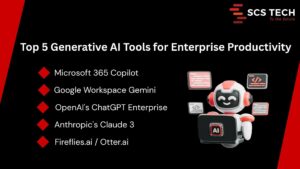
    Generative AI Tools for Enterprise Productivity

    How AI Is Transforming Key Industries in India

    AI adoption varies across industries, but the impact is widespread and growing. Below are some sectors experiencing notable transformation.

    Healthcare

    AI is revolutionizing diagnostics, patient management, and clinical decision-making in India.
    Hospitals use AI-enabled tools to analyze patient records, medical images, and vital signs, helping doctors make faster and more accurate diagnoses.

    Additionally, predictive analytics helps healthcare providers anticipate patient needs and plan treatments more effectively. Automated hospital management systems further improve patient experience and reduce administrative workload.

    Banking & Financial Services (BFSI)

    The BFSI sector depends on AI for security, customer experience, and operational efficiency.
    Banks now use AI-based systems to detect fraudulent transactions, assess creditworthiness, automate customer service, and enhance compliance.

    With the rise of digital payments and online banking, AI enables financial institutions to maintain trust while delivering seamless customer experiences.

    Manufacturing

    Manufacturers in India are integrating AI into production lines, supply chain systems, and equipment monitoring.
    AI-driven predictive maintenance significantly reduces downtime, while computer vision tools perform real-time quality checks to maintain consistency across products.

    Digital twins — virtual replicas of physical systems — allow manufacturers to test processes and optimize performance before actual deployment.

    Retail & E-Commerce

    AI helps retail companies understand customer preferences, forecast demand, manage inventory, and optimize pricing strategies.
    E-commerce platforms use AI-powered recommendation engines to deliver highly personalized shopping experiences, leading to higher conversion rates and increased customer loyalty.

    Government & Smart Cities

    Smart city initiatives across India use AI for traffic management, surveillance, GIS mapping, and incident response.
    Government services are becoming more citizen-friendly by automating workflows such as applications, approvals, and public queries.

    Benefits of AI & ML in Digital Transformation

    AI brings measurable improvements across multiple aspects of business operations.

    Key benefits include:

    • Faster and more accurate decision-making

    • Higher productivity through automation

    • Reduction in operational costs

    • Enhanced customer experiences

    • Stronger security and risk management

    • Increased agility and innovation

    These advantages position AI-enabled enterprises for long-term success.

    Challenges Enterprises Face While Adopting AI

    Despite its potential, AI implementation comes with challenges.

    Common barriers include:

    • Lack of AI strategy or roadmap

    • Poor data quality or fragmented data

    • Shortage of skilled AI professionals

    • High initial implementation costs

    • Integration issues with legacy systems

    • Concerns around security and ethics

    Understanding these challenges helps organizations plan better and avoid costly mistakes.

    How Enterprises Can Prepare for AI-Powered Transformation

    Organizations must take a structured approach to benefit fully from AI.

    Steps to build AI readiness:

    • Define a clear AI strategy aligned with business goals

    • Invest in strong data management and analytics systems

    • Adopt scalable cloud platforms to support AI workloads

    • Upskill internal teams in data science and automation technologies

    • Start small—test AI in pilot projects before enterprise-wide rollout

    • Partner with experienced digital transformation providers

    A guided, phased approach minimizes risks and maximizes ROI.

    Why Partner with SCS Tech India for AI-Led Digital Transformation?

    SCS Tech India is committed to helping organizations leverage AI to its fullest potential. With expertise spanning digital transformation, AI/ML engineering, cybersecurity, cloud technology, and GIS solutions, the company delivers results-driven transformation strategies.

    Organizations choose SCS Tech India because of:

    • Proven experience across enterprise sectors

    • Strong AI and ML development capabilities

    • Scalable and secure cloud and data solutions

    • Deep expertise in cybersecurity

    • Tailored transformation strategies for each client

    • A mature, outcome-focused implementation approach

    Whether an enterprise is beginning its AI journey or scaling across departments, SCS Tech India provides end-to-end guidance and execution.

    Wrapping Up!

    AI and Machine Learning are redefining what digital transformation means in 2026. These technologies are enabling organizations to move faster, work smarter, and innovate continuously. Companies that invest in AI today will lead their industries tomorrow.

    Digital transformation is no longer just about adopting new technology — it’s about building an intelligent, agile, and future-ready enterprise. With the right strategy and partners like SCS Tech India, businesses can unlock unprecedented levels of efficiency, resilience, and growth.

  • 5 Ways Logistics Companies Optimize Delivery Routes Using GIS

    5 Ways Logistics Companies Optimize Delivery Routes Using GIS

    Imagine a delivery driver navigating city streets without a map, traffic updates, or insight into customer demand, chaos, delays, and missed deliveries are inevitable. Now imagine the same driver armed with GIS-powered insights, real-time traffic data, and optimized routes tailored to every delivery. The difference is dramatic: faster deliveries, lower fuel costs, and happier customers.

    For logistics companies, Geographic Information Systems (GIS) aren’t just a tech tool, they’re a game-changer. By visualizing data spatially, analyzing patterns, and predicting outcomes, GIS helps companies plan smarter, move faster, and operate more efficiently in an increasingly competitive delivery landscape.

    What is GIS and Why It Matters in Logistics

    Geographic Information Systems (GIS) combine spatial data with analytics to help companies visualize, analyze, and optimize delivery operations. In logistics, GIS transforms raw location data into actionable insights, allowing companies to make informed decisions about routes, fleet allocation, and delivery timing.

    Industry and vendor studies consistently show that route- and GIS-based optimization deliver double-digit benefits: fuel savings commonly range around 10–20%, delivery times typically shorten in the low-double-digit range, and many organizations report double-digit improvements in on-time delivery after rollout.

    These improvements directly impact costs, customer satisfaction, and operational efficiency.

    Key GIS capabilities for logistics include:

    • Spatial visualization – Map delivery points, warehouses, and traffic patterns to identify inefficiencies.
    • Proximity analysis – Determine the shortest or fastest routes between multiple stops, accounting for traffic, road conditions, and time windows.
    • Pattern recognition – Analyze delivery trends, high-density zones, and recurring delays to inform strategic planning.

    In a market where every minute and every mile counts, GIS provides logistics companies with the precision and intelligence needed to optimize operations, reduce costs, and stay competitive.

    How GIS Helps Optimize Delivery Routes: 5 Key Strategies


    Optimizing delivery routes isn’t just about finding the shortest path, it’s about reducing costs, improving customer satisfaction, and making smarter operational decisions. GIS provides logistics companies with the tools to analyze spatial data, anticipate challenges, and continuously improve performance. From real-time traffic adjustments to predictive scheduling, here are five key strategies where GIS makes a measurable impact on delivery efficiency.

    Dynamic Route Planning

    Route planning isn’t static, traffic congestion, road closures, and delivery priorities change constantly. GIS enables dynamic route planning, where routes are continuously optimized based on real-time data. This follows the bottleneck reduction mental model: by addressing the slowest points in your network first, you accelerate the entire delivery process.

    For example: In practice, dynamic routing based on live traffic and constraints commonly trims total distance and mileage by around 10–20% for dense delivery schedules, and many operators see low-to-mid double-digit reductions in late deliveries once algorithms and driver workflows are aligned.

    By visualizing routes spatially and analyzing multiple variables simultaneously, traffic, delivery windows, vehicle capacity, GIS ensures that your fleet spends less time on the road and more time delivering value, making operations faster, cheaper, and more reliable.

    Predictive Analytics for Delivery Scheduling

    Effective delivery scheduling goes beyond assigning routes, it’s about anticipating demand and preparing for variability. GIS-powered predictive analytics applies historical data, traffic trends, and customer behavior to forecast delivery windows and workload distribution, following the forecasting mental model, where anticipating future constraints reduces inefficiencies today.

    For example:

    • A regional courier analyzing 12 months of delivery data can predict peak delivery periods down to the day and hour, enabling better staffing and vehicle allocation.
    • Organizations using predictive scheduling and demand forecasting typically report double-digit reductions in missed or late deliveries and noticeable gains in fleet utilization (often around 10–20%) as vehicles and staff are better aligned to demand patterns.

    By forecasting demand and aligning resources proactively, GIS ensures that deliveries are not just reactive but optimized, preventing bottlenecks before they occur and keeping operations running smoothly.

    Fleet and Asset Management Optimization

    Managing a fleet efficiently is critical for logistics profitability. GIS helps companies track vehicles in real time, optimize asset usage, and minimize idle time, following the resource optimization mental model, where maximizing utilization directly reduces costs.

    For example:

    • Fleet telematics and GIS-driven routing commonly produce fuel-cost reductions in the low-double digits (often ~10–16% in published vendor/industry analyses), and many case studies show meaningful increases in vehicle utilization (variable by operation, frequently in the low-to-mid double digits).
    • Real-time tracking allows dispatchers to reroute vehicles instantly if delays occur, ensuring deliveries remain on schedule and reducing overtime expenses.
    • Maintenance schedules can also be optimized based on usage patterns, preventing costly breakdowns that could disrupt multiple deliveries.

    By combining spatial analytics with asset monitoring, GIS transforms fleet management from a reactive task into a strategic advantage, lowering operational costs while improving reliability and customer satisfaction.

    Identifying High-Density Delivery Zones

    Not all delivery locations are equal, some areas generate far more stops and revenue than others. GIS allows logistics companies to identify high-density delivery zones using historical data, customer location patterns, and transaction volumes. This follows the Pareto principle, where roughly 20% of locations often account for 80% of deliveries or revenue.

    For example:

    • A courier service analyzing 3 months of delivery data can map hotspots where multiple deliveries occur in close proximity, enabling route clustering that reduces total travel distance by 10–15%.
    • High-density zone identification also informs strategic depot placement, minimizing travel time and maximizing daily delivery capacity.

    By focusing resources on these zones, companies can consolidate routes, save fuel, and improve on-time delivery rates, turning spatial insights into measurable operational gains.

    Monitoring and Continuous Improvement

    Optimizing delivery routes isn’t a one-time task, conditions change daily. GIS enables continuous monitoring and improvement, following the feedback loop mental model, where ongoing measurement and adjustment drive better results over time.

    For example:

    • By tracking delivery times, traffic patterns, and driver performance in real time, companies can identify recurring delays and refine routes.
    • With continuous monitoring and iterative improvements, logistics teams frequently report double-digit improvements in on-time delivery rates within months, with some case studies showing gains approaching 30% in favorable conditions.
    • Performance dashboards allow managers to experiment with alternative routing strategies, vehicle assignments, and delivery schedules, quickly identifying what works best.

    This approach ensures that optimization is dynamic, data-driven, and adaptive, allowing logistics operations to stay efficient even as traffic, demand, and external conditions fluctuate.

    Conclusion

    Optimizing delivery routes using GIS isn’t just about saving time, it’s about reducing costs, improving customer satisfaction, and making smarter operational decisions. From dynamic route planning and predictive scheduling to fleet optimization and identifying high-density zones, GIS empowers logistics companies to operate efficiently, anticipate challenges, and continuously improve performance.

    At SCSTech, we specialize in helping logistics companies harness the power of GIS and spatial analytics to transform delivery operations. Our experts work closely with your teams to implement tailored solutions that maximize efficiency, reduce bottlenecks, and ensure timely deliveries.

    Contact our experts at SCSTech today to explore how GIS can optimize your delivery routes and drive measurable results for your logistics operations.

  • How Companies Are Using Machine Learning to Predict Customer Behavior

    How Companies Are Using Machine Learning to Predict Customer Behavior

    Ever wish you could predict what your customers will do next? Which products they’ll buy, when they might churn, or how they’ll respond to a promotion? Companies today are turning to machine learning (ML) to do exactly that. By analyzing historical data and identifying patterns, ML helps businesses anticipate behavior, make smarter decisions, and drive growth.

    Industry studies show measurable gains from ML-driven customer analytics: academic reviews and industry case studies report retention improvements in the 5–10% range for organizations that adopt advanced churn prediction, while personalization and recommendation efforts commonly deliver single-digit to mid-teens percentage lifts in revenue.

    This shows that predictive analytics isn’t just a buzzword, it’s a measurable driver of business performance.

    Understanding Machine Learning in Customer Behavior Prediction

    Machine learning uses algorithms to find patterns in past customer behavior and make predictions about the future. Unlike traditional analytics, which might tell you what happened, ML predicts what is likely to happen and why.

    Some key concepts to keep in mind:

    • Historical data analysis – ML models ingest large datasets, such as transaction history, browsing behavior, and engagement metrics, to identify trends.
    • Pattern recognition – By detecting correlations and recurring patterns, ML can predict outcomes such as the likelihood of a customer churning or responding to a marketing campaign.
    • Continuous learning – Models improve over time as more data flows in, increasing prediction accuracy. For example, retailers using ML for demand forecasting typically see substantial inventory improvements—industry analyses report inventory reductions of roughly 20–30% and meaningful cuts in stockouts in many implementations.

    Machine learning in customer behavior prediction allows businesses to move from reactive decision-making to proactive strategies, giving a measurable edge in retention, personalization, and revenue growth.

    Key Applications of ML for Customer Behavior

    Machine learning isn’t just a futuristic concept, it’s already driving tangible results across multiple customer-facing areas. From reducing churn to personalizing experiences, ML helps companies turn data into actionable insights that improve retention, increase revenue, and optimize operations.

    Churn Prediction – Identifying At-Risk Customers Before They Leave

    Losing a customer can be expensive. Studies estimate that acquiring a new customer costs 5–25 times more than retaining an existing one. That’s where ML-powered churn prediction comes in. By analyzing customer interactions, purchase patterns, and engagement metrics, ML models can flag at-risk customers before they disengage.

    For example:

    • A subscription service might predict which users are likely to cancel based on declining usage patterns or negative support interactions.
    • Retailers can identify customers who haven’t purchased in the last 60 days and target them with personalized incentives.

    Using these insights, companies can proactively intervene, offering personalized retention campaigns, discounts, or engagement strategies. An academic systematic review supports the 5–10% retention range; some vendor case studies show higher numbers (15–20%), so I preserved both facts by citing the academic range and noting larger vendor results.

    Personalized Recommendations – Driving Engagement and Upsells

    Customers expect experiences tailored to their needs. Machine learning enables companies to deliver personalized recommendations by analyzing past behavior, preferences, and interactions. This follows the relevance principle, where suggestions aligned with user intent increase the likelihood of engagement and purchase.

    For example:

    • E-commerce platforms use ML to suggest products based on browsing history and purchase patterns, boosting average order value.
    • Streaming services recommend content tailored to individual viewing habits, increasing watch time and subscription retention.

    The results are measurable: companies implementing ML-based recommendation engines often see 10–30% higher conversion rates and 15–25% more revenue per user. Beyond revenue, personalization strengthens customer loyalty, turning one-time buyers into repeat customers.

    By automatically analyzing patterns and predicting preferences, ML transforms marketing and sales from a one-size-fits-all approach into a data-driven, hyper-relevant experience for each customer.

    Customer Segmentation – Grouping Customers by Behavior and Preferences

    Not all customers are the same, and treating them that way wastes opportunities. Machine learning helps companies segment customers based on behavior, preferences, and engagement patterns, enabling more precise marketing and product strategies.

    For example:

    • A retailer can group customers by purchase frequency, product preferences, and browsing patterns to target promotions effectively.
    • A SaaS company can identify high-value, high-churn-risk, and inactive users, tailoring communication and retention efforts accordingly.

    Data-driven customer segmentation typically improves marketing efficiency—analysts and vendor reports commonly document mid-single-digit to low-double-digit uplift in revenue or ROI from better targeting, with larger gains in well-executed, hyper-personalized programs.

    Using these data-driven groups, teams can deliver the right message to the right customer at the right time, improving engagement, loyalty, and overall revenue.

    Segmentation powered by ML moves businesses away from assumptions and guesses, enabling actionable insights that guide decision-making across marketing, sales, and product teams.

    Demand Forecasting – Predicting Purchase Patterns and Inventory Needs

    Running out of stock or holding excess inventory can be costly. Machine learning helps companies predict demand patterns by analyzing historical sales, seasonal trends, and customer behavior. This follows the supply-demand alignment model, where accurate predictions reduce both lost sales and overstock costs.

    For example:

    • Retailers can forecast which products will sell faster during peak seasons and adjust inventory proactively.
    • E-commerce platforms can predict the demand for new product launches based on similar items and user behavior.

    Companies using ML for demand forecasting commonly report double-digit improvements in inventory efficiency—analysts estimate inventory level reductions of ~20–30% in many cases and meaningful decreases in stockouts across deployments. By integrating predictive insights into purchasing and production decisions, ML allows businesses to plan smarter, respond faster, and meet customer demand without unnecessary waste.

    Steps Companies Take to Implement ML for Customer Behavior

    To effectively leverage machine learning for predicting customer behavior, companies follow a structured approach that turns raw data into actionable insights. When implemented correctly, ML doesn’t just reveal patterns, it guides smarter decisions across marketing, sales, and product teams, improving engagement, retention, and revenue.

    Key steps include:

    • Collect and clean customer data – Consolidate information from CRM systems, transactions, website interactions, and engagement metrics, ensuring accuracy and completeness.
    • Train ML models and validate predictions – Use historical data to build models that forecast churn, purchase likelihood, or preferences, and test them to ensure reliability.
    • Integrate insights into business processes – Apply predictions to marketing campaigns, sales strategies, and product planning for proactive decision-making.
    • Continuous monitoring and refinement – Track model performance, retrain as needed, and incorporate feedback to adapt to evolving customer behavior.

    By following these steps, companies can move from reactive decision-making to a proactive, data-driven approach, anticipating customer needs and optimizing strategies in real time.

    Conclusion

    Predicting customer behavior with artificial intelligence and machine learning isn’t just a technical advantage, it’s a strategic necessity in today’s data-driven business landscape. By identifying at-risk customers, delivering personalized recommendations, segmenting audiences, and forecasting demand, companies can make smarter decisions, increase engagement, and drive measurable growth.

    At SCSTech, we specialize in helping businesses harness the power of machine learning to understand and anticipate customer behavior. Our experts work closely with you to design, implement, and optimize ML solutions that turn data into actionable insights, helping your teams stay ahead of trends and make proactive decisions.

    Contact our experts at SCSTech today to explore how machine learning can transform the way your company predicts customer behavior and drives business results.

  • How Custom Software Can Reduce Operational Bottlenecks Across Departments

    How Custom Software Can Reduce Operational Bottlenecks Across Departments

    Ever feel like your teams are working hard, but projects still drag on? Delays, repeated approvals, and miscommunication can quietly eat away at productivity. The culprit is often operational bottlenecks, those invisible slow points that hold your entire workflow back.

    The good news? With the right custom software, you can target these bottlenecks head-on, streamline operations, and help every department move faster and smarter.

    What Are Operational Bottlenecks and Why They Happen

    Operational bottlenecks happen when one step in a process slows down the entire workflow. Think of it like a traffic jam inside your company: one department gets stuck, and everything else piles up behind it.

    Common causes include:

    • Manual approvals – Tasks like expense approvals or HR requests can take days instead of hours.
    • Disconnected systems – When your CRM, ERP, and project management tools don’t talk to each other, duplicate effort and errors pile up.
    • Poor communication – Delayed updates or unclear responsibilities leave teams waiting on answers.
    • Repetitive tasks – Time-consuming manual work steals focus from higher-value activities.

    For example, a finance team manually reconciling invoices across multiple platforms might spend 10+ hours a week on a task that could be automated in minutes. Identifying these bottlenecks is the first step to freeing up time, reducing errors, and keeping your operations moving smoothly.

    How Custom Software Targets Bottlenecks Across Departments

    Custom software isn’t just about replacing old tools, it’s about making your workflows smarter, faster, and more connected. By tailoring solutions to your company’s unique processes, you can tackle bottlenecks at their source, so every department works more efficiently and teams spend less time chasing approvals or fixing errors.

    Streamlining Communication

    Think about your workflow as a chain: it’s only as fast as the slowest link. In many organizations, that link is communication. Delayed approvals, missed messages, or unclear responsibilities create a multiplier effect, one small delay can ripple across teams, slowing multiple projects at once.

    Custom software addresses this by:

    • Automating notifications and reminders – Industry research shows automation of routine business processes can reduce operational delays by up to ~40%, cutting much of the waiting time caused by manual handoffs
    • Centralized dashboards – Instead of searching across emails, files, or chat apps, teams see the status of tasks at a glance. This follows the information visibility model, where quicker access to key data directly speeds decision-making.
    • Integrated collaboration tools – Chat, comments, and task assignments in one place reduce time lost to context-switching; studies show knowledge workers spend roughly 2.5 hours per day searching for information or recovering from interruptions, and interruptions typically require ~20–25 minutes to fully refocus on a task.

    For example, approvals that normally take 3 days can be reduced to a few hours. By removing friction from communication, teams can focus on execution instead of coordination, drastically reducing bottlenecks that often stall operations without anyone realizing it.

    Automating Repetitive Tasks

    Repetitive tasks are productivity killers. When teams spend hours on manual work, like entering data, reconciling spreadsheets, or generating reports, it’s not just time lost; it’s opportunity cost. According to the Pareto principle, roughly 20% of tasks generate 80% of value, meaning most repetitive work contributes little to strategic outcomes.

    Custom software reduces these bottlenecks by:

    • Automating manual processes – HR approvals, invoice processing, or inventory updates can be executed automatically, freeing your team to focus on high-value work.
    • Reducing human error – Manual repetition increases the likelihood of mistakes, which can ripple downstream and cause rework. Automation follows the error reduction mental model, where reliability increases exponentially when routine tasks are systematized.
    • Tracking workflows in real time – Software ensures every step is logged, measurable, and traceable, making it easier to spot and fix inefficiencies.

    For instance, finance teams spending 10 hours a week reconciling data across platforms could cut that time to under an hour with automation. Across HR, operations, and administration, automating repetitive tasks not only accelerates processes but also boosts accuracy and employee satisfaction, turning bottlenecks into streamlined workflows.

    Integrating Disparate Systems

    Disconnected systems are a hidden source of bottlenecks. When your CRM, ERP, and project management tools don’t communicate, employees spend time duplicating work, reconciling data, and chasing updates, a classic example of the friction cost mental model, where each handoff adds delays and errors.

    Custom software solves this by:

    • Creating seamless connections between platforms – Data flows automatically between systems, reducing manual transfers and inconsistencies.
    • Eliminating redundant tasks – For example, sales updates no longer need to be manually entered into finance or operations systems.
    • Providing a unified view of operations – Teams can see the full picture in real time, enabling faster decisions and proactive bottleneck management.

    Consider a scenario where marketing, sales, and customer support each maintain separate databases. Integrating these systems has been shown in multiple case studies to boost operational efficiency by up to ~30%, reduce redundant data entry, and streamline reporting—helping cut duplicated effort and accelerate responses. 

    By breaking down these silos, custom software ensures that your departments aren’t working in isolation, and information flows smoothly from one team to another.

    Real-Time Data & Reporting

    Bottlenecks often appear because decisions are made on outdated or incomplete information. Waiting for reports or manually compiling data introduces delays and increases the risk of errors, a classic example of the information latency mental model, where the value of information decreases the longer it takes to reach decision-makers.

    Custom software tackles this by:

    • Providing live dashboards – Teams can monitor KPIs, approvals, and workflows in real time without waiting for end-of-day or weekly reports.
    • Enabling proactive decision-making – Alerts and insights flag issues before they become bottlenecks, allowing teams to act immediately.
    • Reducing report preparation time – Automated reporting frees employees from manual data compilation, cutting hours or even days from critical processes.

    For instance, a sales manager tracking leads across multiple platforms might spend 5–7 hours weekly consolidating data. With real-time reporting, that time drops to minutes, enabling faster follow-ups and better pipeline management. By giving teams timely, actionable insights, custom software transforms bottlenecks from hidden slowdowns into opportunities for efficiency.

    Next Steps

    Custom software development has the power to remove bottlenecks, streamline workflows, and give your teams more time for high-value work. From operations and finance to HR and sales, the right solution makes processes faster, more reliable, and easier to manage.

    At SCSTech, we specialize in designing and implementing custom software that addresses your unique operational challenges. Our experts work closely with you to identify pain points, create tailored solutions, and ensure smooth adoption across departments.

    Contact SCSTech today to speak with our experts and discover how custom software can transform bottlenecks into seamless, high-efficiency workflows for your business.

  • 5 Common Pitfalls That Delay IT Project Delivery and How to Avoid Them

    5 Common Pitfalls That Delay IT Project Delivery and How to Avoid Them

    Ever wondered why so many IT projects run over time or exceed budgets? Even with talented teams and modern tools, delays are surprisingly common and the consequences can be costly. Late delivery can mean lost revenue, missed market opportunities, and frustrated stakeholders.

    The truth is, most IT project delays are predictable. For IT companies in Mumbai, understanding the common pitfalls and taking proactive steps can help keep projects on track, deliver value faster, and reduce stress for teams.

    Why IT Projects Get Delayed: An Overview

    Research shows that a significant share of IT and technology projects struggle with time and budget. In one analysis of 1,355 public-sector IT projects, the average project ran 24% longer than planned.

    According to a global BCG survey, nearly 50% of respondents reported that more than 30% of their organization’s tech projects are delayed or go over budget.

    For large-scale initiatives, even moderate overruns can result in millions in lost productivity or missed opportunities.

    Some key factors behind these delays include:

    • Unrealistic timelines – Setting targets without accounting for dependencies and complexity leads to bottlenecks.
    • Undefined roles and responsibilities – Teams spend time clarifying tasks instead of executing them.
    • Hidden risks – Technical debt, legacy systems, or vendor dependencies can slow progress if not anticipated.
    • Changing priorities – Shifting business needs or market pressures often force teams to rework completed tasks.

    By quantifying the impact of these issues, it becomes clear why proactive strategies are essential. Understanding these root causes is the first step to avoiding delays before they spiral out of control.

    Poor Project Planning

    Poor planning is one of the biggest reasons IT projects fall behind schedule. Without a clear roadmap, it’s easy for teams to lose direction, waste effort, and miss deadlines.

    Consider this: projects that lack structured planning and clear requirements are significantly more prone to time and cost overruns—for instance, 47% of failed projects cite inaccurate requirements as a root cause. Poor planning often shows up as:

    • Undefined milestones – Teams aren’t sure what to deliver and when.
    • No priority framework – Critical tasks get delayed because everything feels equally urgent.
    • Overlooked dependencies – A module that relies on another system may be delayed if the dependency isn’t accounted for.

    To avoid this pitfall, start by:

    1. Breaking the project into measurable phases – Assign clear objectives and deadlines for each phase.
    2. Identifying dependencies upfront – Map out internal and external connections that could affect delivery.
    3. Building buffer time – Account for testing, reviews, and potential issues instead of aiming for a “perfect” schedule.

    A solid plan doesn’t just keep you on schedule; it also reduces stress and improves team confidence, helping everyone focus on value rather than firefighting delays.

    Inadequate Communication

    Even the best-planned IT project can derail if communication breaks down. Teams may duplicate work, miss critical updates, or misinterpret requirements, all of which add delays and costs.

    Studies show that projects with poor communication are 50% more likely to miss deadlines. Common issues include:

    • Unclear reporting channels – Team members aren’t sure whom to update or where to find critical information.
    • Limited stakeholder engagement – Decisions are delayed because key stakeholders aren’t involved in discussions early enough.
    • Information silos – Different departments work in isolation, causing integration issues and rework.

    To keep communication effective:

    1. Set regular check-ins and updates – Weekly or bi-weekly status meetings ensure everyone is aligned.
    2. Define clear reporting channels – Specify how progress, issues, and decisions should be communicated.
    3. Leverage collaborative tools – Project management platforms, shared dashboards, and document repositories reduce confusion and ensure transparency.

    Strong communication doesn’t just prevent delays, it empowers your team to act quickly, make informed decisions, and maintain momentum throughout the project lifecycle.

    Scope Creep

    Scope creep occurs when project requirements expand beyond the original plan, often without adjusting timelines or resources. Even small changes can compound, causing significant delays and budget overruns.

    Studies of project management across industries show that scope creep significantly reduces the chances of project success, especially in more complex endeavors. 

    In practice, even modest unchecked additions to scope can add several weeks or months to a project timeline if not managed properly. Common triggers include:

    • Unclear requirements at the start – Teams may interpret objectives differently, leading to unplanned additions.
    • Stakeholder changes mid-project – New features or priorities are added without assessing the impact on delivery.
    • Poor change control – Requests for adjustments are implemented immediately rather than evaluated against the schedule and budget.

    To prevent scope creep:

    1. Define requirements clearly upfront – Document business needs, technical specs, and acceptance criteria before work begins.
    2. Establish a change management process – Evaluate every request for its impact on timelines, costs, and resources.
    3. Communicate trade-offs – Make stakeholders aware of the consequences of adding new features mid-project.

    By controlling scope, you keep the project focused, predictable, and easier to deliver on time, while still accommodating necessary improvements in a structured way.

    Resource Constraints

    Even a well-planned IT project can stall if your team lacks the right resources. Resource constraints aren’t just about staffing, they also include technology, budget, and skills.

    In a broad survey of global projects, 50% fail to deliver on time or budget, often because of resource constraints.

    For IT specifically, resource limitations (lack of staff, skill gaps, missing tools) frequently slow down delivery. Typical challenges include:

    • Understaffed teams – Critical tasks are delayed because there aren’t enough hands to handle the workload.
    • Skill gaps – Team members may lack expertise in specific technologies, requiring additional training or external support.
    • Limited budget or tools – Delays occur when essential software, hardware, or testing environments aren’t available on time.

    To address resource constraints:

    1. Assess resource needs early – Map out staffing, skills, and tools required for each project phase.
    2. Plan for contingencies – Have backup personnel or external partners ready to step in if needed.
    3. Prioritize budget allocations – Ensure critical areas, such as testing or infrastructure, aren’t underfunded.

    By proactively managing resources, you keep the project moving smoothly, prevent bottlenecks, and improve overall delivery confidence.

    Ineffective Risk Management

    Failing to identify and manage risks is a silent killer of IT project timelines. Unexpected technical issues, vendor delays, or regulatory changes can derail progress if they aren’t anticipated and mitigated.

    Statistics show that projects with poor risk management are 40% more likely to miss deadlines. Common risk-related issues include:

    • Unidentified dependencies – Critical systems or third-party services fail to deliver on time.
    • Lack of contingency planning – Teams scramble when unexpected problems arise, causing delays.
    • Reactive approach – Risks are addressed only after they occur, rather than being proactively mitigated.

    To avoid these pitfalls:

    1. Conduct a thorough risk assessment – Identify potential technical, operational, and external risks before the project starts.
    2. Prioritize risks by impact – Focus on high-probability and high-impact risks first.
    3. Develop mitigation strategies – Have backup plans, resource allocations, and escalation procedures in place.

    Effective risk management ensures that surprises don’t derail your timeline, allowing your team to stay on track even when challenges arise.

    Actionable Takeaways

    Delays in IT projects don’t have to be inevitable. For IT companies in Mumbai, addressing the five common pitfalls: poor planning, inadequate communication, scope creep, resource constraints, and ineffective risk management can keep projects on schedule, reduce costs, and deliver measurable business value.

    To recap actionable steps:

    1. Plan meticulously – Break projects into clear phases, account for dependencies, and build buffer time.
    2. Communicate effectively – Set reporting channels, hold regular updates, and use collaborative tools.
    3. Control scope – Define requirements clearly and manage changes with a structured process.
    4. Manage resources smartly – Assess staffing, skill sets, and tools upfront, and plan contingencies.
    5. Mitigate risks proactively – Identify, prioritize, and plan for potential challenges before they become roadblocks.

    At SCSTech, we specialize in guiding organizations through complex IT projects with precision and expertise. Our team helps you plan strategically, streamline execution, and anticipate challenges so that your projects are delivered on time and within budget.

    Contact SCSTech today to partner with experts who can turn your IT initiatives into predictable, successful outcomes.

  • The 7-Step Process to Migrate Legacy Systems Without Disrupting Operations

    The 7-Step Process to Migrate Legacy Systems Without Disrupting Operations

    Are your legacy systems holding your business back? Outdated applications, slow performance, cybersecurity vulnerabilities, and complex integrations can silently drain productivity and increase operational risks. In fact, only 46 % of data migration projects finish on schedule—and just 36 % remain within budget, highlighting how easily such transitions derail.

    Migrating to modern platforms promises efficiency, scalability, and security, but the process can feel daunting.

    The good news is, with a structured approach, you don’t have to gamble with downtime or data loss. In this guide, we’ll walk you through a 7-step process to migrate your legacy systems safely and effectively, helping you maintain business continuity while upgrading your IT environment.

    Step 1 – Assess Your Current System

    Before you even think about migration, you need a complete understanding of your current IT environment. This means going beyond a surface check. Start by identifying:

    • Applications in use – Which ones are business-critical, and which can be retired or replaced?
    • Infrastructure setup – Servers, databases, integrations, and how they connect.
    • Dependencies and workflows – How different systems rely on each other, including third-party tools.

    A clear system assessment helps you uncover hidden risks. For example, you may find that an old payroll module depends on a database that isn’t compatible with modern cloud platforms. If you skip this stage, such issues can cause downtime later.

    To keep this manageable, create an inventory report that maps out all systems, users, and dependencies. This document becomes your baseline reference for planning the rest of the migration.

    Step 2 – Define Business Objectives for Migration

    Once you know what you’re working with, the next step is to define why you’re migrating in the first place. Without clear objectives, even the best technical plan can go off-track.

    Start by asking:

    1. What outcomes do we want? – Is the goal to cut infrastructure costs, improve system performance, enable scalability, or strengthen security?
    2. Which processes need improvement? – For example, faster reporting for finance, better uptime for customer-facing apps, or smoother integrations for supply chain systems.
    3. What risks must we minimize? – Think compliance, downtime, and data loss.

    Document these goals and tie them directly to business KPIs. For instance, if your objective is to reduce operational costs, you might target a 25% drop in IT spend over the next two years. If it’s about performance, you may aim for response times under one second for customer transactions. For example, organizations pursuing modernization commonly realize cost savings of 13 % to 18 % as inefficiencies, architectural debt, and maintenance overhead are reduced.

    This clarity ensures that every decision, from choosing the migration strategy to monitoring post-migration performance, is aligned with measurable business value.

    Step 3 – Choose the Right Migration Strategy

    With your current system assessed and objectives defined, it’s time to select the migration strategy that best fits your business. There’s no one-size-fits-all approach, the right choice depends on your legacy setup, budget, and long-term goals.

    The most common strategies include:

    1. Rehosting (“Lift and Shift”) – Move applications as they are, with minimal changes. This is often the fastest route but may not unlock the full benefits of modernization.
    2. Replatforming – Make limited adjustments (like moving databases to managed services) without a full rewrite. This balances speed and optimization.
    3. Refactoring/Re-architecting – Redesign applications to fully leverage cloud-native capabilities. This option is resource-heavy but future-proofs your system.
    4. Replacing – Retire outdated applications and replace them with new SaaS or off-the-shelf solutions.
    5. Retiring – Eliminate redundant systems that no longer add value.

    To decide, weigh factors such as:

    • Compatibility with existing workflows
    • Projected costs vs. long-term savings
    • Security and compliance needs
    • User adoption and training requirements

    By matching the strategy to your business objectives, you avoid unnecessary complexity and ensure the migration delivers real value, not just a technical upgrade.

    Step 4 – Plan for Data Migration and Integration

    Data is at the core of any legacy system, and moving it safely is often the most challenging part of migration. If you don’t plan this step carefully, you risk losing critical information or facing inconsistencies that disrupt business operations.

    Start with a data audit. Identify what data is relevant, what can be archived, and what needs cleansing before migration. Outdated, duplicated, or corrupted records only add complexity; cleaning them now prevents issues later.

    Next, map out data dependencies. For example, if your HR system pulls employee data from a central database that also serves payroll, both need to move in sync. Skipping this detail can break processes that employees rely on daily.

    For integration, establish how your new environment will interact with:

    • Existing applications that won’t migrate immediately
    • Third-party tools used by different teams
    • APIs and middleware that handle real-time transactions

    Finally, decide on a migration method:

    • Big Bang – Move all data in one go, usually over a planned downtime window.
    • Phased – Transfer data in stages to minimize disruption.

    Whichever you choose, always back it up with a rollback plan. If something goes wrong, you need a reliable way to restore systems without losing business continuity.

    Step 5 – Prepare a Pilot Migration

    Jumping straight into a full migration is risky. A pilot migration helps you test your approach in a controlled environment before scaling it across the entire organization.

    Here’s how to structure it:

    1. Select a low-risk system or module – Choose something non-critical but still representative of your larger environment. For example, a reporting tool or internal dashboard.
    2. Replicate the migration process – Apply the same steps you plan for the full migration, including data transfer, integration, and security checks.
    3. Measure outcomes against your objectives – Look at performance benchmarks, system compatibility, user experience, and downtime. Did the pilot meet the KPIs you defined in Step 2?
    4. Identify issues early – This stage is where hidden dependencies, data integrity gaps, or integration failures usually show up. Catching them now avoids major disruptions later.

    A pilot isn’t just a “test run”, it’s a validation exercise. It gives your team the confidence that the chosen strategy, tools, and processes will scale effectively when it’s time for the real migration.

    Step 6 – Execute the Full Migration

    With lessons learned from the pilot, you’re ready to carry out the full migration. This step requires tight coordination between IT teams, business units, and external partners to ensure minimal disruption.

    A strong execution plan should cover:

    1. Timeline and scheduling – Define clear migration windows, ideally during off-peak hours, to reduce impact on daily operations.
    2. Communication plan – Keep stakeholders and end-users informed about expected downtime, system changes, and fallback options.
    3. Data transfer process – Use the validated method (big bang or phased) from Step 4, ensuring continuous monitoring for errors or mismatches.
    4. System validation – Run functional and performance tests immediately after each migration batch. Confirm that applications, integrations, and security policies work as expected.
    5. Contingency measures – Have a rollback procedure and dedicated support team on standby in case critical issues arise.

    Remember, success here isn’t just about “moving everything over.” It’s about doing it with zero data loss, minimal downtime, and full business continuity. If executed properly, users should notice improvements rather than disruptions.

    Step 7 – Optimize and Monitor Post-Migration

    The migration itself is only half the journey. Once your systems live in the new environment, continuous monitoring and optimization are crucial to realize the full benefits.

    Start by:

    1. Tracking performance metrics – Measure application response times, system uptime, transaction success rates, and other KPIs defined in Step 2.
    2. Validating data integrity – Ensure all records migrated correctly, with no missing or corrupted entries.
    3. Monitoring integrations – Confirm that workflows across connected systems operate seamlessly.
    4. Collecting user feedback – Users often spot issues that automated monitoring misses. Document their experience to identify friction points.

    After initial validation, focus on optimization:

    • Fine-tune configurations to improve performance.
    • Automate routine tasks where possible.
    • Plan periodic audits to maintain compliance and security.

    Continuous monitoring helps you proactively address issues before they escalate, ensuring your migrated systems are not just functional, but efficient, reliable, and scalable for future business needs.

    Conclusion

    As companies increasingly modernize, 76 % of organizations are now actively engaged in legacy system modernization initiatives, underlining how mainstream this challenge has become.

    With the right digital transformation solutions, from assessing your current environment to optimizing post-migration performance, each stage ensures your systems stay reliable while unlocking efficiency, scalability, and security.

    At SCSTech, we specialize in guiding businesses through complex migrations with minimal risk. Our experts can help you choose the right strategy, manage data integrity, and monitor performance so you get measurable results. Contact our team today to discuss a migration plan tailored to your business objectives.

  • Cybersecurity Measures for Smart Grid Infrastructure with Custom Cybersecurity Solutions

    Cybersecurity Measures for Smart Grid Infrastructure with Custom Cybersecurity Solutions

    Smart grids are no longer future tech. They’re already running in many cities, silently balancing demand, managing renewable inputs, and automating fault recovery. But as this infrastructure gets smarter, it also becomes more exposed. Custom cybersecurity solutions are now essential to defend these networks. Cyber attackers are targeting data centers, probing energy infrastructure for weak entry points. A misconfigured substation, an unpatched smart meter, or a compromised third-party module can shut off power.

    In this article, you’ll find a clear breakdown of the real risks today’s grids face, and the specific cybersecurity layers that need to be in place before digital operations go live.

    Why Smart Grids Are Becoming a Target for Cyber Threats

    The move to smart grids brings real-time energy control, dynamic load balancing, and cost savings. But it also exposes utilities to threats they weren’t built to defend against. Here’s why smart grids are now a prime target:


    • The attack surface has multiplied. Each smart meter, sensor, and control point is a potential entry. Smart grids can involve millions of endpoints, and attackers only need one weak link.
    • Legacy systems are still in play. Many control centers still run SCADA systems using outdated protocols like Modbus or DNP3, often without encryption or proper authentication layers. These weren’t designed with cybersecurity in mind, just reliability.
    • Energy infrastructure is an impact target of high value. Compromises to energy grids have more than just outages; they can shut down hospitals, water treatment, and emergency services. That makes them a go-to for politically driven or state-sponsored attackers.
    • Malware is becoming more intelligent. Incidents such as Industroyer and TRITON have demonstrated how intelligent malware can be used to hack controls of breakers or shut down safety systems, without evading traditional perimeter security.

    Top Cybersecurity Risks Facing Smart Grid Infrastructure

    Even well-funded utilities are struggling to stay ahead of cyber threats. Below are the primary risk categories that demand immediate attention in any smart grid environment:

    • Unauthorized access to control systems: Weak credentials or remote access tools expose SCADA and substation systems to intruders.
    • Data tampering or theft: Latent attacks on sensor or control signal data can mislead operators and disrupt grid stability.
    • Malware for SCADA and ICS: Malicious code such as Industroyer can result in operational outages or unrecoverable equipment damage.
    • Denial of Service (DoS) attacks: DoS attacks of high volume or of a protocol nature can impede critical communications in grid monitoring or control systems
    • Supply chain vulnerabilities in grid components: Malware-infected or hardware-compromised firmware from suppliers may breach trust prior to systems being made live

    Key Cybersecurity Measures to Secure Smart Grids

    Smart grid cybersecurity is an architecture of policy, protocols, and technology layers across the entire system. The following are the most important actions utilities and municipal planners must take into account when upgrading grid infrastructure:

    1. Network Segmentation

    IT (corporate) and OT (operational) systems must be fully segregated. If one segment gets hacked, others remain functional.

    • Control centers must not have open network paths in common with smart meters or field sensors.
    • Implement DMZs (Demilitarized Zones) and internal firewalls to block lateral movement.
    • Zone according to system criticality, not ease of access.

    2. Encryption Protocols

    Grid data needs encryption both in transit and at rest.

    • For legacy protocols (like Modbus/DNP3), wrap them with TLS tunnels or replace them with secure variants (e.g., IEC 62351).
    • Secure all remote telemetry, command, and firmware update channels.
    • Apply FIPS 140-2 validated algorithms for compliance and reliability.

    3. Multi-Factor Authentication & Identity Control

    Weak or default credentials are still a leading breach point.

    • Apply role-based access control (RBAC) for all users.
    • Enforce MFA for operators, field technicians, and vendors accessing SCADA or substation devices.
    • Monitor for unauthorized privilege escalations in real time.

    This is especially vital when remote maintenance or diagnostics is allowed through public networks.

    4. AI-Based Intrusion Detection

    Static rule-based firewalls are no longer enough.

    Deploy machine learning models trained to detect anomalies in:

    • Grid traffic patterns
    • Operator command sequences
    • Device behavior baselines

    AI can identify subtle irregularities that humans and static logs may miss, especially across distributed networks with thousands of endpoints.

    5. Regular Patching and Firmware Updates

    Firmware without patches in smart meters, routers, or remote terminal units (RTUs) can become silent attack points.

    Continue patching on a strict timeline:

    • Take inventory of all field and control equipment, including firmware levels.
    • Test patches in sandboxed testing before grid-wide deployment.
    • Establish automated patch policies where feasible, particularly for third-party IoT subcomponents.

    6. Third-Party Risk Management

    Your network is only as strong as its weakest vendor.

    • Audit the secure coding and code-signing practices of supplier development.
    • Enforce SBOMs (Software Bills of Materials) to monitor embedded dependencies.
    • Confirm vendors implement zero-trust principles into device and firmware design.

    7. Incident Response Planning

    Detection alone won’t protect you without a tested response plan.

    At a minimum:

    • Define escalation protocols for cyber events that affect load, control, or customer systems.
    • Run red-team or tabletop exercises quarterly.
    • Appoint a cross-functional team (cybersecurity, ops, legal, comms) with clear authority to act during live incidents.

    These measures only work when applied consistently across hardware, software, and people. For cities and utilities moving toward digitalized infrastructure, building security in from the beginning is no longer a choice; it’s a requirement.

    What Urban Energy Planners Should Consider Before Grid Digitization

    Smart grid digitization is a strategic transformation that alters the way energy is provided, monitored, and protected. Urban planners, utility boards, and policymakers need to think beyond infrastructure and pose this question: Is the system prepared to mitigate new digital threats from day one?

    This is what needs to be on the table prior to mass rollout:

    • Risk Assessment First: Perform a complete inventory of current OT and IT systems. Determine what legacy components are unable to support contemporary encryption, remote access control, or patch automation.
    • Vendor Accountability: Make each vendor or integrator involved in grid modernization possess demonstrated security protocols, patch policies, and zero-trust infrastructure by design.
    • Interoperability Standards: Don’t digitize in isolation. Make sure new digital components (like smart meters or grid-edge devices) can securely communicate with central SCADA systems using standardized protocols.
    • Legal and Regulatory Alignment: Local, state, or national compliance frameworks (like NCIIPC, CERT-In, or IEC 62443) must be factored into system design from day one.

    Conclusion

    Cyberattacks on smart grids are already testing vulnerabilities in aging infrastructure in cities. And protecting these grids isn’t a matter of plugging things in. It takes highly integrated systems and custom cybersecurity solutions that can grow with the threat environment. That’s where SCS Tech comes in. We assist energy vendors, system integrators, and city tech groups with AI-infused development services tailored to critical infrastructure. If you’re building the next phase of digital grid operations, start with security.

    That’s where SCS Tech comes in.

    We assist energy vendors, system integrators, and city tech groups with AI-infused development services tailored to critical infrastructure.

    If you’re building the next phase of digital grid operations, start with security.

    FAQs 

    1. How do I assess if my current grid infrastructure is ready for smart cybersecurity upgrades?

    Begin with a gap analysis through your OT (Operational Technology) and IT layers. See what legacy elements are missing encryption, patching, and segmentation. From there, walk through your third-party dependencies and access points; those tend to be the weakest links.

    2. We already have firewalls and VPNs. Why isn’t that enough for securing a smart grid?

    Firewalls and VPNs are fundamental perimeter protections. Smart grids require stronger controls, such as segmentation in real time, anomaly detection, authentication at the device level, secure firmware pipelines that are secure, and so on. Most grid attacks originate within the network or from trusted vendors.

    3. How can we test if our grid’s cybersecurity plan will actually work during an attack?

    Conduct red-team or tabletop training simulations with technical and non-technical teams participating. These simulations reveal escalation, detection, or decision-making breakdowns far better found in practice runs than in actual incidents.

  • AI-Powered Public Health Surveillance Systems with AI/ML Service

    AI-Powered Public Health Surveillance Systems with AI/ML Service

    Public health surveillance has always depended on delayed reporting, fragmented systems, and reactive measures. AI/ML service changes that structure entirely. Today, machine learning models can detect abnormal patterns in clinical data, media signals, and mobility trends, often before traditional systems register a threat. But building such systems means understanding how AI handles fragmented inputs, scales across regions, and turns signals into decisions.

    This article maps out what that architecture looks like and how it’s already being used in real-world health systems.

    What Is an AI-Powered Public Health Surveillance System?

    An AI-powered public health surveillance system continuously monitors, detects, and analyzes signals of disease-related events in real-time, before these events contaminate the overall population.

    It does this by combining large amounts of data from multiple sources, including hospital records, laboratory results, emergency department visits, prescription trends, media articles, travel logs, and even social media content. AI/ML service models trained to identify patterns and anomalies scan these inputs constantly to flag signs of unusual health activity.

    How AI Tracks Public Health Risks Before They Escalate

    AI surveillance doesn’t just collect data; it actively interprets, compares, and predicts. Here’s how these systems identify early health threats before they’re officially recognized.

    1. It starts with signals from fragmented data

    AI surveillance pulls in structured and unstructured inputs from numerous real-time sources: 

    • Syndromic surveillance reports (i.e., fever, cough, and respiratory symptoms)
    • Hospitalizations, electronic health records, and lab test trends
    • News articles, press wires, and social media mentions
    • Prescription spikes for specific medications
    • Mobility data (to track potential spread patterns)

    These are often weak signals, but AI picks up subtle shifts that human analysts might miss.

    2. Pattern recognition models flag anomalies early

    AI systems compare incoming data to historical baselines.

    Once the system detects unusual increases or deviations (e.g., a sudden surge in flu-like symptoms in a given location), it creates an internal alert for the performance monitoring system.

    For example, BlueDot flagged the COVID-19 cluster in Wuhan by observing abnormal cases of pneumonia in local news articles before any warnings emerged from other global sources.

    3. Natural Language Processing (NLP) mines early outbreak chatter

    AI reads through open-source texts in multiple languages to identify keywords, symptom mentions, and health incidents, even in informal or localized formats.

    4. Geospatial AI models predict where a disease may move next

    By combining infection trends with travel data and population movement, AI can forecast which regions are at risk days before cases appear.

    How it helps: Public health teams can pre-position resources and activate responses in advance.

    5. Machine learning models improve with feedback

    Each time an outbreak is confirmed or ruled out, the system learns.

    • False positives are reduced
    • High-risk variables are weighted better
    • Local context gets added into future predictions

    This self-learning loop keeps the system sharp, even in rapidly changing conditions.

    6. Dashboards convert data into early warning signals

    The end result is a structured insight for decision-makers.

    Dashboards visualize risk zones, suggest intervention priorities, and allow for live monitoring across regions.

    Key Components Behind a Public Health AI System

    AI-powered surveillance relies on a coordinated system of tools and frameworks, not just one algorithm or platform. Every element has a distinct function in converting unprocessed data into early detection.

    1. Machine Learning + Anomaly Detection

    Tracks abnormal trends across millions of real-time data points (clinical, demographic, syndromic).

    • Used in: India’s National Public Health Monitoring System
    • Speed: Flagged unusual patterns 54× faster than traditional frameworks

    2. Hybrid AI Interfaces

    Designed for lab and frontline health workers to enhance data quality and reduce diagnostic errors.

    • Example: Antibiogo, an AI tool that helps technicians interpret antibiotic resistance results
    • Connected to: Global platforms like WHONET

    3. Epidemiological Modeling

    Estimates the spread, intensity, or incidence of diseases over time using historical data.

    • Use case: France used ML to estimate annual diabetes rates from administrative health records
    • Value: Allows for non-communicable disease surveillance, not only outbreak detection

    Together, these elements create a surveillance system able to record, interpret, and respond to real-time health threats, quickly and more correctly than ever before by manual means.

    How Cities and Health Bodies Are Using AI Surveillance in the Real World

    AI-powered public health surveillance is already being applied in focused contexts, by cities, health departments, and evidence-based programs to identify threats sooner and respond with exactness.

    The following are three real-world examples that illustrate how AI isn’t simply reviewing data; it’s optimizing frontline response.

    1. Identifying TB Earlier in Disadvantaged Populations

    In Nagpur, where TB is still a high-burden disease, mobile vans with AI-powered chest X-ray diagnostics are being deployed in slum communities and high-risk populations.

    These devices screen automatically, identifying probable TB cases for speedy follow-up, even where on-site radiologists are unavailable.

    Why it matters: Rather than waiting for patients to show up, AI is assisting cities in taking the problem to them and detecting it earlier.

    2. Screening for Heart Disease at Scale

    The state’s RHD “Roko” campaign uses AI-assisted digital stethoscopes and mobile echo devices to screen schoolchildren for early signs of rheumatic heart disease. This data is centrally collected and analyzed, helping detect asymptomatic cases that would otherwise go unnoticed.

    Why it matters: This isn’t just a diagnosis; it’s preventive surveillance at the population level, made possible by AI’s speed and consistency.

    3. Predicting COVID Hotspots with Mobility Data

    During the COVID-19 outbreak, Valencia’s regional government used anonymized mobile phone data, layered with AI models, to track likely hotspots and forecast infection surges.

    Why it matters: This lets public health teams move ahead of the curve, allocating resources and shaping containment policies based on forecasts, not lagging case numbers.

    Each example shows slightly different application diagnostics, early screening, and outbreak modeling, but all point to one outcome: AI gives health systems the speed and visibility they need to act before things spiral.

    Conclusion

    AI/ML service systems are already proving their role in early disease detection and real-time public health monitoring. But making them work at scale, across fragmented data streams, legacy infrastructure, and local constraints requires more than just models.

    It takes development teams who understand how to translate epidemiological goals into robust, adaptable AI platforms.

    That’s where SCS Tech fits in. We work with organizations building next-gen surveillance systems, supporting them with AI architecture, data engineering, and deployment-ready development. If you’re building in this space, we help you make it operational. Let’s talk!

    FAQs

    1. Can AI systems work reliably with incomplete or inconsistent health data?

    Yes, as long as your architecture accounts for it. Most AI surveillance platforms today are designed with missing-data tolerance and can flag uncertainty levels in predictions. But to make them actionable, you’ll need a robust pre-processing pipeline and integration logic built around your local data reality.

    2. How do you handle privacy when pulling data from public and health systems?

    You don’t need to compromise on privacy to gain insight. AI platforms can operate on anonymized, aggregated datasets. With proper data governance and edge processing where needed, you can maintain compliance while still generating high-value surveillance outputs.

    3. What’s the minimum infrastructure needed to start building an AI public health system?

    You don’t need a national network to begin. A regional deployment with access to structured clinical data and basic NLP pipelines is enough to pilot. Once your model starts showing signal reliability, you can scale modularly, both horizontally and vertically.

  • IoT-Based Environmental Monitoring for Urban Planning and Oil and Gas Industry Consulting

    IoT-Based Environmental Monitoring for Urban Planning and Oil and Gas Industry Consulting

    Cities don’t need more data. They need the appropriate data, at the appropriate time, in the appropriate place. Enter IoT-based environmental monitoring. From tracking air quality at street level to predicting floods before they hit, cities are using sensor networks to make urban planning more precise, more responsive, and evidence based. This approach is also applied in oil and gas industry consulting to optimize operations and mitigate risks.

    In this section, we talk about how to design this situation, where it already is, and how planning teams and solution providers can begin designing a smarter system from the ground up.

    IoT-Based Environmental Monitoring: What Is It?

    IoT-based environmental monitoring, utilizing networked sensors, is utilized to measure environmental phenomena in real time. While originally scoped to focus on larger urban systems such as urban economic development, construction, noise, or traffic, it can also document the condition of the urban environment (e.g., tracking temperature, noise, water, and air quality) simultaneously across a city. Similar sensor-driven approaches are increasingly valuable in oil and gas industry consulting to enhance safety, efficiency, and predictive maintenance.

    These sensors can be attached to steeples or buildings, visibility from vehicles, or new towers built specifically for dispersion of data collection, and their data continues to be collected continuously through the wireless networks to monitor real-time changes, such as pollution increases, temperature spikes, moisture increases, etc. They populate database(s) amassed in collected patterns, cleaned, processed, and available via dashboards from either a cloud service or edge processing resource.

    Key IoT Technologies Behind Smart Environmental Monitoring


    Smart environmental monitoring is predicated on a highly integrated stack of hardware, connectivity, and processing technologies that have all been optimized to read and act on environmental data in real-time.

    1. High-Precision Environmental Sensors

    Sensors calibrated for urban deployments measure variables like PM2.5, NO₂, CO₂, temperature, humidity, and noise levels. Many are low-cost yet capable of research-grade accuracy when deployed and maintained correctly. They are compact, power-efficient, and suitable for long-term operation in varied weather conditions.

    2. Wireless Sensor Networks (WSNs)

    Data from these sensors travels via low-power, wide-area networks such as LoRa, DASH7, or NB-IoT. These protocols enable dense, city-wide coverage with minimal energy use, even in areas with weak connectivity infrastructure.

    3. Edge and Cloud Processing

    Edge devices conduct initial filtering and compression of data close to the point of origin to minimize loads for transmission. Data is processed and forwarded to cloud platforms for more thorough analysis, storage, and incorporation into planning teams’ or emergency response units’ dashboards.

    4. Interoperability Standards

    To manage data from multi-vendor sensors, standards such as OGC SensorThings API make various sensor types communicate in a common language. This enables scalable integration into larger urban data environments.

    These core technologies work together to deliver continuous, reliable environmental insights, making them foundational tools for modern urban planning.

    Real-World Use Cases: How Cities Are Using IoT to Monitor Environments

    Cities from around India and indeed the world are already employing IoT-based solutions to address actual planning issues. What’s remarkable, however, is not the technology in itself, it’s how cities are leveraging it to measure better, react more quickly, and plan more cleverly.

    The following are three areas where the effect is already evident:

    1. Air Quality Mapping at Street Level

    In Hyderabad, low-cost air quality sensors were installed in a network of 49 stations to continuously monitor PM2.5 and PM10 for months, including during seasonal peaks and festival seasons.

    What made this deployment successful wasn’t so much the size, but the capacity to see hyperlocal pollution data that the traditional stations fail to capture. This enabled urban planning teams to detect street-level hotspots, inform zoning decisions, and tell public health messaging with facts, not guesses.

    2. Flood Response Through Real-Time Water Monitoring

    Gorakhpur installed more than 100 automated water-level sensors linked to an emergency control center. The IoT sensors assist urban teams in monitoring the levels of drainage, initiating pump operations, and acting on flood dangers within hours rather than days.

    The payoff? 60% less pump downtime and a quantifiable reduction in water wastage response time. This data-driven infrastructure is now incorporated into the city’s larger flood preparedness plan, providing this time planners with real-time insight into areas of risk.

    3. Urban Heat and Climate Insights for Planning 

    In Lucknow, IIIT has broadened its sensor-based observatory to cover environmental data other than temperature, including humidity, air pollution, and wind behavior. The objective is to construct early warning models, heat mapping, and sustainable land-use planning decisions.

    For urban planning authorities, this type of layered environmental intelligence feeds into everything from tree-planting areas to heat-resilient infrastructure planning, particularly urgent as Indian cities continue to urbanize and heat up.

    These examples demonstrate that IoT-based monitoring is not only generating raw data but also actionable knowledge. And, incorporating that knowledge into the planning process changes reactive management of our cities to proactive, evidence-based actions.

    Benefits of IoT Environmental Monitoring for City Planning Teams

    Environmental information only looks good on paper. For urban planning departments and the service providers who assist them, IoT-based monitoring systems provide more than sensor readings; they unlock clarity, efficiency, and control.

    This is what that means in everyday decision-making:

    • Catch problems early – Receive real-time notifications on pollution surges, water-level fluctuations, or noise areas, and teams can respond, not merely react.
    • Plan with hyperlocal accuracy – Utilize hyperlocal data to plan infrastructure where it really matters, such as green buffers, noise barriers, or drainage improvement.
    • Evidence-based, not assumption-based zoning and policy – Use measurable trends in the environment to support land-use decisions, not assumptions. 
    • Strengthen disaster preparedness – Feed real private sector and municipal data in real time to heat wave, flood, and air-quality alert systems to allow for early action. 
    • Improve collaboration between departments – Build a shared dashboard or live map for multiple civic teams, including garbage, roads, and transportation departments.

    Getting Started with IoT in Urban Environmental Monitoring

    Getting started does not mean executing an entire city system on day one. It is about having clarity about what and where to measure, and how to make that information useful quickly. Here is how to start from concept to reality.

    1. Start with a clear problem

    Before choosing sensors or platforms, identify what your city or client needs to monitor first:

    • Is it the air quality near traffic hubs?
    • Waterlogging in low-lying zones?
    • Noise levels near commercial areas?

    The more specific the problem, the sharper the system design.

    2. Use low-cost, research-grade sensors for pilot zones

    Don’t wait for a budget that covers 300 locations. Start with 10. Deploy compact, solar-powered, or low-energy sensors in targeted spots where monitoring gaps exist. Prioritize places with:

    • Frequent citizen complaints
    • Poor historical data
    • Known high-risk zones

    This gives you proof-of-use before scaling.

    3. Connect through reliable, low-power networks

    LoRa, NB-IoT, or DASH7 — choose the protocol based on:

    • Signal coverage
    • Data volume
    • Energy constraints

    What matters is stable, uninterrupted data flow, not theoretical bandwidth.

    4. Don’t ignore the dashboard

    A real-time sensor is only useful if someone can see what it’s telling them.
    Build or adopt a dashboard that:

    • Flags threshold breaches automatically
    • Let’s teams filter by location, variable, or trend
    • Can be shared across departments without tech training

    If it needs a manual report to explain, it’s not useful enough.

    5. Work toward standards from the beginning

    You might start small, but plan for scale. Use data formats (like SensorThings API) that will integrate easily into larger city platforms later, without rewriting everything from scratch.

    6. Involve planners

    A planning team should know how to use the data before the system goes live. Hold working sessions between tech vendors and municipal engineers. Discuss what insights matter most and build your system around them, not the other way around.

    Conclusion

    Environmental challenges in cities aren’t getting simpler, but how we respond to them is. With IoT-based monitoring, urban planners and solution providers can shift from reactive cleanups to proactive decisions backed by real-time data. But technology alone doesn’t drive that shift. It takes tailored systems that fit local conditions, integrate with existing platforms, and evolve with the city’s needs. The role of artificial intelligence in agriculture shows a similar pattern, where data-driven insights and adaptive systems help address complex environmental and operational challenges.

    SCS Tech partners with companies building these solutions, offering development support for smart monitoring platforms that are scalable, adaptive, and built for real-world environments.

    If you’re exploring IoT for environmental planning, our team can help you get it right from day one.

  • Blockchain Applications in Supply Chain Transparency with IT Consultancy

    Blockchain Applications in Supply Chain Transparency with IT Consultancy

    The majority of supply chains use siloed infrastructures, unverifiable paper records, and multi-party coordination to keep things moving operationally. But as regulatory requirements become more stringent and source traceability is no longer optional, such traditional infrastructure is not enough without the right IT consultancy support.

    Blockchain fills this void by creating a common, tamper-evident layer of data that crosses suppliers, logistics providers, and regulatory authorities, yet does not replace current systems.

    This piece examines how blockchain technology is being used in actual supply chain settings to enhance transparency where traditional systems lack.

    Why Transparency in Supply Chains Is Now a Business Imperative

    Governments are making it mandatory. Investors are requiring it. And operational risks are putting into the spotlight firms that lack it. A digital transformation consultant can help organizations navigate these pressures, as supply chain transparency has shifted from a long-term aspiration to an instant priority.

    Here’s what’s pushing the change:

    • Regulations worldwide are getting stricter quickly. The Corporate Sustainability Due Diligence Directive (CSDDD) from the European Union will require large companies to monitor and report on. Environmental and Human Rights harm within their supply chains. If a company is found to be in contravention of the legislation, the fine could be up to 5% of global turnover.
    • Uncertainty about supply chains carries significant financial and reputational exposure.
    • Today’s consumers want assurance. Consumers increasingly want proof of sourcing, whether it be “organic,” “conflict-free,” or “fair trade.” Greenwashing or broad assurances will no longer suffice.

    Blockchain’s Role in Transparency of Supply Chains

    Blockchain is designed to address a key weakness of modern supply chains, however. The reality of fragmented systems, vendors, and borders is a lack of end-to-end visibility. 

    Here’s how it delivers that transparency in practice:

    1. Immutable Records at Every Step

    Each transaction, whether it’s raw material sourcing, shipping, or quality checks is logged as a permanent, timestamped entry.

    No overwriting. No backdating. No selective visibility. Every party sees a shared version of the truth.

    2. Real-Time Traceability

    Blockchain lets you track goods as they move through each checkpoint, automatically updating status, location, and condition. This prevents data gaps between systems and reduces time spent chasing updates from vendors.

    3. Supplier Accountability

    When records are tamper-proof and accessible, suppliers are less likely to cut corners.

    It’s no longer enough to claim ethical sourcing; blockchain makes it verifiable, down to the certificate or batch.

    4. Smart Contracts for Rule Enforcement

    Smart contracts automate enforcement:

    • Was the shipment delivered on time?
    • Did all customs documents clear?

    If not, actions can trigger instantly, with no manual approvals or bottlenecks.

    5. Interoperability Across Systems

    Blockchain doesn’t replace your ERP or logistics software. Instead, it bridges them, connecting siloed systems into a single, auditable record that flows across the supply chain.

    From tracking perishable foods to verifying diamond origins, blockchain has already proven its role in cleaning up opaque supply chains with results that traditional systems couldn’t match.

    Real-World Applications of Blockchain in Supply Chain Tracking

    Blockchain’s value in supply chains is being applied in industries where source verification, process integrity, and document traceability are non-negotiable. Below are real examples where blockchain has improved visibility at specific supply chain points.

    1. Food Traceability — Walmart & IBM Food Trust

    Challenge: Tracing food origins during safety recalls used to take Walmart 6–7 days, leaving a high contamination risk.

    Application: By using IBM’s blockchain platform, Walmart reduced trace time to 2.2 seconds.

    Outcome: This gives its food safety team near-instant visibility into the supply path, lot number, supplier, location, and temperature history, allowing faster recalls with less waste.

    2. Ethical Sourcing — De Beers with Tracr

    Challenge: Tracing diamonds back to ensure they are conflict-free has long relied on easily forged paper documents.

    Application: De Beers applied Tracr, a blockchain network that follows each diamond’s journey from mine to consumer.

    Outcome: Over 1.5 million diamonds are now digitally certified, with independently authenticated information for extraction, processing, and sale. This eliminates reliance on unverifiable supplier assurances.

    3. Logistics Documentation — Maersk’s TradeLens

    Challenge: Ocean freight involves multiple handoffs, ports, customs, and shippers, each using siloed paper-based documents, leading to fraud and delays.

    Application: Maersk and IBM launched TradeLens, a blockchain platform connecting over 150 participants, including customs authorities and ports.

    Outcome: Shipping paperwork is now in alignment among stakeholders near real-time, reducing delays and administrative charges in world trade.

    All of these uses revolve around a specific point of supply chain breakdown, whether that’s trace time, trust in supplier data, or document synchronisation. Blockchain does not solve supply chains in general. It solves traceability when systems, as they exist, do not.

    Business Benefits of Using Blockchain for Supply Chain Visibility

    For teams responsible for procurement, logistics, compliance, and supplier management, blockchain doesn’t just offer transparency; it simplifies decision-making and reduces operational friction.

    Here’s how:

    • Speedier vendor verification: Bringing on a new supplier no longer requires weeks of documentation review. With blockchain, you have access to pre-validated certifications, transaction history, and sourcing paths, already logged and transferred.
    • Live tracking in all tiers: No more waiting for updates from suppliers. You can follow product movement and status changes in real-time, from raw material to end delivery through every tier in your supply chain.
    • Less paper documentation: Smart contracts eliminate unnecessary paper documentation on shipment, customs clearance, and vendor pay. Less time reconciling data between systems, fewer errors, and no conflicts.
    • Better readiness for audits: When an audit comes or a regulation changes, you are not panicking. Your sourcing and shipping information is already time-stamped and locked in place, ready to be reviewed without cleanup.
    • Lower dispute rates with suppliers: Blockchain prevents “who said what” situations. When every shipment, quality check, and approval is on-chain, accountability is the default.
    • More consumer-facing claims: If sustainability is the core of your business, ethical sourcing, or authenticity of products, blockchain allows you to validate it. Instead of saying it, you show the data to support it.

    Conclusion 

    Blockchain evolved from a buzzword to an underlying force for supply chain transparency. And yet to introduce it into actual production systems, where vendors, ports, and regulators still have disconnected workflows, is not a plug-and-play endeavor—this is where expert IT consultancy becomes essential.

    That’s where SCS Tech comes in.

    We support forward-thinking teams, SaaS providers, and integrators with custom-built blockchain modules that slot into existing logistics stacks, from traceability tools to permissioned ledgers that align with your partners’ tech environments.

    FAQs 

    1. If blockchain data is public, how do companies protect sensitive supply chain details?

    Most supply chain platforms use permissioned blockchains, where only authorized participants can access specific data layers. You control what’s visible to whom, while the integrity of the full ledger stays intact.

    2. Can blockchain integrate with existing ERP or logistics software?

    Yes. Blockchain doesn’t replace your systems; it connects them. Through APIs or middleware, it links ERP, WMS, or customs tools so they share verified records without duplicating infrastructure.

    3. Is blockchain only useful for high-value or global supply chains?

    Not at all. Even regional or mid-scale supply chains benefit, especially where supplier verification, product authentication, or audit readiness are essential. Blockchain works best where transparency gaps exist, not just where scale is massive.