
Before you begin any digital transformations, you need to see what you’ve got. Most teams are using dozens of tools throughout their departments, and for the most part, they are underutilized, do not connect with one another, or are not in alignment with the current objectives.
The tech stack audit is what helps you identify your tools, how they fit together, and where you have gaps or threats. If you haven’t done this process, even the best digital plans can wilt due to slowdowns, increased expenses, or breaches of security.
This guide guides you step-by-step in how to do an audit of your stack properly, so your digital transformation starts from a good foundation, not with new software.
What Is a Tech Stack Audit?
A tech stack audit reviews all the software, platforms, and integrations being used in your business. It checks how well these components integrate, how well they execute, and how they align with your digital transformation goals.
A fragmented or outdated stack can slow progress and increase risk. According to Struto, outdated or incompatible tools “can hinder performance, compromise security, and impede the ability to scale.”
Poor data, redundant tools, and technical debt are common issues. Poor team morale and inefficiencies ensue, according to Brightdials, as stacks become unstructured or unmaintained.
Core benefits of a thorough audit
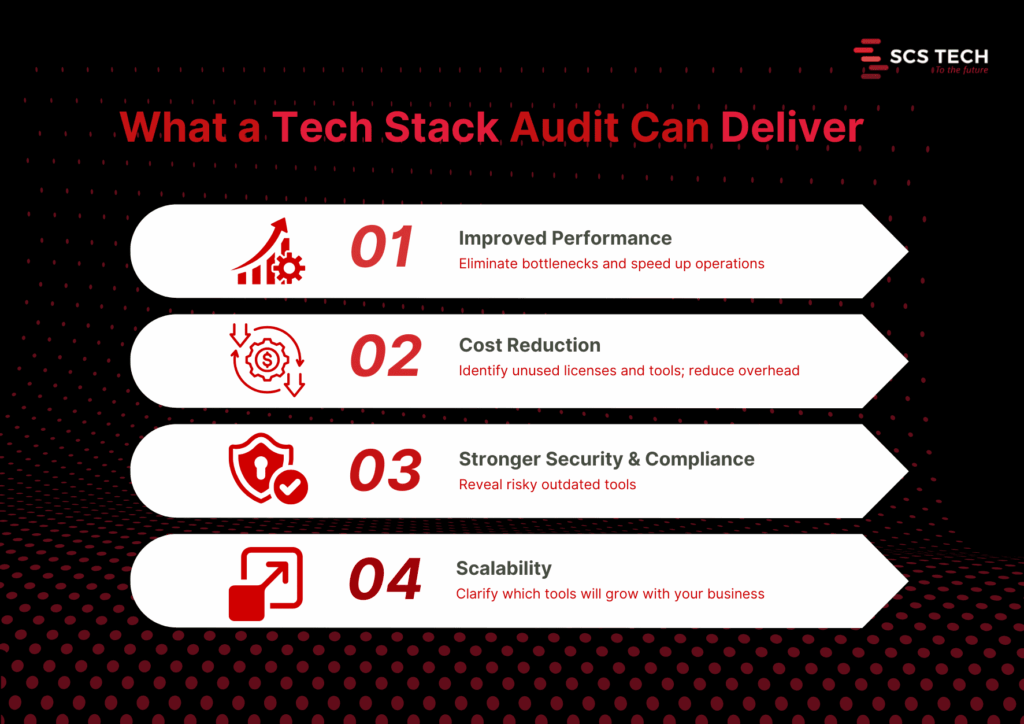
- Improved performance. Audits reveal system slowdowns and bottlenecks. Fixing them can lead to faster response times and higher user satisfaction. Streamlining outdated systems through tech digital solutions can unlock performance gains that weren’t previously possible.
- Cost reduction. You may discover unneeded licenses, redundant software, or shadow IT. One firm saved $20,000 annually after it discovered a few unused tools.
- Improved security and compliance. Auditing reveals stale or exposed pieces. It avoids compliance mistakes and reduces the attack surface.
- Better scalability and future-proofing. An audit shows what tools will be scalable with growth or need to be replaced before new needs drive them beyond their usefulness.
Step-by-Step Process to Conduct a Tech Stack Audit
It is only logical to understand what you already have and how well it is working before you begin any digital transformation program. The majority of organizations go in for new tools and platforms without checking their current systems properly. That leads to problems later on.
A systematic tech stack review makes sense. It will inform you about what to keep, what to phase out, and what to upgrade. More importantly, it ensures your transformation isn’t based on outdated, replicated, or fragmented systems.
The following is the step-by-step approach we suggest, in the way that we assist teams in getting ready for effective, low-risk digital transformation.
Step 1: Create a Complete Inventory of Your Tech Stack
Start by listing every tool, platform, and integration your organization currently uses. This includes everything from your core infrastructure (servers, databases, CRMs, ERPs) to communication tools, collaboration apps, third-party integrations, and internal utilities developed in-house.
And it needs to be complete, not skimpy.
Go by department or function. So:
- Marketing may be employing an email automation tool, a customer data platform, social scheduling apps, and analytics dashboards.
- Sales can have CRM, proposal tools, contract administration, and billing integration.
- Operations can have inventory platforms, scheduling tools, and reporting tools.
- IT will deal with infrastructure, security, endpoint management, identity access, and monitoring tools.
Also account for:
- Licensing details: Is the tool actively paid for or in trial phase?
- Usage level: Is the team using it daily, occasionally, or not at all?
- Ownership: Who’s responsible for managing the tool internally?
- Integration points: Does this tool connect with other systems or stand alone?
Be careful to include tools that are rarely talked about, like those used by one specific team, or tools procured by individual managers outside of central IT (also known as shadow IT).
A good inventory gives you visibility. Without it, you will probably go about attempting to modernize against tools that you didn’t know were still running or lose the opportunity to consolidate where it makes sense.
We recommend keeping this inventory in a shared spreadsheet or software auditing tool. Keep it up to date with all stakeholders before progressing to the next stage of the audit. This is often where a digital transformation consultancy can provide a clear-eyed perspective and structured direction.
Step 2: Evaluate Usage, Cost, and ROI of Each Tool
Having now made a list of all tools, the next thing is to evaluate if each one is worth retaining. This involves evaluating three things: how much it is being used, its cost, and what real value it provides.
Start with usage. Talk to the teams who are using each one. Is it part of their regular workflow? Do they use one specific feature or the whole thing? If adoption is low or spotty, it’s a flag to go deeper. Teams tend to stick with a tool just because they know it, more than because it’s the best option.
Then consider the price. That is the direct cost, such as subscription, license, and renewal. But don’t leave it at that. Add concealed costs: support, training, and the time wasted on troubleshooting. Two resources might have equal initial costs, but the resource that delays or requires constant aid has a higher cost.
Last but not least, emphasize ROI. This is usually the neglected section. A tool might be used extensively and cheaply, yet it does not automatically mean it performs well. Ask:
- Does it help your team accomplish objectives faster?
- Has efficiency or manual labor improved?
- Has an impact been made that can be measured, e.g., faster onboarding, better customer response time, or cleaner data?
You don’t need complex math for this—just simple answers. If a tool is costing more than it returns or if a better alternative exists, it must be tagged for replacement, consolidation, or elimination.
A digital transformation consultant can help you assess ROI with fresh objectivity and prevent emotional attachment from skewing decisions. This ensures that your transformation starts with tools that make progress and not just occupy budget space.
Step 3: Map Data Flow and System Integrations
Start by charting how data moves through your systems. How does it begin? Where does it go next? What devices send or receive data, and in what format? This is to pull out the form behind your operations, customer journey, reporting, collaboration, automation, etc.
Break it up by function:
- Is your CRM feeding back to your email system?
- Is your ERP pumping data into inventory or logistics software?
- How is data from customer support synced with billing or account teams?
Map these flows visually or in a shared document. List each tool, the data it shares, where it goes, and how (manual export, API, middleware, webhook, etc.).
While doing this, ask the following:
- Are there any manual handoffs that slow things down or increase errors?
- Do any of your tools depend on redundant data entry?
- Are there any places where data needs to flow but does not?
- Are your APIs solid, or are they perpetually patch-pending to keep working?
This step tends to reveal some underlying problems. For instance, a tool might seem valuable when viewed in a vacuum but fails to integrate properly with the remainder of your stack, slowing teams down or building data silos.
You’ll also likely find tools doing similar jobs in parallel, but not communicating. In those cases, either consolidate them or build better integration paths.
The point here isn’t merely to view your tech stack; it’s to view how integrated it is. Uncluttered, reliable data flows are one of the best indications that your company is transformation-ready.
Step 4: Identify Redundancies, Risks, and Outdated Systems
With your tools and data flow mapped out, look at what is stopping you.
- Start with redundancies. Do you have more than one tool to fix the same problem? If two systems are processing customer data or reporting, check to see if both are needed or if it is just a relic of an old process.
- Scan for threats second. Tools that are outdated or tools that are no longer supported by their vendors can leave vulnerabilities. So can systems that use manual operations to function. When a tool fails and there is no defined failover, it’s a threat.
- Then, assess for outdated systems. These are platforms that don’t integrate well, slow down teams, or can’t scale with your growth plans. Sometimes, you’ll find legacy tools still in use just because they haven’t been replaced, yet they cost more time and money to maintain.
All of these duplicative, risky, or outdated, demands a decision: sunset it, replace it, or redefine its use. It is done now to avoid complexity in future transformation.
Step 5: Prioritize Tools to Keep, Replace, or Retire
With your results from the audit in front of you, sort each tool into three boxes:
- Keep: In current use, fits well, aids current and future goals.
- Misaligned, too narrow in scope, or outrun by better alternatives.
- Retire: Redundant, unused, or imposes unnecessary cost or risk.
Make decisions based on usage, ROI, integration, and team input. The simplicity of this method will allow you to build a lean, focused stack to power digital transformation without bringing legacy baggage into the future. Choosing the right tech digital solutions ensures your modernization plan aligns with both technical capability and long-term growth.
Step 6: Build an Action Plan for Tech Stack Modernization
Use your audit findings to give clear direction. Enumerate what must be implemented, replaced, or phased out with responsibility, timeline, and cost.
Split it into short- and long-term considerations.
- Short-term: purge unused tools, eliminate security vulnerabilities, and build useful integrations.
- Long-term: timeline for new platforms, large migrations, or re-architected markets.
This is often the phase where a digital transformation consultant can clarify priorities and keep execution grounded in ROI.
Make sure all stakeholders are aligned by sharing the plan, assigning the work, and tracking progress. This step will turn your audit into a real upgrade roadmap ready to drive your digital transformation.
Step 7: Set Up a Recurring Tech Stack Audit Process
An initial audit is useful, but it’s not enough. Your tools will change. Your needs will too.
Creating a recurring schedule to examine your stack every 6 or 12 months is suitable for most teams. Use the same checklist: usage, cost, integration, performance, and alignment with business goals.
Make someone in charge of it. Whether it is IT, operations, or a cross-functional lead, consistency is the key.
This allows you to catch issues sooner, and waste less, while always being prepared for future change, even if it’s not the change you’re currently designing for.
Conclusion
A digital transformation project can’t succeed if it’s built on top of disconnected, outdated, or unnecessary systems. That’s why a tech stack audit isn’t a nice-to-have; it’s the starting point. It helps you see what’s working, what’s getting in the way, and what needs to change before you move forward.
Many companies turn to digital transformation consultancy at this stage to validate their findings and guide the next steps.
By following a structured audit process, inventorying tools, evaluating usage, mapping data flows, and identifying gaps, you give your team a clear foundation for smarter decisions and smoother execution.
If you need help assessing your current stack, a digital transformation consultant from SCSTech can guide you through a modernization plan. We work with companies to align technology with real business needs, so tools don’t just sit in your stack; they deliver measurable value. With SCSTech’s expertise in tech digital solutions, your systems evolve into assets that drive efficiency, not just cost.