

It’s a question more IT leaders are asking as automation pressures rise and modernization budgets lag behind.
While robotic process automation (RPA) promises speed, scale, and relief from manual drudgery, most organizations aren’t operating in cloud-native environments. They’re still tied to legacy systems built decades ago and not exactly known for playing well with new tech.
So, can RPA actually work with these older systems? Short answer: yes, but not without caveats. This article breaks down how RPA fits into legacy infrastructure, what gets in the way, and how smart implementation can turn technical debt into a scalable automation layer.
Let’s get into it.
Understanding the Compatibility Between RPA and Legacy Systems
Legacy systems aren’t built for modern integration, but that’s exactly where RPA finds its edge. Unlike traditional automation tools that depend on APIs or backend access, RPA Services works through the user interface, mimicking human interactions with software. That means even if a system is decades old, closed off, or no longer vendor-supported, RPA can still operate on it, safely and effectively.
This compatibility isn’t a workaround — it’s a deliberate strength. For companies running mainframes, terminal applications, or custom-built software, RPA offers a non-invasive way to automate without rewriting the entire infrastructure.
How RPA Maintains Compatibility with Legacy Systems:
- UI-Level Interaction: RPA tools replicate keyboard strokes, mouse clicks, and field entries, just like a human operator, regardless of how old or rigid the system is.
- No Code-Level Dependencies: Since bots don’t rely on source code or APIs, they work even when backend integration isn’t possible.
- Terminal Emulator Support: Most RPA platforms include support for green-screen mainframes (e.g., TN3270, VT100), enabling interaction with host-based systems.
- OCR & Screen Scraping: For systems that don’t expose readable text, bots can use optical character recognition (OCR) to extract and process data.
- Low-Risk Deployment: Because RPA doesn’t alter the underlying system, it poses minimal risk to legacy environments and doesn’t interfere with compliance.
Common Challenges When Connecting RPA to Legacy Environments
While RPA is compatible with most legacy systems on the surface, getting it to perform consistently at scale isn’t always straightforward. Legacy environments come with quirks — from unpredictable interfaces to tight access restrictions — that can compromise bot reliability and performance if not accounted for early.
Some of the most common challenges include:
1. Unstable or Inconsistent Interfaces
Legacy systems often lack UI standards. A small visual change — like a shifted field or updated window — can break bot workflows. Since RPA depends on pixel- or coordinate-level recognition in these cases, any visual inconsistency can cause the automation to fail silently.
2. Limited Access or Documentation
Many legacy platforms have little-to-no technical documentation. Access might be locked behind outdated security protocols or hardcoded user roles. This makes initial configuration and bot design harder, especially when developers need to reverse-engineer interface logic without support from the original vendor.
3. Latency and Response Time Issues
Older systems may not respond at consistent speeds. RPA bots, which operate on defined wait times or expected response behavior, can get tripped up by delays, resulting in skipped steps, premature entries, or incorrect reads.
Advanced RPA platforms allow dynamic wait conditions (e.g., “wait until this field appears”) rather than fixed timers.
4. Citrix or Remote Desktop Environments
Some legacy apps are hosted on Citrix or RDP setups where bots don’t “see” elements the same way they would on local machines. This forces developers to rely on image recognition or OCR, which are more fragile and require constant calibration.
5. Security and Compliance Constraints
Many legacy systems are tied into regulated environments — banking, utilities, government — where change control is strict. Even though RPA is non-invasive, introducing bots may still require IT governance reviews, user credential rules, and audit trails to pass compliance.
Best Practices for Implementing RPA with Legacy Systems
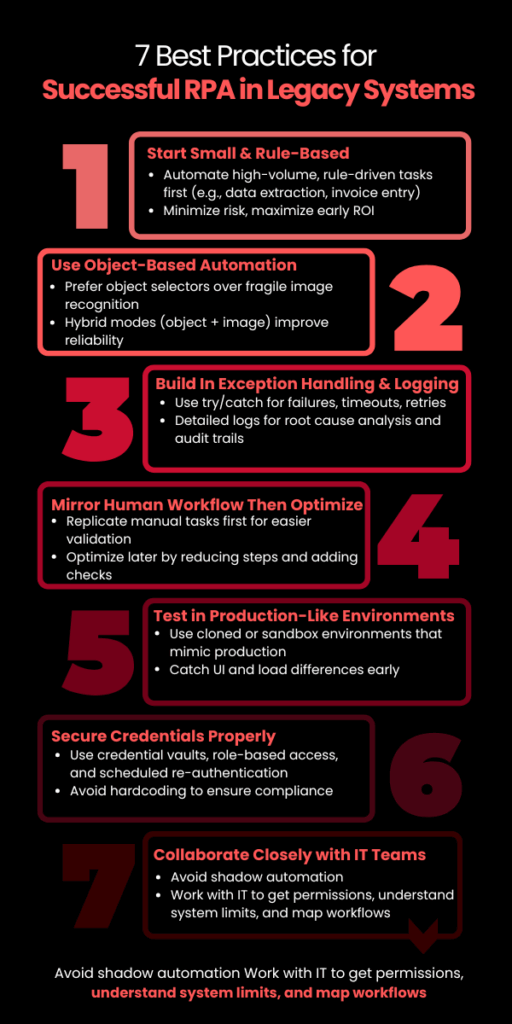
Implementing RPA Development Services in a legacy environment is not plug-and-play. While modern RPA platforms are built to adapt, success still depends on how well you prepare the environment, design the workflows, and choose the right processes.
Here are the most critical best practices:
1. Start with High-Volume, Rule-Based Tasks
Legacy systems often run mission-critical functions. Instead of starting with core processes, begin with non-invasive, rule-driven workflows like:
- Data extraction from mainframe screens
- Invoice entry or reconciliation
- Batch report generation
These use cases deliver ROI fast and avoid touching business logic, minimizing risk.
2. Use Object-Based Automation Where Possible
When dealing with older apps, UI selectors (object-based interactions) are more stable than image recognition. But not all legacy systems expose selectors. Identify which parts of the system support object detection and prioritize automations there.
Tools like UiPath and Blue Prism offer hybrid modes (object + image) — use them strategically to improve reliability.
3. Build In Exception Handling and Logging from Day One
Legacy systems can behave unpredictably — failed logins, unexpected pop-ups, or slow responses are common. RPA bots should be designed with:
- Try/catch blocks for known failures
- Timeouts and retries for latency
- Detailed logging for root-cause analysis
Without this, bot failures may go undetected, leading to invisible operational errors — a major risk in high-compliance environments.
4. Mirror the Human Workflow First — Then Optimize
Start by replicating how a human would perform the task in the legacy system. This ensures functional parity and easier stakeholder validation. Once stable, optimize:
- Reduce screen-switches
- Automate parallel steps
- Add validations that the system lacks
This phased approach avoids early overengineering and builds trust in automation.
5. Test in Production-Like Environments
Testing legacy automation in a sandbox that doesn’t behave like production is a common failure point. Use a cloned environment with real data or test after hours in production with read-only roles, if available.
Legacy UIs often behave differently depending on screen resolution, load, or session type — catch this early before scaling.
6. Secure Credentials with Vaults or IAM
Hardcoding credentials for bots in legacy systems is a major compliance red flag. Use:
- RPA-native credential vaults (e.g., CyberArk integrations)
- Role-based access controls
- Scheduled re-authentication policies
This reduces security risk while keeping audit logs clean for governance teams.
7. Loop in IT, Not Just Business Teams
Legacy systems are often undocumented or supported by a single internal team. Avoid shadow automation. Work with IT early to:
- Map workflows accurately
- Get access permissions
- Understand system limitations
Collaboration here prevents automation from becoming brittle or blocked post-deployment.
RPA in legacy environments is less about brute-force automation and more about thoughtful design under constraint. Build with the assumption that things will break — and then build workflows that recover fast, log clearly, and scale without manual patchwork.
Is RPA a Long-Term Solution for Legacy Systems?
Yes, but only when used strategically.
RPA isn’t a forever fix for legacy systems, but it is a durable bridge, one that buys time, improves efficiency, and reduces operational friction while companies modernize at their own pace.
For utility, finance, and logistics firms still dependent on legacy environments, RPA offers years of viable value when:
- Deployed with resilience and security in mind
- Designed around the system’s constraints, not against them
- Scaled through a clear governance model
However, RPA won’t modernize the core, it enhances what already exists. For long-term ROI, companies must pair automation with a roadmap that includes modernization or system transformation in parallel.
This is where SCSTech steps in. We don’t treat robotic process automation as a tool; we approach it as a tactical asset inside larger modernization strategy. Whether you’re working with green-screen terminals, aging ERP modules, or disconnected data silos, our team helps you implement automation that’s reliable now, but aligned with where your infrastructure needs to go.