Category: Disaster Management Software

  • How to Structure Tier-1 to Tier-3 Escalation Flows with Incident Software

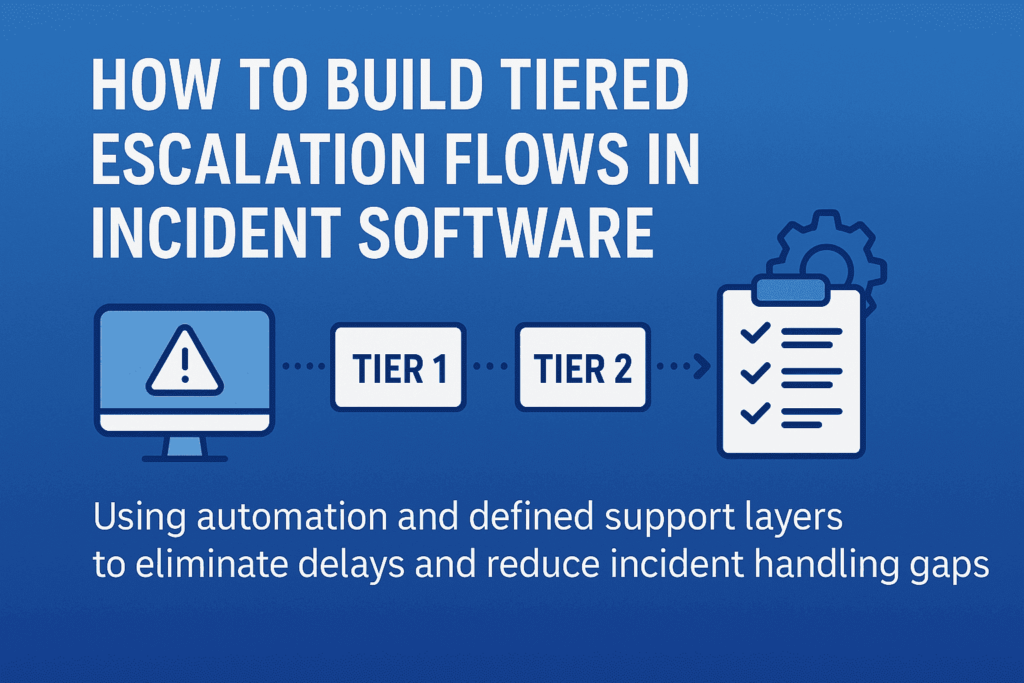
    How to Structure Tier-1 to Tier-3 Escalation Flows with Incident Software

    When an alert hits your system, there’s a split-second decision that determines how long it lingers: Can Tier-1 handle this—or should we escalate?

    Now multiply that by hundreds of alerts a month, across teams, time zones, and shifts—and you’ve got a pattern of knee-jerk escalations, duplicated effort, and drained senior engineers stuck cleaning up tickets that shouldn’t have reached them in the first place.

    Most companies don’t lack talent—they lack escalation logic. They escalate based on panic, not process.

    Here’s how incident software can help you fix that—by structuring each tier with rules, boundaries, and built-in context, so your team knows who handles what, when, and how—without guessing.

    The Real Problem with Tiered Escalation (And It’s Not What You Think)

    Tiered Escalation
    Most escalation flows look clean—on slides. In reality? It’s a maze of sticky notes, gut decisions, and “just pass it to Tier-2” habits.

    Here’s what usually goes wrong:

    • Tier-1 holds on too long—hoping to fix it, wasting response time
    • Or escalates too soon—with barely any context
    • Tier-2 gets it, but has to re-diagnose because there’s no trace of what’s been done
    • Tier-3 ends up firefighting issues that were never filtered properly

    Why does this happen? Because escalation is treated like a transfer, not a transition. And without boundary-setting and logic, even the best software ends up becoming a digital dumping ground.

    That’s where structured escalation flows come in—not as static chains, but as decision systems. A well-designed incident management software helps implement these decision systems by aligning every tier’s scope, rules, and responsibilities. Each tier should know:

    • What they’re expected to solve
    • What criteria justifies escalation
    • What information must be attached before passing the baton

    Anything less than that—and escalation just becomes escalation theater.

    Structuring Escalation Logic: What Should Happen at Each Tier (with Boundaries)

    Escalation tiers aren’t ranks—they’re response layers with different scopes of authority, context, and tools. Here’s how to structure them so everyone acts, not just reacts.

    Tier-1: Containment and Categorization—Not Root Cause

    Tier-1 isn’t there to solve deep problems. They’re the first line of control—triaging, logging, and assigning severity. But often they’re blamed for “not solving” what they were never supposed to.

    Here’s what Tier-1 should do:

    • Acknowledge the alert within the SLA window
    • Check for known issues in a predefined knowledge base or past tickets
    • Apply initial containment steps (e.g., restart service, check logs, run diagnostics)
    • Classify and tag the incident: severity, affected system, known symptoms
    • Escalate with structured context (timestamp, steps tried, confidence level)

    Your incident management software should enforce these checkpoints—nothing escalates without it. That’s how you stop Tier-2 from becoming Tier-1 with more tools.

    Tier-2: Deep Dive, Recurrence Detection, Cross-System Insight

    This team investigates why it happened, not just what happened. They work across services, APIs, and dependencies—often comparing live and historical data.

    What should your software enable for Tier-2?

    • Access to full incident history, including diagnostic steps from Tier-1
    • Ability to cross-reference logs across services or clusters
    • Contextual linking to other open or past incidents (if this looks like déjà vu, it probably is)
    • Authority to apply temporary fixes—but flag for deeper RCA (root cause analysis) if needed

    Tier-2 should only escalate if systemic issues are detected, or if business impact requires strategic trade-offs.

    Tier-3: Permanent Fixes and Strategic Prevention

    By the time an incident reaches Tier-3, it’s no longer about restoring function—it’s about preventing it from happening again.

    They need:

    • Full access to code, configuration, and deployment pipelines
    • The authority to roll out permanent fixes (sometimes involving product or architecture changes)
    • Visibility into broader impact: Is this a one-off? A design flaw? A risk to SLAs?

    Tier-3’s involvement should trigger documentation, backlog tickets, and perhaps even blameless postmortems. Escalating to Tier-3 isn’t a failure—it’s an investment in system resilience.

    Building Escalation into Your Incident Management Software (So It’s Not Just a Ticket System)

    Most incident tools act like inboxes—they collect alerts. But to support real escalation, your software needs to behave more like a decision layer, not a passive log.

    Here’s how that looks in practice.

    1. Tier-Based Views

    When a critical alert fires, who sees it? If everyone on-call sees every ticket, it dilutes urgency. Tier-based visibility means:

    • Tier-1 sees only what’s within their response scope
    • Tier-2 gets automatically alerted when severity or affected systems cross thresholds
    • Tier-3 only gets pulled when systemic patterns emerge or human escalation occurs

    This removes alert fatigue and brings sharp clarity to ownership. No more “who’s handling this?”

    2. Escalation Triggers

    Your escalation shouldn’t rely on someone deciding when to escalate. The system should flag it:

    • If Tier-1 exceeds time to resolve
    • If the same alert repeats within X hours
    • If affected services reach a certain business threshold (e.g., customer-facing)

    These triggers can auto-create a Tier-2 task, notify SMEs, or even open an incident war room with pre-set stakeholders. Think: decision trees with automation.

    3. Context-Rich Handoffs 

    Escalation often breaks because Tier-2 or Tier-3 gets raw alerts, not narratives. Your software should automatically pull and attach:

    • Initial diagnostics
    • Steps already taken
    • System health graphs
    • Previous related incidents
    • Logs, screenshots, and even Slack threads

    This isn’t a “notes” field. It’s structured metadata that keeps context alive without relying on the person escalating.

    4. Accountability Logging

    A smooth escalation trail helps teams learn from the incident—not just survive it.

    Your incident software should:

    • Timestamp every handoff
    • Record who escalated, when, and why
    • Show what actions were taken at each tier
    • Auto-generate a timeline for RCA documentation

    This makes postmortems fast, fair, and actionable—not hours of Slack archaeology.

    When escalation logic is embedded, not documented, incident response becomes faster and repeatable—even under pressure.

    Common Pitfalls in Building Escalation Structures (And How to Avoid Them)

    While creating a smooth escalation flow sounds simple, there are a few common traps teams fall into when setting up incident management systems. Avoiding these pitfalls ensures your escalation flows work as they should when the pressure is on.

    1. Overcomplicating Escalation Triggers

    Adding too many layers or overly complex conditions for when an escalation should happen can slow down response times. Overcomplicating escalation rules can lead to delays and miscommunication.

    Keep escalation triggers simple but actionable. Aim for a few critical conditions that must be met before escalating to the next tier. This keeps teams focused on responding, not searching through layers of complexity. For example:

    • If a high-severity incident hasn’t been addressed in 15 minutes, auto-escalate.
    • If a service has reached 80% of capacity for over 5 minutes, escalate to Tier-2.

    2. Lack of Clear Ownership at Each Tier

    When there’s uncertainty about who owns a ticket, or ownership isn’t transferred clearly between teams, things slip through the cracks. This creates chaos and miscommunication when escalation happens.

    Be clear on ownership at each level. Your incident software should make this explicit. Tier-1 should know exactly what they’re accountable for, Tier-2 should know the moment a critical incident is escalated, and Tier-3 should immediately see the complete context for action.

    Set default owners for every tier, with auto-assignment based on workload. This eliminates ambiguity during time-sensitive situations.

    3. Underestimating the Importance of Context

    Escalations often fail because they happen without context. Passing a vague or incomplete incident to the next team creates bottlenecks.

    Ensure context-rich handoffs with every escalation. As mentioned earlier, integrate tools for pulling in logs, diagnostics, service health, and team notes. The team at the next tier should be able to understand the incident as if they’ve been working on it from the start. This also enables smoother collaboration when escalation happens.

    4. Ignoring the Post-Incident Learning Loop

    Once the incident is resolved, many teams close the issue and move on, forgetting to analyze what went wrong and what can be improved in the future.

    Incorporate a feedback loop into your escalation process. Your incident management software should allow teams to mark incidents as “postmortem required” with a direct link to learning resources. Encourage root-cause analysis (RCA) after every major incident, with automated templates to capture key findings from each escalation level.

    By analyzing the incident flow, you’ll uncover bottlenecks or gaps in your escalation structure and refine it over time.

    5. Failing to Test the Escalation Flow

    Thinking the system will work perfectly the first time is a mistake. Incident software can fail when escalations aren’t tested under realistic conditions, leading to inefficiencies during actual events.

    Test your escalation flows regularly. Simulate incidents with different severity levels to see how your system handles real-time escalations. Bring in Tier-1, Tier-2, and Tier-3 teams to practice. Conduct fire drills to identify weak spots in your escalation logic and ensure everyone knows their responsibilities under pressure.

    Wrapping Up

    Effective escalation flows aren’t just about ticket management—they are a strategy for ensuring that your team can respond to critical incidents swiftly and intelligently. By avoiding common pitfalls, maintaining clear ownership, integrating automation, and testing your system regularly, you can build an escalation flow that’s ready to handle any challenge, no matter how urgent. 

    At SCS Tech, we specialize in crafting tailored escalation strategies that help businesses maintain control and efficiency during high-pressure situations. Ready to streamline your escalation process and ensure faster resolutions? Contact SCS Tech today to learn how we can optimize your systems for stability and success.

  • How Artificial Intelligence in Disaster Management Software Is Saving Lives?

    How Artificial Intelligence in Disaster Management Software Is Saving Lives?

    What if we could turn chaos into clarity during disasters? Since 1990, floods have caused $50 billion in damages and impacted millions in India. Knowing about a disaster before it strikes could give communities time to prepare and respond effectively. That’s where Artificial Intelligence is turning this possibility into a reality. From issuing early warnings for hurricanes to guiding rescue operations during floods, AI is revolutionizing disaster management.

    In this blog, let’s explore how AI in disaster management software transforms predictions, responses, and recovery efforts to save lives.

    How Artificial Intelligence in Disaster Management Software Is Saving Lives?

    AI in disaster management software enhancing life-saving efforts
    AI in disaster management software enhancing life-saving efforts

    Artificial Intelligence (AI) revolutionizes disaster management by permitting more accurate predictions, speedy responses, and efficient recoveries. AI enables advanced algorithms, and real-time data is fed to disaster management software to soften the impact of natural and artificial disasters.

    1. Disaster forecasting through AI

    AI has come as one of the significant transformations that AI has undergone to improve disaster management systems. Through analyzing vast amounts of data and finding patterns, the chances of predicting and, thus, preparing for any disaster are primarily enhanced.

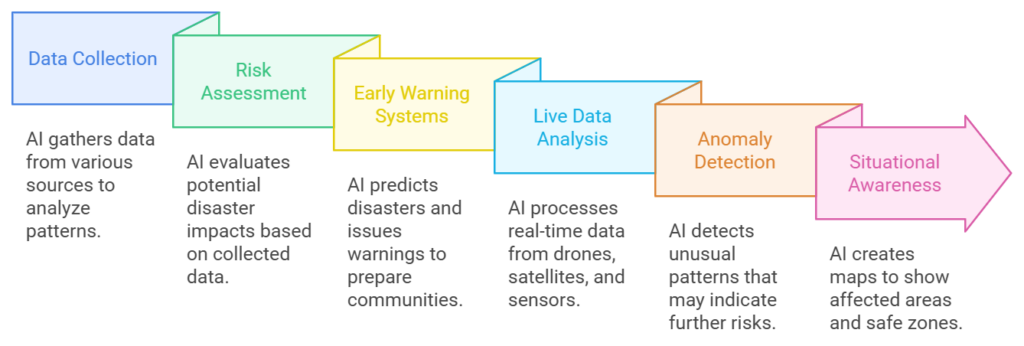
    Data Collection by AI

    AI collects data from different sources, and this includes:

    • Weather data, which can track storms, hurricanes, and cyclones
    • A seismic activity record is used to identify the initial seismic signals of an earthquake.
    • Historical data to identify trends of disaster recurrences in certain areas.

    This integrated analysis helps accurately predict when and where disasters might occur. For instance, AI can scan satellite images to monitor ocean temperatures and predict the cyclone’s formation.

    Risk Assessment

    AI evaluates the potential damage caused by disasters by assessing:

    • Population density: Determining areas where the disaster would impact the most people.
    • Infrastructure weaknesses: This highlights the weak points such as bridges, dams, or flood-prone neighborhoods.
    • Environmental factors: These are natural features such as forests or water bodies that may affect the intensity of disasters.

    This helps governments and agencies to plan better and provide more resources to high-risk areas.

    Early Warning Systems

    Machine learning models are trained on historical data, predicting disaster patterns and providing early warnings. These warnings:

    • Give communities enough time to evacuate or prepare.
    • Allowing authorities to preposition emergency supplies, including food, water, and medical kits.

    For instance, AI-based flood prediction systems use rainfall, river levels, and soil saturation data to predict floods days ahead of time. This helps save lives and reduce property damage.

    2. Real-Time Monitoring of Disasters

    When disasters occur, the difference between life and death can be a matter of having accurate information in real-time. AI shines in monitoring unfolding events and guiding responders in real-time.

    Live Data Analysis

    AI processes live feeds from sources like:

    • Drones: Taking aerial views of disaster-stricken areas to identify damage and locate stranded individuals.
    • Satellites: Offering large-scale images to track the spread of disasters such as wildfires or floods.
    • IoT Sensors: Track water levels, air quality, and structural strength in disaster areas.

    Processing this information in real-time, AI provides actionable insight to the emergency teams to determine the nature of the situation and plan for it.

    Anomaly Detection

    AI constantly monitors the critical parameters and detects anomalies that might lead to further deterioration. Such anomalies could be:

    • Rising water levels above flood safety levels.
    • Rapidly rising temperatures in a forested area potentially indicate wildfires.
    • Gas leaks in earthquake-damaged industrial areas.

    The detection alerts the responders, who can take prompt action before further damage is done.

    Situational Awareness

    AI-based GIS creates comprehensive maps that outline the following:

    • Storm-inundated areas
    • Affected areas due to wildfires and landslides
    • Safe zones for evacuation or relief operations.

    These maps enable better resource allocation so that aid would first reach the most vulnerable areas. For instance, AI-enhanced drones can identify stranded victims and direct rescue boats to that area during floods.

    3. Response Automation

    With AI able to automate critical tasks in the response function, emergency operations become swift and efficient with fewer chances of delay and error.

    Optimized Dispatch

    AI orders distress calls according to priority and determines their urgency and location. It may be demonstrated as below:

    • Calls from severely affected areas will be prioritized over other less urgent requests.
    • AI systems scan traffic conditions to route emergency vehicles to destinations as quickly as possible.

    This ensures that ambulances, fire trucks, and rescue teams reach the victims in need much faster, even in the most chaotic environment.

    Traffic Management

    In evacuations, traffic congestion is one of the biggest threats to lives. AI systems scan traffic patterns in real-time and recommend:

    • Alternative routes to avoid gridlocks.
    • Safe evacuation routes for big crowds.

    AI will give the safest route to avoid danger zones during a wildfire, ensuring civilians and emergency responders stay safe.

    The Future of AI in Disaster Management Software

    The use of AI in disaster management is getting stronger with every passing day. Here’s what might be in store:

    • Improved Predictive Models: AI will predict disasters even more accurately with better algorithms and data.
    • Real-Time Adaptation: AI systems would change responses dynamically in response to real-time updates to be efficient.
    • Collaboration Tools: Future AI systems enable easy data exchange among government agencies, NGOs, and AI technology companies.
    • Integration with IoT: AI-based incident management systems work with IoT devices like smart sensors to monitor critical parameters like water level and air quality in real-time.

    For instance, in flood-prone areas, AI, in conjunction with IoT sensors, can facilitate real-time updates that inform people in advance to evacuate in time.

    Conclusion

    Artificial Intelligence changes the face of disaster management software by saving lives through accurate predictions, swift reactions, and intelligent resource allocation. AI ensures people obtain information immediately by sending early warnings and real-time updates.

    In countries with frequent natural disasters, we must use AI-driven tools to reduce damage and protect communities. These tools do not only help us prepare but also respond better during emergencies. Companies like SCS Tech drive these innovations to build safer and more resilient communities and tap into the power of technology to save lives.


  • Why Is Incident Management Software Vital for Homeland Security and Defence Operations?

    Why Is Incident Management Software Vital for Homeland Security and Defence Operations?

    Are you aware that India ranks as the world’s second most flood-affected country?

    Facing an average of 17 floods each year, these flood events annually affect about 345 million people every year. With these frequent natural disasters, along with threats like terrorism and cyberattacks, India faces constant challenges. Therefore, now more than ever it is crucial to protect people and resources.

    To tackle this, having an effective incident management software (IMS) system is very important. It helps teams coordinate effectively and plan ahead, ensuring rapid action in critical situations.

    So how exactly does incident management software support homeland security and defense operations in managing these complex crises?

    Why Is Incident Management Software Vital for Homeland Security and Defence Operations?

    why incident management software for homeland security and defence?

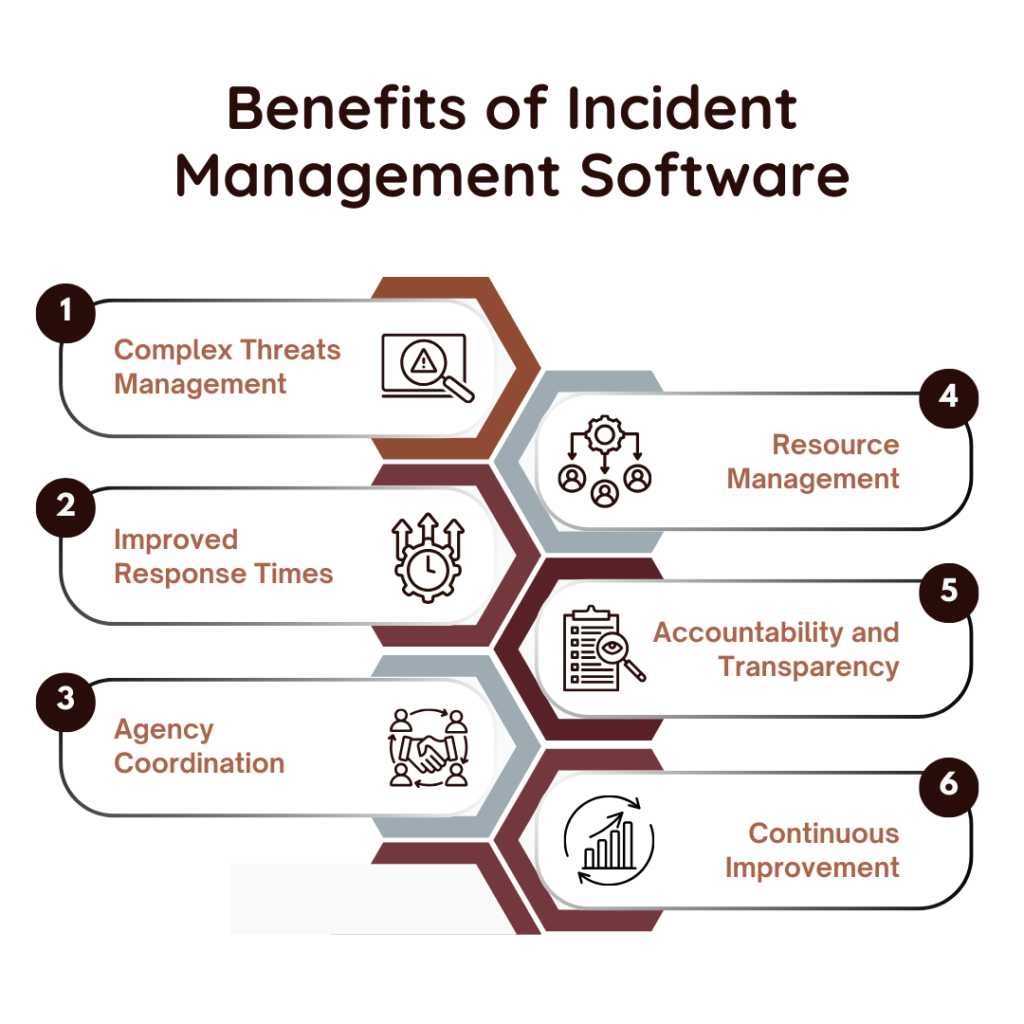
    #1. Tackling the Complexity of Security Threats

    India’s diverse threats- from natural disasters to public health emergencies- call for special and flexible response strategies. This is where incident management software makes an all-important difference.

    • Multi-Dimensional Threat Landscape: India’s threats are multi-dimensional and heterogeneous, so different agencies are called to work together. IMS centralizes the platform for police, medical teams, fire services, and defense forces to share data and communicate closely to ensure all responders are in sync.
    • Evolving Threats: The threats are diverse and cannot be predicted. Incident management software is designed to respond to unanticipated crisis changes, whereas traditional responses are often left behind. It enables on-site changes based on fresh information, creating agility in response efforts.

    #2. Response Time Improvement

    When disasters strike, every second counts. Delayed response translates to more deaths or more significant property damage. Incident management software drastically cuts down response times by standardizing procedures for critical activities.

    • Access to Information in Real Time: IMS offers decision-makers instant information about the status of incidents, resource utilization, and current operations. With rapid access to the correct information, mobilization of resources is quicker and certainly does not result in delays that may augment the crisis condition.
    • Automated Processes: Some of the core processes in an IMS are automated, such as reporting and tracking, which eliminates more human errors and lets the information flow faster. At times of high pressure, such automation is instrumental in transmitting responses fast enough for loss of life and further damage.

    #3. Coordination between Agencies

    A coordinated response involving multiple agencies is fundamental during crisis management. Incident management software helps coordinate unified action by creating a central communication hub for all the responders.

    • Unified Communication Channels: IMS presents a common communication channel to all agencies. This saves the agency from confusion and misunderstanding, which may lead to errors in response and thus present hazards to the public.
    • Standard protocols: IMS places agencies into parallel response frameworks at the national level, similar to the National Disaster Management Act. That way, they will work from the same protocols, and accountability can be easily known and understood.

    #4. Enable Resource Management

    Resources are always scarce at any given moment of a disaster. The effectiveness of response is often related to the way resources are managed. Incident management software provides an essential function in resource allocation so that it reaches precisely where and when it is needed.

    • Resource Availability Visibility: IMS provides real-time situational awareness concerning available resources, people, equipment, and supplies. Agencies can rapidly deploy resources to the point of need.
    • Dynamic Resource Allocation: The demand for resources changes sharply in more significant incidents. IMS enables the responder to promptly make dynamic resource allocations to fulfill urgent needs.

    #5. Enabling Accountability and Transparency

    Transparency and accountability are essential for any democratic country such as India. Public trust must be there, and incident management software supports this and lays the foundation for the trust of people in crisis management by the government.

    • Detailed Documentation: IMS offers an audit trail of everything done during the incident. It is crucial for accountability, with every agency responding accountable for every piece of action.
    • Public Trust: Incident management transparency will build the trust of the public. More people will feel confident and trusting that the government can be there for them if they realize there is evidence of successful crisis management. IMS helps illustrate that it is not only responsive but prepared and organized.

    #6. Enabling Continuous Improvement

    One of the greatest strengths of incident management software lies in its support for continuous improvement. Through lessons learned from past events, the agencies improve their strategies in preparation for other challenges.

    • Data-Driven Insights: IMS collects data from each incident, based on which analysis of response effectiveness is conducted to identify what areas need improvements. The insights drawn from such data guide training programs, resource planning, and policy adjustments. The system thus becomes more resilient in the face of future challenges.
    • Adaptation to New Challenges: Constant adaptation is necessary, from the emergence of cyberattacks and climate-related disasters to others yet to emerge. Through historical data analysis, the central agencies are better placed to stay ahead of rising challenges and refine their responses based on lessons learned.

    Conclusion

    Incident management software has become essential in a world where evolving security threats and natural disasters constantly challenge a nation’s resilience. This is especially true for countries like India. Companies like SCS Tech develop the most sophisticated incident management software solutions, boosting response time and coordinating and managing resources accordingly.

    Such investment is bound to be operational and goes beyond that to enhance national resilience and public trust, equipping India’s security forces to respond to emerging challenges effectively.

  • 7 Key Features to Look for in Disaster Management Software for Urban Development

    7 Key Features to Look for in Disaster Management Software for Urban Development

    With expansion and growth comes an increase in the possibility of disaster occurrence, both natural and anthropogenic. There must be a designated focus on preparing cities for whatever nature brings. Leveraging technologies like natural disaster prediction can play a critical role in minimizing risks and enhancing preparedness. According to the Global Assessment Report (UNISDR, 2015), disasters cost an estimated $314 billion annually in the built environment alone.

    That’s where disaster management software steps into the scene, a crucial tool that helps cities plan, respond, and recover quickly in the face of crisis. But with so many out there, knowing what matters is what counts. Continue reading to learn the 7 essential characteristics to look for to deploy the most robust disaster management software for urban development.

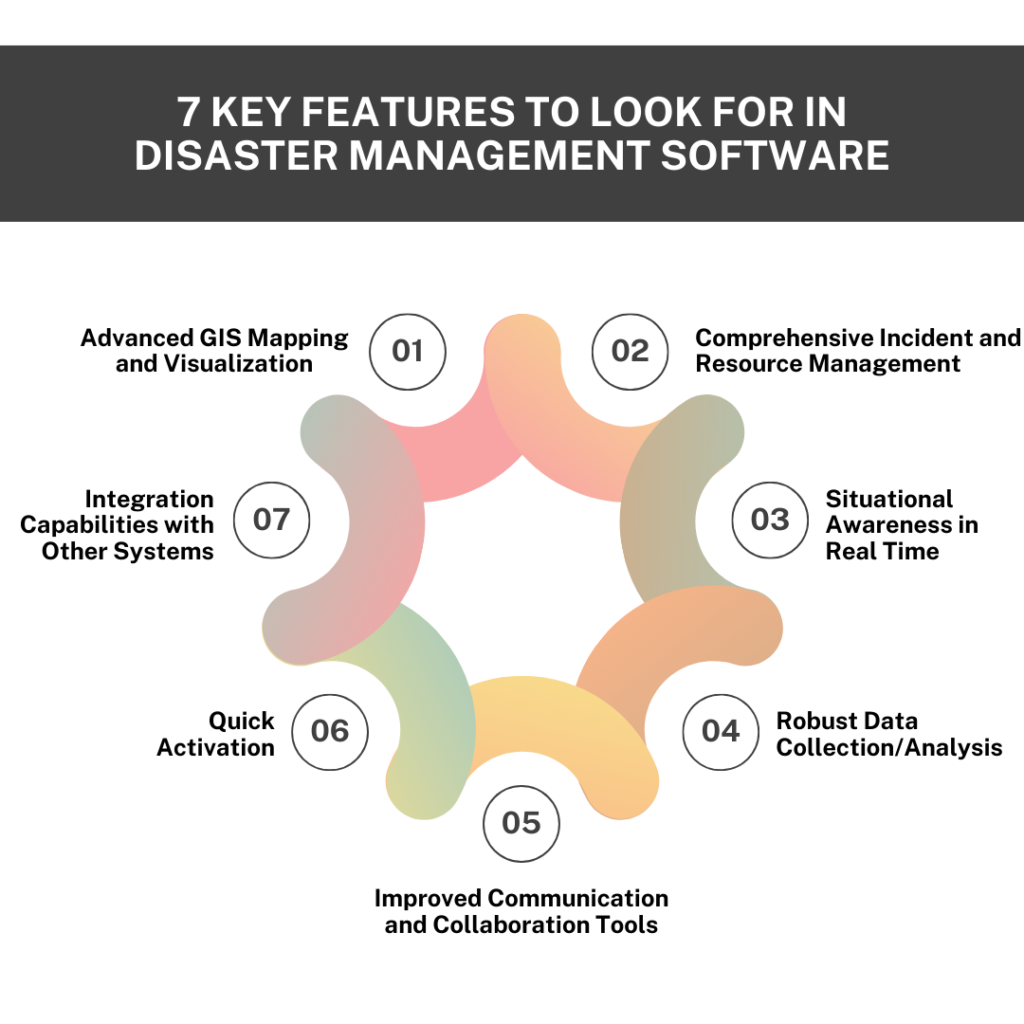
    Here are 7 Key Features to Look for in Disaster Management Software

    7 Key Features to Look for in Disaster Management Software

    #1. Advanced GIS Mapping and Visualization

    The fundamental capabilities of disaster management software are GIS mapping services and visualization. The GIS functionalities provide a real-time view of affected areas, evacuation routes, and resources required in a disaster scenario.

    • Dynamic Mapping: The package will feature dynamic hotspot updates, enabling real-time tracking of disaster changes. It will support layered mapping, allowing users to visualize different data layers such as infrastructure, hazard zones, and population density on the provided maps.
    • Interactive and 3D Maps: Zoom, pan, and click on maps for more information with detailed views of the area. 3D visualization is particularly helpful in urban environments to assess the impacts of disasters such as floods or landslides on buildings and terrain.
    • Scenario Simulations: Software that simulates scenarios allows the user to model possible disaster situations. This feature is crucial for city planners while trying to predict the aftereffects of an inevitable disaster that could affect the infrastructure.

    #2. Comprehensive Incident and Resource Management

    The tracking of an incident and the management of resources effectively become crucial during a disaster response situation. Comprehensive incident management ensures that the responders are well-informed and that the procedure is carried out as quickly as possible to cause minimal damage.

    • Incident Logging: Incident management software should be logged in real time. In ideal ones, there should be standardized reporting templates for logging critical incident information, such as location, severity, and nature of the disaster. Attachments of multimedia photos and videos help enhance situational awareness.
    • Resource Tracking: Real-time tracking of resources like workforce, equipment, and supplies. More sophisticated systems will be able to geolocate all resources accurately so that positioning can be determined with high precision. The system will track the availability and status of critical assets, such as medical equipment, ambulances, or rescue people.
    • Task Management: The automation of task assignment through the skills available from responders ensures that the right personnel handle appropriate challenges. Features for tracking progress allow users to gauge the completion of tasks in real time, which increases coordination.

    #3. Situational Awareness in Real Time

    Situational awareness during disaster scenes is essential. The disaster management software must integrate live feeds of data from various sources so that updated information is gotten across to teams for appropriate decision-making.

    • Data Feeds Integration: The software should search for information from meteorological services, emergency broadcasts, and social media monitoring. Real-time weather updates and public sentiment tracking will help define emerging issues early.
    • Impact Assessment Tools: One can assess the immediate effects of a disaster if such capability is available. This includes modules that look into damage assessment from satellite or drone imagery and community impact metrics that quantify how populations are affected.
    • Alerts: Best disaster management software should automatically send alerts upon predetermined thresholds. Additionally, it should also allow for multi-language communication to respond to different communities’ multifaceted diversity appropriately.

    #4. Robust Data Collection/Analysis

    Effective decision-making in a disaster situation strictly depends on proper and integrated data collection. Incident management software must present flexible tools customized to suit data collection/analysis.

    • Self-Customizable Data Forms: It should allow the users to create their own data forms with any configuration suitable to the needs of the information required for the incident. First responders can use the field data collection app to enter their information on-site.
    • Predictive Analytics: It should provide advanced capabilities and methods to predict natural disasters or resource needs based on historical analysis. Trending analysis reports and the database on lessons learned track past performances to provide insight into future planning.

    #5. Improved Communication and Collaboration Tools

    Communication during a disaster may either save or consume lives. The disaster management software should ensure multi-channel communication and involve safe collaboration environments.

    • Multi-Channel Communication: Alerts and updates should be duly sent through SMS, email, and push notifications to reach as many people as possible. The social media integration with the software will enable teams to give news about updates to people quickly.
    • Secure Messaging Platforms: There is communication between teams; sensitive information has to be encrypted and only accessible to authorized personnel. Role-based access control (RBAC) ensures that information only reaches the right people.
    • Collaboration Workspaces: When disaster strikes, responders need immediate sharing of documents, images, and plans. Therefore, collaboration workspaces, with real-time editing features, allow teams to make decisions and make vital changes without delay.

    #6. Quick Activation

    Time is of the essence in disaster management. Rapid activation of the emergency personnel and response plans would make all the difference between quick and non-responsive organisations to a disaster. Incident management software should enable rapid deployment of emergency operations centres and allow teams to activate pre-configured response plans with a button.

    • Pre-Configured Action Plans: The software should enable organizations to establish and implement pre-configured action plans for different situations, reducing response delay.
    • Predefined Interfaces According to Role: The predefined interfaces, according to the role, will allow the responders to quickly access the tools and information they need, meaning fast and effective mobilization.

    That means that teams hit the ground running and are on time to make things effective in terms of the mobilization of resources.

    #7. Integration Capabilities with Other Systems

    Disaster management software needs to integrate with existing systems to be operational seamlessly.

    • API Support: The application should offer APIs to interface with existing emergency management systems, GIS platforms, and municipal databases. This helps ease data flow between different agencies involved in disaster management.
    • Data Migration Tools: Such software/systems should provide handy data migration tools to support the importing of historical data into the new system, and compliance with interoperability standards is maintained to ensure that the systems interoperate with national and regional emergency management frameworks.

    Key Takeaways

    Urban disaster management requires a tailored approach. By developing essential features such as advanced GIS mapping, real-time resource tracking, data collection, training simulations, and more, organizations can better prepare themselves for disasters and respond more quickly.

    The disaster management software selects the right opportunity for ready cities to face the growing urban development challenges. The most essential characteristics of cities using SCS Tech disaster management software include proactive preparation, rapid response, and quick recovery.

  • Can Disaster Management Software Protect Your Business from Unexpected Crises?

    Can Disaster Management Software Protect Your Business from Unexpected Crises?

    As per the Industry Growth Insight Report, the global emergency disaster management software market is expected to grow at a CAGR of 10.8% from 2018 to 2030. The global emergency disaster management software is divided into two segments, i.e., local deployment and cloud-based.

    As per the report, the cloud-based segment is expected to grow at a faster rate during the forecast year due to increased concerns in enterprises for potential crises that may occur due to natural disasters like hurricanes, earthquakes, and cyber attacks, which can result in severe damage and business losses.

    As businesses have started to understand the need to be prepared for the unexpected, the question arises: Can disaster management software predict natural disasters and shield your businesses from unanticipated catastrophes? This blog sheds light upon its various uses, advantages, disadvantages, and how disaster management software can play a significant role in safeguarding during times of crisis.

    Understanding Disaster Management Software 

    Disaster management software is a great tool to prepare, respond, and recover from situations of crisis by emphasizing decreased levels of risks, clear communication, synchronizing emergency responses, and supervising recovery efforts efficiently. It essentially serves as a unified platform for administering all aspects of crisis management.

    The key aspects of disaster management software comprise of:

    • Risk Assessment: Disaster management software offers tools and techniques for risk assessment like qualitative and quantitative assessment, risk mapping, scenario analysis, failure mode and effects analysis (FEMA), SWOT analysis, and more. Listed below are crucial steps integrated into disaster management software for risk assessment:
    • Threat Identification
    • Vulnerability Analysis
    • Risk Analysis and Score Generation
    • Visualization and Risk Mapping
    • Forecasting and Scenario Analysis
    • Risk Mitigation Planning
    • Monitoring and Alert Generation
    • Reporting and Compliance
    • Emergency Response Planning: This aspect focuses on creating and implementing strategies to manage the disaster effectively through customizable templates so the organization can plan out the action as per the scenario, simulation, drills, incident management software integration, plan adaptation, real-time updates, and focusing on post-incident review for identifying areas of improvement.
    • Communication Tools: Disaster management software includes various communication tools like mass notification systems, GIS for disaster management based communication, incident management platforms, etc., that help mitigate the risk by sharing real-time information and coordinating effectively.
    • Recovery Management: The software helps in reducing the intensity of damage and restarting the operations by adding supporting recovering management features that integrate the following solutions and tools:
    • Business Continuity Planning Tools
    • Resource Management Tools
    • Data Recovery and Backup Solutions
    • Recovery Point Objective (RPO) Tracking
    • Recovery Time Objective (RTO)

    Benefits of Disaster Management Software

    Disaster management software extends various advantages that are vital in maintaining the continuity of business operations, which are discussed below:

    • Efficient Response and Recovery: Disaster management software helps simplify the response and recovery phase by utilizing pre-defined response plans and related resources to subjugate any crisis successfully.
    • Compliance and Reporting: Several industries demand compliance with certain regulations concerning the management and reporting of crises. Disaster management software acts as an aid in the fulfillment of these requirements in reporting, documentation, and auditing.
    • Enhanced Communication: Disaster management software provides the necessary communication tools to ensure clear and consistent communication, which eliminates the risk of delayed response, thus resulting in a unified and collectively coordinated response.
    • Proactive Risk Management: This involves the engagement of advanced analytics and data visualization tools to recognize potential risks involved before they develop into a major crisis.  This approach promotes the advanced implementation of risk alleviation strategies.

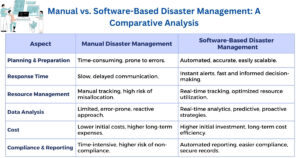
     Comparison of Manual vs. Software based disaster management

    Challenges And Limitations Of Disaster Management Software

    Let us understand the limitations of disaster management software that have a significant impact on the business’s decision-making ability and its implementation:

    • Human Factor: Human errors such as wrong data entry, misinterpreted information, etc. are a major risk in diminishing the efficacy of disaster management software. Therefore, businesses must ensure timely and appropriate training to employees to ensure a smoother resolution of the crisis involved.
    • Initial Costs and Implementation: The initial execution of this software can be costly for enterprises with budget constraints. These costs include integration, customization, and regular maintenance of the software.
    • Complexity and Training: Disaster management software emphasizes proper training of their employees to harness their true potential to the advantage of the organization. However, the complexity of this software often results in employees sticking to the old traditional ways to resolve crises.
    • Dependence on Technology: Technology is a powerful tool, but it can lead to various risks. Heavily relying on disaster management software can be concerning if all the software gets jeopardized. To avoid such difficult scenarios, businesses must have detailed backup plans to ensure smooth functioning.

    Future of Disaster Management Software

    Artificial intelligence (AI) and the Internet of Things (IoT) are becoming a crucial part of the evolving landscape of disaster management software due to the unique features they offer.

    AI helps in improving risk assessment by easy dissemination of large sets of data, which helps in predicting and preventing potential crises that may occur shortly. On the other hand, IoT devices offer the collection of real-time data which promotes quick and accurate responses.

    Businesses can expect to increase their potential manifold through the successful integration of these latest technologies into disaster management software.

    Conclusion

    Any enterprise can struggle with unexpected crises that can negatively impact its business operations. Disaster management software acts as a savior in navigating through such crises successfully by providing the necessary resources and solutions to safeguard assets and ensure the continuity of business operations, along with quick and informed decision-making.

    Partnering with a technology provider like SCS Tech India can significantly amplify your benefits of disaster management software while ensuring that the organizations are provided with innovative solutions and required tools to handle any unforeseen emergencies successfully, whilst focusing on speedy recovery and business continuity.

    FAQs

    Is disaster management software suitable for small businesses?
    Yes, disaster management software is suitable for businesses of all sizes, including small businesses.

    Does GIS help in natural disaster management?
    Yes, GIS in disaster management as it helps in giving real-time data, so efficient resource allocation can be done by mapping out the prone areas, predicting the impact level, and creating a recovery plan.

    How does disaster management software integrate with other systems?
    It is integrated into businesses through human resources, information technology, and communication platforms.

    (more…)