

Most businesses continue to use monolithic systems to support key operations such as billing, inventory, and customer management.
However, as business requirements change, these systems become more and more cumbersome to renew, expand, or interoperate with emerging technologies. This not only holds back digital transformation but also increases IT expenditures, frequently gobbling up a significant portion of the technology budget just for maintaining the systems.
But replacing them completely has its own risks: downtime, data loss, and business disruption. That’s where IT consultancies come in—providing phased, risk-managed modernization strategies that maintain the business up and running while systems are redeveloped below.
What Are Legacy Monoliths
Legacy monolith software is big, tightly coupled software applications developed prior to the current cloud-native or microservices architecture becoming commonplace. They typically combine several business functions—e.g., inventory management, billing, and customer service—into a single code base, where even relatively minor changes are problematic and take time.
Since all elements are interdependent, alterations in one component will unwittingly destabilize another and need massive regression testing. Such rigidity contributes to lengthy development times, decreased feature delivery rates, and growing operational expenses.
Where Legacy Monolithic Systems Fall Back?
Monolithic systems offered stability and centralised control, and they couldn’t be ignored. However, as technology evolves, it becomes faster and more integrated. This is where legacy monolithic applications struggle to keep up. One key example of this is their architectural rigidity.
Because all business logic, UI, and data access layers are bundled into a single executable or deployable unit, making updates or scaling individual components becomes nearly impossible without redeploying the entire system.
Take, for instance, a retail management system that handles inventory, point-of-sale, and customer loyalty in one monolithic application. If developers need to update only the loyalty module—for example, to integrate with a third-party CRM—they must test and redeploy the entire application, risking downtime for unrelated features.
Here’s where they specifically fall short, apart from architectural rigidity:
- Limited scalability. You can’t scale high-demand services (like order processing during peak sales) independently.
- Tight hardware and infrastructure coupling. This limits cloud adoption, containerisation, and elasticity.
- Poor integration capabilities. Integration with third-party tools requires invasive code changes or custom adapters.
- Slow development and deployment cycles. This slows down feature rollouts and increases risk with every update.
This gap in scalability and integration is one reason why AI technology companies have fully transitioned to modular, flexible architectures that support real-time analytics and intelligent automation.
Can Microservices Be Used as a Replacement for Monoliths?
Microservices are usually regarded as the default choice when reengineering a legacy monolithic application. By decomposing a complex application into independent, smaller services, microservices enable businesses to update, scale, and maintain components of an application without impacting the overall system. This makes them an excellent choice for businesses seeking flexibility and quicker deployments.
But microservices aren’t the only option for replacing monoliths. Based on your business goals, needs, and existing configuration, other contemporary architecture options could be more appropriate:
- Modular cloud-native platforms provide a mechanism to recreate legacy systems as individual, independent modules that execute in the cloud. These don’t need complete microservices, but they do deliver some of the same advantages such as scalability and flexibility.
- Decoupled service-based architectures offer a framework in which various services communicate via specified APIs, providing a middle ground between monolithic and microservices.
- Composable enterprise systems enable companies to choose and put together various elements such as CRM or ERP systems, usually tying them together via APIs. This provides companies with flexibility without entirely disassembling their systems.
- Microservices-driven infrastructure is a more evolved choice that enables scaling and fault isolation by concentrating on discrete services. But it does need strong expertise in DevOps practices and well-defined service boundaries.
Ultimately, microservices are a potent tool, but they’re not the only one. What’s key is picking the right approach depending on your existing requirements, your team’s ability, and your goals over time.
If you’re not sure what the best approach is to replacing your legacy monolith, IT consultancies can provide more than mere advice—they contribute structure, technical expertise, and risk-mitigation approaches. They can assist you in overcoming the challenges of moving from a monolithic system, applying clear-cut strategies and tested methods to deliver a smooth and effective modernization process.
How IT Consultancies Manage Risk in Legacy Replacement?
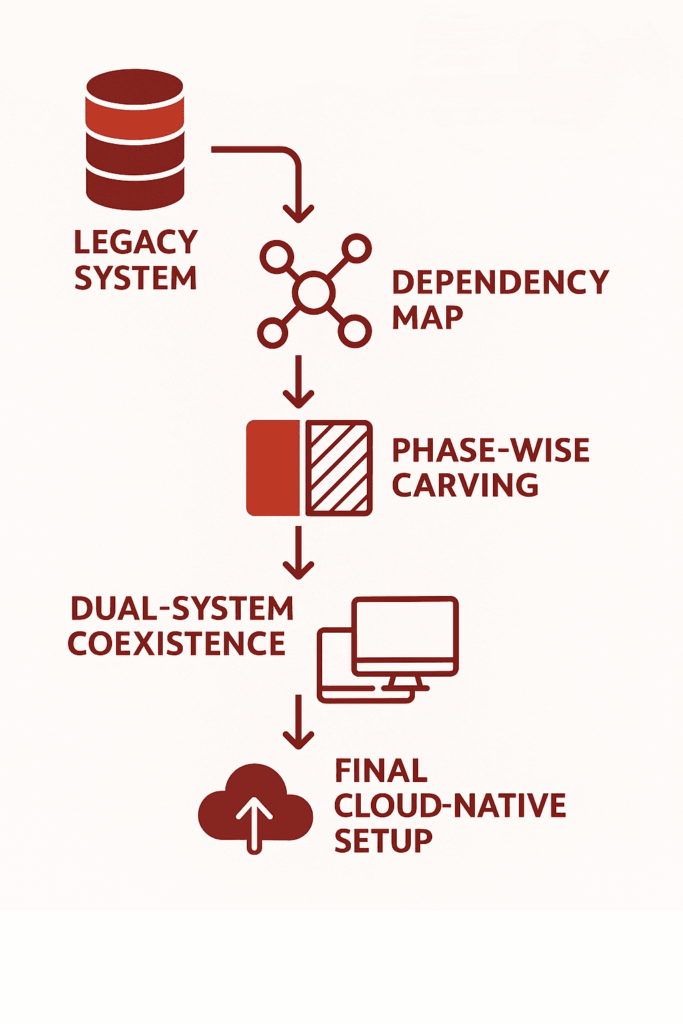
1. Assessment & Mapping:
1.1 Legacy Code Audit:
Legacy code audit is one of the initial steps taken for modernization. IT consultancies perform an exhaustive analysis of the current codebase to determine what code is outdated, where there are bottlenecks, and where it is more likely to fail.
A 2021 report by McKinsey found that 75% of cloud migrations took longer than planned and 37% were behind schedule, which was usually due to unexpected intricacies in the legacy codebase. This review finds old libraries, unstructured code, and poorly documented functions, all which are potential issues in the process of migration.
1.2 Dependency Mapping
Mapping out dependencies is important to guarantee that no key services are disrupted during the move. IT advisors employ sophisticated software such as SonarQube and Structure101 to develop visual maps of program dependencies, where it is transparently indicated that interactions exist among various components of the system.
Mapping dependencies serves to establish in what order systems can be safely migrated, avoiding the possibility of disrupting critical business functions.
1.3 Business Process Alignment
Aligning the technical solution to business processes is critical to avoiding disruption of operational workflows during migration.
During the evaluation, IT consultancies work with business leaders to determine primary workflows and areas of pain. They utilize tools such as BPMN (Business Process Model and Notation) to ensure that the migration honors and improves on these processes.
2. Phased Migration Strategy
IT consultancies use staged migration to minimize downtime, preserve data integrity, and maintain business continuity. Each of these stages are designed to uncover blind spots, reduce operational risk, and accelerate time-to-value without compromising business continuity.
- Strangler pattern or microservice carving
- Hybrid coexistence (old + new systems live together during transition)
- Failover strategies and rollback plans
2.1 Strangler Pattern or Microservice Carving
A migration strategy where parts of the legacy system are incrementally replaced with modern services, while the rest of the monolith continues to operate. Here is how it works:
- Identify a specific business function in the monolith (e.g., order processing).
- Rebuild it as an independent microservice with its own deployment pipeline.
- Redirect only the relevant traffic to the new service using API gateways or routing rules.
- Gradually expand this pattern to other parts of the system until the legacy core is fully replaced.
2.2 Hybrid Coexistence
A transitional architecture where legacy systems and modern components operate in parallel, sharing data and functionality without full replacement at once.
- Legacy and modern systems are connected via APIs, event streams, or middleware.
- Certain business functions (like customer login or billing) remain on the monolith, while others (like notifications or analytics) are handled by new components.
- Data synchronization mechanisms (such as Change Data Capture or message brokers like Kafka) keep both systems aligned in near real-time.
2.3 Failover Strategies and Rollback Plans
Structured recovery mechanisms that ensure system continuity and data integrity if something goes wrong during migration or after deployment. How it works:
- Failover strategies involve automatic redirection to backup systems, such as load-balanced clusters or redundant databases, when the primary system fails.
- Rollback plans allow systems to revert to a previous stable state if the new deployment causes issues—achieved through versioned deployments, container snapshots, or database point-in-time recovery.
- These are supported by blue-green or canary deployment patterns, where changes are introduced gradually and can be rolled back without downtime.
3. Tooling & Automation
To maintain control, speed, and stability during legacy system modernization, IT consultancies rely on a well-integrated toolchain designed to automate and monitor every step of the transition. These tools are selected not just for their capabilities, but for how well they align with the client’s infrastructure and development culture.
Key tooling includes:
- CI/CD pipelines: Automate testing, integration, and deployment using tools like Jenkins, GitLab CI, or ArgoCD.
- Monitoring & observability: Real-time visibility into system performance using Prometheus, Grafana, ELK Stack, or Datadog.
- Cloud-native migration tech: Tools like AWS Migration Hub, Azure Migrate, or Google Migrate for Compute help facilitate phased cloud adoption and infrastructure reconfiguration.
These solutions enable teams to deploy changes incrementally, detect regressions early, and keep legacy and modernized components in sync. Automation reduces human error, while monitoring ensures any risk-prone behavior is flagged before it affects production.
Bottom Line
Legacy monoliths are brittle, tightly coupled, and resistant to change, making modern development, scaling, and integration nearly impossible. Their complexity hides critical dependencies that break under pressure during transformation. Replacing them demands more than code rewrites—it requires systematic deconstruction, staged cutovers, and architecture that can absorb change without failure. That’s why AI technology companies treat modernisation not just as a technical upgrade, but as a foundation for long-term adaptability
SCS Tech delivers precision-led modernisation. From dependency tracing and code audits to phased rollouts using strangler patterns and modular cloud-native replacements, we engineer low-risk transitions backed by CI/CD, observability, and rollback safety.
If your legacy systems are blocking progress, consult with SCS Tech. We architect replacements that perform under pressure—and evolve as your business does.
FAQs
- Why should businesses replace legacy monolithic applications?
Replacing legacy monolithic applications is crucial for improving scalability, agility, and overall performance. Monolithic systems are rigid, making it difficult to adapt to changing business needs or integrate with modern technologies. By transitioning to more flexible architectures like microservices, businesses can improve operational efficiency, reduce downtime, and drive innovation.
-
What is the ‘strangler pattern’ in software modernization?
The ‘strangler pattern’ is a gradual approach to replacing legacy systems. It involves incrementally replacing parts of a monolithic application with new, modular components (often microservices) while keeping the legacy system running. Over time, the new system “strangles” the old one, until the legacy application is fully replaced.
-
Is cloud migration always necessary when replacing a legacy monolith?
No, cloud migration is not always necessary when replacing a legacy monolith, but it often provides significant advantages. Moving to the cloud can improve scalability, enhance resource utilization, and lower infrastructure costs. However, if a business already has a robust on-premise infrastructure or specific regulatory requirements, replacing the monolith without a full cloud migration may be more feasible.