

System migrations don’t fail because the tools were wrong. They fail when planning gaps go unnoticed, and operational details get overlooked. That’s where most of the risk lies, not in execution, but in the lack of structure leading up to it.
If you’re working on a major system migration, you already know what’s at stake: missed deadlines, broken integrations, user downtime, and unexpected costs. What’s often unclear is what an IT consultant actually does to prevent those outcomes.
This article breaks that down. It shows you what a skilled consultant handles before, during, and after migration, not just the technical steps, but how the entire process is scoped, sequenced, and stabilized. An experienced IT consulting firm brings that orchestration by offering more than technical support; it provides migration governance end-to-end.
What a Systems Migration Actually Involves
System migration is not simply relocating data from a source environment to a target environment. It is a multi-layered process with implications on infrastructure, applications, workflows, and in most scenarios, how entire teams function once migrated.
System migration is fundamentally a process of replacing or upgrading the infrastructure of an organization’s digital environment. It may be migrating from legacy to contemporary systems, relocating workloads to the cloud, or combining several environments into one. Whatever the size, however, the process is not usually simple.
Why? Because errors at this stage are expensive.
- According to Bloor Research, 80% of ERP projects run into data migration issues.
- Planning gaps often lead to overruns. Projects can exceed budgets by up to 30% and delay timelines by up to 41%.
- In more severe cases, downtime during migration costs range from $137 to $9,000 per minute, depending on company size and system scale.
That’s why companies do not merely require a service provider. They need an experienced IT consultancy that can translate technical migration into strategic, business-aligned decisions from the outset.
A complete system migration will involve:
“6 Key Phases of a System Migration”
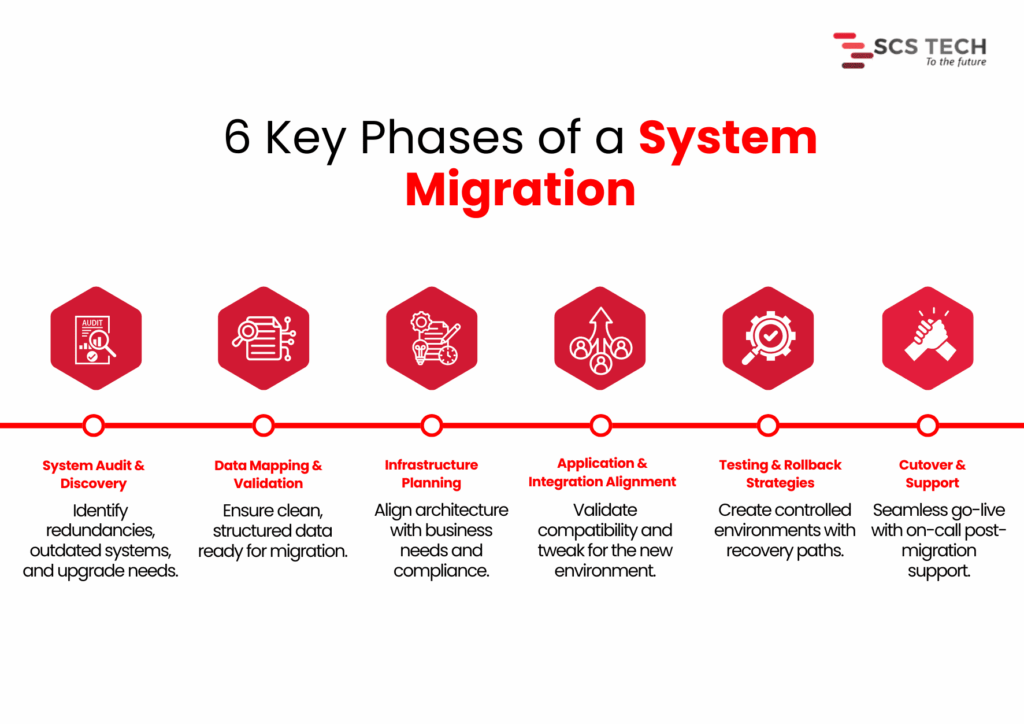
- System audit and discovery — Determining what is being used, what is redundant, and what requires an upgrade.
- Data mapping and validation — Satisfying that key data already exists, needs to be cleaned up, and is ready to be transferred without loss or corruption.
- Infrastructure planning — Aligning the new systems against business objectives, user load, regulatory requirements, and performance requirements.
- Application and integration alignment — Ensuring that current tools and processes are accommodated or modified for the new configuration.
- Testing and rollback strategies — Minimizing service interruption by testing everything within controlled environments.
- Cutover and support — Handling go-live transitions, reducing downtime, and having post-migration support available.
Each of these stages carries its own risks. Without clarity, preparation, and skilled handling, even minor errors in the early phase can multiply into budget overruns, user disruption, or worse, permanent data loss.
The Critical Role of an IT Consultant: Step by Step
When system migration is on the cards, technical configuration isn’t everything. How the project is framed, monitored, and managed is what typically determines success.
At SCS Tech, we own up to making that framework explicit from the beginning. We’re not just executioners. We remain clear through planning, coordination, testing, and transition, so the migration can proceed with reduced risk and improved decisions.
Here, we’ve outlined how we work on large migrations, what we do, and why it’s important at every stage.
Pre-Migration Assessment
Prior to making any decisions, we first figure out what the world is like today. This is not a technical exercise. How systems are presently configured, where data resides, and how it transfers between tools, all of this has a direct impact on how a migration needs to be planned.
We treat the pre-migration assessment as a diagnostic step. The goal is to uncover potential risks early, so we don’t run into them later during cutover or integration. We also use this stage to help our clients get internal clarity. That means identifying what’s critical, what’s outdated, and where the most dependency or downtime sensitivity exists.
Here’s how we run this assessment in real projects:
- First, we conduct a technical inventory. We list all current systems, how they’re connected, who owns them, and how they support your business processes. This step prevents surprises later.
- Next, we evaluate data readiness. We profile and validate sample datasets to check for accuracy, redundancy, and structure. Without clean data, downstream processes break. Industry research shows projects regularly go 30–41% over time or budget, partly due to poor data handling, and downtime can cost $137 to $9,000 per minute, depending on scale.
- We also engage stakeholders early: IT, finance, and operations. Their insights help us identify critical systems and pain points that standard tools might miss. A capable IT consulting firm ensures these operational nuances are captured early, avoiding assumptions that often derail the migration later.
By handling these details up front, we significantly reduce the risk of migration failure and build a clear roadmap for what comes next.
Migration Planning
Once the assessment is done, we shift focus to planning how the migration will actually happen. This is where strategy takes shape, not just in terms of timelines and tools, but in how we reduce risk while moving forward with confidence.
1. Mapping Technical and Operational Dependencies
Before we move anything, we need to know how systems interact, not just technically, but operationally. A database may connect cleanly to an application on paper, but in practice, it may serve multiple departments with different workflows. We review integration points, batch jobs, user schedules, and interlinked APIs to avoid breakage during cutover.
Skipping this step is where most silent failures begin. Even if the migration seems successful, missing a hidden dependency can cause failures days or weeks later.
2. Defining Clear Rollback Paths
Every migration plan we create includes defined rollback procedures. This means if something doesn’t work as expected, we can restore the original state without creating downtime or data loss. The rollback approach depends on the architecture; sometimes it’s snapshot-based, and sometimes it involves temporary parallel systems.
We also validate rollback logic during test runs, not after failure. This way, we’re not improvising under pressure.
3. Choosing the Right Migration Method
There are typically two approaches here:
- Big bang: Moving everything at once. This works best when dependencies are minimal and downtime can be tightly controlled.
- Phased: Moving parts of the system over time. This is better for complex setups where continuity is critical.
We don’t make this decision in isolation. Our specialized IT consultancy team helps navigate these trade-offs more effectively by aligning the migration model with your operational exposure and tolerance for risk.
Toolchain & Architecture Decisions
Choosing the right tools and architecture shapes how smoothly the migration proceeds. We focus on precise, proven decisions, aligned with your systems and business needs.
We assess your environment and recommend tools that reduce manual effort and risk. For server and VM migrations, options like Azure Migrate, AWS Migration Hub, or Carbonite Migrate are top choices. According to Cloudficient, using structured tools like these can cut manual work by around 40%. For database migrations, services like AWS DMS or Google Database Migration Service automate schema conversion and ensure consistency.
We examine if your workloads integrate with cloud-native services, such as Azure Functions, AWS Lambda, RDS, or serverless platforms. Efficiency gain makes a difference in the post-migration phase, not just during the move itself.
Unlike a generic vendor, a focused IT consulting firm selects tools based on system dynamics, not just brand familiarity or platform loyalty.
Risk Mitigation & Failover Planning
Every migration has risks. It’s our job at SCS Tech to reduce them from the start and embed safeguards upfront.
- We begin by listing possible failure points, data corruption, system outages, and performance issues, and rate them by impact and likelihood. This structured risk identification is a core part of any mature information technology consulting engagement, ensuring real-world problems are anticipated, not theorized.
- We set up backups, snapshots, or parallel environments based on business needs. Blusonic recommends pre-migration backups as essential for safe transitions. SCSTech configures failover systems for critical applications so we can restore service rapidly in case of errors.
Team Coordination & Knowledge Transfer
Teams across IT, operations, finance, and end users must stay aligned.
- We set a coordinated communication plan that covers status updates, cutover scheduling, and incident escalation.
- We develop clear runbooks that define who does what during migration day. This removes ambiguity and stops “who’s responsible?” questions in the critical hours.
- We set up shadow sessions so your team can observe cutover tasks firsthand, whether it’s data validation, DNS handoff, or system restart. This builds confidence and skills, avoiding post-migration dependency on external consultants.
- After cutover, we schedule workshops covering:
- System architecture changes
- New platform controls and best practices
- Troubleshooting guides and escalation paths
These post-cutover workshops are one of the ways information technology consulting ensures your internal teams aren’t left with knowledge gaps after going live. By documenting these with your IT teams, we ensure knowledge is embedded before we step back.
Testing & Post-Migration Stabilization
A migration isn’t complete when systems go live. Stabilizing and validating the environment ensures everything functions as intended.
- We test system performance under real-world conditions. Simulated workloads reveal bottlenecks that weren’t visible during planning.
- We activate monitoring tools like Azure Monitor or AWS CloudWatch to track critical metrics, CPU, I/O, latency, and error rates. Initial stabilization typically takes 1–2 weeks, during which we calibrate thresholds and tune alerts.
After stabilization, we conduct a review session. We check whether objectives, such as performance benchmarks, uptime goals, and cost limits, were met. We also recommend small-scale optimizations.
Conclusion
A successful migration of the system relies less on the tools and more on the way the process is designed upfront. Bad planning, lost dependencies, and poorly defined handoffs are what lead to overruns, downtime, and long-term disruption.
It’s for this reason that the work of an IT consultant extends beyond execution. It entails converting technical complexity into simple decisions, unifying teams, and constructing the mitigations that ensure the migration remains stable at each point.
This is what we do at SCS Tech. Our proactive IT consultancy doesn’t just react to migration problems; it preempts them with structured processes, stakeholder clarity, and tested fail-safes.
We assist organizations through each stage from evaluation and design to testing and after-migration stabilization, without unnecessary overhead. Our process is based on system-level thinking and field-proven procedures that minimize risk, enhance clarity, and maintain operations while changes occur unobtrusively in the background.
SCS Tech offers expert information technology consulting to scope the best approach, depending on your systems, timelines, and operational priorities.