Tag: #automation

  • How to Structure Tier-1 to Tier-3 Escalation Flows with Incident Software

    How to Structure Tier-1 to Tier-3 Escalation Flows with Incident Software

    When an alert hits your system, there’s a split-second decision that determines how long it lingers: Can Tier-1 handle this—or should we escalate?

    Now multiply that by hundreds of alerts a month, across teams, time zones, and shifts—and you’ve got a pattern of knee-jerk escalations, duplicated effort, and drained senior engineers stuck cleaning up tickets that shouldn’t have reached them in the first place.

    Most companies don’t lack talent—they lack escalation logic. They escalate based on panic, not process.

    Here’s how incident software can help you fix that—by structuring each tier with rules, boundaries, and built-in context, so your team knows who handles what, when, and how—without guessing.

    The Real Problem with Tiered Escalation (And It’s Not What You Think)

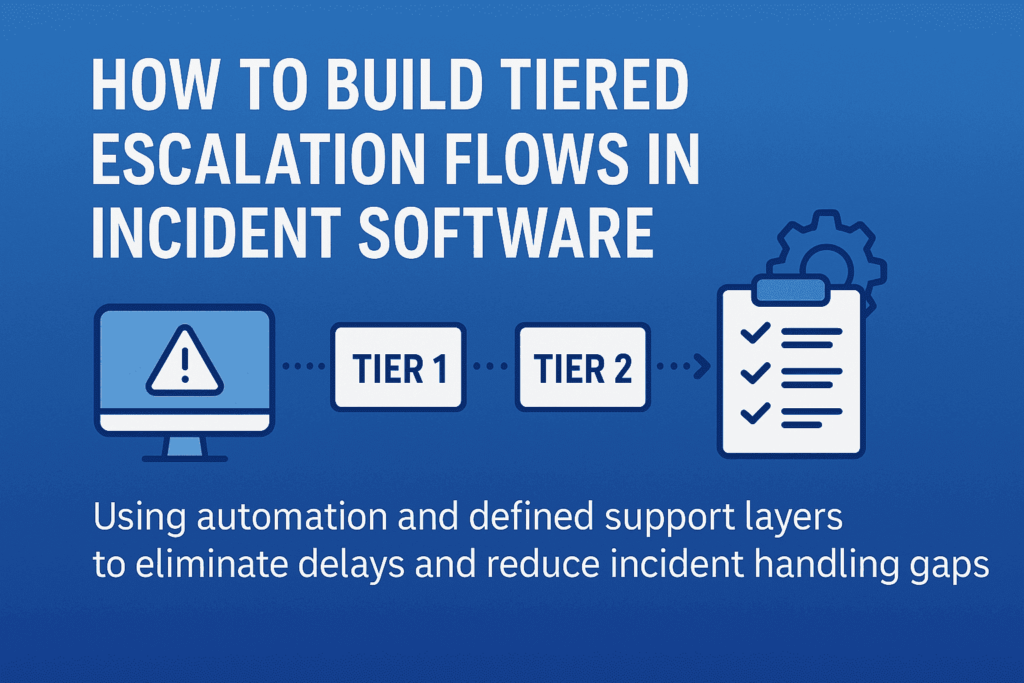
    Tiered Escalation
    Most escalation flows look clean—on slides. In reality? It’s a maze of sticky notes, gut decisions, and “just pass it to Tier-2” habits.

    Here’s what usually goes wrong:

    • Tier-1 holds on too long—hoping to fix it, wasting response time
    • Or escalates too soon—with barely any context
    • Tier-2 gets it, but has to re-diagnose because there’s no trace of what’s been done
    • Tier-3 ends up firefighting issues that were never filtered properly

    Why does this happen? Because escalation is treated like a transfer, not a transition. And without boundary-setting and logic, even the best software ends up becoming a digital dumping ground.

    That’s where structured escalation flows come in—not as static chains, but as decision systems. A well-designed incident management software helps implement these decision systems by aligning every tier’s scope, rules, and responsibilities. Each tier should know:

    • What they’re expected to solve
    • What criteria justifies escalation
    • What information must be attached before passing the baton

    Anything less than that—and escalation just becomes escalation theater.

    Structuring Escalation Logic: What Should Happen at Each Tier (with Boundaries)

    Escalation tiers aren’t ranks—they’re response layers with different scopes of authority, context, and tools. Here’s how to structure them so everyone acts, not just reacts.

    Tier-1: Containment and Categorization—Not Root Cause

    Tier-1 isn’t there to solve deep problems. They’re the first line of control—triaging, logging, and assigning severity. But often they’re blamed for “not solving” what they were never supposed to.

    Here’s what Tier-1 should do:

    • Acknowledge the alert within the SLA window
    • Check for known issues in a predefined knowledge base or past tickets
    • Apply initial containment steps (e.g., restart service, check logs, run diagnostics)
    • Classify and tag the incident: severity, affected system, known symptoms
    • Escalate with structured context (timestamp, steps tried, confidence level)

    Your incident management software should enforce these checkpoints—nothing escalates without it. That’s how you stop Tier-2 from becoming Tier-1 with more tools.

    Tier-2: Deep Dive, Recurrence Detection, Cross-System Insight

    This team investigates why it happened, not just what happened. They work across services, APIs, and dependencies—often comparing live and historical data.

    What should your software enable for Tier-2?

    • Access to full incident history, including diagnostic steps from Tier-1
    • Ability to cross-reference logs across services or clusters
    • Contextual linking to other open or past incidents (if this looks like déjà vu, it probably is)
    • Authority to apply temporary fixes—but flag for deeper RCA (root cause analysis) if needed

    Tier-2 should only escalate if systemic issues are detected, or if business impact requires strategic trade-offs.

    Tier-3: Permanent Fixes and Strategic Prevention

    By the time an incident reaches Tier-3, it’s no longer about restoring function—it’s about preventing it from happening again.

    They need:

    • Full access to code, configuration, and deployment pipelines
    • The authority to roll out permanent fixes (sometimes involving product or architecture changes)
    • Visibility into broader impact: Is this a one-off? A design flaw? A risk to SLAs?

    Tier-3’s involvement should trigger documentation, backlog tickets, and perhaps even blameless postmortems. Escalating to Tier-3 isn’t a failure—it’s an investment in system resilience.

    Building Escalation into Your Incident Management Software (So It’s Not Just a Ticket System)

    Most incident tools act like inboxes—they collect alerts. But to support real escalation, your software needs to behave more like a decision layer, not a passive log.

    Here’s how that looks in practice.

    1. Tier-Based Views

    When a critical alert fires, who sees it? If everyone on-call sees every ticket, it dilutes urgency. Tier-based visibility means:

    • Tier-1 sees only what’s within their response scope
    • Tier-2 gets automatically alerted when severity or affected systems cross thresholds
    • Tier-3 only gets pulled when systemic patterns emerge or human escalation occurs

    This removes alert fatigue and brings sharp clarity to ownership. No more “who’s handling this?”

    2. Escalation Triggers

    Your escalation shouldn’t rely on someone deciding when to escalate. The system should flag it:

    • If Tier-1 exceeds time to resolve
    • If the same alert repeats within X hours
    • If affected services reach a certain business threshold (e.g., customer-facing)

    These triggers can auto-create a Tier-2 task, notify SMEs, or even open an incident war room with pre-set stakeholders. Think: decision trees with automation.

    3. Context-Rich Handoffs 

    Escalation often breaks because Tier-2 or Tier-3 gets raw alerts, not narratives. Your software should automatically pull and attach:

    • Initial diagnostics
    • Steps already taken
    • System health graphs
    • Previous related incidents
    • Logs, screenshots, and even Slack threads

    This isn’t a “notes” field. It’s structured metadata that keeps context alive without relying on the person escalating.

    4. Accountability Logging

    A smooth escalation trail helps teams learn from the incident—not just survive it.

    Your incident software should:

    • Timestamp every handoff
    • Record who escalated, when, and why
    • Show what actions were taken at each tier
    • Auto-generate a timeline for RCA documentation

    This makes postmortems fast, fair, and actionable—not hours of Slack archaeology.

    When escalation logic is embedded, not documented, incident response becomes faster and repeatable—even under pressure.

    Common Pitfalls in Building Escalation Structures (And How to Avoid Them)

    While creating a smooth escalation flow sounds simple, there are a few common traps teams fall into when setting up incident management systems. Avoiding these pitfalls ensures your escalation flows work as they should when the pressure is on.

    1. Overcomplicating Escalation Triggers

    Adding too many layers or overly complex conditions for when an escalation should happen can slow down response times. Overcomplicating escalation rules can lead to delays and miscommunication.

    Keep escalation triggers simple but actionable. Aim for a few critical conditions that must be met before escalating to the next tier. This keeps teams focused on responding, not searching through layers of complexity. For example:

    • If a high-severity incident hasn’t been addressed in 15 minutes, auto-escalate.
    • If a service has reached 80% of capacity for over 5 minutes, escalate to Tier-2.

    2. Lack of Clear Ownership at Each Tier

    When there’s uncertainty about who owns a ticket, or ownership isn’t transferred clearly between teams, things slip through the cracks. This creates chaos and miscommunication when escalation happens.

    Be clear on ownership at each level. Your incident software should make this explicit. Tier-1 should know exactly what they’re accountable for, Tier-2 should know the moment a critical incident is escalated, and Tier-3 should immediately see the complete context for action.

    Set default owners for every tier, with auto-assignment based on workload. This eliminates ambiguity during time-sensitive situations.

    3. Underestimating the Importance of Context

    Escalations often fail because they happen without context. Passing a vague or incomplete incident to the next team creates bottlenecks.

    Ensure context-rich handoffs with every escalation. As mentioned earlier, integrate tools for pulling in logs, diagnostics, service health, and team notes. The team at the next tier should be able to understand the incident as if they’ve been working on it from the start. This also enables smoother collaboration when escalation happens.

    4. Ignoring the Post-Incident Learning Loop

    Once the incident is resolved, many teams close the issue and move on, forgetting to analyze what went wrong and what can be improved in the future.

    Incorporate a feedback loop into your escalation process. Your incident management software should allow teams to mark incidents as “postmortem required” with a direct link to learning resources. Encourage root-cause analysis (RCA) after every major incident, with automated templates to capture key findings from each escalation level.

    By analyzing the incident flow, you’ll uncover bottlenecks or gaps in your escalation structure and refine it over time.

    5. Failing to Test the Escalation Flow

    Thinking the system will work perfectly the first time is a mistake. Incident software can fail when escalations aren’t tested under realistic conditions, leading to inefficiencies during actual events.

    Test your escalation flows regularly. Simulate incidents with different severity levels to see how your system handles real-time escalations. Bring in Tier-1, Tier-2, and Tier-3 teams to practice. Conduct fire drills to identify weak spots in your escalation logic and ensure everyone knows their responsibilities under pressure.

    Wrapping Up

    Effective escalation flows aren’t just about ticket management—they are a strategy for ensuring that your team can respond to critical incidents swiftly and intelligently. By avoiding common pitfalls, maintaining clear ownership, integrating automation, and testing your system regularly, you can build an escalation flow that’s ready to handle any challenge, no matter how urgent. 

    At SCS Tech, we specialize in crafting tailored escalation strategies that help businesses maintain control and efficiency during high-pressure situations. Ready to streamline your escalation process and ensure faster resolutions? Contact SCS Tech today to learn how we can optimize your systems for stability and success.

  • How RPA is Redefining Customer Service Operations in 2025

    How RPA is Redefining Customer Service Operations in 2025

    Customer service isn’t broken, but it’s slow.

    Tickets stack up. Agents switch between tools. Small issues turn into delays—not because people aren’t working, but because processes aren’t designed to handle volume.

    By 2025, this is less about headcount and more about removing steps that don’t need humans.

    That’s where the robotic process automation service (RPA) fits. It handles the repeatable parts—status updates, data entry, and routing—so your team can focus on exceptions.

    Deloitte reports that 73% of companies using RPA in service functions saw faster response times and reduced costs for routine tasks by up to 60%.

    Let’s look at how RPA is redefining what great customer service actually looks like—and where smart companies are already ahead of the curve.

    What’s Really Slowing Your Team Down (Even If They’re Performing Well)

    If your team is resolving tickets on time but still falling behind, the issue isn’t talent or effort—it’s workflow design.

    In most mid-sized service operations, over 60% of an agent’s day is spent not resolving customer queries, but navigating disconnected systems, repeating manual inputs, or chasing internal handoffs. That’s not inefficiency—it’s architectural debt.

    Here’s what that looks like in practice:

    • Agents switch between 3–5 tools to close a single case
    • CRM fields require double entry into downstream systems for compliance or reporting
    • Ticket updates rely on batch processing, which delays real-time tracking
    • Status emails, internal escalations, and customer callbacks all follow separate workflows

    Each step seems minor on its own. But at scale, they add up to hours of non-value work—per rep, per day.

    Customer Agent Journey

    A Forrester study commissioned by BMC found a major disconnect between what business teams experience and what IT assumes. The result? Productivity losses and a customer experience that slips, even when your people are doing everything right.

    RPA addresses this head-on—not by redesigning your entire tech stack, but by automating the repeatable steps that shouldn’t need a human in the loop in the first place.

    When deployed correctly, RPA becomes the connective layer between systems, making routine actions invisible to the agent. What they experience instead: is more time on actual support and less time on redundant workflows.

    So, What Is RPA Actually Doing in Customer Service?

    In 2025, RPA in customer service is no longer a proof-of-concept or pilot experiment—it’s a critical operations layer.

    Unlike chatbots or AI agents that face the customer, RPA works behind the scenes, orchestrating tasks that used to require constant agent attention but added no real value.

    And it’s doing this at scale.

    What RPA Is Really Automating

    A recent Everest Group CXM study revealed that nearly 70% of enterprises using RPA in customer experience management (CXM) have moved beyond experimentation and embedded bots as a permanent fixture in their service delivery architecture.

    So, what exactly is RPA doing today in customer service operations?

    Here are the three highest-impact RPA use cases in customer service today, based on current enterprise deployments:

    1. End-to-End Data Coordination Across Systems

    In most service centers—especially those using legacy CRMs, ERPs, and compliance platforms—agents have to manually toggle between tools to view, verify, or update information.

    This is where RPA shines.

    RPA bots integrate with legacy and modern platforms alike, performing tasks like:

    • Pulling customer purchase or support history from ERP systems
    • Verifying eligibility or warranty status across databases
    • Copying ticket information into downstream reporting systems
    • Syncing status changes across CRM and dispatch tools

    In a documented deployment by Infosys, BPM, a Fortune 500 telecom company, faced a high average handle time (AHT) due to system fragmentation. By introducing RPA bots that handled backend lookups and updates across CRM, billing, and field-service systems, the company reduced AHT by 32% and improved first-contact resolution by 22%—all without altering the front-end agent experience.

    2. Automated Case Closure and Wrap-Up Actions

    The hidden drain on service productivity isn’t always the customer interaction—it’s what happens after. Agents are often required to:

    • Update multiple CRM fields
    • Trigger confirmation emails
    • Document case resolutions
    • Notify internal stakeholders
    • Apply classification tags

    These are low-value but necessary. And they add up—2–4 minutes per ticket.

    What RPA does: As soon as a case is resolved, a bot can:

    • Automatically update CRM fields
    • Send templated but personalized confirmation emails
    • Trigger workflows (like refunds or part replacements)
    • Close out tickets and prepare them for analytics
    • Route summaries to quality assurance teams

    In a UiPath case study, a European airline implemented RPA bots across post-interaction workflows. The bots performed tasks like seat change confirmation, fare refund logging, and CRM note entry. Over one quarter, the bots saved over 15,000 agent hours and contributed to a 14% increase in CSAT, due to faster resolution closure and improved response tracking.

    3. Real-Time Ticket Categorization and Routing

    Not all tickets are created equal. A delay in routing a complaint to Tier 2 support or failing to flag a potential SLA breach can cost more than just time—it damages trust.

    Before RPA, ticket routing depended on either agent discretion or hard-coded rules, which often led to misclassification, escalation delays, or manual queues.

    RPA bots now triage tickets in real-time, using conditional logic, keywords, customer history, and even metadata from email or chat submissions.

    This enables:

    • Immediate routing to the correct queue
    • Auto-prioritization based on SLA or customer tier
    • Early alerts for complaints, cancellations, or churn indicators
    • Assignment to the most suitable rep or team

    Deloitte’s 2023 Global Contact Center Survey notes that over 47% of RPA-enabled contact centers use robotic process automation to handle ticket classification, contributing to first-response time improvements between 35–55%, depending on volume and complexity.

    4. Proactive Workflow Monitoring and Error Reduction

    RPA in 2025 goes beyond just triggering actions. With built-in logic and integrations into workflow monitoring tools, bots can now detect anomalies and automatically:

    • Alert supervisors of stalled tickets
    • Escalate SLA risks
    • Retry failed data transfers
    • Initiate fallback workflows

    This transforms RPA from a “task doer” to a workflow sentinel, proactively removing bottlenecks before they affect CX.

    Why Smart Teams Still Delay RPA—Until the Cost Becomes Visible

    Let’s be honest—RPA isn’t new. But the readiness of the ecosystem is.

    Five years ago, automating customer service workflows meant expensive integrations, complex IT lift, and months of change management. Today, vendors offer pre-built bots, cloud deployment, and low-code interfaces that let you go from idea to implementation in weeks.

    So why are so many teams still holding back?

    Because the tipping point isn’t technical. It’s psychological.

    There’s a belief that improving CX means expensive software, new teams, or a full system overhaul. But in reality, some of the biggest gains come from simply taking the repeatable tasks off your team’s plate—and giving them to software that won’t forget, fatigue, or fumble under pressure.

    The longer you wait, the wider the performance gap grows—not just between you and your competitors, but between what your team could be doing and what they’re still stuck with.

    Before You Automate: Do This First

    You don’t need a six-month consulting engagement to begin. Start here:

    • List your 10 most repetitive customer service tasks
      (e.g., ticket tagging, CRM updates, refund processing)
    • Estimate how much time each task eats up daily
      (per agent or team-wide)
    • Ask: What value would it unlock if a bot handled this?
      (Faster SLAs? More capacity for complex issues? Happier agents?)

    This is your first-pass robotic process automation roadmap—not an overhaul, just a smarter delegation plan. And this is where consultative automation makes all the difference.

    Don’t Deploy Bots. Rethink Workflows First.

    You don’t need to automate everything.

    You need to automate the right things—the tasks that:

    • Slow your team down
    • Introduce risk through human error
    • Offer zero value to the customer
    • Scale poorly with volume

    When you get those out of the way, everything else accelerates—without changing your tech stack or budget structure.

    RPA isn’t replacing your service team. It’s protecting them from work that was never meant for humans in the first place.

    Automate the Work That Slows You Down Most

    If you’re even thinking about robotic process automation services in India, you’re already behind companies that are saving hours per day through precise robotic process automation.

    At SCS Tech India, we don’t just deploy bots—we help you:

    • Identify the 3–5 highest-impact workflows to automate
    • Integrate seamlessly with your existing systems
    • Launch fast, scale safely, and see results in weeks

    Whether you need help mapping your workflows or you’re ready to deploy, let’s have a conversation that moves you forward.

    FAQs

    What kinds of customer service tasks are actually worth automating first?

    Start with tasks that are rule-based, repetitive, and time-consuming—but don’t require judgment or empathy. For example:

    • Pulling and syncing customer data across tools
    • Categorizing and routing tickets
    • Sending follow-up messages or escalations
    • Updating CRM fields after resolution

    If your agents say “I do this 20 times a day and it never changes,” that’s a green light for robotic process automation.

    Will my team need to learn how to code or maintain these bots?

    No. Most modern RPA solutions come with low-code or no-code interfaces. Once the initial setup is done by your robotic process automation partner, ongoing management is simple—often handled by your internal ops or IT team with minimal training.

    And if you work with a vendor like SCS Tech, ongoing support is part of the package, so you’re not left troubleshooting on your own.

    What happens if our processes change? Will we need to rebuild everything?

    Good question—and no, not usually. One of the advantages of mature RPA platforms is that they’re modular and adaptable. If a field moves in your CRM or a step changes in your workflow, the bot logic can be updated without rebuilding from scratch.

    That’s why starting with a well-structured automation roadmap matters—it sets you up to scale and adapt with ease.

  • The Role of Predictive Analytics in Driving Business Growth in 2025

    The Role of Predictive Analytics in Driving Business Growth in 2025

    Consumer behaviour is shifting faster than ever. Algorithms are making decisions before you do. And your gut instinct? It’s getting outpaced by businesses that see tomorrow coming before it arrives.

    According to a 2024 Gartner survey, 79% of corporate strategists say analytics, AI, and automation are critical to their success over the next two years. Many are turning to specialised AI/ML services to operationalise these priorities at scale.

    Markets are moving too fast for backward-looking plans. Today’s winning companies aren’t just reacting to change — they’re anticipating it. Predictive analytics gives you the edge by turning historical data into future-ready decisions faster than your competition can blink.

    If you’ve ever timed a campaign based on last year’s buying cycle, you’ve already used predictive instinct. But in 2025, instinct isn’t enough. You need a system that scales it.

    Where It Actually Moves the Needle — And Where It Doesn’t

    Let’s get real—predictive analytics isn’t a plug-and-play miracle. It’s a tool. Its value comes from where and how you apply it. Some companies see 10x ROI. Others walk away unimpressed. The difference? Focus.

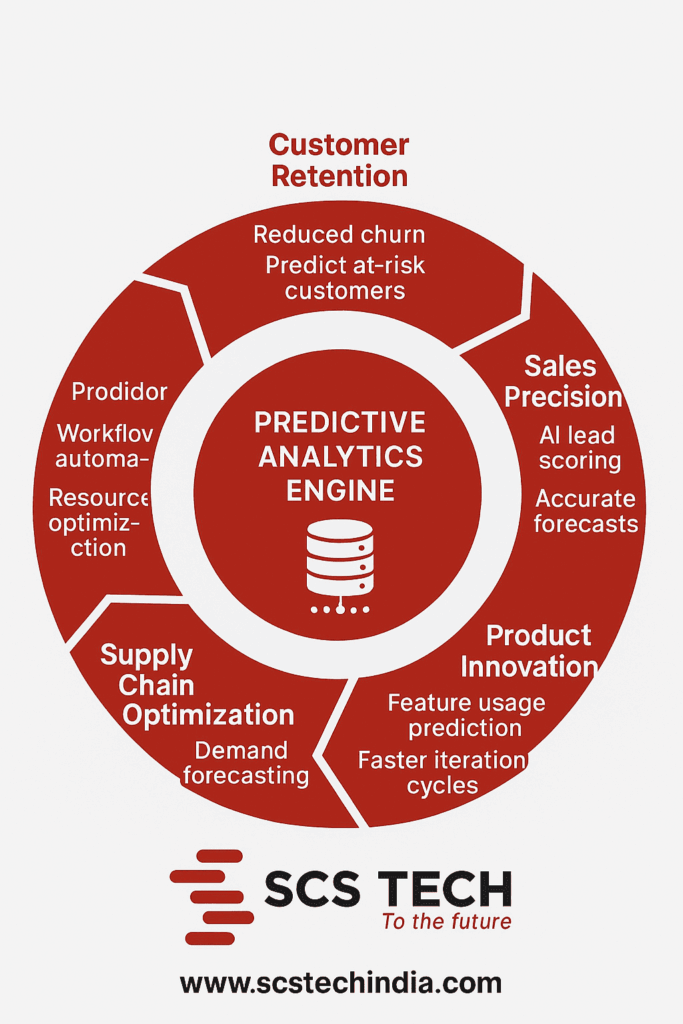
    Predictive Analytics Engine

    A McKinsey report noted that companies using predictive analytics in key operational areas see up to 6% improvement in profit margins and 10% higher customer satisfaction scores. However, these results only show up when the use case is aligned with actual friction points. Especially when backed by an integrated AI/ML service that aligns models with on-the-ground decision triggers.

    Here’s where prediction delivers outsized returns:

    1. Demand Forecasting (Relevant for: Manufacturing, retail, and healthcare): These industries lose revenue when supply doesn’t match demand, either through excess inventory that expires or stockouts that miss sales. It helps businesses align production with real demand patterns, often region-specific or seasonal.
    2. Customer Churn Prediction (Relevant for: Telecom and BFSI): When customers leave quietly, the business loses long-term value without warning. What prediction does: It flags small changes in user behavior that often go unnoticed, like a drop in usage or payment delays, so retention teams can intervene early.
    3. Predictive Maintenance (Relevant for: Heavy machinery, logistics, and energy sectors): Unplanned downtime halts operations and damages client trust. It uses machine data—often analysed through an AI/ML service—to identify early signs of failure, so teams can act before breakdowns happen.
    4. Fraud Detection (Relevant for: Banking and insurance): As digital transactions scale, fraud becomes harder to detect through manual checks alone. Algorithms analyse transaction patterns and flag anomalies in real time—often faster and more accurately than audits.

    But not every use case delivers.

    Where It Fails—or Flatlines

    • When data is sparse or irregular. Prediction thrives on patterns. No patterns? No value.
    • When you’re trying to forecast rare, one-off events—like a regulatory upheaval or leadership shift.
    • When departments work in silos, hoarding insights instead of feeding them back into models.
    • When you deploy tools before identifying problems, a common mistake with off-the-shelf dashboards.

    Key Applications of Predictive Analytics for Business Growth

    Predictive analytics becomes valuable only when it integrates with core decision systems—those that determine how, when, and where a business allocates its capital, people, and priorities. Used correctly, it transforms lagging indicators into real-time levers for operational clarity. Below are not categories—but impact zones—where the application of predictive intelligence changes how growth is executed, not just reported.

    1. Customer acquisition and retention

    Retention is not a loyalty problem. It’s an attention problem. Businesses lose customers not when value disappears—but when relevance lapses. Predictive analytics identifies these lapses early.

    • By leveraging behavioural clustering and time-series models, high-performing businesses can detect churn signals long before customers take action.
    • According to a Forrester study, companies that operationalized churn prediction frameworks reported up to 15–20% improvement in customer lifetime value (CLV) by deploying targeted interventions when disengagement patterns first emerge.

    This is not segmentation. It’s micro-forecasting—where response likelihood is recalculated in real time across interaction channels.

    In B2C models, these drives offer timing and personalization. In B2B SaaS, it influences renewal forecasts and account management priorities. Either way, the growth engine no longer runs on intuition. It runs on modeled intent.

    2. Marketing and revenue operations

    Campaigns fail not because of creative gaps—but because they’re misaligned with demand timing. Predictive analytics changes that by eliminating the lag between audience insight and go-to-market execution.

    • By integrating external signals—like macroeconomic indicators, sector-specific sentiment, and real-time intent data—into media planning systems, marketing teams shift from reactive attribution to predictive conversion modeling. Such insights often come faster when powered by a reliable AI/ML service capable of digesting external and internal data streams.
    • This reduces CAC volatility and improves budget elasticity.

    In sales, predictive scoring systems ingest CRM data, email trails, past deal cycles, and intent signals to identify not just who is likely to close, but when and at what cost to serve.

    A McKinsey study noted that sales teams with mature predictive analytics frameworks closed deals 12–15% faster and achieved 10–20% higher conversion rates than those using standard lead scoring.

    3. Product strategy and innovation

    The traditional model of product development—build, launch, measure—is fundamentally reactive. Predictive analytics shifts this flow by identifying undercurrents in customer need before they surface as requests or complaints.

    • NLP models—typically deployed through an AI/ML service—run across support tickets, online reviews, and feedback forms, and extract friction themes at scale.
    • Layered with usage telemetry, companies can model not just what customers want next, but what will reduce churn and increase NPS with the lowest development cost.

    In hardware and manufacturing, predictive analytics ties into field service data and defect logs to anticipate which design improvements will yield the greatest operational return—turning product development into a value optimization function, not a roadmap gamble.

    4. Supply chain and operations

    Supply chains break not because of a lack of planning, but because of dependence on static planning. Predictive models inject fluidity—adapting forecasts based on upstream and downstream fluctuations in near real-time.

    • One electronics OEM layered weather data, regional demand shifts, and supplier capacity metrics into its forecasting models—cutting inventory holding costs by 22% and avoiding stockouts in two consecutive holiday seasons.
    • Beyond demand, predictive analytics enables logistics risk profiling, flagging geographies, vendors, or nodes that show early signals of disruption.

    It also supports capacity-aware scheduling—adjusting throughput based on absenteeism, machine wear signals, or raw material inconsistencies. This doesn’t require full automation. It requires precision frameworks that make manual interventions smarter, faster, and more aligned with system constraints.

    5. Finance and risk management

    Financial models typically operate on the assumption of linearity. Predictive analytics exposes the reality—that financial health is event-driven and behavior-dependent.

    • Revenue forecasting systems embedding signals like interest rate changes, currency volatility, and regional policy shifts improved forecast accuracy by up to 25%, according to PwC.
    • In credit and fraud, supervised models don’t just look for rule violations—but for breaks in pattern coherence, even when individual inputs appear safe.

    This is why predictive risk systems are no longer limited to banks. Mid-sized enterprises exposed to global vendors, multi-currency transactions, or digital assets are embedding fraud detection into operational controls—not waiting for post-event audits.

    Challenges in Implementing Predictive Analytics

    The failure rate of predictive analytics initiatives remains high, not because the technology is insufficient, but because most organizations misdiagnose what prediction actually requires. It is not a data visualization problem. It’s an integration problem. Below are the real constraints that separate signal from noise.

    1. Data infrastructure

    Predictive accuracy depends on historical depth, temporal granularity, and data context. Most organizations underestimate how fragmented or unstructured their data is, until the model flags inconsistent inputs.

    • According to IDC, only 32% of organizations have enterprise-wide data governance sufficient to support cross-functional predictive models.
    • Without normalized pipelines, real-time ingestion, and tagging standards, even advanced models collapse under ambiguity.

    2. Model reliability and explainability

    In regulated industries—finance, healthcare, insurance—accuracy alone isn’t enough. Explainability becomes critical.

    • Stakeholders need to understand why a model flagged a transaction, rejected a claim, or reprioritized a lead.
    • Black-box models like deep learning demand interpretability frameworks (e.g., LIME or SHAP) or hybrid models that balance clarity with accuracy.

    Without this transparency, trust erodes—and regulatory non-compliance becomes a serious risk.

    3. Siloed ownership

    Prediction has no value if insight stays in a dashboard. Yet many organizations keep data science isolated from sales, ops, or finance.

    • This leads to what Gartner calls the “insight-to-action gap.”
    • Models generate accurate outputs, but no one acts on them—either due to unclear ownership or because workflows aren’t built to accept predictive triggers.

    To close this, predictions must be embedded into decision architecture—CRM systems, scheduling tools, pricing engines—not just reporting layers.

    4. Talent scarcity

    Most businesses conflate data analytics with predictive modeling. But statistical reports aren’t predictive systems.

    • You don’t need someone to report what happened—you need people who build systems that act on what will happen.
    • That means hiring data engineers, ML ops architects, and domain-informed modelers—not spreadsheet analysts.

    This mismatch leads to failed pilots and dashboards that look impressive but fail to drive business impact.

    5. Change management

    The biggest friction point isn’t technical—it’s cultural.

    • Predictive systems challenge intuition. They force leaders to trust data over experience.
    • This only works when there’s executive alignment—when leadership is willing to move from authority-based decisions to model-informed strategy.

    Adoption requires not just access to tools, but governance models, feedback loops, and measurable accountability.

    What Business Growth Looks Like with Prediction Built-In

    When predictive analytics is done right, growth doesn’t look like fireworks. It looks like precision.

    • You don’t over-hire.
    • You don’t overstock.
    • You don’t launch in the wrong quarter.
    • You don’t spend weeks figuring out why shipments are delayed—because you already fixed it two cycles ago.

    The power of prediction is in consistency.

    And in mid-sized businesses, consistency is the difference between making payroll comfortably and cutting corners to survive Q4.

    In public health systems, predictive models helped reduce patient wait times by anticipating post-holiday surges in outpatient visits. The result? Less crowding. Faster care. Better resource planning.

    No billion-dollar transformation. Just friction, removed.

    This is where SCS Tech earns its edge.

    They don’t sell dashboards—they offer a tailored AI/ML service that solves recurring friction points using AI/ML architectures tailored to your reality.

    • If your shipment delays always happen in the same two regions,
    • If your production overruns always start with the same raw material,
    • If your customer complaints always spike on certain weekdays—

    That’s where they begin. They don’t drop a model and leave. They build prediction into your process to the point where it stops you from losing money.

    What to Look for If You Want to Explore Further

    Before bringing in predictive analytics, ask yourself:

    • Where are we routinely late in making calls?
    • Which part of the business costs more than it should—because we’re always reacting?
    • Do we have enough historical data tied to that problem?

    If the answer is yes, you’re not early. You’re already behind.

    That’s the entry point for SCS Tech. They don’t lead with tools. They start by identifying high-friction, recurring events that can be modelled—and then make that logic part of your system.

    Their strength isn’t variety. It’s pattern recognition across sectors where delay costs money: logistics bottlenecks, vendor overruns, and churn without warning. SCS Tech knows how to operationalise prediction—not as a shiny overlay but as a layer that runs quietly behind the scenes.

    Final Thoughts

    Most business problems aren’t surprising—they just keep resurfacing because we’re too late to catch them. Prediction changes that. It gives you leverage, not hindsight.

    This isn’t about being futuristic. It’s about preventing wasted spend, lost hours, and missed quarters.

    If you’re running a mid-sized business and are tired of reacting late, talk to SCS Tech India. Start with one recurring issue. If it’s predictable, we’ll help you systemize the fix—and prove the return in weeks, not quarters.

    FAQs

    We already use dashboards and reports—how is this different?

    Dashboards tell you what has already happened. Predictive analytics tells you what’s likely to happen next. It moves you from reactive decision-making to proactive planning. Instead of seeing a sales dip after it occurs, prediction can flag the drop before it shows up on reports, giving you time to correct the course.

    Do we need a massive data science team to get started?

    No. You don’t need an in-house AI lab. Most companies start with external partners or off-the-shelf platforms tailored to their domain. The critical part isn’t the tool—it’s the clarity of the problem you’re solving. You’ll need clean data, domain insight, and a team that can translate the output into action. That’s more important than building everything from scratch.

    Can we apply predictive analytics to small or one-time projects?

    You can try—but it won’t deliver much value. Prediction is best suited for ongoing, high-volume decisions. Think of recurring purchases, ongoing maintenance, repeat fraud attempts, etc. If you’re testing a new product or entering a new market with no history to learn from, traditional analysis or experimentation will serve you better.


  • How AI/ML Services and AIOps Are Making IT Operations Smarter and Faster?

    How AI/ML Services and AIOps Are Making IT Operations Smarter and Faster?

    Are you seeking to speed up and make IT operations smarter? With infrastructure becoming increasingly complex and workloads dynamic, traditional approaches are insufficient. IT operations are vital to business continuity, and to address today’s requirements, organizations are adopting AI/ML services and AIOps (Artificial Intelligence for IT Operations).

    These technologies make work autonomous and efficient, changing how systems are monitored and controlled. Gartner says 20% of companies will leverage AI to automate operations—removing more than half of middle management positions by 2026.

    In this blog, let’s see how AI/ML services and AIOps are making organizations really work smarter, faster, and proactively.

    How Are AI/ML Services and AIOps Making IT Operations Faster?

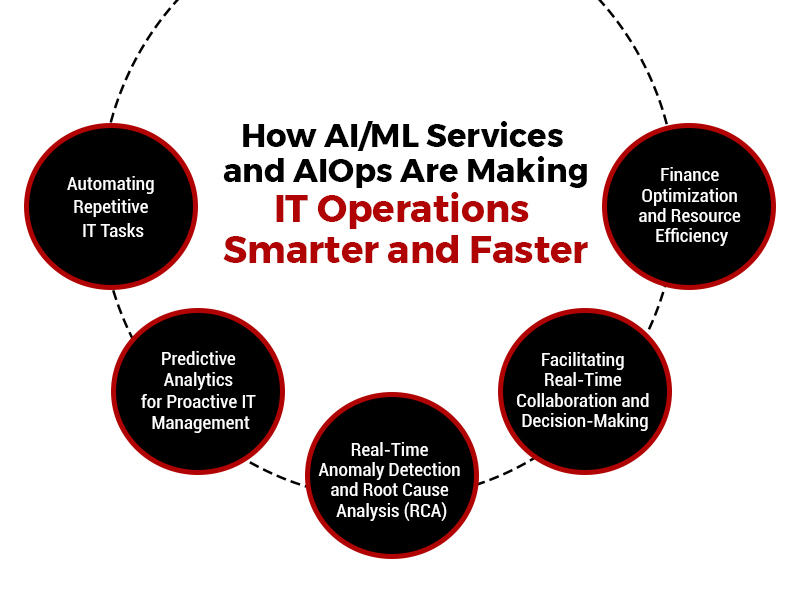
    1. Automating Repetitive IT Tasks

    AI/ML services apply models to transform operations into intelligent and quicker ones by identifying patterns and taking actions automatically—without human intervention. This eliminates IT teams’ need to manually read logs, answer alerts, or perform repetitive diagnostics.

    Through this, log parsing, alert verification, and restart of services that previously used hours can be achieved in an instant using AIOps platforms, vastly enhancing response time and efficiency. The key areas of automation include the following:

    A. Log Analysis

    Each layer of IT infrastructure, from hardware to applications, generates high-volume, high-velocity log data with performance metrics, error messages, system events, and usage trends.

    AI-driven log analysis engines use machine learning algorithms to consume this real-time data stream and analyze it against pre-trained models. These models can detect known patterns and abnormalities, do semantic clustering, and correlate behaviour deviations with historical baselines. The platform then exposes operational insights or passes incidents when deviations hit risk thresholds. This eliminates the need for human-driven parsing and cuts the diagnostic cycle time to a great extent.

    B. Alert Correlation

    Distributed environments have multiple systems that generate isolated alerts based on local thresholds or fault detection mechanisms. Without correlation, these alerts look unrelated and cannot be understood in their overall impact.

    AIOps solutions apply unsupervised learning methods and time-series correlation algorithms to group these alerts into coherent incident chains. The platform links lower-level events to high-level failures through temporal alignment, causal relationships, and dependency models, achieving an aggregated view of the incident. This makes the alerts much more relevant and speeds up incident triage.

    C. Self-Healing Capabilities

    After anomalies are identified or correlations are made, AIOps platforms can initiate pre-defined remediation workflows through orchestration engines. These self-healing processes are set up to run based on conditional logic and impact assessment.

    The system initially confirms whether the problem satisfies resolution conditions (e.g., severity level, impacted nodes, length) and subsequently engages in recovery procedures like service restarting, resource redimensioning, cache clearing, or reverting to baseline configuration. Everything gets logged, audited, and reported, so automated flows are being tweaked.

    2. Predictive Analytics for Proactive IT Management

    AI/ML services optimize operations to make them faster and smarter by employing historical data to develop predictive models that anticipate problems such as system downtime or resource deficiency well ahead of time. This enables IT teams to act early, minimizing downtime, enhancing uptime SLAs, and preventing delays usually experienced during live troubleshooting. These predictive functionalities include the following:

    A. Early Failure Detection

    Predictive models in AIOps platforms employ supervised learning algorithms trained on past incident history, performance logs, telemetry, and infrastructure behaviour. Predictive models analyze real-time telemetry streams against past trends to identify early-warning signals like performance degradation, unusual resource utilization, or infrastructure stress indicators.

    Critical indicators—like increasing response times, growing CPU/memory consumption, or varying network throughput—are possible leading failure indicators. The system then ranks these threats and can suggest interventions or schedule automatic preventive maintenance.

    B. Capacity Forecasting

    AI/ML services examine long-term usage trends, load variations, and business seasonality to create predictive models for infrastructure demand. With regression analysis and reinforcement learning, AIOps can simulate resource consumption across different situations, such as scheduled deployments, business incidents, or external dependencies.

    This enables the system to predict when compute, storage, or bandwidth demands exceed capacity. Such predictions feed into automated scaling policies, procurement planning, and workload balancing strategies to ensure infrastructure is cost-effective and performance-ready.

    3. Real-Time Anomaly Detection and Root Cause Analysis (RCA)

    AI/ML services render operations more intelligent by learning to recognize normal system behaviour over time and detect anomalies that could point to problems, even if they do not exceed fixed limits. They also render operations quicker by connecting data from metrics, logs, and traces immediately to identify the root cause of problems, lessening the requirement for time-consuming manual investigations.


     real-time anomaly detection and root cause analysis (RCA) using AI/ML

    The functional layers include the following:

    A. Anomaly Detection

    Machine learning models—particularly those based on unsupervised learning and clustering—are employed to identify deviations from established system baselines. These baselines are dynamic, continuously updated by the AI engine, and account for time-of-day behaviour, seasonal usage, workload patterns, and system context.

    The detection mechanism isolates anomalies based on deviation scores and statistical significance instead of fixed rule sets. This allows the system to detect insidious, non-apparent anomalies that can go unnoticed under threshold-based monitoring systems. The platform also prioritizes anomalies regarding severity, system impact, and relevance to historical incidents.

    B. Root Cause Analysis (RCA)

    RCA engines in AIOps platforms integrate logs, system traces, configuration states, and real-time metrics into a single data model. With the help of dependency graphs and causal inference algorithms, the platform determines the propagation path of the problem, tracing upstream and downstream effects across system components.

    Temporal analysis methods follow the incident back to its initial cause point. The system delivers an evidence-based causal chain with confidence levels, allowing IT teams to confirm the root cause with minimal investigation.

    4. Facilitating Real-Time Collaboration and Decision-Making

    AI/ML services and AIOps platforms enhance decision-making by providing a standard view of system data through shared dashboards, with insights specific to each team’s role. This gives every stakeholder timely access to pertinent information, resulting in faster coordination, better communication, and more effective incident resolution. These collaboration frameworks include the following:

    A. Unified Dashboards

    AIOps platforms consolidate IT-domain metrics, alerts, logs, and operation statuses into centralized dashboards. These dashboards are constructed with modular widgets that provide real-time data feeds, historical trend overlays, and visual correlation layers.

    The standard perspective removes data silos, enables quicker situational awareness, and allows for synchronized response by developers, system admins, and business users. Dashboards are interactive and allow deep drill-downs and scenario simulation while managing incidents.

    B. Contextual Role-Based Intelligence

    Role-based views are created by dividing operational data along with teams’ responsibilities. Runtime execution data, code-level exception reporting, and trace spans are provided to developers.

    Infrastructure engineers view real-time system performance statistics, capacity notifications, and network flow information. Business units can receive high-level SLA visibility or service availability statistics. This level of granularity is achieved to allow for quicker decisions by those most capable of taking the necessary action based on the information at hand.

    5. Finance Optimization and Resource Efficiency

    With AI/ML services, they conduct real-time and historical usage analyses of the infrastructure to suggest cost-saving resource deployment methods. With automation, scaling, budgeting, and resource tuning activities are carried out instantly, eliminating manual calculations or pending approvals and achieving smoother and more efficient operations.

    The optimization techniques include the following:

    A. Cloud Cost Governance

    AIOps platforms track usage metrics from cloud providers, comparing real-time and forecasted usage. Such information is cross-mapped to contractual cost models, billing thresholds, and service-level agreements.

    The system uses predictive modeling to decide when to scale up or down according to expected demand and flags underutilized resources for decommissioning. It also supports non-production scheduling and cost anomaly alerts—allowing the finance and DevOps teams to agree on operational budgets and savings goals.

    B. Labor Efficiency Gains

    By automating issue identification, triage, and remediation, AIOps dramatically lessen the number of manual processes that skilled IT professionals would otherwise handle. This speeds up time to resolution and frees up human capital for higher-level projects such as architecture design, performance engineering, or cybersecurity augmentation.

    Conclusion

    Adopting AI/ML services and AIOps is a significant leap toward enhancing IT operations. These technologies enable companies to transition from reactive, manual work to faster, more innovative, and real-time adaptive systems.

    This transition is no longer a choice—it’s required for improved performance and sustainable growth. SCS Tech facilitates this transition by providing custom AI/ML services and AIOps solutions that optimize IT operations to be more efficient, predictable, and anticipatory. Getting the right tools today can equip organizations to be ready, decrease downtime, and operate their systems with increased confidence and mastery.

  • How GIS Companies in India Use Satellites and Drones to Improve Land Records & Property Management?

    How GIS Companies in India Use Satellites and Drones to Improve Land Records & Property Management?

    India, occupying just 2.4% of the world’s entire land area, accommodates 18% of the world’s population, resulting in congested land resources, high-speed urbanization, and loss of productive land. For sustainable land management, reliable land records, effective land use planning, and better property management are essential.

    To meet the demand, Geographic Information System (GIS) companies use satellite technology and drones to establish precise, transparent, and current land records while facilitating effective property management. The latest technologies are revolutionizing land surveying, cadastral mapping, property valuation, and land administration, enhancing decision-making immensely.

    This in-depth blog discussion addresses all steps involved in how GIS companies in India utilize satellites and drones to improve land records and property management.

    How Satellite Technology is Used in Land Records & Property Management

    Satellite imagery is the foundation of contemporary land management, as it allows for exact documentation, analysis, and tracking of land lots over massive regions. In contrast to error-prone, time-consuming ground surveys, satellite-based land mapping provides high-scale, real-time, and highly accurate knowledge.

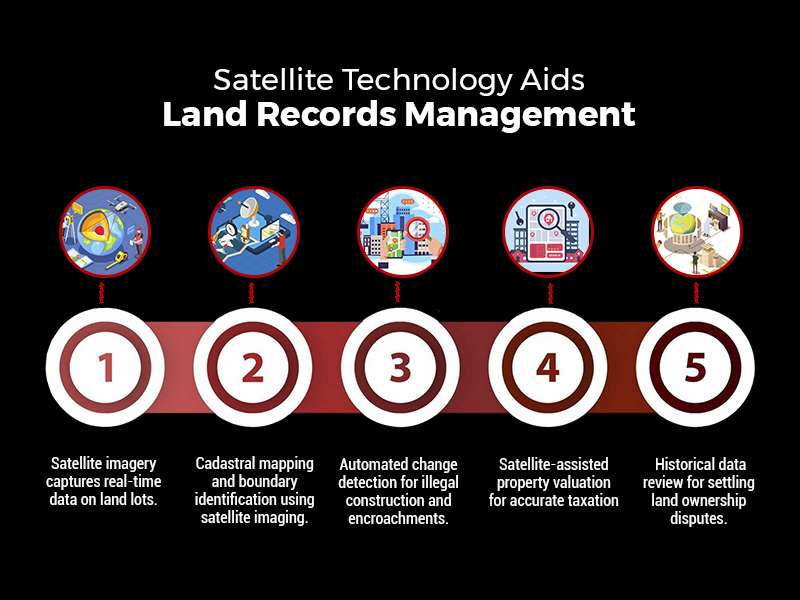
    how satellite technology aids land records management

    The principal benefits of employing satellites in land records management are:

    • Extensive Coverage: Satellites can simultaneously cover entire states or the whole nation, enabling mass-scale mapping.
    • Availability of Historical Data: Satellite images taken decades ago enable monitoring of land-use patterns over decades, facilitating settlement of disputes relating to ownership.
    • Accessibility from Remote Locations: No requirement for physical field visits; the authorities can evaluate land even from remote areas.

    1. Cadastral Mapping – Determining Accurate Property Boundaries

    Cadastral maps are the legal basis for property ownership. Traditionally, they were manually drafted, with the result that they contained errors, boundary overlap, and owner disputes. Employing satellite imaging, GIS companies in India can now:

    • Map land parcels digitally, depicting boundaries accurately.
    • Cross-check land titles by layering historical data over satellite-derived cadastral data.
    • Identify encroachments by matching old records against new high-resolution imagery.

    For example, a landowner asserting additional land outside their legal boundary can be easily located using satellite-based cadastral mapping, assisting local authorities in correcting such instances.

    2. Land Use and Land Cover Classification (LULC)

    Land use classification is essential for urban, conservation, and infrastructure planning. GIS companies in India examine satellite images to classify land, including:

    • Agricultural land
    • Forests and protected areas
    • Residential, commercial, and industrial areas
    • Water bodies and wetlands
    • Barren land

    Such a classification aids the government in regulating zoning laws, tracking illegal land conversions, and enforcing environmental rules.

    For instance, the illegal conversion of agricultural land into residential areas can be easily identified using satellite imagery, allowing regulatory agencies to act against unlawful real estate development simultaneously.

    3. Automated Change Detection – Tracking Illegal Construction & Encroachments

    One of the biggest challenges in land administration is the proliferation of illegal constructions and unauthorized encroachments. Satellite-based GIS systems offer automated change detection, wherein:

    • Regular satellite scans detect new structures that do not match approved plans.
    • Illegal mining, deforestation, or land encroachments are flagged in real-time.
    • Land conversion violations (e.g., illegally converting wetlands into commercial zones) are automatically reported to authorities.

    For example, a satellite monitoring system identified the unauthorized expansion of a residential colony into government land in Rajasthan, which prompted timely action and legal proceedings.

    4. Satellite-Based Property Taxation & Valuation

    Correct property valuation is critical for equitable taxation and the generation of revenues. Property valuation traditionally depended on physical surveys, but satellites have made it a streamlined process:

    • Location-based appraisal: Distance to highways, commercial centers, and infrastructure developments is included in the tax calculation.
    • Footprint building analysis: Machine learning-based satellite imaging calculates covered areas, avoiding tax evasion.
    • Market trend comparison: Satellite photos and property sale data enable the government to levy property taxes equitably.

    For example, the municipal government in Bangalore utilized satellite images to spot almost 30,000 properties that had not been appropriately reported in tax returns, and the property tax revenue went up.

    How Drone Technology is Applied to Land Surveys & Property Management

    While satellites give macro-level information, drones collect high-accuracy, real-time, and localized data. Drones are indispensable in regions where extreme precision is required, such as:

    • Urban land surveys with millimeter-level accuracy.
    • Land disputes demanding legally admissible cadastral records.
    • Surveying terrain in hilly, forested, or inaccessible areas.
    • Rural land mapping under government schemes such as SVAMITVA.

    1. Drone-Based Cadastral Mapping & Land Surveys

    Drones with LiDAR sensors, high-resolution cameras, and GPS technology undertake automated cadastral surveys, allowing:

    • Accurate land boundary mapping, dispelling disputes.
    • Faster surveying (weeks rather than months), cutting down administrative delays.
    • Low-cost operations compared to conventional surveying.

    For example, drones are being employed to map rural land digitally under the SVAMITVA Scheme, issuing official property titles to millions of landholders.

    2. 3D Modeling for Urban & Infrastructure Planning

    Drones produce precise 3D maps that offer:

    • Correct visualization of cityscapes for planning infrastructure projects.
    • Topography models that facilitate flood control and disaster management.
    • Better land valuation insights based on elevation, terrain, and proximity to amenities.

    For example, Mumbai’s urban planning department used drone-based 3D mapping to assess redevelopment projects, ensuring efficient use of land resources.

    3. AI-Powered Analysis of Drone Data

    Modern GIS software integrates Artificial Intelligence (AI) and Machine Learning (ML) to:

    • Detect unauthorized construction automatically.
    • Analyze terrain data for thoughtful city planning.
    • Classify land parcels for taxation and valuation purposes.

    For instance, a Hyderabad-based drone-based AI system identified illegal constructions and ensured compliance with urban planning regulations.

    Integration of GIS, Satellites & Drones into Land Information Systems

    Satellite and drone data are integrated into Intelligent Land Information Systems (ILIS) by GIS companies in India that encompass:

    A. System of Record (Digital Land Registry)

    • Geospatial database correlating land ownership, taxation, and legal titles.
    • Blockchain-based digital land records resistant to tampering.
    • Uninterrupted connectivity with legal and financial organizations.

    B. System of Insight (Automated Land Valuation & Analytics)

    • Artificial intelligence-based property valuation models based on geography, land topology, and urbanization.
    • Automated taxation ensures equitable revenue collection.

    C. System of Engagement (Public Access & Governance)

    • Internet-based GIS portals enable citizens to confirm property ownership electronically.
    • Live dashboards monitor land transactions, conflicts, and valuation patterns.

    Conclusion

    GIS, satellite imagery, and drones have transformed India’s land records and property management by making accurate mapping, real-time tracking, and valuation efficient. Satellites give high-level insights, while drones provide high-precision surveys, lowering conflicts and enhancing taxation.

    GIS companies in India like SCS Tech, with their high-end GIS strength, facilitate such data-based land administration, propelling India towards a transparent, efficient, and digitally integrated system of governance, guaranteeing equitable property rights, sustainable planning, and economic development.

  • How Robotic Process Automation Services Achieve Hyperautomation?

    How Robotic Process Automation Services Achieve Hyperautomation?

    Do you know that the global hyper-automation market is growing at a 12.5% CAGR? The change is fast and represents a transformational period wherein enterprises can no longer settle for automating single tasks. They need to optimize entire workflows for superior efficiency.

    But how does a company move from task automation to full-scale hyperautomation? It all starts with Robotic Process Automation services in india (RPA), the foundational technology that allows organizations to scale beyond the automation of simple tasks and into intelligent, end-to-end workflow optimization.

    Continue reading to see how robotic process automation services in india services powers hyperautomation for businesses, automating workflows to improve speed, accuracy, and digital transformation.

    What is Hyperautomation?

    Hyperautomation, more than just the automation of repetitive tasks, is reaching for an interconnected automation ecosystem that makes processes, data, and decisions flow smoothly. It’s the strategic approach for enterprises to quickly identify, vet, and automate as many business and IT processes as possible and to extend traditional automation to create an impact across the entire organization. RPA, at its core, represents this revolution, which can automate structured rule-based tasks at speed, consistency, and precision.

    However, pure hyper-automation extends beyond RPA and integrates with more technologies like AI, ML, process mining, and intelligent document processing that incorporate to get the entire workflow automated. These technologies enhance decision-making ability, eliminate inefficiencies, and optimize workflows across the enterprise.

    What is the Role of RPA in Hyperautomation?

    1. RPA as the “Hands” of Hyperautomation

    RPA shines with the automation of structured and rule-based work as the execution engine of hyper-automation. RPA bots can execute pre-defined workflows and interact with different systems to perform repetitive duties. For example, during invoice processing, RPA bots can extract data from PDFs and automatically update accounting software, which can be efficient and accurate.

    1. RPA as a Bridge for Legacy Systems

    Many organizations have problems integrating with old infrastructure. RPA solves the problem by simulating human interaction with legacy systems that do not have APIs. This way, automation can work with these systems by simulating user actions. For instance, a bank may use RPA bots to move data from a mainframe to a new reporting tool without needing expensive and complicated API integrations.

    1. RPA for Data Aggregation and Consolidation

    RPA helps automatically collect and aggregate business data. With the support of RPA, businesses can gain a better single view through a consolidated fragmented source of data. For instance, RPA-based sales data collected from different e-commerce channels can provide a performance overview.

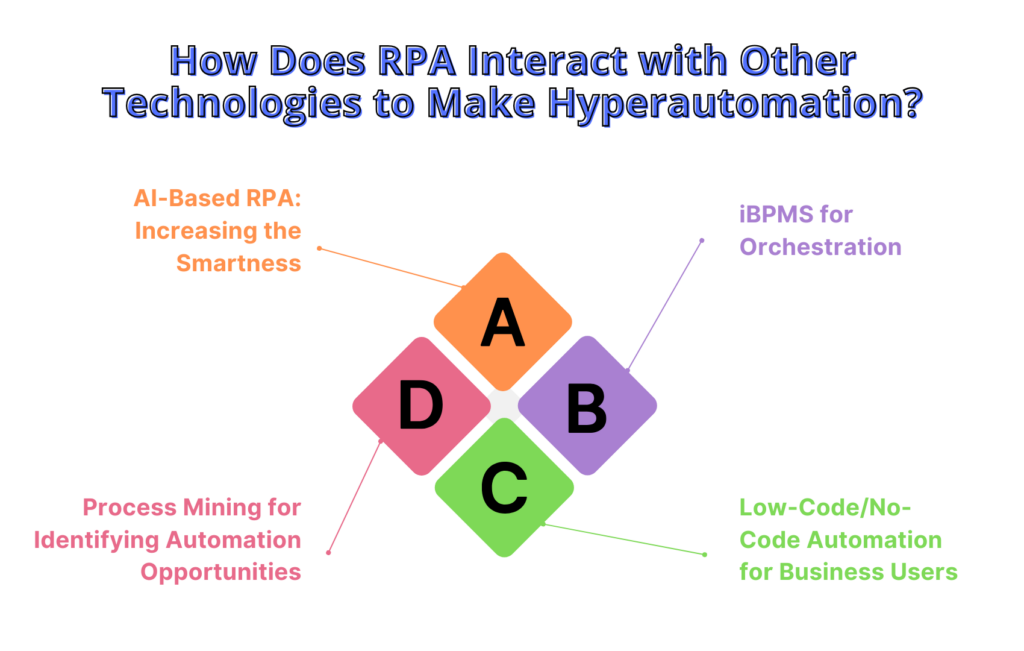
    How Does RPA Interact with Other Technologies to Make Hyperautomation?

    1. AI-Based RPA: Increasing the Smartness

    RPA becomes intelligent by associating with other AI-based technologies.

    • Natural Language Processing (NLP): This facilitates using unstructured emails and chat logs to enable the intelligent routing of communications
    • Machine Learning (ML): These bots increase their performance over time because of the data they draw from the previous records. Hence, it maximizes accuracy and efficiency.
    • Computer Vision: This is an advancement of RPA since it enables one to interface with applications that may or may not contain structured interfaces with no screen present.

    For instance, AI-based RPA can be used in intelligent claims processing in insurance, where it can automatically extract, validate, and route data.

    1. Process Mining for Identifying Automation Opportunities

    Process mining tools assess the workflow and then identify the points of inefficiency by pointing to where automating is likely. The bottleneck found can be automated using RPA, streamlining the processes involved. An example would be if a hospital optimized admission using process mining to automate entry and verification through RPA.

    1. iBPMS for Orchestration

    iBPMS provides governance and real-time automation monitoring; therefore, it executes processes efficiently and effectively. RPA automates some tasks within an extensive process framework managed by iBPMS. For example, order fulfillment in e-commerce involves using RPA to update inventory and ship orders.

    1. Low-Code/No-Code Automation for Business Users

    Low-code/no-code platforms enable nontechnical employees to develop RPA workflows, thus democratizing automation and speeding up hyper-automation adoption. For example, a marketing team can use a low-code tool to automate lead management, freeing time for more strategic activities while improving efficiency.

    RPA's Interaction with Other Technologies to Make Hyperautomation

    What is the Impact Of RPA on Hyperautomation in Terms of Business?

    1. Unleash Full Potential

    Hyperautomation unlocks the true potential of RPA, which is rich in AI, process mining, and intelligent decision-making. The RPA performs mundane tasks, while AI-driven tools optimize workflows and improve decision-making and accuracy.

    For example, RPA bots can process invoice data extraction. AI enhances document classification and validation to ensure everything is automated.

    1. Flexibility and Agility in Operations

    RPA enables businesses to integrate multiple automation tools under one umbrella while still being able to change immediately according to fluctuating market and business situations. This cannot be achieved through static automation, but it provides more scalable and flexible ways of automating workflows with real-time optimization using RPA-based hyperautomation.

    1. Increasing Workforce Productivity

    With the automation of mundane, time-consuming tasks, RPA allows others to apply more of their expertise in strategic thinking, innovation, and customer interaction, thereby improving workforce productivity and further driving the business.

    1. Seamless Interoperability Of Systems

    RPA makes the data exchange and execution of workflows between business units, digital workers or bots, and IT systems invisible. This gives organizations the benefit of faster decisions and effective operations.

    Hyperautomation using RPA provides for efficiency, reduced operational cost, and ROI. Therefore, business benefits range from real-time data processing to automatic compliance checks with easy scalability to stay sustainable and profitable over long periods.

    Conclusion

    Hyperautomation is more than just RPA services—it’s about integrating technologies like AI, process mining, and low-code platforms to drive real transformation.

    Hyperautomation is not just about adding technology to your processes — it’s about rethinking how work flows across your organization. By combining technology intelligently, businesses can automate smarter, work faster, and make decisions with greater accuracy.]

    This powerful digital strategy, driven by RPA services, can not only boost efficiency but also help your organization become more agile, resilient, and future-ready.

    As a leader in the automation solutions firm, SCS Tech supports initiating this digital strategy in organizations to help them move beyond tactical automation to a strategic enabler of that same transformation.

  • What Are the Key Challenges And Opportunities of Digital Transformation in Finance?

    What Are the Key Challenges And Opportunities of Digital Transformation in Finance?

    In an industry where precision and trust are paramount, finance is undergoing a seismic shift driven by digital transformation. The pressure to innovate and adapt is reshaping the very core of banking and financial services, forcing institutions to rethink how they operate, serve clients, and comply with ever-evolving regulations.

    It’s no longer just about adopting technology—it’s about harnessing it to create value, enhance customer experiences, and stay ahead in a fiercely competitive landscape. Yet, with transformation comes complexity.

    Cyber security threats, data management & integration, legal hindrances, and more stand in the way of progress. In this blog, we’ll explore these challenges and how financial institutions can leverage digital tools to overcome them, turning potential roadblocks into opportunities for long-term success.

    Key Challenges of Digital Transformation in Finance

    • Cybersecurity Threats: With the increase in digitization in the financial sector, the risk for increased data breaches like phishing attacks, ransomware attacks, and sensitive data targeting is the key challenge to look for, along with understanding the complexity of security measures.
    • Data Management and Integration: The key 3 issues in terms of data management and integration are scalability, complex integration, and data silos. The 3 subheads are explained below:
        • Data Silos: As the data is stored in different departments, it results in fragmented data storage, lack of unified view, and makes it difficult to share data. With data silos, the data governance gets complicated.
        • Scalability Issues: With growing data information, managing and scaling data infrastructure becomes complex, which also results in performance degradation.
        • Complex Integration: Data integration becomes complex due to diverse data sources, resulting in various technical challenges like data format discrepancies, inconsistent data quality, etc.
    • Legal System Integration: The integration faces various challenges, like compatibility challenges due to outdated technology, protocol and data format differences, etc. It also results in operational disruption as service delivery might get impacted, leading to dissatisfaction among customers. Upgrading or replacing legacy systems results in high costs, as the money is involved in training and development, and implementation of the system, which incurs costs like consulting fees, system customization, etc.
    • Managing Regulatory and Compliance Challenges: Evolving regulations can be challenging as they require extensive regulatory data requirements and demand a high level of accuracy. Efficient regulatory compliance requires investments in compliance management systems and data analytics tools with regular audits that can increase expenses.

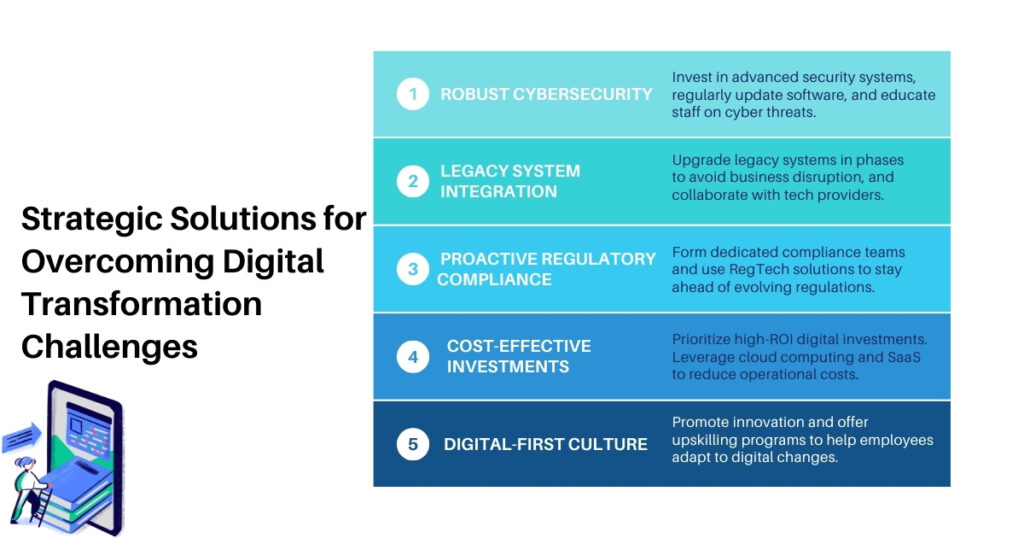
    Solutions to Overcome Digital Transformation Challenges in Finance

    Opportunities of Digital Transformation in Finance

    • Enhanced Risk Management: Digital transformation services like predictive analytics, real-time analytics solutions, fraud detection systems, Regtech solutions, compliance management platforms, etc., help in improving risk management related to finance aspects like fraud detection, refining credit score models, automating compliance tracking, and more.
    • Improved Operational Efficiency: In the finance field, digital transformation services help in operational efficiency through process automation, system integration, and cost reduction. Listed below explained are 3 key factors:
        • Process Automation: Digital transformation services like RPA tools for automated routine tasks like task automation, robotic process automation, and workflow automation help improve overall productivity through compliance checks, report generation, invoice processing, etc.
        • System Integration: Financial system integration with ERP helps in improved financial reporting, forecasting, etc. Other integrations, like APIs and data integration, help in real-time data exchange that improves decision-making.
        • Cost Reduction: Cloud computing and cost management tool integration help in cost management and efficient resource allocation.
    • Data-Driven Insights: Digital transformation services and technologies like big data analytics, behavioral analytics, data visualization, etc., help in offering tailored recommendations to customers and help in setting dynamic pricing. Do you know, as per the Infosys report, that approximately 76% of financial service executives say that customer experience is now the most integral part of digital transformation?

    For enhanced forecasting, various tools can be used for trend analysis and scenario analysis for mitigating risks.

    • Ability for Agility and Innovation by Leveraging Continuous Development in Financial Products and Services: Enterprises can focus on rapid development by implementing agile development practices like Jira or Trello for the gradual development of financial products. Along with agile practices, launching MVPs enables financial enterprises to test new ideas and features with real users rapidly. Other integrations, like modular banking platforms, microservices frameworks, and cloud computing, help give flexibility to operations.

    What is the Future of Digital Finance?

    Fintech plays a key role in transforming the future of digital finance with continuous implementation of technology to elevate the seamless outcome for both enterprises and customers. The fintech sector is projected to grow at a CAGR of 16.5% from 2024 to 2032. Listed below are some digital key integrations to look forward to in the field of finance:

    • Alternative Lending Platforms
    • Quantum Computing
    • Wealth Management Solutions
    • Collaboration with Traditional Banks
    • Open Banking and API Integration for Customer Control Over Data, Improved Competition, and Innovation
    • Sustainability and Green Finance
    • Rise of Decentralized Finance (DeFi)
    • Artificial Intelligence (AI) in Predictive Finance

    Conclusion

    The finance industry stands at a critical juncture where embracing digital transformation is no longer optional but imperative for future growth. Successfully tackling the complexities of cost management, cybersecurity, and regulatory compliance requires more than just technological adoption—it calls for a strategic, forward-thinking approach. By addressing these key challenges head-on, financial institutions can unlock new opportunities to enhance customer experiences, harness data for smarter decision-making, and drive sustainable innovation.

    At SCS Tech India, we recognize the need for integration of digital transformation services/technologies like IoT applications, AI-driven solutions, advanced cybersecurity services, etc., in navigating these complexities and challenges to drive innovation in enterprises. By partnering with SCS Tech India, organizations in the financial sector can build a resilient framework that improves agility and efficiency, helping them to capitalize on digital transformation opportunities and have a competitive edge in the dynamic financial landscape.

    FAQ

    • What is the key role of fintech in digital transformation?

    Fintech helps in digital transformation by offering real-time services, helping in cost efficiency, personalized financial advice, a focus on financial inclusion through micro-lending and digital wallets, collaboration with traditional institutions, etc., that helps in remaining competitive.

    • How do cloud-native architectures help in digital transformation in finance?

    Cloud-native architectures focus on scalability, agility, and innovation; disaster recovery and continuity; security; and compliance through inbuilt features like encryption, access controls, etc.

    • How does decentralized finance (DeFi) help in digital transformation in finance?

    Decentralized finance (DeFi) helps eliminate the need for traditional intermediaries. Transactions are recorded in the public blockchain, thereby ensuring transparency, giving access to financial services, and global accessibility.

    • What are a few challenges in AI-driven personalization in financial services?

    Challenges in AI-driven personalization in financial services include data privacy and security, biases of algorithms, customer trust, cost incurred in implementation, data integration complexity, evolving customer expectations, etc.

    (more…)

  • Overcoming Challenges: Implementing Robotic Process Automation Successfully

    Overcoming Challenges: Implementing Robotic Process Automation Successfully

    Implementing Robotic Process Automation (RPA) presents transformative opportunities for businesses aiming to streamline operations and enhance efficiency. When you think of a world in which every worker never gets tired and can do repetitive tasks with zero mistakes. RPA is no different, as it carries a similar tagline and guarantees businesses solutions that will make them run smoother and cost less. Sadly, the road towards RPA realization is not always lined with rainbows and butterflies. However, achieving successful RPA integration requires navigating a range of challenges, from selecting appropriate processes for automation to managing change within the organization. 

    Therefore, overcoming these technical difficulties such as process mapping, API integration, and error handling would create the foundation for RPA, thereby ensuring the achievement of excellence in automation.

    This blog delves into the strategies and best practices essential for overcoming these hurdles, providing a roadmap for harnessing the full potential of RPA to drive operational excellence and innovation.

    Challenges of Robotic Process Automation Implementation

    Even though RPA has great potential, a few challenges may hamper the successful implementation of RPA.

    Process Inefficiency

    It is crucial not to automate an inefficient process, as it makes pre-existing issues worse. A process in its optimal state should first be designed and structured to allow the technology in robotic process automation to work as efficiently as possible.

    Inadequate Skills and Resources

    Lacking a team of competent workers who have specialized in process analysis, RPA technology, and change management will be a letdown when it comes to implementing RPA. Lack of such skills may be a definitive threat to the success of the project.

    Integration Issues

    RPA bot integration with IT is possible, and companies may face some challenges while integrating bots with other systems of the enterprise. There are compatibility and data security issues that may hamper its proper functioning to be addressed.

    Resistance to Change

    Workers may fear that as automation advances, the job market will shrink and cut out positions for people to fill. Through discussions concerning training, communication, and emphasis programs that seek to reskill staff, incidences of resistance and non-adoption can be reduced.

    Data Security and Governance

    The important thing to note is that even in most RPA processes, the use of personal data is inevitable. To reduce security risks, it is essential to use prepared security measures, such as user rights, data security, and controls, as well as security updates and scans.

    Overcoming the Obstacles: A Roadmap to Successful RPA Implementation

    By proactively addressing these challenges, you can pave the way for a successful RPA implementation:

    Define a Clear Strategy

    Begin by developing an effective and strategic RPA framework. Suggest measurable and achievable objectives, determine the areas that could be best suited to automation, and carefully analyze the ROI.

    Focus on Process Optimization

    When using RPA as part of the robotic process automation strategy, it is crucial to assess the process to be automated and enhance it to achieve the best results with minimal glitches.

    Build a Strong Team

    Constitute a team with the ability to complete the project as planned. If the company does not have a strong internal team, then it might be a wise decision to hire RPA specialists or outsource the task to a provider that has the necessary experience.

    Prioritize Integration

    Assess existing functionalities and ensure the selected RPA tools are compatible with the IT infrastructure. Create a sound integration plan and work on integration issues especially those of data security.

    Embrace Change Management

    User adoption is crucial to every RPA implementation plan and strategy. One should ensure that change management practices such as communication, training, and tackling employee issues are exercised and should talk about how RPA will enable higher-value work.

    Start Small and Scale Up

    First, try to establish a well-understood, low-risk process to illustrate the potential of RPA and gain trust. Once you hit the initial levels of success, it is possible to invest in better systems to handle more advanced tasks.

    Moreover, A McKinsey report published in 2023 shows that 80% of executives interviewed argued that automation would likely disrupt their organizations and industries by 2030. This raises a bar showing the gradual realization that RPA is indeed a plausible way of enhancing productivity, minimizing errors, and enhancing staff happiness.

    The Benefits of Successful Robotic Process Automation Implementation

    By overcoming these challenges, you can discover the true potential of RPA and experience a range of benefits:

    Increased Efficiency

    Robotic process automation can work on monotonous tasks to reduce the burden on employees and utilize their time on more significant responsibilities. This means there is increased efficiency and hence better results are achieved.

    Reduced Errors

    RPA bots offer a means of reducing manual errors to enhance data credibility and procedures’ quality.

    Enhanced Employee Satisfaction

    Hounding routine tasks means employees can engage in more complex and interesting work to enhance their work satisfaction.

    Cost Savings

    Less time is required for processing, fewer mistakes occur, and the functioning of organizational processes becomes more smooth; all of these factors lead to decreased organizational costs.

    Improved Customer Satisfaction

    More efficiency and fewer mistakes mean shorter times while fulfilling orders and better interactions with customers.

    To learn about how these RPA Services are implemented, visit this link.

    Investing in Your Future – Embracing RPA for Success

    Robotic Process Automation is not an ultimate solution, but when effectively managed, it is a powerful tool for change. Likewise, when considering the challenges, following the guidelines of the recommended actions, and shifting towards the adoption of a user-centered strategy, one may integrate RPA into an organization and experience the benefits of a more efficient, productive, and prospective business.

    Get in touch with us to know more about how you can implement intelligent automation by utilizing the expertise of RPA tools and automation services


  • Process Automation – a business lifesaver

    Process Automation – a business lifesaver

    In today’s highly competitive and rapidly evolving business environment, leaders face numerous hurdles. With customers and market demands constantly shifting, companies must remain ahead of the curve to gain a competitive edge. One crucial way to achieve this is through Process Automation, which can streamline operations, boost profitability, and enhance resilience and agility in the face of ever-evolving challenges.

    Understanding the significance of Process Automation
    Discovering the different forms of Process Automation and its benefits

    Process automation is a valuable tool for businesses to reduce costs, minimize risk, and enhance operations. By relying on automation, companies can prevent human errors that could result in significant losses and also streamline processes to improve service delivery. Process automation promises faster task completion, more efficiency, and minimal errors, enabling businesses to stay competitive.

    Understanding the significance of Process Automation

    Process automation refers to the use of technology to perform tasks without the need for human intervention. In today’s fast-paced business environment, it is a crucial element that can lead to increased efficiency, reduced errors, lower costs, and improved productivity.

    By automating routine and repetitive tasks, companies can enable their employees to concentrate on more strategic and value-adding activities such as innovation and problem-solving. This approach can improve the efficient and effective use of resources, ultimately resulting in increased competitiveness and profitability. Moreover, process automation can enhance data processing accuracy, minimize manual errors, and provide a consistent, standardized approach to tasks, resulting in improved quality control.

    Discovering the different forms of Process Automation and its Benefits

    Process automation is transforming businesses by streamlining workflows, reducing costs, and enhancing efficiency. However, with several automation types available, choosing the right one can be daunting. Here are five essential process automation types to consider.

    1. Marketing Automation

    Marketing automation is an essential tool for businesses that frees up time and resources. It streamlines marketing efforts and delivers desired results, creating a better customer experience. Automated email campaigns target specific audiences and deliver tailored messages, with real-time adjustments to improve the marketing strategy. Marketing automation increases customer satisfaction and drives higher conversions, making it the future of marketing.

    2. IT Asset Management Automation

    IT asset management automation saves time, ensures accuracy, and reduces costs by automating tracking and management of IT assets. Automated solutions optimize the IT supply chain, streamline processes, and keep the IT team up-to-date on the latest hardware updates. Refine and optimize IT processes and keep tech running smoothly with the power of automation.

    3. Accounting Automation

    Accounting automation can streamline financial processes, saving time, and boosting accuracy. It simplifies tasks like creating purchase orders and managing contracts, providing clear and accurate records. Automation frees up the finance team’s time, allowing them to work smarter and provides a higher ROI for businesses.

    4. HR Automation

    HR automation can streamline traditional HR processes such as sifting through resumes, managing payroll and benefits, and handling contracts, tax data, and training programs. This can help ensure accuracy, mitigate the risk of errors, comply with employment laws, and allow HR teams to focus on other important responsibilities. Finding the right candidate and the entire offer process can be automated, saving time and effort.

    5. Customer Support Automation

    Customer support automation offers a solution to streamline customer service and create a seamless and efficient customer experience. Automated processes can help businesses attend to customer needs quickly and effectively, reducing mistakes and miscommunications while boosting efficiency levels. Embracing customer support automation can differentiate a business from the competition and create loyal customers.


  • Ultimate guide to RPA and the industry response

    Ultimate guide to RPA and the industry response

    Robotic process automation, or RPA, is a crucial component of the digital transformation for corporations and business organisations regardless of their location or function. To comprehend why automation is so beneficial, let’s delve into this brand-new universe.

    • RPA Services: What Are They?
    • How do RPA Services function?
    • RPA – the best solutions for enterprises
    • RPA process benefits

    How do RPA Services work?

    Robotic process automation, or RPA, is a technology that enables businesses to automate some repetitive processes.

    RPA software uses a mix of cognitive processes, automation, and modern technologies (such machine learning and automation). It can be used to carry out straightforward operations like sending an email automatically as well as sophisticated ones that thousands of bots can carry out simultaneously.

    Robotic process automation as a service, or RPAaaS, is a cloud-based, outsourced service that involves the deployment of software robots to handle such repetitive operations without any input from the clients.

    According to recent data on the status of RPA implementation, 78% of those who have previously done so anticipate much more investment in RPA over the following three years. There is obviously a lot to do, and there is a big demand. Let’s examine why.

    How are RPA Services implemented?

    RPA services significantly influence how businesses change and grow. Software robots can navigate systems, identify data, and carry out a wide range of tasks that resemble those carried out by humans. They can complete jobs more quickly and reliably than humans since they are robots, which also don’t make mistakes, get weary, or need breaks. They don’t get side tracked by social media, and they don’t require extra encouragement to get things done.

    RPA technology boosts efficiency, productivity, and accuracy in many corporate operations thanks to these benefits. This is why it became so important for organisations that want to grow, expand, or improve their effectiveness.

    Benefits of RPA processes for businesses

    It is far preferable to adapt RPA and use it in daily work than to hire new workers to perform simple tasks or to assign highly competent employees to repetitive activities and so waste their expertise. Employees who are relieved of monotonous and simple tasks can concentrate on bringing innovation to the company and coming up with fresh ideas to increase its success.

    The main benefits of RPA processes for enterprises include:

    • increase in effectiveness
    • efficiency
    • productivity
    • client satisfaction
    • cost savings
    • revenue growth
    • work quality and quantity improvement
    • improved compliance
    • faster pace of digitalization are all desirable outcomes

    The best solutions for large enterprises involves RPA

    53% of various firms use RPA services internationally, according to research. Depending on their demands, size, and industry, it is predicted that almost all businesses will use some form of automation within the next five years.

    Interested in learning more RPA?

    Consider putting it into practise in your business to advance it. Get in contact with our experts; we’d be pleased to assist you!