Tag: #cloudcomputing #cloud #IT

  • Choosing Between MDR vs. EDR: What Fits Your Security Maturity Level?

    Choosing Between MDR vs. EDR: What Fits Your Security Maturity Level?

    If you’re weighing MDR versus EDR, you probably know what each provides, but deciding between the two isn’t always easy. The actual challenge is determining which one suits your security maturity, internal capabilities, and response readiness. 

    Some organizations already have analysts, 24×7 coverage, and SIEM tools, so EDR could play well there. Others are spread thin, suffering from alert fatigue or gaps in threat response; that’s where MDR is more appropriate.

    This guide takes you through that decision step by step, so you can match the correct solution with how your team actually functions today.

    Core Differences Between MDR and EDR

    Both MDR and EDR enhance your cybersecurity stance, but they address different requirements based on the maturity and resources of your organization. They represent two levels of cybersecurity services, offering either internal control or outsourced expertise, depending on your organization’s readiness.

    EDR offers endpoints for continuous monitoring, alerting on suspicious behavior. It gives your team access to rich forensic data, but your security staff must triage alerts and take action.

    MDR includes all EDR functions and adds a managed service layer. A dedicated security team handles alert monitoring, threat hunting, and incident response around the clock.

    Here’s a clear comparison:

    Feature  EDR  MDR 
    Core Offering Endpoint monitoring & telemetry EDR platform + SOC-led threat detection & response
    Internal Skill Needed High analysts, triage, and response Low–Moderate oversight, not 24×7 operational burden
    Coverage Endpoint devices Endpoints and often network/cloud visibility
    Alert Handling Internal triage and escalation Provider triages and escalates confirmed threats
    Response Execution Manual or semi-automated Guided or remote hands-on response by experts
    Cost Approach Licensing + staffing Subscription service with bundled expertise


    Security Maturity and Internal Capabilities

    Before choosing EDR or MDR, assess your organization’s security maturity, your team’s resources, expertise, and operational readiness.
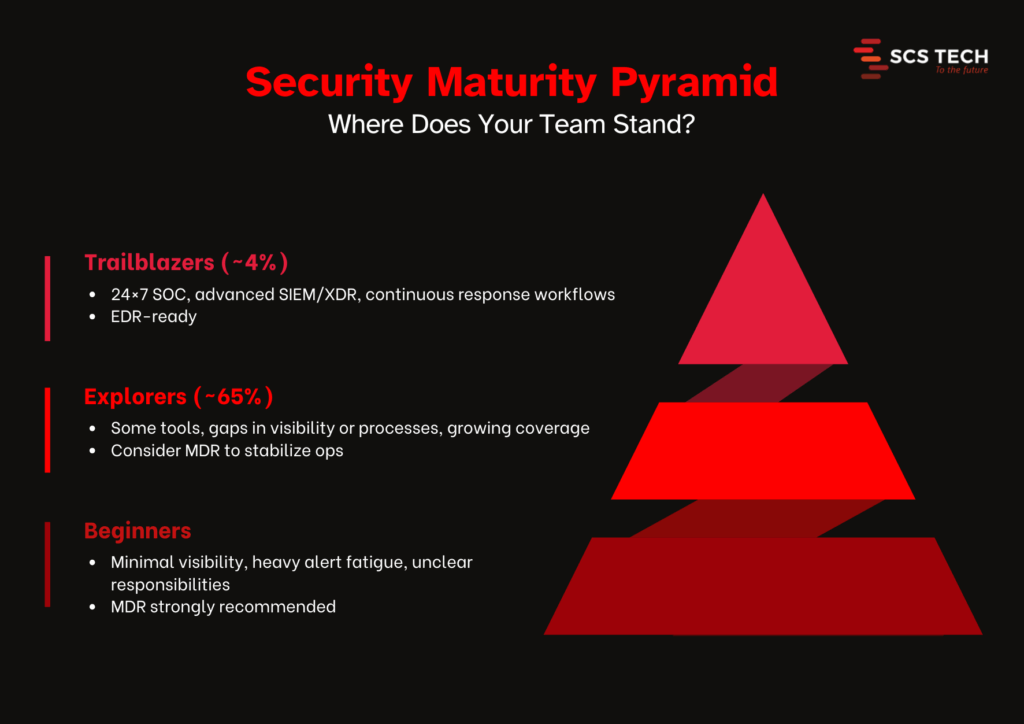
    Security Maturity Pyramid

    How Mature Is Your Security Program?

    A recent Kroll study reveals that 91% of companies overestimate their detection-and-response maturity, but only 4% are genuinely “Trailblazers” in capability. Most fall into the “Explorer” category, awareness exists, but full implementation lags behind.  

    That’s where cybersecurity consulting adds value, bridging the gap between awareness and execution through tailored assessments and roadmaps.

    Organizations with high maturity (“Trailblazers”) experience 30% fewer major security incidents, compared to lower-tier peers, highlighting the pay-off of well-executed cyber defenses

    When EDR Is a Better Fit

    EDR suits organizations that already have a capable internal security team and tools and can manage alerts and responses themselves:

    According to Trellix, 84% of critical infrastructure organizations have adopted EDR or XDR, but only 35% have fully deployed capabilities, leaving room for internal teams to enhance operations

    EDR is appropriate when you have a scalable IT security service in place that supports endpoint monitoring and incident resolution internally. 

    • 24×7 analyst coverage or strong on-call SOC support
    • SIEM/XDR systems and internal threat handling processes
    • The capacity to investigate and respond to alerts continuously

    An experienced SOC analyst put it this way:

    “It kills me when… low‑risk computers don’t have EDR … those blindspots let ransomware spread.”

    EDR delivers strong endpoint visibility, but its value depends on skilled staff to translate alerts into action.

    When MDR Is a Better Fit

    MDR is recommended when internal security capabilities are limited or stretched:

    • Integrity360 reports a global cybersecurity skills shortage of 3.1 million, with 60% of organizations struggling to hire or retain talent.
    • A WatchGuard survey found that only 27% of organizations have the resources, processes, and technology to handle 24×7 security operations on their own.
    • MDR adoption is rising fast: Gartner forecasts that 50% of enterprises will be using MDR by 2025.

    As demand for managed cybersecurity services increases, MDR is becoming essential for teams looking to scale quickly without increasing internal overhead.

    MDR makes sense if:

    • You lack overnight coverage or experienced analysts
    • You face frequent alert fatigue or overwhelming logs
    • You want SOC-grade threat hunting and guided incident response
    • You need expert support to accelerate maturity

    Choose EDR if you have capable in-house staff, SIEM/XDR tools, and the ability to manage alerts end-to-end. Choose MDR if your internal team lacks 24×7 support and specialist skills, or if you want expert-driven threat handling to boost maturity.

    MDR vs. EDR by Organization Type

    Not every business faces the same security challenges or has the same capacity to deal with them. What works for a fast-growing startup may not suit a regulated financial firm. That’s why choosing between EDR and MDR isn’t just about product features; it depends on your size, structure, and the way you run security today.

    Here’s how different types of organizations typically align with these two approaches.

    1. Small Businesses & Startups

    • EDR fit? Often challenging. Many small teams lack 24×7 security staff and deep threat analysis capabilities. Managing alerts can overwhelm internal resources.
    • MDR fit? Far better match. According to Integrity360, 60% of organizations struggle to retain cybersecurity talent, something small businesses feel intensely. MDR offers affordable access to SOC-grade expertise without overwhelming internal teams.

    2. Mid-Sized Organizations

    • EDR fit? Viable for those with a small IT/Security team (1–3 analysts). Many mid-size firms use SIEM and EDR to build internal detection capabilities. More maturity here means lower reliance on external services.
    • MDR fit? Still valuable. Gartner projects that 50% of enterprises will use MDR by 2025, indicating that even mature mid-size companies rely on it to strengthen SOC coverage and reduce alert fatigue.

    Many also use cybersecurity consulting services during transition phases to audit gaps before fully investing in internal tools or MDR contracts.

    3. Large Enterprises & Regulated Industries

    • EDR fit? Solid choice. Enterprises with in-house SOC, SIEM, and XDR solutions benefit from direct control over endpoints. They can respond to threats internally and integrate EDR into broader defense strategies.
    • MDR fit? Often used as a complementary service. External threat hunting and 24×7 monitoring help bridge coverage gaps without replacing internal teams.

    4. High-Risk Sectors (Healthcare, Finance, Manufacturing)

    • EDR fit? Offered compliance and detection coverage, but institutions report resource and skill constraints, and 84% of critical infrastructure organizations report partial or incomplete adoption.
    • MDR fit? Ideal for the following reasons:
      • Compliance: MDR providers usually provide support for standards such as HIPAA, PCI-DSS, and SOX.
      • Threat intelligence: Service providers consolidate knowledge from various sectors.
      • 24×7 coverage: Constant monitoring is very important for industries with high-value or sensitive information.

    In these sectors, having a layered IT security service becomes non-negotiable to meet compliance, visibility, and response needs effectively.

    Final Take: MDR vs. EDR

    Choosing between EDR and MDR should be made based on how ready your organization is to detect and respond to threats using internal resources.

    • EDR works if you have an expert security team that can address alerts and investigations in-house.
    • MDR is more appropriate if your team requires assistance with monitoring, analysis, and response to incidents.

    SCS Tech provides both advanced IT security service offerings and strategic guidance to align your cybersecurity technology with real-time operational capability. If you have the skills and coverage within your team, we offer sophisticated EDR technology that can be integrated into your current processes. If you require extra assistance, our MDR solution unites software and managed response to minimize risk without creating operational overhead.

    Whether your team needs endpoint tools or full-service cybersecurity services, the decision should align with your real-time capabilities, not assumptions. If you’re not sure where to go, SCS Tech is there to evaluate your existing configuration and suggest a solution suitable for your security maturity and resource levels. 
  • The Future of Disaster Recovery: Leveraging Cloud Solutions for Business Continuity

    The Future of Disaster Recovery: Leveraging Cloud Solutions for Business Continuity

    Because “It Won’t Happen to Us” Is No Longer a Strategy

    Let’s face it—most businesses don’t think about disaster recovery until it’s already too late.

    A single ransomware attack, server crash, or regional outage can halt operations in seconds. And when that happens, the clock starts ticking on your company’s survival.

    According to FEMA, over 90% of businesses without a disaster recovery plan shut down within a year of a major disruption.

    That’s not just a stat—it’s a risk you can’t afford to ignore.

    Today’s threats are faster, more complex, and less predictable than ever. From ransomware attacks to cyclones, unpredictability is the new normal—despite advancements in methods to predict natural disasters, business continuity still hinges on how quickly systems recover.

    This article breaks down:

    • What’s broken in traditional DR
    • Why cloud solutions offer a smarter path forward
    • How to future-proof your business with a partner like SCS Tech India

    If you’re responsible for keeping your systems resilient, this is what you need to know—before the next disaster strikes.

    Why Traditional Disaster Recovery Fails Modern Businesses

    Even the best disaster prediction models can’t prevent outages. Whether it’s an unanticipated flood, power grid failure, or cyberattack, traditional DR struggles to recover systems in time.

    Disaster recovery used to mean racks of hardware, magnetic tapes, and periodic backup drills that were more hopeful than reliable. But that model was built for a slower world.

    Today, business moves faster than ever—and so do disasters.

    Here’s why traditional DR simply doesn’t keep up:

    • High CapEx, Low ROI: Hardware, licenses, and maintenance costs pile up, even when systems are idle 99% of the time.
    • Painfully Long Recovery Windows: When recovery takes hours or days, every minute of downtime costs real money. According to IDC, Indian enterprises lose up to ₹3.5 lakh per hour of IT downtime.
    • Single Point of Failure: On-prem infrastructure is vulnerable to floods, fire, and power loss. If your backup’s in the building—it’s going down with it.

    The Cloud DR Advantage: Real-Time, Real Resilience

    Cloud-based Disaster Recovery (Cloud DR) flips the traditional playbook. It decentralises your risk, shortens your downtime, and builds a smarter failover system that doesn’t collapse under pressure.

    Let’s dig into the core advantages, not just as bullet points—but as strategic pillars for modern businesses.

    1. No CapEx Drain — Shift to a Fully Utilized OPEX Model

    Capital-intensive. You pre-purchase backup servers, storage arrays, and co-location agreements that remain idle 95% of the time. Average CapEx for a traditional DR site in India? ₹15–25 lakhs upfront for a mid-sized enterprise (IDC, 2023).

    Everything is usage-based. Compute, storage, replication, failover—you pay for what you use. Platforms like AWS Elastic Disaster Recovery (AWS DRS) or Azure Site Recovery (ASR) offer DR as a service, fully managed, without owning any physical infrastructure.

    According to TechTarget (2022), organisations switching to cloud DR reported up to 64% cost reduction in year-one DR operations.

    2. Recovery Time (RTO) and Data Loss (RPO): Quantifiable, Testable, Guaranteed

    Forget ambiguous promises.

    With traditional DR:

    • Average RTO: 4–8 hours (often manual)
    • RPO: Last backup—can be 12 to 24 hours behind
    • Test frequency: Once a year (if ever), with high risk of false confidence

    With Cloud DR:

    • RTO: As low as <15 minutes, depending on setup (continuous replication vs. scheduled snapshots)
    • RPO: Often <5 minutes with real-time sync engines
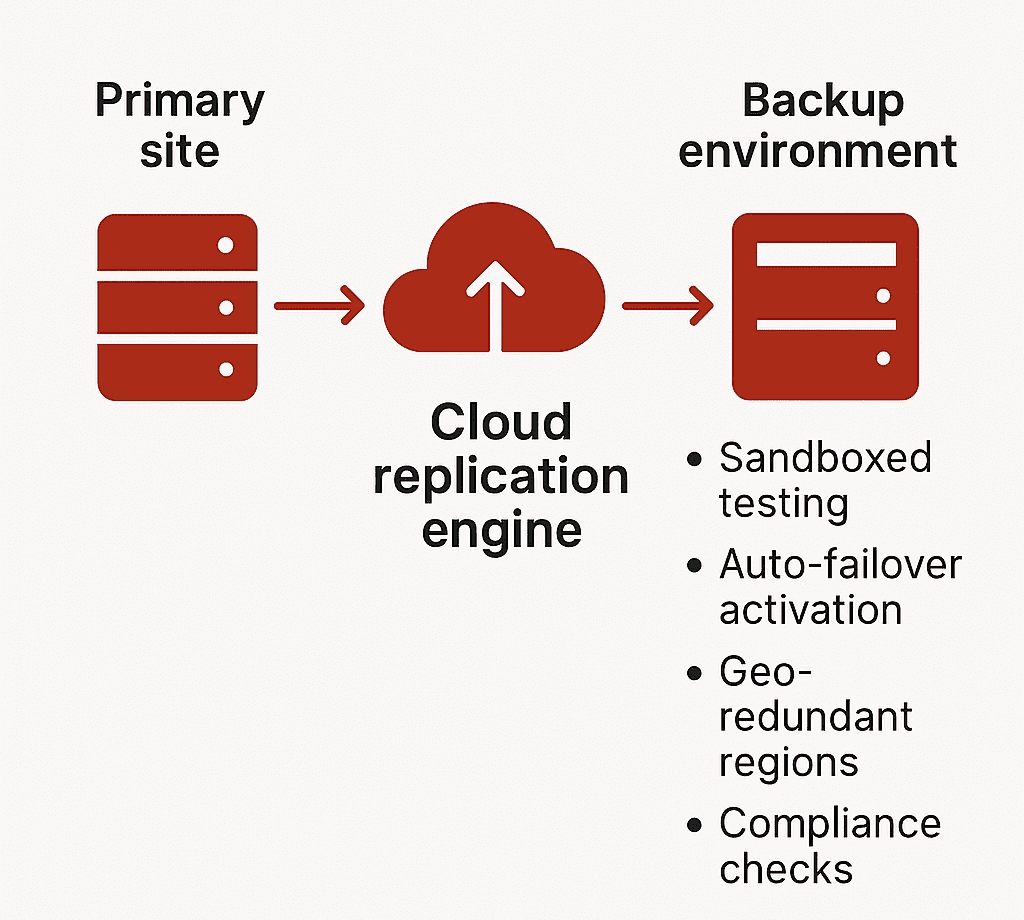
    • Testing: Sandboxed testing environments allow monthly (or even weekly) drills without production downtime

    Zerto, a leading DRaaS provider, offers continuous journal-based replication with sub-10-second RPOs for virtualised workloads. Their DR drills do not affect live environments.

    Many regulated sectors (like BFSI in India) now require documented evidence of tested RTO/RPO per RBI/IRDAI guidelines.

    3. Geo-Redundancy and Compliance: Not Optional, Built-In

    Cloud DR replicates your workloads across availability zones or even continents—something traditional DR setups struggle with.

    Example Setup with AWS:

    • Production in Mumbai (ap-south-1)
    • DR in Singapore (ap-southeast-1)
    • Failover latency: 40–60 ms round-trip (acceptable for most critical workloads)

    Data Residency Considerations: India’s Personal Data Protection Bill (DPDP 2023) and sector-specific mandates (e.g., RBI Circular on IT Framework for NBFCs) require in-country failover for sensitive workloads. Cloud DR allows selective geo-redundancy—regulatory workloads stay in India, others failover globally.

    4. Built for Coexistence, Not Replacement

    You don’t need to migrate 100% to cloud. Cloud DR can plug into your current stack.

    Supported Workloads:

    • VMware, Hyper-V virtual machines
    • Physical servers (Windows/Linux)
    • Microsoft SQL, Oracle, SAP HANA
    • File servers and unstructured storage

    Tools like:

    • Azure Site Recovery: Supports agent-based and agentless options
    • AWS CloudEndure: Full image-based replication across OS types
    • Veeam Backup & Replication: Hybrid environments, integrates with on-prem NAS and S3-compatible storage

    Testing Environments: Cloud DR allows isolated recovery environments for DR testing—without interrupting live operations. This means CIOs can validate RPOs monthly, report it to auditors, and fix configuration drift proactively.

    What Is Cloud-Based Disaster Recovery (Cloud DR)?

    Cloud-based Disaster Recovery is a real-time, policy-driven replication and recovery framework—not a passive backup solution.

    Where traditional backup captures static snapshots of your data, Cloud DR replicates full workloads—including compute, storage, and network configurations—into a cloud-hosted recovery environment that can be activated instantly in the event of disruption.

    This is not just about storing data offsite. It’s about ensuring uninterrupted access to mission-critical systems through orchestrated failover, tested RTO/RPO thresholds, and continuous monitoring.

    Cloud DR enables:

    • Rapid restoration of systems without manual intervention
    • Continuity of business operations during infrastructure-level failures
    • Seamless experience for end users, with no visible downtime

    It delivers recovery with precision, speed, and verifiability—core requirements for compliance-heavy and customer-facing sectors.

    Architecture of a typical Cloud DR solution


    Types of Cloud DR Solutions

    Every cloud-based recovery solution is not created equal. Distinguishing between Backup-as-a-Service (BaaS) and Disaster Recovery-as-a-Service (DRaaS) is critical when evaluating protection for production workloads.

    1. Backup-as-a-Service (BaaS)

    • Offsite storage of files, databases, and VM snapshots
    • Lacks pre-configured compute or networking components
    • Recovery is manual and time-intensive
    • Suitable for non-time-sensitive, archival workloads

    Use cases: Email logs, compliance archives, shared file systems. BaaS is part of a data retention strategy, not a business continuity plan.

    2. Disaster Recovery-as-a-Service (DRaaS)

    • Full replication of production environments including OS, apps, data, and network settings
    • Automated failover and failback with predefined runbooks
    • SLA-backed RTOs and RPOs
    • Integrated monitoring, compliance tracking, and security features

    Use cases: Core applications, ERP, real-time databases, high-availability systems

    Providers like AWS Elastic Disaster Recovery, Azure Site Recovery, and Zerto deliver end-to-end DR capabilities that support both planned migrations and emergency failovers. These platforms aren’t limited to restoring data—they maintain operational continuity at an infrastructure scale.

    Steps to Transition to a Cloud-Based DR Strategy

    Transitioning to cloud DR is not a plug-and-play activity. It requires an integrated strategy, tailored architecture, and disciplined testing cadence. Below is a framework that aligns both IT and business priorities.

    1. Assess Current Infrastructure and Risk

      • Catalog workloads, VM specifications, data volumes, and interdependencies
      • Identify critical systems with zero-tolerance for downtime
      • Evaluate vulnerability points across hardware, power, and connectivity layers. Incorporate insights from early-warning tools or methods to predict natural disasters—such as flood zones, seismic zones, or storm-prone regions—into your risk model.
    • Conduct a Business Impact Analysis (BIA) to quantify recovery cost thresholds

    Without clear downtime impact data, recovery targets will be arbitrary—and likely insufficient.

    2. Define Business-Critical Applications

    • Segment workloads into tiers based on RTO/RPO sensitivity
    • Prioritize applications that generate direct revenue or enable operational throughput
    • Establish technical recovery objectives per workload category

    Focus DR investments on the 10–15% of systems where downtime equates to measurable business loss.

    3. Evaluate Cloud DR Providers

    Assess the technical depth and compliance coverage of each platform. Look beyond cost.

    Evaluation Checklist:

    • Does the platform support your hypervisor, OS, and database stack?
    • Are Indian data residency and sector-specific regulations addressed?
    • Can the provider deliver testable RTO/RPO metrics under simulated load?
    • Is sandboxed DR testing supported for non-intrusive validation?

    Providers should offer reference architectures, not generic templates.

    4. Create a Custom DR Plan

    • Define failover topology: cold, warm, or hot standby
    • Map DNS redirection, network access rules, and IP range failover strategy
    • Automate orchestration using Infrastructure-as-Code (IaC) for replicability
    • Document roles, SOPs, and escalation paths for DR execution

    A DR plan must be auditable, testable, and aligned with ongoing infrastructure updates.

    5. Run DR Drills and Simulations

    • Simulate both full and partial outage scenarios
    • Validate technical execution and team readiness under realistic conditions
    • Monitor deviation from expected RTOs and RPOs
    • Document outcomes and remediate configuration or process gaps

    Testing is not optional—it’s the only reliable way to validate DR readiness.

    6. Monitor, Test, and Update Continuously

    • Integrate DR health checks into your observability stack
    • Track replication lag, failover readiness, and configuration drift
    • Schedule periodic tests (monthly for critical systems, quarterly full-scale)
    • Adjust DR policies as infrastructure, compliance, or business needs evolve

    DR is not a static function. It must evolve with your technology landscape and risk profile.

    Don’t Wait for Disruption to Expose the Gaps

    The cost of downtime isn’t theoretical—it’s measurable, and immediate. While others recover in minutes, delayed action could cost you customers, compliance, and credibility.

    Take the next step:

    • Evaluate your current disaster recovery architecture
    • Identify failure points across compute, storage, and network layers
    • Define RTO/RPO metrics aligned with your most critical systems
    • Leverage AI-powered observability for predictive failure detection—not just for IT, but to integrate methods to predict natural disasters into your broader risk mitigation strategy.

    Connect with SCS Tech India to architect a cloud-based disaster recovery solution that meets your compliance needs, scales with your infrastructure, and delivers rapid, reliable failover when it matters most.

  • What IT Infrastructure Solutions Do Businesses Need to Support Edge Computing Expansion?

    What IT Infrastructure Solutions Do Businesses Need to Support Edge Computing Expansion?

    Did you know that by 2025, global data volumes are expected to reach an astonishing 175 zettabytes? This will create huge challenges for businesses trying to manage the growing amount of data. So how do businesses manage such vast amounts of data instantly without relying entirely on cloud servers?

    What happens when your data grows faster than your IT infrastructure can handle? As businesses generate more data than ever before, the pressure to process, analyze, and act on that data in real time continues to rise. Traditional cloud setups can’t always keep pace, especially when speed, low latency, and instant insights are critical to business success.

    That’s where edge computing addresses such limitations. By bringing computation closer to where data is generated, it eliminates delays, reduces bandwidth use, and enhances security.

    Therefore, with local processing, and reducing reliance on cloud infrastructure, organizations are allowed to make faster decisions, improve efficiency, and stay competitive in an increasingly data-driven world.

    Read further to understand why edge computing matters and how IT infrastructure solutions help support the same.

    Why do Business Organizations need Edge Computing?

    Regarding business benefits, edge computing is a strategic benefit, not merely a technical upgrade. While edge computing allows organizations to attain better operational efficiencies through reduced latency and improve real-time decision-making to deliver continuous, seamless experiences for customers, mission-critical applications involve processing data on time to enhance reliability and safety – financial services, smart cities.

    As the Internet of Things expands its reach, scaling and decentralized infrastructure solutions become necessary for competing in an aggressively data-driven and rapidly evolving new world. Edge computing has many savings, enabling any company to stretch resources to great lengths and scale costs across operations and edge computing services into a new reality.

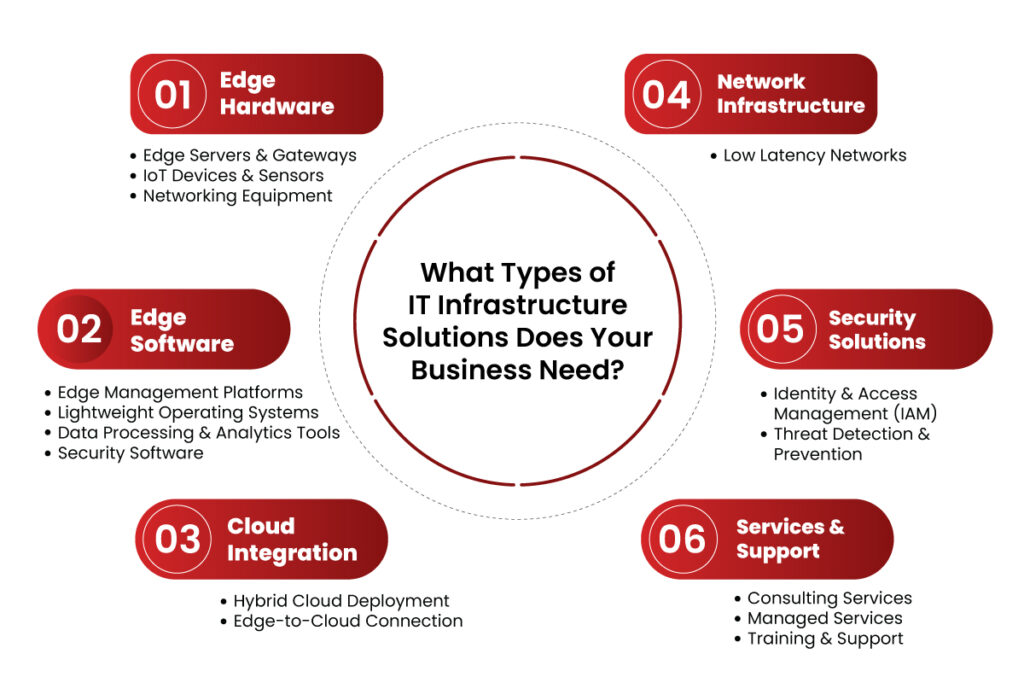
    What Types of IT Infrastructure Solutions Does Your Business Need?

    1. Edge Hardware

    Hardware is the core of any IT infrastructure solutions. For a business to benefit from the advantages of edge computing, the following are needed:

    Edge Servers & Gateways

    Edge servers compute the data at the location, thus avoiding communication back and forth between the centralized data centers. Gateways act as an interface middle layer aggregating and filtering IoT device data before forwarding it to the cloud or edge servers.

    IoT Devices & Sensors

    These are the primary data collectors in an edge computing architecture. Cameras, motion sensors, and environmental monitors collect and process data at the edge to support real-time analytics and instant response.

    Networking Equipment

    A network infrastructure is very important for a seamless communication system. High-speed routers and switches enable fast data transfer between the edge devices and cloud or on-premise servers.

    2. Edge Software

    The core requirement to make data processing effective is that a business must install edge computing feature-supporting software.

    Edge Management Platforms

    Controlling various edge nodes spread over different locations becomes quite complex. Platforms such as Digi Remote Manager enable the remote configuration, deployment, and monitoring of edge devices.

    Lightweight Operating Systems

    Standard OSs consume many resources. Businesses must install OS solutions designed especially for edge devices to utilize available resources effectively.

    Data Processing & Analytics Tools

    Real-time decision-making is imperative at the edge. AI-driven tools allow immediate analysis of data coming in and reduce reliance on cloud processing to enhance operational efficiency.

    Security Software

    Data on the edge is highly susceptible to cyber threats. Security measures like firewalls, encryption, and intrusion detection keep the edge computing environment safe.

    3. Cloud Integration

    While edge computing advises processing near data sources, it does not do away with cloud dependency for extensive storage and analytical functions.

    Hybrid Cloud Deployment

    Business enterprises must accept hybrid clouds, combining seamless integration with the edge and the cloud platform. Services in AWS, Azure, and Google Cloud enable proper data synchronization that an option for a central control panel can replicate.

    Edge-to-Cloud Connection

    Reliable and safe communication between edge devices and cloud data centres is fundamental. 5G, fiber-optic networking, and software-defined networking offer low-latency networking.

    4. Network Infrastructure

    Edge computing involves a robust network delivering low-latency, high-speed data transfer.

    Low Latency Networks

    The technologies, including 5G, provide for lower latency real-time communication. Those organizations that depend on edge computing will require high-speed networking solutions optimized for all their operations. SD-WAN stands for Software-Defined Wide Area Network.

    SD-WAN optimizes the network performance while ensuring data routes remain efficient and secure, even in highly distributed edge environments.

    5. Security Solutions

    Security is one of the biggest concerns with edge computing, as distributed data processing introduces more potential attack points.

    Identity & Access Management (IAM)

    The IAM solutions ensure that only authorized personnel access sensitive edge data. MFA and role-based access controls can be used to reduce security risks.

    Threat Detection & Prevention

    Businesses must deploy real-time intrusion detection and endpoint security at the edge. Cisco Edge Computing Solutions advocates trust-based security models to prevent cyberattacks and unauthorized access.

    6. Services & Support

    Deploying and managing edge infrastructure requires ongoing support and expertise.

    Consulting Services

    Businesses should seek guidance from edge computing experts to design customized solutions that align with industry needs.

    Managed Services

    Managed services for businesses lacking in-house expertise provide end-to-end support for edge computing deployments.

    Training & Support

    Ensuring IT teams understand edge management, security protocols, and troubleshooting is crucial for operational success.

    What Types of IT Infrastructure Solutions Does Your Business Need?

    Conclusion

    As businesses embrace edge computing, they must invest in scalable, secure, and efficient IT infrastructure solutions. The right combination of hardware, software, cloud integration, and security solutions ensures organizations can leverage edge computing benefits for operational efficiency and business growth.

    With infrastructure investment aligned to meet business needs, companies will come out with the best of opportunities in a very competitive, evolving digital landscape. That’s where SCS Tech comes in as an IT infrastructure solution provider, helping businesses with cutting-edge solutions that seamlessly integrate edge computing into their operations. This ensures they stay ahead in the future of computing—right at the edge.

  • Embracing Hybrid Cloud IT Infrastructure Solutions as the New Norm

    Embracing Hybrid Cloud IT Infrastructure Solutions as the New Norm

    In today’s world, where data breaches are becoming alarmingly frequent, how can companies strike the right balance between ensuring robust security and maintaining the scalability required for growth?

    Well, hybrid cloud architectures might just be the answer to this! They provide a solution by enabling sensitive data to reside in secure private clouds while leveraging the expansive resources of public clouds for less critical operations.

    As hybrid cloud becomes the norm, it empowers organizations to optimize their IT infrastructure solutions, ensuring they remain competitive and agile in a continuously ever-changing digital landscape.

    This blog is about the importance of hybrid cloud solutions as the new norm in IT infrastructure solutions.

    Embracing Hybrid Cloud IT Infrastructure Solutions as the New Norm


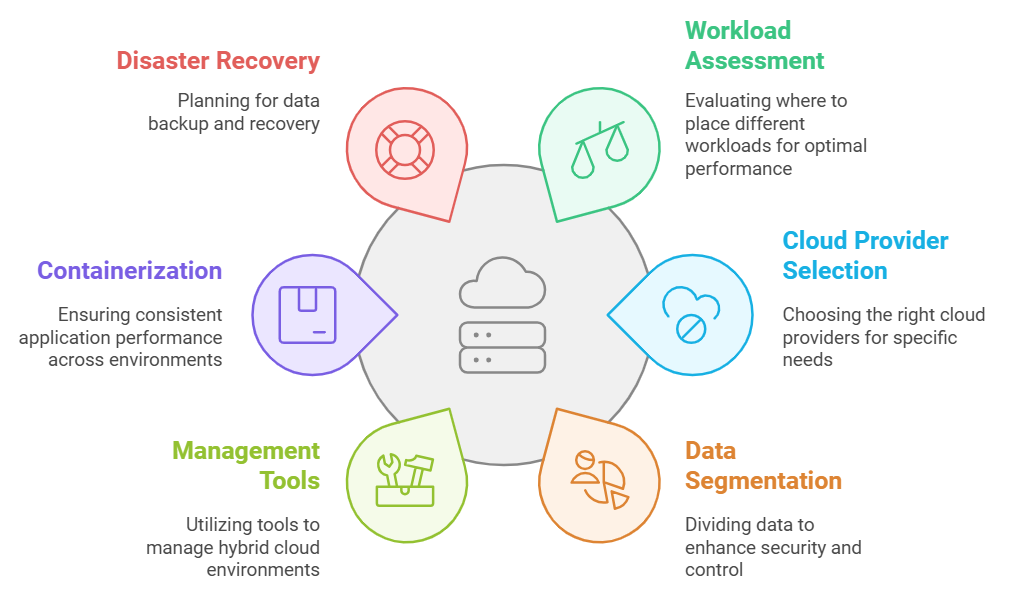
    Hybrid cloud IT infrastructure solutions
    Hybrid cloud IT infrastructure solutions

    1. Evaluating Organizational Needs and Goals

    • Assess Workloads: Determine which workloads best suit public clouds, private clouds, or on-premises environments. For example, latency-sensitive applications may remain on-premises, while scalable web applications thrive in public clouds.
    • Set Objectives: Define specific goals such as cost reduction, enhanced security, or improved scalability to effectively guide the hybrid cloud strategy.

    2. Designing a Tailored Architecture

    • Select Cloud Providers: Select public and private cloud providers based on features such as scalability, global reach, and compliance capabilities.
    • Integrate Platforms: Use orchestration tools or middleware to integrate public and private clouds with on-premises systems for smooth data flow and operations.

    3. Data Segmentation

    • Data Segmentation: Maintain sensitive data on private clouds or on-premises systems for better control.
    • Unified Security Policies: Define detailed frameworks for all environments, including encryption, firewalls, and identity management systems.
    • Continuous Monitoring: Utilize advanced monitoring tools to identify and mitigate threats in real-time.

    4. Embracing Advanced Management Tools

    • Hybrid Cloud Management Platforms: Solutions such as VMware vRealize, Microsoft Azure Arc, or Red Hat OpenShift make it easier to manage hybrid clouds.
    • AI-Driven Insights: Utilize AI & ML services to optimize resource utilization, avoid waste, and predict potential failures.

    5. Flexibility through Containerization

    • Containers: Docker and Kubernetes ensure that applications operate uniformly across different environments.
    • Microservices: Breaking an application into smaller, independent components allows for better scalability and performance optimization.

    6. Disaster Recovery and Backup Planning

    • Distribute Backups: Spread the backups across public and private clouds to prevent data loss during outages.
    • Failover Mechanisms: Configure the hybrid cloud with automatic failover systems to ensure business continuity.

    7. Audits and Updates

    • Audit Resources: Regularly assess resource utilization to remove inefficiencies and control costs.
    • Ensure Compliance: Periodically review data handling practices to comply with regulations like GDPR, HIPAA, or ISO standards.

    Emerging Trends Shaping the Future of Hybrid Cloud

    1. AI and Automation Integration

    Artificial Intelligence (AI) and automation are changing hybrid cloud environments to make them more innovative and efficient.

    • Automated Resource Allocation: AI dynamically adjusts resources according to the workload’s real-time demands for better performance. For example, AI & ML services can automatically reroute resources during traffic spikes to prevent service disruptions.
    • Predictive Analytics: Historical time series data analysis to predict potential failures to avoid faults and reduce downtime.
    • Improved monitoring: The AI-driven tools enable granular views of performance metrics, usage patterns, and cost analysis to help better make decisions.
    • AI for Security: AI detects anomalies, responds to potential threats, and strengthens hybrid environments’ security.

    2. Edge computing is on the rise

    Edging involves processing data near its sources; it combines well with hybrid cloud strategies, particularly in IoT and real-time applications.

    • Real-time Processing: Autonomous vehicles will benefit through edge computing, where sensor data is computed locally for instantaneous decisions.
    • Optimized Bandwidth: It conserves bandwidth as the critical data is processed locally, and the necessary information alone is sent to the cloud.
    • Better Resilience: With hybrid environments and edge devices, distributed workloads are more resilient when networks break.
    • Support for Emerging Tech: Hybrid systems use low-latency edge computing, especially for implementing AR and Industry 4.0 technologies.

    3. Sustainability Focus

    Hybrid cloud solutions would be crucial in aligning IT operations with and supporting environmental sustainability goals.

    • Effective utilization of resources: Hybrid could shift workloads into low-carbon environments like a public cloud provider powered by renewable sources.
    • Dynamic scaling: By scaling resources on demand through hybrid clouds, they keep energy wastage down over periods of low use
    • Green data centers: Harnessing sustainable IT infrastructure solutions by AWS and Microsoft Azure providers reduces carbon footprints.
    • Carbon Accounting: Analytics tools in hybrid platforms give accurate carbon emission measures, which allows organizations to reduce their carbon footprint.

    4. Unified Security Frameworks

    Hybrid cloud environments require consistent and robust security measures to protect distributed data.

    • Policy Enforcement: Unified frameworks apply security policies across all environments, ensuring consistency.
    • Integrated Tools: Data protection is enhanced by features like encryption, multi-factor authentication, and identity access management (IAM).
    • Threat Detection: Machine learning algorithms detect and prevent real-time threats, reducing vulnerability.
    • Compliance Simplification: Unified frameworks provide built-in auditing and reporting capabilities that simplify compliance with regulations.

    5. Hybrid Cloud and Multicloud Convergence

    Increasingly, hybrid cloud strategies are being used with multi-cloud to maximize flexibility and efficiency.

    • Diversification of vendors: Reduced dependency on one vendor can ensure resilience and help build more robust services.
    • Optimized Costs: Strategically spreading workloads across IT infrastructure solution providers can help leverage cost efficiencies and unique features.
    • Improved Interoperability: Tools such as Kubernetes ensure smooth operations across diverse cloud environments, thus enhancing flexibility and collaboration.

    Conclusion

    The future of hybrid cloud IT infrastructure solutions is shaped by transformative trends emphasizing agility, scalability, and innovation. As organizations embrace AI and automation, edge computing, sustainability, and unified security frameworks, they get better prepared to thrive in a fast-changing digital world.

    Proactively dealing with these trends can help achieve operational excellence and bring long-term growth and resilience in the age of digital transformation. SCS Tech enables businesses to navigate this evolution seamlessly, offering cutting-edge solutions tailored to modern hybrid cloud needs.

  • How Custom Cybersecurity Solutions Protect Cloud, Mobile, and On-Site Systems?

    How Custom Cybersecurity Solutions Protect Cloud, Mobile, and On-Site Systems?

    Just 39 seconds—that’s all it takes for a cyberattack to strike, faster than you can reply to your emails.

    This alarming frequency indicates the urgent need for cybersecurity solutions. With every company relying on cloud computing, mobile devices, and on-site infrastructure, the demand for robust protection has never been greater. While each environment has its own unique vulnerabilities, cyber security consulting services help organizations identify and address these gaps effectively. General security measures may cover major threats, but expert consulting ensures even the less obvious vulnerabilities are not overlooked.

    That is where custom cybersecurity solutions come in for each system, which are different, specified according to their needs, and used to counter specific threats.

    Let’s discuss, in detail, each of the challenges presented by cloud, mobile, and on-site systems. Understand how custom cybersecurity solutions overcome those challenges, and improve security in each.

    Security of Cloud Systems: Overcoming Unique Security Challenges

    With the advent of cloud computing, tremendous flexibility and scalability emerged for businesses, but they differ through unique risks. With various users sharing cloud environments and being managed by third parties, they pose unique security issues that vary from traditional systems.

    What Are the Challenges in Cloud Security?

    • Data Breach: When sensitive information is stored in the cloud, it is most vulnerable to unauthorized access, especially if it has weak credentials or is not configured correctly.
    • Account Hijacking: Compromise from phishing leads to allowing attackers access to valuable information.
    • Insecure API: An insecure API control can be equated to an open door for an attacker with services in the cloud.
    • Compliance Complexities: These are the complexities of the compliance cloud configurations that must be put into strict regulatory standards like GDPR or HIPAA. This is challenging to implement effectively.

    How Do Custom Cybersecurity Solutions Enhance Cloud Security?

    Discover how custom cybersecurity solutions provide tailored protection for secure cloud environments

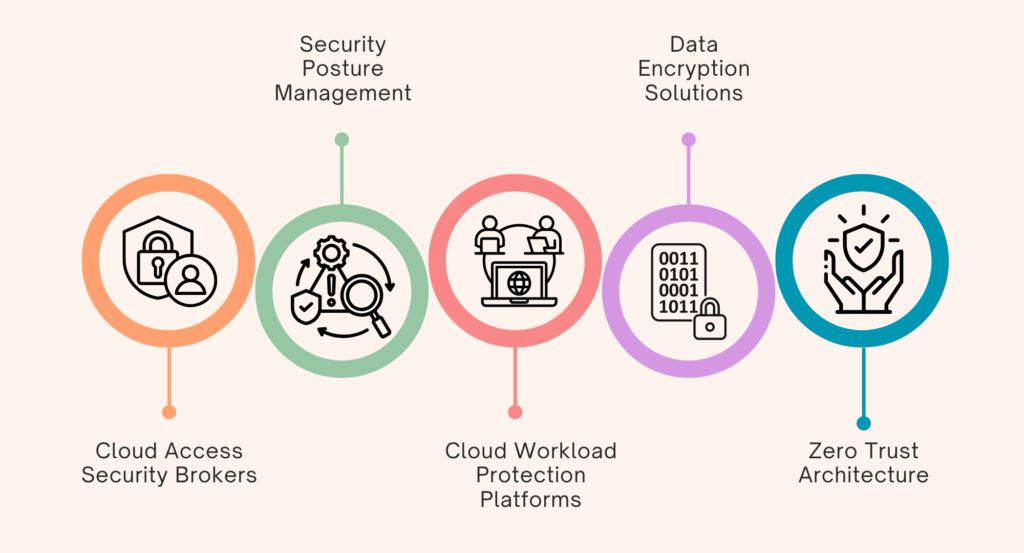
    1. Cloud Access Security Brokers (CASBs): CASBs serve as security layers between the cloud provider and the user base. It provides
      1. Data Protection: CASBs enforce data-loss-prevention policies through enforcing DLP policies by monitoring how data is transferred and blocking unauthorized access to sensitive information.
      2. Threat Detection: They use behavioral analytics to detect anomalies in user behavior that might suggest a breach.
      3. Compliance Management: CASBs help keep organizations compliant with all the appropriate industry regulations based on audit trails and reporting.
    2. Security Posture Management (SPM): SPM tools continuously watch for identifying vulnerabilities and misconfigurations in the cloud environments. This is done through:
      1. Vulnerability Scanning: Scanner tools that scan for all misconfigurations and known vulnerabilities in cloud resources.
      2. Compliance Audits: Periodic audits that the configurations adhere to best security practices and the appropriate regulations from the mandate.
    3. Cloud Workload Protection Platforms (CWPP): They protect the applications running in the cloud by analyzing activity in real-time and blocking unauthorized access attempts.
      1. Runtime Protection: The CWPP can detect real-time threats by protecting applications against malicious activity.
      2. Intrusion Prevention: The CWPP prevents any unauthorized access attempt and reduces the attack’s impact on workloads.
    4. Data Encryption Solutions: Encryption at rest, associated with the storage of data, and in motion, associated with the transfer of data utilise strong algorithms such as Advanced Encryption Standard (AES) coupled with Rivest-Shamir-Adleman (RSA) ensuring the integrity of data as it flows through all its stages of the life cycle.
      1. Encryption at Rest: With strong encryption algorithms such as AES-256, data is encrypted to secure those at rest in the cloud.
      2. Encryption in Transit: Encryption protocols, such as TLS/SSL, consist of specific ones that encrypt data between users and cloud services.
    5. Zero Trust Architecture: Zero Trust continuously verifies users and devices, limits network access, and controls lateral movement. This architectural model is designed so that not a single user or device should be trusted by default, regardless of whether they are inside or outside the network perimeter.
      1. Identity Verification: MFA ensures only the proper users can access cloud resources.
      2. Micro-Segmentation: This involves limiting lateral movement as the workload is segmented so multiple attack vectors remain inaccessible to the hackers if one resource is compromised.

    Mobile Systems: Unique Risks and Custom Solutions for Security

    The increasing use of mobile devices in the workplace has become a meaningful way to access company information. Still, they also pose vulnerabilities due to their portability and high connectivity. Among mobile security threats are malware attacks, phishing scams, and accidental data leaks in cases where information is mishandled.

    What Are the Issues in Mobile Security?

    • Threats of Malware: The mobile phone is highly vulnerable to malware that can steal away information or compromise system operations.
    • Phishing Attacks: Mobile phishing attacks target mobile users with fake messages that compel the victims to unveil sensitive information.
    • Leakage of Data: The leakage of data is facilitated by mishandling and storing some applications without appropriate security, thereby making them vulnerable.

    How Do Custom Cybersecurity Solutions Improve Mobile Security?

    How to Improve Mobile Security with Custom Cybersecurity Solutions

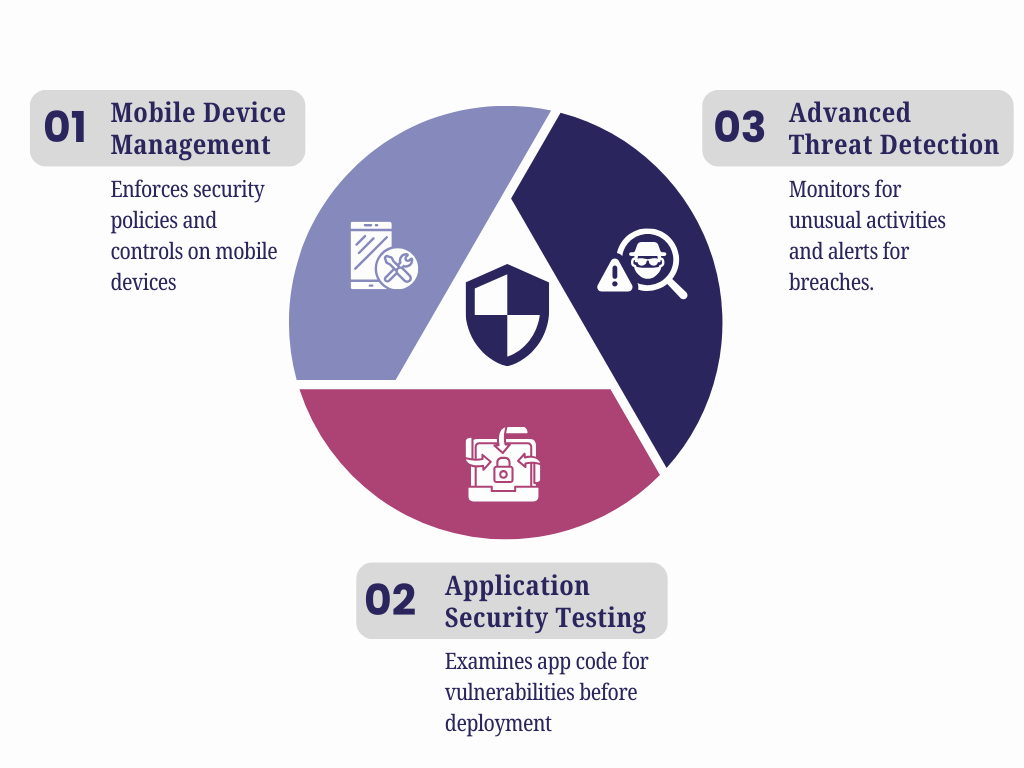
    1. Mobile Device Management (MDM): MDM will help enforce security policies across mobile devices and controls preventing the installation of unauthorized applications. This is done by:
      1. Wipe Remotely Ability: IT administrators can remotely wipe the data off lost or stolen devices so sensitive information cannot be accessed.
      2. Application Control: MDM enables organizations to mark applications as white lists or black lists depending on security policies to prevent malicious applications from being installed.
    2. Application Security Testing: This examines the code of a mobile application for potential vulnerabilities while simulating attacks to determine hidden weaknesses before deploying the app.
      1. Static Application Security Testing (SAST): It scans for possible weaknesses in the source code that may occur when executed.
      2. Dynamic Application Security Testing (DAST): Running applications are tested for vulnerability through simulated attacks that could reveal the exploits.
    3. Advanced Threat Detection: Behavioral analytics monitor mobile devices for unusual activities and enable an immediate response to potential breaches.
      1. Behavioral Analytics: These systems monitor patterns in the user behavior that signify a potential compromise.
      2. Real-Time Alerts: Instant alerting of suspicious events to allow for prompt investigation and action.

    On-Site Systems: Controlling Internal and Physical Threats through Custom Cybersecurity Solutions

    As businesses continue their digital transformation, on-site systems form the backbone of most organizations, since they provide a direct source of access to data coupled with control.

    They are always vulnerable to internal threats and intrusion by physical persons. Insiders and unauthorized physical intrusion are the main risks to on-site systems.

    What Are the Security Problems in On-Site Systems?

    • Insider Threat: The insiders compromised the security since those authorized to privilege access may misuse their rights.
    • Physical Violations: Unauthorized physical entities entering critical areas directly result in hardware or data exposure.

    How Do Custom Cybersecurity Solutions Improve On-Site Security?

    Learn how custom cybersecurity solutions enhance on-site security by addressing unique vulnerabilities.

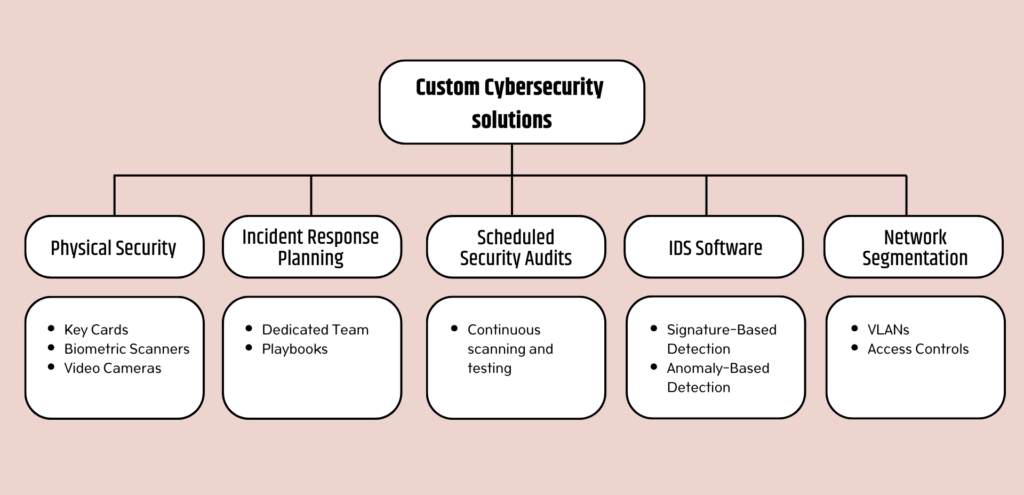
    1. Network Segmentation: Division of the network into sub-divisions. Segmentation limits the movement of attackers and restricts access to sensitive data. This format helps isolate breaches, thus protecting the rest of the network.
      1. Virtual Local Area Networks (VLANs): Separation of the different network-level departments reduces the likelihood of lateral movement by an attacker.
      2. Access Controls Between Segments: Strict access controls make sure that only authorized persons gain access to the sensitive segments.
    2. IDS Software: Intrusion Detection Systems (IDS) software keeps track of network traffic by detecting signatures and anomalies, which will notify of a threat in real-time.
      1. Signature-Based Detection: Predefined signatures of known threats are recognized and provide immediate responses to familiar attacks.
      2. Anomaly-Based Detection: This form of detection involves scanning for patterns that don’t fall under the usual traffic profile within the network. The method finds new threats that do not match existing signatures.
    3. Scheduled Security Audit: Periodic scanning for weaknesses and penetration testing will discover and remove all the possible vulnerabilities within the system before hackers take advantage of them.
    4. Incident Response Planning: A dedicated incident response team and a few playbooks for common scenarios ensure that breaches are fast and efficient and the eventual damage is reduced.
    5. Physical Security: Restrict access to building parts using key cards, biometric scanners, and video cameras.

    Conclusion

    Present-day generic solutions fail when unique challenges exist in cloud, mobile, and on-site systems. SCS Tech, a trusted name among the cybersecurity solutions group, provides targeted protection needed to keep data and operations safe.

    Whether planning a new security strategy or seeking to build upon and enhance the existing one, investing in custom cybersecurity solutions is paramount in these times of constant global changes and cyber threats.


  • What Are the Key Services Offered by Top Digital Transformation Services?

    What Are the Key Services Offered by Top Digital Transformation Services?

    In today’s dynamic digital landscape, businesses face the ongoing challenge of adapting to technological advancements and meeting the ever-expanding demands of consumers.

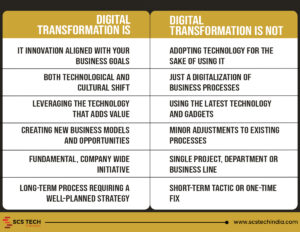
    That’s where digital transformation comes in— a strategic effort to integrate digital tools and strategies to revolutionize business operations and enhance customer experiences.


    Importance of Digital Transformation

    Digital transformation is indispensable for organizations in today’s fast-changing world. It’s a strategic necessity that helps companies maintain competitiveness, enhance efficiency, and drive growth. By embracing digital tools and adopting innovative approaches, businesses can deliver personalized customer experiences, gain a competitive edge, and respond swiftly to market changes.

    Experts are forecasting a staggering growth rate of over 58% between 2021 and 2026, with the market value expected to reach a whopping USD 124.95 billion by 2026 (source). By leveraging digital tools and strategies, you’re not only streamlining operations and boosting efficiency but also tapping into new revenue streams and enhancing the customer experience.

    Benefits of Digital Transformation

    Digital transformation brings numerous benefits to businesses in various industries, helping them succeed in today’s digital era. Here are some important advantages

    1. Enhanced Efficiency: By automating manual processes and streamlining operations, digital transformation enables businesses to work more efficiently. This leads to reduced turnaround times, increased productivity, and cost savings.
    2. Improved Customer Experiences: It allows businesses to deliver personalized and seamless experiences to their customers. Through digital channels, companies can engage with customers in real-time, tailor offerings to their preferences, and provide superior service.
    3. Increased Agility: It equips businesses with the agility to respond quickly to market changes and customer needs. By adopting flexible technologies and agile methodologies, organizations can adapt their strategies and processes in real-time,

    Core Services Offered by Top Digital Transformation Service Providers

    Digital transformation service providers offer a diverse range of solutions tailored to meet the evolving needs of businesses in the digital age. Here are some key services provided by these industry-leading firms:

    1. Cloud Computing Solutions: One of the foundational services offered by digital transformation service providers is cloud computing. These providers offer a range of cloud-based solutions, including Infrastructure as a Service (IaaS), Platform as a Service (PaaS), and Software as a Service (SaaS). Cloud computing enables businesses to access computing resources providing scalability, flexibility, and cost-effectiveness.
    2. Data Analytics and Insights: Digital transformation service providers help businesses unlock the value of their data by offering expertise in data collection, storage, processing, and analysis. By harnessing the power of data, businesses can make informed decisions, optimize operations, and drive strategic growth initiatives.
    3. Artificial Intelligence (AI) and Machine Learning (ML): AI MI services are transformative technological services that play a crucial role in digital transformation initiatives. AI and ML solutions helps to automate processes, enhance decision-making, and drive innovation. These solutions encompass a wide range of applications, including natural language processing, computer vision, etc, to unlock new opportunities and stay ahead of the curve.
    4. Internet of Things (IoT) Integration: IoT is revolutionizing industries by connecting devices, sensors, and machines to the internet, enabling real-time data collection and analysis. From smart manufacturing and connected healthcare to smart cities and intelligent transportation, IoT integration enables businesses to optimize processes, improve efficiency, and deliver innovative products and services.

    Choosing the Right Digital Transformation Services

    Selecting the right digital transformation services is paramount for successful business evolution. Here’s a simplified guide:

    1. Assess Business Needs: Understand your organization’s challenges, identify areas for improvement, and define clear objectives for the digital transformation initiative.  Ensure the provider understands your industry dynamics, compliance requirements, and business challenges, offering tailored solutions that meet your specific needs.

    2. Evaluate Service Providers:

    • Expertise and Experience: Prioritize providers with a proven track record in digital transformation across various industries.
    • Range of Services and Technology Capabilities: Choose a provider offering expertise in key areas such as cloud computing, data analytics, AI, IoT, cybersecurity, and digital marketing.
    • Reputation and Client Testimonials: Research the provider’s reputation, review client testimonials, case studies, and industry awards to gauge their reliability and success in delivering results.
    1. Collaborate and Conduct Due Diligence: Establish open communication channels with potential partners, discuss expectations, and request detailed proposals outlining scope, timelines, deliverables, and pricing.

    Conclusion

    So, if you’re a business owner or leader, here’s the bottom line: digital transformation isn’t just some fancy trend—it’s your ticket to future-proofing your business. By embracing digital innovation and partnering with the right experts, you can unlock new opportunities, drive efficiency, and deliver exceptional value to your customers.

    But here’s the thing: choosing the right digital transformation services is key. It’s not just about jumping on the latest tech bandwagon—it’s about finding solutions that align with your business goals and objectives.At SCS Tech India, we  offer tailored solutions to meet your specific needs and drive your business forward. So, take the time to assess your needs, evaluate service providers.

  • A complete guide on Cloud Computing

    A complete guide on Cloud Computing

    One of the technologies influencing how we work and play is cloud computing. The cloud helps businesses eliminate IT problems and promotes security, productivity, and efficiency. It also enables small enterprises to utilize cutting-edge computing technologies at a significantly lesser cost. Here is what you need to know about the cloud and how it can benefit your company.

    On-Demand Computing

    The term “cloud” describes online-accessible servers and software that anyone can use. You are spared from hosting and managing your hardware and software as a result. Additionally, it implies that you can use these systems from any location where you have internet access.

    Every day, you encounter cloud computing. You are accessing data that is kept on a server somewhere in the world whenever you check your Gmail inbox, look at a photo on your Dropbox account, or watch your favorite shows on Netflix. Even though the emails, videos, or other files you require are not physically present on your computer, you may quickly, simply, and affordably access them owing to contemporary cloud computing technology.

    Public, Private, and Hybrid Cloud

    Private, public, and hybrid deployment strategies are the three main types of cloud computing. In the end, all three models will give customers access to their business-critical documents and software from any location, at any time. It all depends on how they approach the task. The kind of cloud you should use for your company depends on several variables, including the purposes for which you intend to use it, applicable laws on data storage and transmission, and other aspects.

    Private Cloud

    A single entity is served via private clouds. While some companies construct and manage their ecosystems, others rely on service providers to do so. In either case, private clouds are expensive and hostile to the cloud’s advantages for the economy and IT labor productivity. Private clouds, however, are their sole choice because certain organizations are subject to greater data privacy and regulatory constraints than others.

    Public Cloud

    Distributed across the open internet, public clouds are hosted by cloud service providers. Customers can avoid having to buy, operate, and maintain their own IT infrastructure by using the most widely used and least-priced public clouds.

    Hybrid Cloud

    A hybrid cloud combines one or more public clouds with private clouds. Imagine you operate in a sector where data privacy laws are extremely rigorous. While you don’t want to host legally required data in the cloud, you do want to be able to access it there. To access data saved in your private cloud, you also want to deploy your CRM in the cloud. Using a hybrid cloud is the most sensible choice under these circumstances.

    Everything as a Service

    The cloud “stack” is made up of numerous levels. The collection of frameworks, tools and other elements that make up the infrastructure supporting cloud computing is referred to as a stack. Software as a Service (SaaS), Platform as a Service (PaaS), and Infrastructure as a Service (IaaS) components are included in this. Customers that use these services have varied degrees of control and accountability over their cloud environment.


    Infrastructure as a Service

    The customer oversees managing everything with IaaS, including the OS, middle-ware, data, and applications. Other duties, including virtualization, servers, storage, and networking obligations, are handled by the service provider. Customers are charged by how many resources, including CPU cycles, memory, bandwidth, and others, they consume. Microsoft Azure and Amazon Web Services are two examples of IaaS products.

    Platform as a Service

    Customers can create, test, and host their applications using PaaS solutions. The consumer oversees managing their software and data; otherwise, the service provider takes care of everything. You don’t have to be concerned about operating systems, software upgrades, or storage requirements if you use PaaS solutions. Customers of PaaS pay for any computing resources they use. Google App Engine and SAP Cloud are a couple of examples of PaaS technologies.

    Software as a Service

    Customers acquire licenses to utilize an application hosted by the provider under the SaaS model. Customers often buy annual or monthly subscriptions per user instead of how much of a certain computer resource they consumed, unlike IaaS and PaaS models. Microsoft 365, Dropbox, and DocuSign are a few popular SaaS products. Small firms that lack the capital or IT resources to implement the most cutting-edge technologies would benefit greatly from SaaS solutions.

    Benefits of the Cloud

    Reduced IT costs: By using cloud computing services, recurrent costs for monitoring and maintaining an IT infrastructure can be greatly decreased.

    Scalability: When necessary, developers can increase storage and processing capability by using cloud services. Additionally, development teams do not have to spend time or money upgrading cloud computing services.

    Collaboration efficiency: For the agile technology sector, cooperation has always been a need. Professionals from all around the world may work and collaborate using current cloud services. With these functionalities, teams may communicate with clients or other teams online while collaborating in real-time and sharing resources.

    Flexibility: Cloud computing can provide a great deal of flexibility in addition to helping to lower operational costs. Developers and other key stakeholders now have easier access to crucial data metrics at any time and from any location.

    Automatic updates: Teams may use the most recent resources available while managing and meeting IT standards thanks to automatic updates. Cloud computing is a popular technology because it allows users to access the newest tools and resources without having to spend a fortune.