Tag: data migration

  • A complete guide on Cloud Computing

    A complete guide on Cloud Computing

    One of the technologies influencing how we work and play is cloud computing. The cloud helps businesses eliminate IT problems and promotes security, productivity, and efficiency. It also enables small enterprises to utilize cutting-edge computing technologies at a significantly lesser cost. Here is what you need to know about the cloud and how it can benefit your company.

    On-Demand Computing

    The term “cloud” describes online-accessible servers and software that anyone can use. You are spared from hosting and managing your hardware and software as a result. Additionally, it implies that you can use these systems from any location where you have internet access.

    Every day, you encounter cloud computing. You are accessing data that is kept on a server somewhere in the world whenever you check your Gmail inbox, look at a photo on your Dropbox account, or watch your favorite shows on Netflix. Even though the emails, videos, or other files you require are not physically present on your computer, you may quickly, simply, and affordably access them owing to contemporary cloud computing technology.

    Public, Private, and Hybrid Cloud

    Private, public, and hybrid deployment strategies are the three main types of cloud computing. In the end, all three models will give customers access to their business-critical documents and software from any location, at any time. It all depends on how they approach the task. The kind of cloud you should use for your company depends on several variables, including the purposes for which you intend to use it, applicable laws on data storage and transmission, and other aspects.

    Private Cloud

    A single entity is served via private clouds. While some companies construct and manage their ecosystems, others rely on service providers to do so. In either case, private clouds are expensive and hostile to the cloud’s advantages for the economy and IT labor productivity. Private clouds, however, are their sole choice because certain organizations are subject to greater data privacy and regulatory constraints than others.

    Public Cloud

    Distributed across the open internet, public clouds are hosted by cloud service providers. Customers can avoid having to buy, operate, and maintain their own IT infrastructure by using the most widely used and least-priced public clouds.

    Hybrid Cloud

    A hybrid cloud combines one or more public clouds with private clouds. Imagine you operate in a sector where data privacy laws are extremely rigorous. While you don’t want to host legally required data in the cloud, you do want to be able to access it there. To access data saved in your private cloud, you also want to deploy your CRM in the cloud. Using a hybrid cloud is the most sensible choice under these circumstances.

    Everything as a Service

    The cloud “stack” is made up of numerous levels. The collection of frameworks, tools and other elements that make up the infrastructure supporting cloud computing is referred to as a stack. Software as a Service (SaaS), Platform as a Service (PaaS), and Infrastructure as a Service (IaaS) components are included in this. Customers that use these services have varied degrees of control and accountability over their cloud environment.


    Infrastructure as a Service

    The customer oversees managing everything with IaaS, including the OS, middle-ware, data, and applications. Other duties, including virtualization, servers, storage, and networking obligations, are handled by the service provider. Customers are charged by how many resources, including CPU cycles, memory, bandwidth, and others, they consume. Microsoft Azure and Amazon Web Services are two examples of IaaS products.

    Platform as a Service

    Customers can create, test, and host their applications using PaaS solutions. The consumer oversees managing their software and data; otherwise, the service provider takes care of everything. You don’t have to be concerned about operating systems, software upgrades, or storage requirements if you use PaaS solutions. Customers of PaaS pay for any computing resources they use. Google App Engine and SAP Cloud are a couple of examples of PaaS technologies.

    Software as a Service

    Customers acquire licenses to utilize an application hosted by the provider under the SaaS model. Customers often buy annual or monthly subscriptions per user instead of how much of a certain computer resource they consumed, unlike IaaS and PaaS models. Microsoft 365, Dropbox, and DocuSign are a few popular SaaS products. Small firms that lack the capital or IT resources to implement the most cutting-edge technologies would benefit greatly from SaaS solutions.

    Benefits of the Cloud

    Reduced IT costs: By using cloud computing services, recurrent costs for monitoring and maintaining an IT infrastructure can be greatly decreased.

    Scalability: When necessary, developers can increase storage and processing capability by using cloud services. Additionally, development teams do not have to spend time or money upgrading cloud computing services.

    Collaboration efficiency: For the agile technology sector, cooperation has always been a need. Professionals from all around the world may work and collaborate using current cloud services. With these functionalities, teams may communicate with clients or other teams online while collaborating in real-time and sharing resources.

    Flexibility: Cloud computing can provide a great deal of flexibility in addition to helping to lower operational costs. Developers and other key stakeholders now have easier access to crucial data metrics at any time and from any location.

    Automatic updates: Teams may use the most recent resources available while managing and meeting IT standards thanks to automatic updates. Cloud computing is a popular technology because it allows users to access the newest tools and resources without having to spend a fortune.
     

  • Data Migration: Process, Types, and Golden Rules to Follow

    Data Migration: Process, Types, and Golden Rules to Follow

    In our daily lives, moving information from one location to another is no more than a simple copy-and-paste operation. Everything gets far more complicated when it comes to transferring millions of data units into a new system.

    However, many companies treat even a massive data migration as a low-level, two-clicks task. Such an initial underestimation translates to spending extra time and money. Recent studies revealed that 55 percent of data migration projects went over budget and 62 percent appeared to be harder than expected or actually failed.

    How to avoid falling into the same trap? The answer lies in understanding the essentials of the data migration process, from its triggers to final phases.

    If you are already familiar with theoretical aspects of the problem, you may jump to the section Data Migration Process where we give practical recommendations. Otherwise, let’s start from the most basic question: What is data migration?

    What is data migration?

    In general terms, data migration is the transfer of the existing historical data to new storage, system, or file format. This process is not as simple as it may sound. It involves a lot of preparation and post-migration activities including planning, creating backups, quality testing, and validation of results. The migration ends only when the old system, database, or environment is shut down.

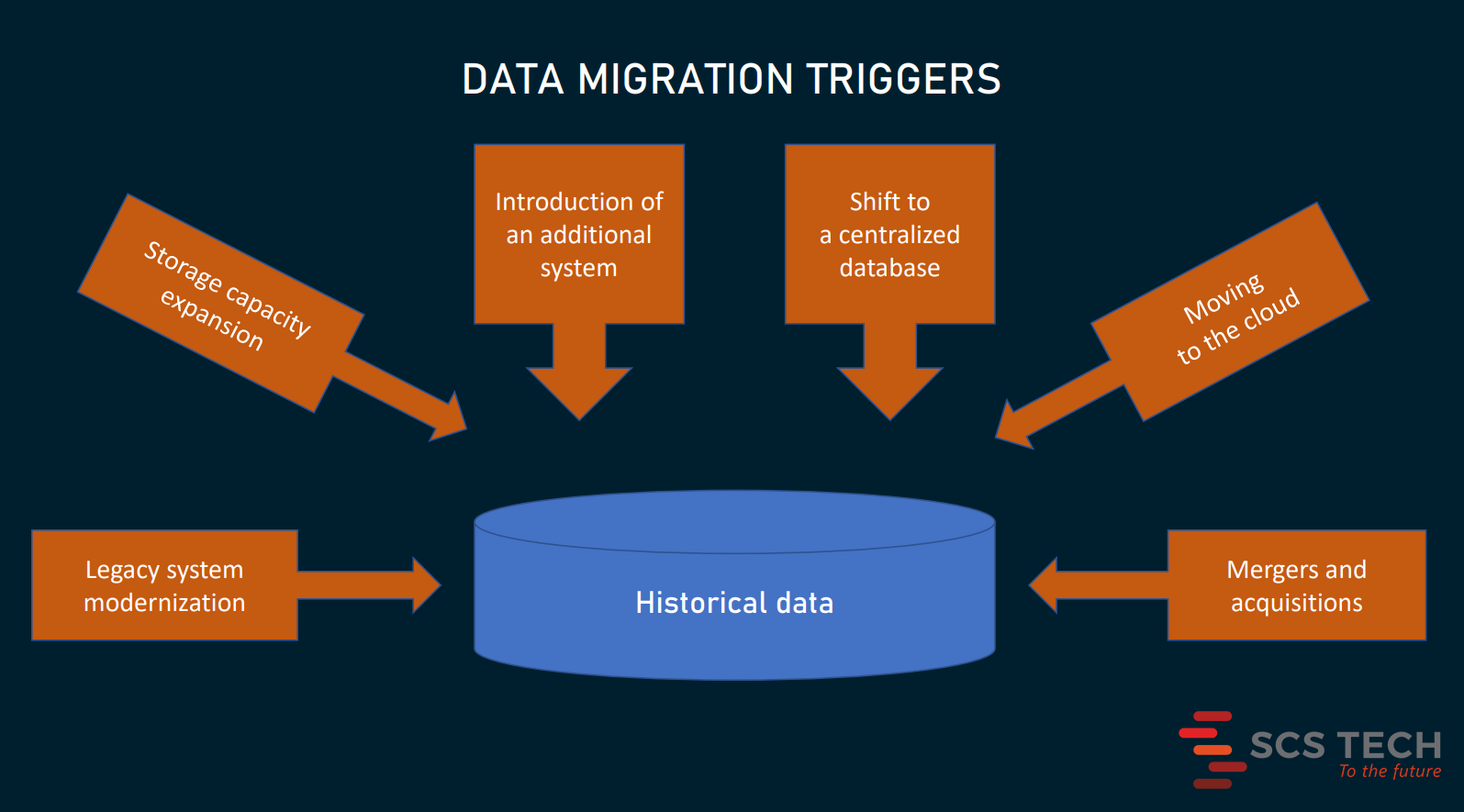
    Usually, data migration comes as a part of a larger project such as

    • legacy software modernization or replacement
    • the expansion of system and storage capacities,
    • the introduction of an additional system working alongside the existing application
    • the shift to a centralized database to eliminate data silos and achieve interoperability
    • moving IT infrastructure to the cloud, or
    • merger and acquisition (M&A) activities when IT landscapes must be consolidated into a single system.

    Data migration is sometimes confused with other processes involving massive data movements. Before we go any further, it’s important to clear up the differences between data migration, data integration, and data replication.

    Data migration vs data integration

    Unlike migration dealing with the company’s internal information, integration is about combining data from multiple sources outside and inside the company into a single view. It is an essential element of the data management strategy that enables connectivity between systems and gives access to the content across a wide array of subjects. Consolidated datasets are a prerequisite for accurate analysis, extracting business insights, and reporting.

    Data migration is a one-way journey that ends once all the information is transported to a target location. Integration, by contrast, can be a continuous process, that involves streaming real-time data and sharing information across systems.

    Data migration vs data replication

    In data migration, after the data is completely transferred to a new location, you eventually abandon the old system or database. In replication, you periodically transport data to a target location, without deleting or discarding its source. So, it has a starting point, but no defined completion time.

    Data replication can be a part of the data integration process. Also, it may turn into data migration — provided that the source storage is decommissioned.

    Now, we’ll discuss only data migration — a one-time and one-way process of moving to a new house, leaving an old one empty.

    Main types of data migration

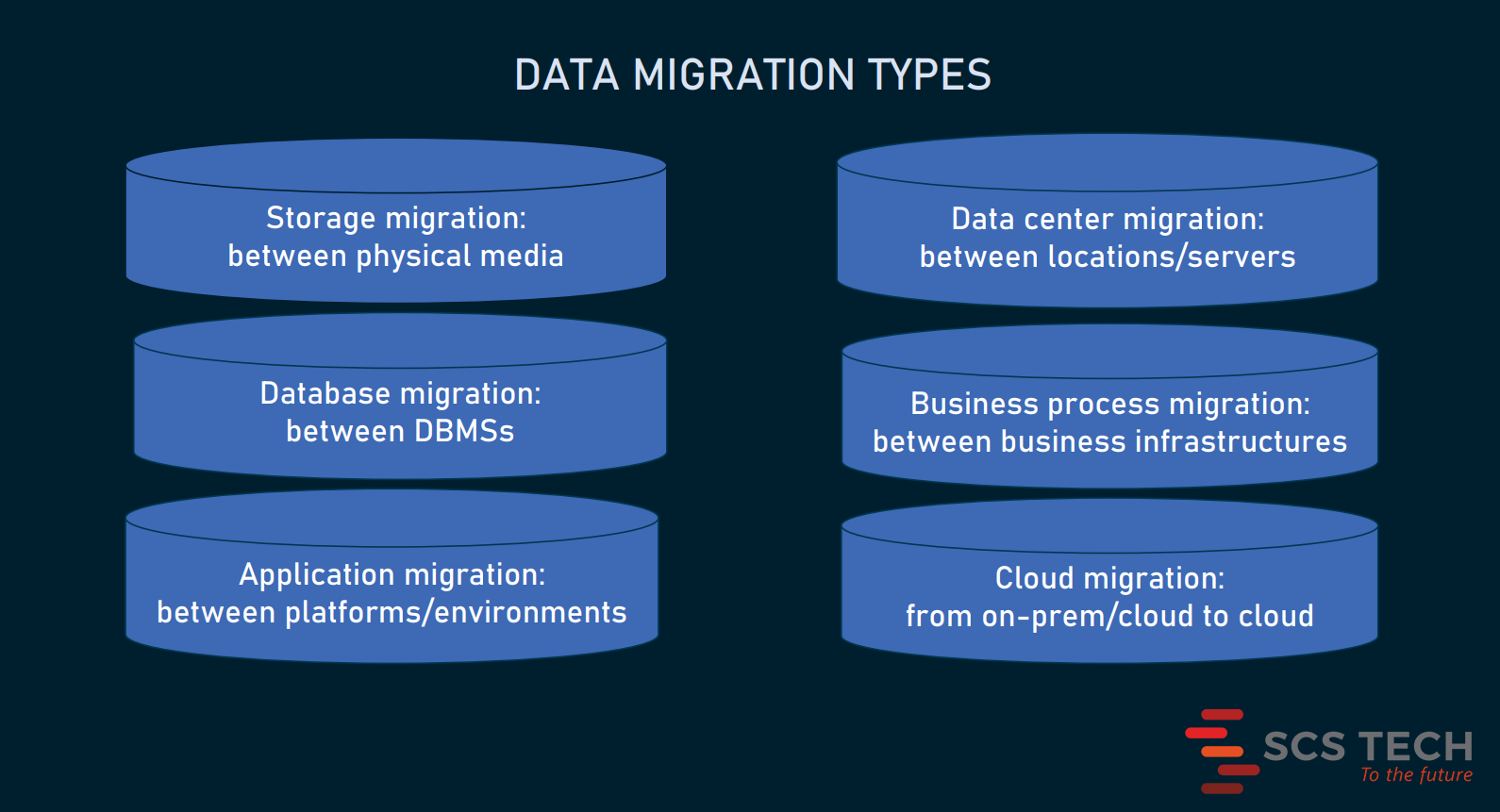
    There are six commonly used types of data migration. However, this division is not strict. A particular case of the data transfer may belong, for example, to both database and cloud migration or involve application and database migration at the same time.

    Storage migration

    Storage migration occurs when a business acquires modern technologies discarding out-of-date equipment. This entails the transportation of data from one physical medium to another or from a physical to a virtual environment. Examples of such migrations are when you move data

    • from paper to digital documents
    • from hard disk drives (HDDs) to faster and more durable solid-state drives (SSDs), or
    • from mainframe computers to cloud storage.

    Database migration

    A database is not just a place to store data. It provides a structure to organize information in a specific way and is typically controlled via a database management system (DBMS).

    So, most of the time, database migration means

    • an upgrade to the latest version of DBMS (so-called homogeneous migration),
    • a switch to a new DBMS from a different provider — for example, from MySQL to PostgreSQL or from Oracle to MSSQL (so-called heterogeneous migration)

    The latter case is tougher than the former, especially if target and source databases support different data structures. It makes the task still more challenging when you have to move data from legacy databases — like Adabas, IMS, or IDMS.

    Application migration

    When a company changes an enterprise software vendor — for instance, a hotel implements a new property management system or a hospital replaces its legacy EHR system — this requires moving data from one computing environment to another. The key challenge here is that old and new infrastructures may have unique data models and work with different data formats.

    Data center migration

    A data center is a physical infrastructure used by organizations to keep their critical applications and data. Put more precisely, it’s the very dark room with servers, networks, switches, and other IT equipment. So, data center migration can mean different things: from relocation of existing computers and wires to other premises to moving all digital assets, including data and business applications to new servers and storages.

    Business process migration

    This type of migration is driven by mergers and acquisitions, business optimization, or reorganization to address competitive challenges or enter new markets. All these changes may require the transfer of business applications and databases with data on customers, products, and operations to the new environment.

    Cloud migration

    Cloud migration is a popular term that embraces all the above-mentioned cases, if they involve moving data from on-premises to the cloud or between different cloud environments. Gartner expects that by 2024 the cloud will attract over 45 percent of IT spending and dominate ever-growing numbers of IT decisions.

    Depending on volumes of data and differences between source and target locations, migration can take from some 30 minutes to months and even years. The complexity of the project and the cost of downtime will define how exactly to unwrap the process.

    Approaches to data migration

    Choosing the right approach to migration is the first step to ensure that the project will run smoothly, with no severe delays.

    Big bang data migration

    Advantages: less costly, less complex, takes less time, all changes happen once

    Disadvantages: a high risk of expensive failure, requires downtime

    In a big bang scenario, you move all data assets from source to target environment in one operation, within a relatively short time window.