Tag: database

  • Best security tips to avoid a cyber breach

    Best security tips to avoid a cyber breach

    Preventing cyber data breaches is the best defense against the nightmare and expense that comes with them. Nevertheless, you must first identify them in order to be able to stop a data breach. The sorts and costs of data breaches you could experience as a small- to medium-sized business owner are described below, along with tips on how to avoid them.

    When hackers gain access to data and sensitive information, data breaches occur. These breaches are very expensive. According to a data report, the average cost of a data breach is around $3.86 million that too in addition to the irreparable harm to an organization’s reputation. It costs time as well. The identifying of the cause and reprimanding it usually takes up to 280 days.

    You can use a variety of high-level security techniques, such as AI and prepared incident response teams, to stop a data breach. Let’s dig deep into that!

    Limit access to your valuable data –

    Every employee used to have access to all of the files on their computer back in the day. Companies today are discovering the hard way how important it is to restrict access to their most important data. A mailroom employee has no need to see a customer’s financial information, after all. By limiting who is permitted to read specific papers, you reduce the number of workers who might unintentionally click on a hazardous link. Expect to see all records partitioned off as organisations go into the future so that only those who specifically require access will have it. One of those obvious fixes that businesses probably ought to have implemented sooner rather than later.

    Security policy with third party vendors –

    Every firm interacts with a variety of outside vendors. The need to understand who these people are has never been greater. Even permitting visitors onto their property might expose businesses to legal action. It’s necessary to restrict the kinds of documents that these vendors can access.

    Although taking such steps can be a bother for the IT department, the alternative could be a data breach that costs millions of dollars. Demand transparency from the businesses that are permitted to access your sensitive information. Don’t just assume that they are abiding by privacy regulations; verify it. Request background checks for any outside contractors entering your business.

    Employee awareness training –

    Employees are the weakest link in the data security chain, according to recent research. Despite training, workers read dubious emails with the potential to download malware every day. Employers make the error of assuming that one cybersecurity training session is sufficient. Schedule frequent sessions every quarter or even monthly if you’re serious about protecting your crucial data.

    According to marketing studies, the majority of consumers must hear the same message at least seven times before their behaviour starts to change.

    Update Software Regularly–

    Experts advise routinely updating all operating systems and application software. When patches are available, install them. When programmes aren’t constantly patched and updated, your network is exposed. Baseline Security Analyzer, a software from Microsoft, may now be used to periodically check that all programmes are patched and current. This is a simple and affordable solution to fortify your network and thwart attacks before they start.

    Develop a cyber breach response plan –

    What would you do if you discovered a data breach when you arrived to work the following day? Surprisingly few businesses have a reliable breach response strategy in place. Both the company and the employees can understand the potential losses by creating a thorough breach preparedness strategy. Employees want to know the truth; therefore, an employer should be very open about the extent of the violation. A sound response strategy can reduce lost productivity and stop bad press.

    Setting strong passwords –

    One thing that security professionals will emphasise when they visit your organisation to train your staff is the importance of routinely changing all passwords. The majority of people are now aware of how crucial it is to make passwords challenging to crack. We have mastered the use of capital letters, numbers, and special characters when creating passwords, even on our home PCs. Make it as difficult as you can for hackers to enter and steal your belongings.


  • Data Migration: Process, Types, and Golden Rules to Follow

    Data Migration: Process, Types, and Golden Rules to Follow

    In our daily lives, moving information from one location to another is no more than a simple copy-and-paste operation. Everything gets far more complicated when it comes to transferring millions of data units into a new system.

    However, many companies treat even a massive data migration as a low-level, two-clicks task. Such an initial underestimation translates to spending extra time and money. Recent studies revealed that 55 percent of data migration projects went over budget and 62 percent appeared to be harder than expected or actually failed.

    How to avoid falling into the same trap? The answer lies in understanding the essentials of the data migration process, from its triggers to final phases.

    If you are already familiar with theoretical aspects of the problem, you may jump to the section Data Migration Process where we give practical recommendations. Otherwise, let’s start from the most basic question: What is data migration?

    What is data migration?

    In general terms, data migration is the transfer of the existing historical data to new storage, system, or file format. This process is not as simple as it may sound. It involves a lot of preparation and post-migration activities including planning, creating backups, quality testing, and validation of results. The migration ends only when the old system, database, or environment is shut down.

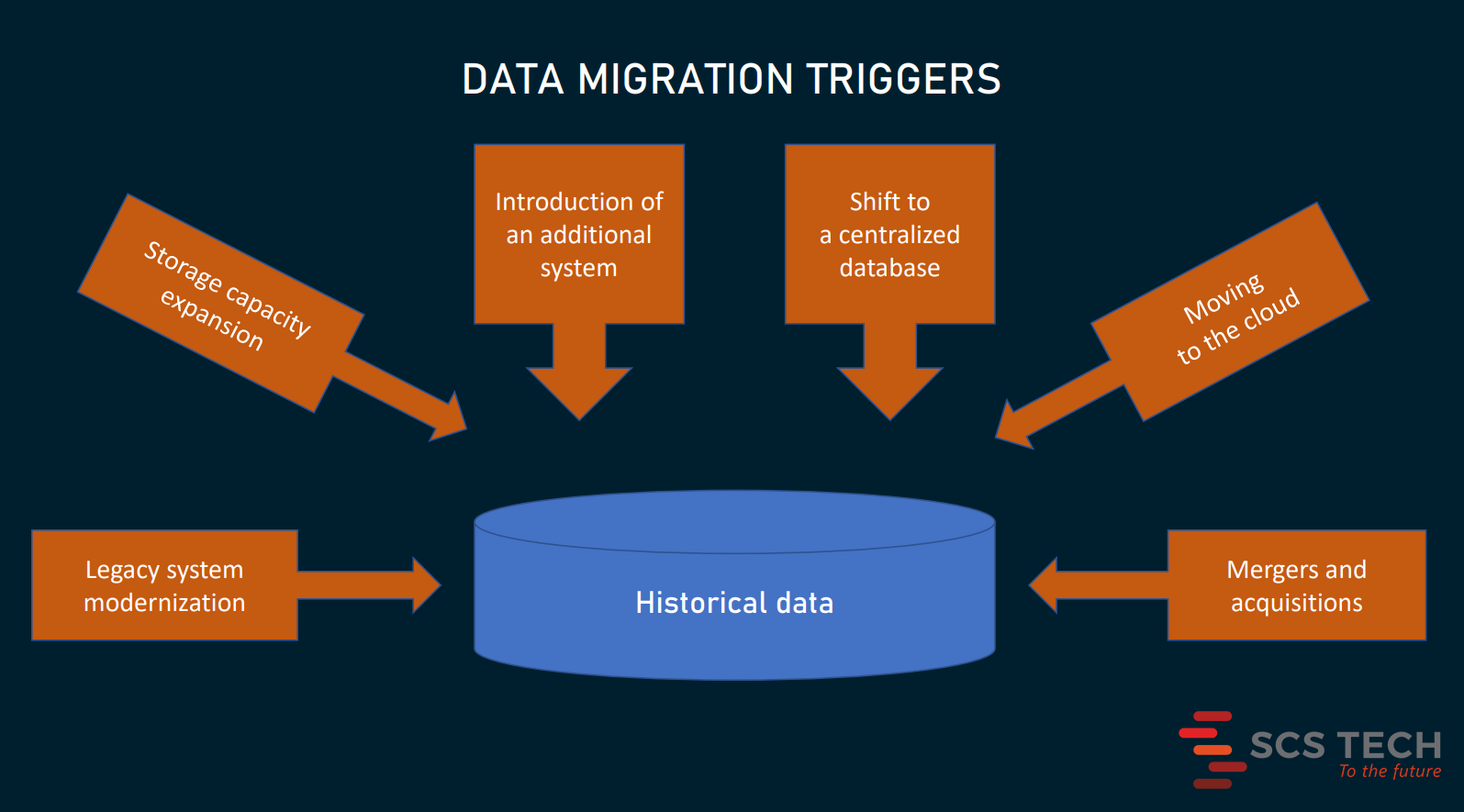
    Usually, data migration comes as a part of a larger project such as

    • legacy software modernization or replacement
    • the expansion of system and storage capacities,
    • the introduction of an additional system working alongside the existing application
    • the shift to a centralized database to eliminate data silos and achieve interoperability
    • moving IT infrastructure to the cloud, or
    • merger and acquisition (M&A) activities when IT landscapes must be consolidated into a single system.

    Data migration is sometimes confused with other processes involving massive data movements. Before we go any further, it’s important to clear up the differences between data migration, data integration, and data replication.

    Data migration vs data integration

    Unlike migration dealing with the company’s internal information, integration is about combining data from multiple sources outside and inside the company into a single view. It is an essential element of the data management strategy that enables connectivity between systems and gives access to the content across a wide array of subjects. Consolidated datasets are a prerequisite for accurate analysis, extracting business insights, and reporting.

    Data migration is a one-way journey that ends once all the information is transported to a target location. Integration, by contrast, can be a continuous process, that involves streaming real-time data and sharing information across systems.

    Data migration vs data replication

    In data migration, after the data is completely transferred to a new location, you eventually abandon the old system or database. In replication, you periodically transport data to a target location, without deleting or discarding its source. So, it has a starting point, but no defined completion time.

    Data replication can be a part of the data integration process. Also, it may turn into data migration — provided that the source storage is decommissioned.

    Now, we’ll discuss only data migration — a one-time and one-way process of moving to a new house, leaving an old one empty.

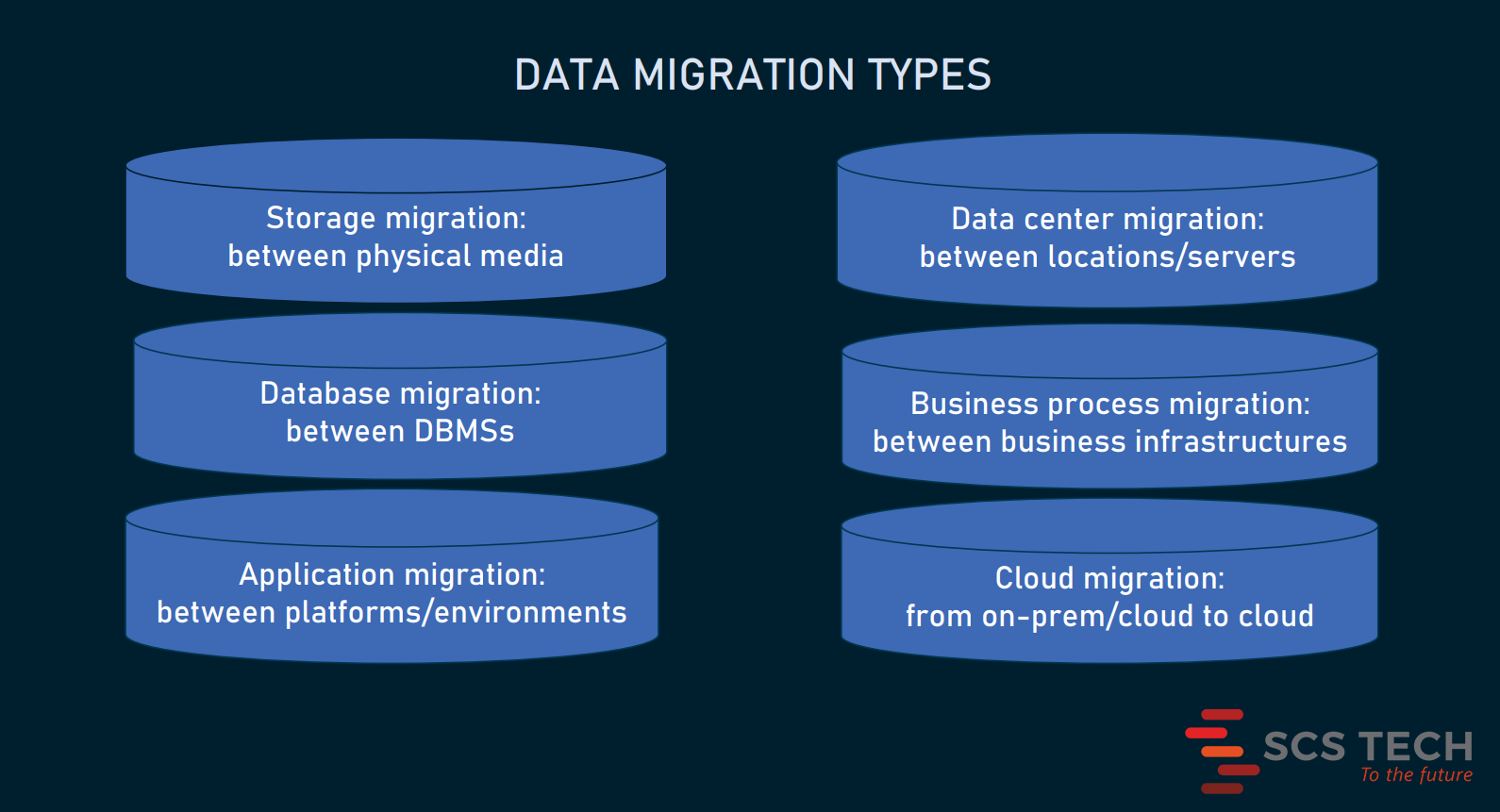
    Main types of data migration

    There are six commonly used types of data migration. However, this division is not strict. A particular case of the data transfer may belong, for example, to both database and cloud migration or involve application and database migration at the same time.

    Storage migration

    Storage migration occurs when a business acquires modern technologies discarding out-of-date equipment. This entails the transportation of data from one physical medium to another or from a physical to a virtual environment. Examples of such migrations are when you move data

    • from paper to digital documents
    • from hard disk drives (HDDs) to faster and more durable solid-state drives (SSDs), or
    • from mainframe computers to cloud storage.

    Database migration

    A database is not just a place to store data. It provides a structure to organize information in a specific way and is typically controlled via a database management system (DBMS).

    So, most of the time, database migration means

    • an upgrade to the latest version of DBMS (so-called homogeneous migration),
    • a switch to a new DBMS from a different provider — for example, from MySQL to PostgreSQL or from Oracle to MSSQL (so-called heterogeneous migration)

    The latter case is tougher than the former, especially if target and source databases support different data structures. It makes the task still more challenging when you have to move data from legacy databases — like Adabas, IMS, or IDMS.

    Application migration

    When a company changes an enterprise software vendor — for instance, a hotel implements a new property management system or a hospital replaces its legacy EHR system — this requires moving data from one computing environment to another. The key challenge here is that old and new infrastructures may have unique data models and work with different data formats.

    Data center migration

    A data center is a physical infrastructure used by organizations to keep their critical applications and data. Put more precisely, it’s the very dark room with servers, networks, switches, and other IT equipment. So, data center migration can mean different things: from relocation of existing computers and wires to other premises to moving all digital assets, including data and business applications to new servers and storages.

    Business process migration

    This type of migration is driven by mergers and acquisitions, business optimization, or reorganization to address competitive challenges or enter new markets. All these changes may require the transfer of business applications and databases with data on customers, products, and operations to the new environment.

    Cloud migration

    Cloud migration is a popular term that embraces all the above-mentioned cases, if they involve moving data from on-premises to the cloud or between different cloud environments. Gartner expects that by 2024 the cloud will attract over 45 percent of IT spending and dominate ever-growing numbers of IT decisions.

    Depending on volumes of data and differences between source and target locations, migration can take from some 30 minutes to months and even years. The complexity of the project and the cost of downtime will define how exactly to unwrap the process.

    Approaches to data migration

    Choosing the right approach to migration is the first step to ensure that the project will run smoothly, with no severe delays.

    Big bang data migration

    Advantages: less costly, less complex, takes less time, all changes happen once

    Disadvantages: a high risk of expensive failure, requires downtime

    In a big bang scenario, you move all data assets from source to target environment in one operation, within a relatively short time window.