Tag: Future Technology

  • How to Audit Your Existing Tech Stack Before Starting a Digital Transformation Project

    How to Audit Your Existing Tech Stack Before Starting a Digital Transformation Project

    Before you begin any digital transformations, you need to see what you’ve got. Most teams are using dozens of tools throughout their departments, and for the most part, they are underutilized, do not connect with one another, or are not in alignment with the current objectives. 

    The tech stack audit is what helps you identify your tools, how they fit together, and where you have gaps or threats. If you haven’t done this process, even the best digital plans can wilt due to slowdowns, increased expenses, or breaches of security.

    This guide guides you step-by-step in how to do an audit of your stack properly, so your digital transformation starts from a good foundation, not with new software.

    What Is a Tech Stack Audit?

    A tech stack audit reviews all the software, platforms, and integrations being used in your business. It checks how well these components integrate, how well they execute, and how they align with your digital transformation goals.

    A fragmented or outdated stack can slow progress and increase risk. According to Struto, outdated or incompatible tools “can hinder performance, compromise security, and impede the ability to scale.”

    Poor data, redundant tools, and technical debt are common issues. Poor team morale and inefficiencies ensue, according to Brightdials, as stacks become unstructured or unmaintained.
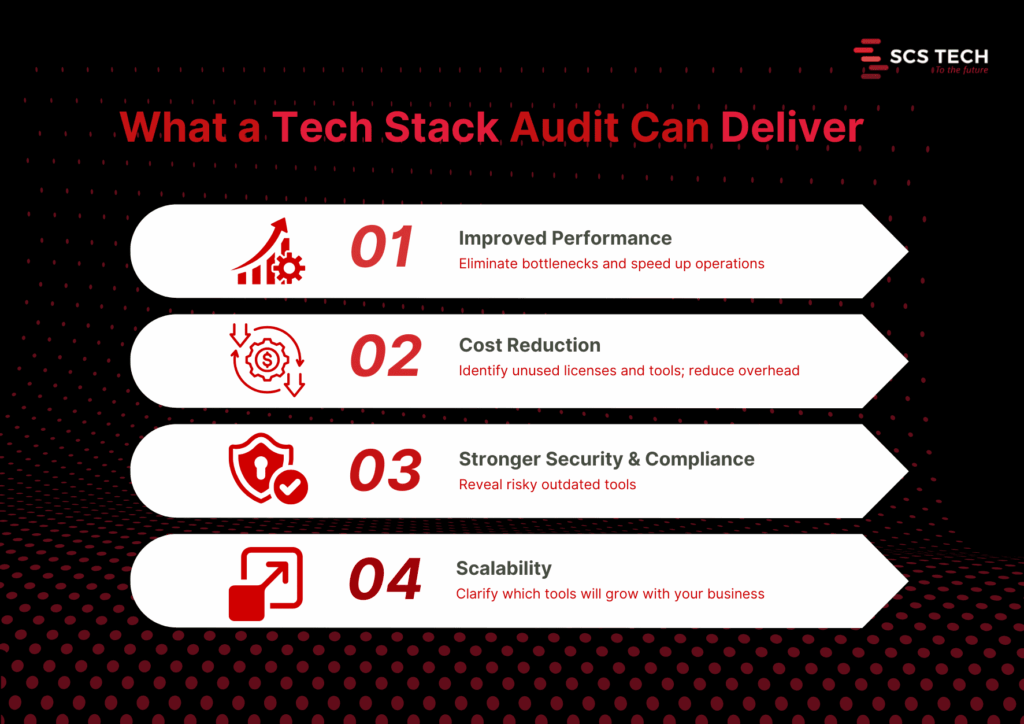
    Core benefits of a thorough audit

    1. Improved performance. Audits reveal system slowdowns and bottlenecks. Fixing them can lead to faster response times and higher user satisfaction. Streamlining outdated systems through tech digital solutions can unlock performance gains that weren’t previously possible.
    2. Cost reduction. You may discover unneeded licenses, redundant software, or shadow IT. One firm saved $20,000 annually after it discovered a few unused tools.
    3. Improved security and compliance. Auditing reveals stale or exposed pieces. It avoids compliance mistakes and reduces the attack surface.
    4. Better scalability and future-proofing. An audit shows what tools will be scalable with growth or need to be replaced before new needs drive them beyond their usefulness.

    Step-by-Step Process to Conduct a Tech Stack Audit

    It is only logical to understand what you already have and how well it is working before you begin any digital transformation program. The majority of organizations go in for new tools and platforms without checking their current systems properly. That leads to problems later on.

    A systematic tech stack review makes sense. It will inform you about what to keep, what to phase out, and what to upgrade. More importantly, it ensures your transformation isn’t based on outdated, replicated, or fragmented systems.

    The following is the step-by-step approach we suggest, in the way that we assist teams in getting ready for effective, low-risk digital transformation.

    Step 1: Create a Complete Inventory of Your Tech Stack

    Start by listing every tool, platform, and integration your organization currently uses. This includes everything from your core infrastructure (servers, databases, CRMs, ERPs) to communication tools, collaboration apps, third-party integrations, and internal utilities developed in-house.

    And it needs to be complete, not skimpy.

    Go by department or function. So:

    • Marketing may be employing an email automation tool, a customer data platform, social scheduling apps, and analytics dashboards.
    • Sales can have CRM, proposal tools, contract administration, and billing integration.
    • Operations can have inventory platforms, scheduling tools, and reporting tools.
    • IT will deal with infrastructure, security, endpoint management, identity access, and monitoring tools.

    Also account for:

    • Licensing details: Is the tool actively paid for or in trial phase?
    • Usage level: Is the team using it daily, occasionally, or not at all?
    • Ownership: Who’s responsible for managing the tool internally?
    • Integration points: Does this tool connect with other systems or stand alone?

    Be careful to include tools that are rarely talked about, like those used by one specific team, or tools procured by individual managers outside of central IT (also known as shadow IT).

    A good inventory gives you visibility. Without it, you will probably go about attempting to modernize against tools that you didn’t know were still running or lose the opportunity to consolidate where it makes sense.

    We recommend keeping this inventory in a shared spreadsheet or software auditing tool. Keep it up to date with all stakeholders before progressing to the next stage of the audit. This is often where a digital transformation consultancy can provide a clear-eyed perspective and structured direction.

    Step 2: Evaluate Usage, Cost, and ROI of Each Tool

    Having now made a list of all tools, the next thing is to evaluate if each one is worth retaining. This involves evaluating three things: how much it is being used, its cost, and what real value it provides.

    Start with usage. Talk to the teams who are using each one. Is it part of their regular workflow? Do they use one specific feature or the whole thing? If adoption is low or spotty, it’s a flag to go deeper. Teams tend to stick with a tool just because they know it, more than because it’s the best option.

    Then consider the price. That is the direct cost, such as subscription, license, and renewal. But don’t leave it at that. Add concealed costs: support, training, and the time wasted on troubleshooting. Two resources might have equal initial costs, but the resource that delays or requires constant aid has a higher cost.

    Last but not least, emphasize ROI. This is usually the neglected section. A tool might be used extensively and cheaply, yet it does not automatically mean it performs well. Ask:

    • Does it help your team accomplish objectives faster?
    • Has efficiency or manual labor improved?
    • Has an impact been made that can be measured, e.g., faster onboarding, better customer response time, or cleaner data?

    You don’t need complex math for this—just simple answers. If a tool is costing more than it returns or if a better alternative exists, it must be tagged for replacement, consolidation, or elimination.

    A digital transformation consultant can help you assess ROI with fresh objectivity and prevent emotional attachment from skewing decisions. This ensures that your transformation starts with tools that make progress and not just occupy budget space.

    Step 3: Map Data Flow and System Integrations

    Start by charting how data moves through your systems. How does it begin? Where does it go next? What devices send or receive data, and in what format? This is to pull out the form behind your operations, customer journey, reporting, collaboration, automation, etc.

    Break it up by function:

    • Is your CRM feeding back to your email system?
    • Is your ERP pumping data into inventory or logistics software?
    • How is data from customer support synced with billing or account teams?

    Map these flows visually or in a shared document. List each tool, the data it shares, where it goes, and how (manual export, API, middleware, webhook, etc.).

    While doing this, ask the following:

    • Are there any manual handoffs that slow things down or increase errors?
    • Do any of your tools depend on redundant data entry?
    • Are there any places where data needs to flow but does not?
    • Are your APIs solid, or are they perpetually patch-pending to keep working?

    This step tends to reveal some underlying problems. For instance, a tool might seem valuable when viewed in a vacuum but fails to integrate properly with the remainder of your stack, slowing teams down or building data silos.

    You’ll also likely find tools doing similar jobs in parallel, but not communicating. In those cases, either consolidate them or build better integration paths.

    The point here isn’t merely to view your tech stack; it’s to view how integrated it is. Uncluttered, reliable data flows are one of the best indications that your company is transformation-ready.

    Step 4: Identify Redundancies, Risks, and Outdated Systems

    With your tools and data flow mapped out, look at what is stopping you.

    • Start with redundancies. Do you have more than one tool to fix the same problem? If two systems are processing customer data or reporting, check to see if both are needed or if it is just a relic of an old process.
    • Scan for threats second. Tools that are outdated or tools that are no longer supported by their vendors can leave vulnerabilities. So can systems that use manual operations to function. When a tool fails and there is no defined failover, it’s a threat.
    • Then, assess for outdated systems. These are platforms that don’t integrate well, slow down teams, or can’t scale with your growth plans. Sometimes, you’ll find legacy tools still in use just because they haven’t been replaced, yet they cost more time and money to maintain.

    All of these duplicative, risky, or outdated, demands a decision: sunset it, replace it, or redefine its use. It is done now to avoid complexity in future transformation.

    Step 5: Prioritize Tools to Keep, Replace, or Retire

    With your results from the audit in front of you, sort each tool into three boxes:

    • Keep: In current use, fits well, aids current and future goals.
    • Misaligned, too narrow in scope, or outrun by better alternatives.
    • Retire: Redundant, unused, or imposes unnecessary cost or risk.

    Make decisions based on usage, ROI, integration, and team input. The simplicity of this method will allow you to build a lean, focused stack to power digital transformation without bringing legacy baggage into the future. Choosing the right tech digital solutions ensures your modernization plan aligns with both technical capability and long-term growth.

    Step 6: Build an Action Plan for Tech Stack Modernization

    Use your audit findings to give clear direction. Enumerate what must be implemented, replaced, or phased out with responsibility, timeline, and cost.

    Split it into short- and long-term considerations.

    • Short-term: purge unused tools, eliminate security vulnerabilities, and build useful integrations.
    • Long-term: timeline for new platforms, large migrations, or re-architected markets.

    This is often the phase where a digital transformation consultant can clarify priorities and keep execution grounded in ROI.

    Make sure all stakeholders are aligned by sharing the plan, assigning the work, and tracking progress. This step will turn your audit into a real upgrade roadmap ready to drive your digital transformation.

    Step 7: Set Up a Recurring Tech Stack Audit Process

    An initial audit is useful, but it’s not enough. Your tools will change. Your needs will too.

    Creating a recurring schedule to examine your stack every 6 or 12 months is suitable for most teams. Use the same checklist: usage, cost, integration, performance, and alignment with business goals.

    Make someone in charge of it. Whether it is IT, operations, or a cross-functional lead, consistency is the key.

    This allows you to catch issues sooner, and waste less, while always being prepared for future change, even if it’s not the change you’re currently designing for.

    Conclusion

    A digital transformation project can’t succeed if it’s built on top of disconnected, outdated, or unnecessary systems. That’s why a tech stack audit isn’t a nice-to-have; it’s the starting point. It helps you see what’s working, what’s getting in the way, and what needs to change before you move forward.

    Many companies turn to digital transformation consultancy at this stage to validate their findings and guide the next steps.

    By following a structured audit process, inventorying tools, evaluating usage, mapping data flows, and identifying gaps, you give your team a clear foundation for smarter decisions and smoother execution.

    If you need help assessing your current stack, a digital transformation consultant from SCSTech can guide you through a modernization plan. We work with companies to align technology with real business needs, so tools don’t just sit in your stack; they deliver measurable value. With SCSTech’s expertise in tech digital solutions, your systems evolve into assets that drive efficiency, not just cost.

  • Can RPA Work With Legacy Systems? Here’s What You Need to Know!

    Can RPA Work With Legacy Systems? Here’s What You Need to Know!

    It’s a question more IT leaders are asking as automation pressures rise and modernization budgets lag behind. 

    While robotic process automation (RPA) promises speed, scale, and relief from manual drudgery, most organizations aren’t operating in cloud-native environments. They’re still tied to legacy systems built decades ago and not exactly known for playing well with new tech.

    So, can RPA actually work with these older systems? Short answer: yes, but not without caveats. This article breaks down how RPA fits into legacy infrastructure, what gets in the way, and how smart implementation can turn technical debt into a scalable automation layer.

    Let’s get into it.

    Understanding the Compatibility Between RPA and Legacy Systems

    Legacy systems aren’t built for modern integration, but that’s exactly where RPA finds its edge. Unlike traditional automation tools that depend on APIs or backend access, RPA Services works through the user interface, mimicking human interactions with software. That means even if a system is decades old, closed off, or no longer vendor-supported, RPA can still operate on it, safely and effectively.

    This compatibility isn’t a workaround — it’s a deliberate strength. For companies running mainframes, terminal applications, or custom-built software, RPA offers a non-invasive way to automate without rewriting the entire infrastructure.

    How RPA Maintains Compatibility with Legacy Systems:

    • UI-Level Interaction: RPA tools replicate keyboard strokes, mouse clicks, and field entries, just like a human operator, regardless of how old or rigid the system is.
    • No Code-Level Dependencies: Since bots don’t rely on source code or APIs, they work even when backend integration isn’t possible.
    • Terminal Emulator Support: Most RPA platforms include support for green-screen mainframes (e.g., TN3270, VT100), enabling interaction with host-based systems.
    • OCR & Screen Scraping: For systems that don’t expose readable text, bots can use optical character recognition (OCR) to extract and process data.
    • Low-Risk Deployment: Because RPA doesn’t alter the underlying system, it poses minimal risk to legacy environments and doesn’t interfere with compliance.

    Common Challenges When Connecting RPA to Legacy Environments

    While RPA is compatible with most legacy systems on the surface, getting it to perform consistently at scale isn’t always straightforward. Legacy environments come with quirks — from unpredictable interfaces to tight access restrictions — that can compromise bot reliability and performance if not accounted for early.

    Some of the most common challenges include:

    1. Unstable or Inconsistent Interfaces

    Legacy systems often lack UI standards. A small visual change — like a shifted field or updated window — can break bot workflows. Since RPA depends on pixel- or coordinate-level recognition in these cases, any visual inconsistency can cause the automation to fail silently.

    2. Limited Access or Documentation

    Many legacy platforms have little-to-no technical documentation. Access might be locked behind outdated security protocols or hardcoded user roles. This makes initial configuration and bot design harder, especially when developers need to reverse-engineer interface logic without support from the original vendor.

    3. Latency and Response Time Issues

    Older systems may not respond at consistent speeds. RPA bots, which operate on defined wait times or expected response behavior, can get tripped up by delays, resulting in skipped steps, premature entries, or incorrect reads.

    Advanced RPA platforms allow dynamic wait conditions (e.g., “wait until this field appears”) rather than fixed timers.

    4. Citrix or Remote Desktop Environments

    Some legacy apps are hosted on Citrix or RDP setups where bots don’t “see” elements the same way they would on local machines. This forces developers to rely on image recognition or OCR, which are more fragile and require constant calibration.

    5. Security and Compliance Constraints

    Many legacy systems are tied into regulated environments — banking, utilities, government — where change control is strict. Even though RPA is non-invasive, introducing bots may still require IT governance reviews, user credential rules, and audit trails to pass compliance.

    Best Practices for Implementing RPA with Legacy Systems

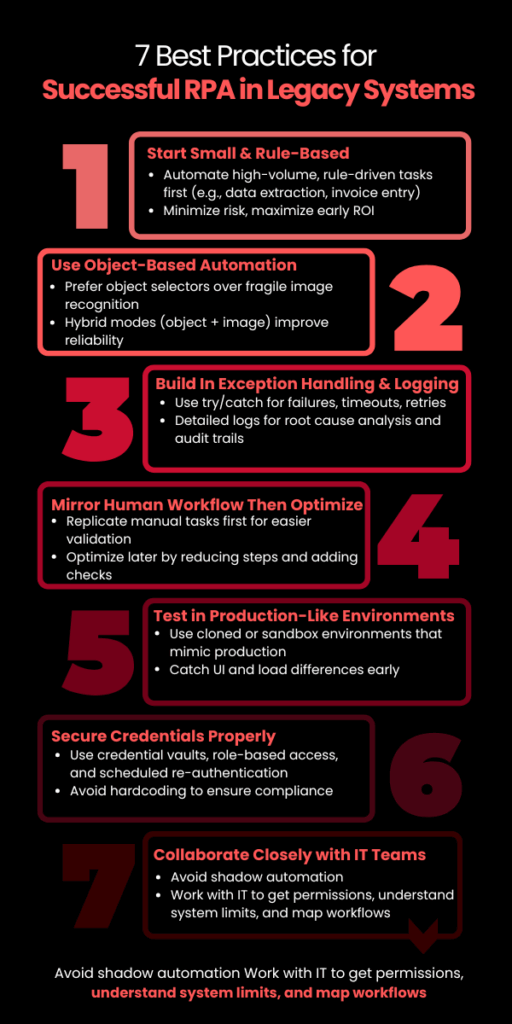
    Best Practices for Successful RPA in Legacy Systems

    Implementing RPA Development Services in a legacy environment is not plug-and-play. While modern RPA platforms are built to adapt, success still depends on how well you prepare the environment, design the workflows, and choose the right processes.

    Here are the most critical best practices:

    1. Start with High-Volume, Rule-Based Tasks

    Legacy systems often run mission-critical functions. Instead of starting with core processes, begin with non-invasive, rule-driven workflows like:

    • Data extraction from mainframe screens
    • Invoice entry or reconciliation
    • Batch report generation

    These use cases deliver ROI fast and avoid touching business logic, minimizing risk. 

    2. Use Object-Based Automation Where Possible

    When dealing with older apps, UI selectors (object-based interactions) are more stable than image recognition. But not all legacy systems expose selectors. Identify which parts of the system support object detection and prioritize automations there.

    Tools like UiPath and Blue Prism offer hybrid modes (object + image) — use them strategically to improve reliability.

    3. Build In Exception Handling and Logging from Day One

    Legacy systems can behave unpredictably — failed logins, unexpected pop-ups, or slow responses are common. RPA bots should be designed with:

    • Try/catch blocks for known failures
    • Timeouts and retries for latency
    • Detailed logging for root-cause analysis

    Without this, bot failures may go undetected, leading to invisible operational errors — a major risk in high-compliance environments.

    4. Mirror the Human Workflow First — Then Optimize

    Start by replicating how a human would perform the task in the legacy system. This ensures functional parity and easier stakeholder validation. Once stable, optimize:

    • Reduce screen-switches
    • Automate parallel steps
    • Add validations that the system lacks

    This phased approach avoids early overengineering and builds trust in automation.

    5. Test in Production-Like Environments

    Testing legacy automation in a sandbox that doesn’t behave like production is a common failure point. Use a cloned environment with real data or test after hours in production with read-only roles, if available.

    Legacy UIs often behave differently depending on screen resolution, load, or session type — catch this early before scaling.

    6. Secure Credentials with Vaults or IAM

    Hardcoding credentials for bots in legacy systems is a major compliance red flag. Use:

    • RPA-native credential vaults (e.g., CyberArk integrations)
    • Role-based access controls
    • Scheduled re-authentication policies

    This reduces security risk while keeping audit logs clean for governance teams.

    7. Loop in IT, Not Just Business Teams

    Legacy systems are often undocumented or supported by a single internal team. Avoid shadow automation. Work with IT early to:

    • Map workflows accurately
    • Get access permissions
    • Understand system limitations

    Collaboration here prevents automation from becoming brittle or blocked post-deployment.

    RPA in legacy environments is less about brute-force automation and more about thoughtful design under constraint. Build with the assumption that things will break — and then build workflows that recover fast, log clearly, and scale without manual patchwork.

    Is RPA a Long-Term Solution for Legacy Systems?

    Yes, but only when used strategically. 

    RPA isn’t a forever fix for legacy systems, but it is a durable bridge, one that buys time, improves efficiency, and reduces operational friction while companies modernize at their own pace.

    For utility, finance, and logistics firms still dependent on legacy environments, RPA offers years of viable value when:

    • Deployed with resilience and security in mind
    • Designed around the system’s constraints, not against them
    • Scaled through a clear governance model

    However, RPA won’t modernize the core, it enhances what already exists. For long-term ROI, companies must pair automation with a roadmap that includes modernization or system transformation in parallel.

    This is where SCSTech steps in. We don’t treat robotic process automation as a tool; we approach it as a tactical asset inside larger modernization strategy. Whether you’re working with green-screen terminals, aging ERP modules, or disconnected data silos, our team helps you implement automation that’s reliable now, but aligned with where your infrastructure needs to go.

  • The Future of Disaster Recovery: Leveraging Cloud Solutions for Business Continuity

    The Future of Disaster Recovery: Leveraging Cloud Solutions for Business Continuity

    Because “It Won’t Happen to Us” Is No Longer a Strategy

    Let’s face it—most businesses don’t think about disaster recovery until it’s already too late.

    A single ransomware attack, server crash, or regional outage can halt operations in seconds. And when that happens, the clock starts ticking on your company’s survival.

    According to FEMA, over 90% of businesses without a disaster recovery plan shut down within a year of a major disruption.

    That’s not just a stat—it’s a risk you can’t afford to ignore.

    Today’s threats are faster, more complex, and less predictable than ever. From ransomware attacks to cyclones, unpredictability is the new normal—despite advancements in methods to predict natural disasters, business continuity still hinges on how quickly systems recover.

    This article breaks down:

    • What’s broken in traditional DR
    • Why cloud solutions offer a smarter path forward
    • How to future-proof your business with a partner like SCS Tech India

    If you’re responsible for keeping your systems resilient, this is what you need to know—before the next disaster strikes.

    Why Traditional Disaster Recovery Fails Modern Businesses

    Even the best disaster prediction models can’t prevent outages. Whether it’s an unanticipated flood, power grid failure, or cyberattack, traditional DR struggles to recover systems in time.

    Disaster recovery used to mean racks of hardware, magnetic tapes, and periodic backup drills that were more hopeful than reliable. But that model was built for a slower world.

    Today, business moves faster than ever—and so do disasters.

    Here’s why traditional DR simply doesn’t keep up:

    • High CapEx, Low ROI: Hardware, licenses, and maintenance costs pile up, even when systems are idle 99% of the time.
    • Painfully Long Recovery Windows: When recovery takes hours or days, every minute of downtime costs real money. According to IDC, Indian enterprises lose up to ₹3.5 lakh per hour of IT downtime.
    • Single Point of Failure: On-prem infrastructure is vulnerable to floods, fire, and power loss. If your backup’s in the building—it’s going down with it.

    The Cloud DR Advantage: Real-Time, Real Resilience

    Cloud-based Disaster Recovery (Cloud DR) flips the traditional playbook. It decentralises your risk, shortens your downtime, and builds a smarter failover system that doesn’t collapse under pressure.

    Let’s dig into the core advantages, not just as bullet points—but as strategic pillars for modern businesses.

    1. No CapEx Drain — Shift to a Fully Utilized OPEX Model

    Capital-intensive. You pre-purchase backup servers, storage arrays, and co-location agreements that remain idle 95% of the time. Average CapEx for a traditional DR site in India? ₹15–25 lakhs upfront for a mid-sized enterprise (IDC, 2023).

    Everything is usage-based. Compute, storage, replication, failover—you pay for what you use. Platforms like AWS Elastic Disaster Recovery (AWS DRS) or Azure Site Recovery (ASR) offer DR as a service, fully managed, without owning any physical infrastructure.

    According to TechTarget (2022), organisations switching to cloud DR reported up to 64% cost reduction in year-one DR operations.

    2. Recovery Time (RTO) and Data Loss (RPO): Quantifiable, Testable, Guaranteed

    Forget ambiguous promises.

    With traditional DR:

    • Average RTO: 4–8 hours (often manual)
    • RPO: Last backup—can be 12 to 24 hours behind
    • Test frequency: Once a year (if ever), with high risk of false confidence

    With Cloud DR:

    • RTO: As low as <15 minutes, depending on setup (continuous replication vs. scheduled snapshots)
    • RPO: Often <5 minutes with real-time sync engines
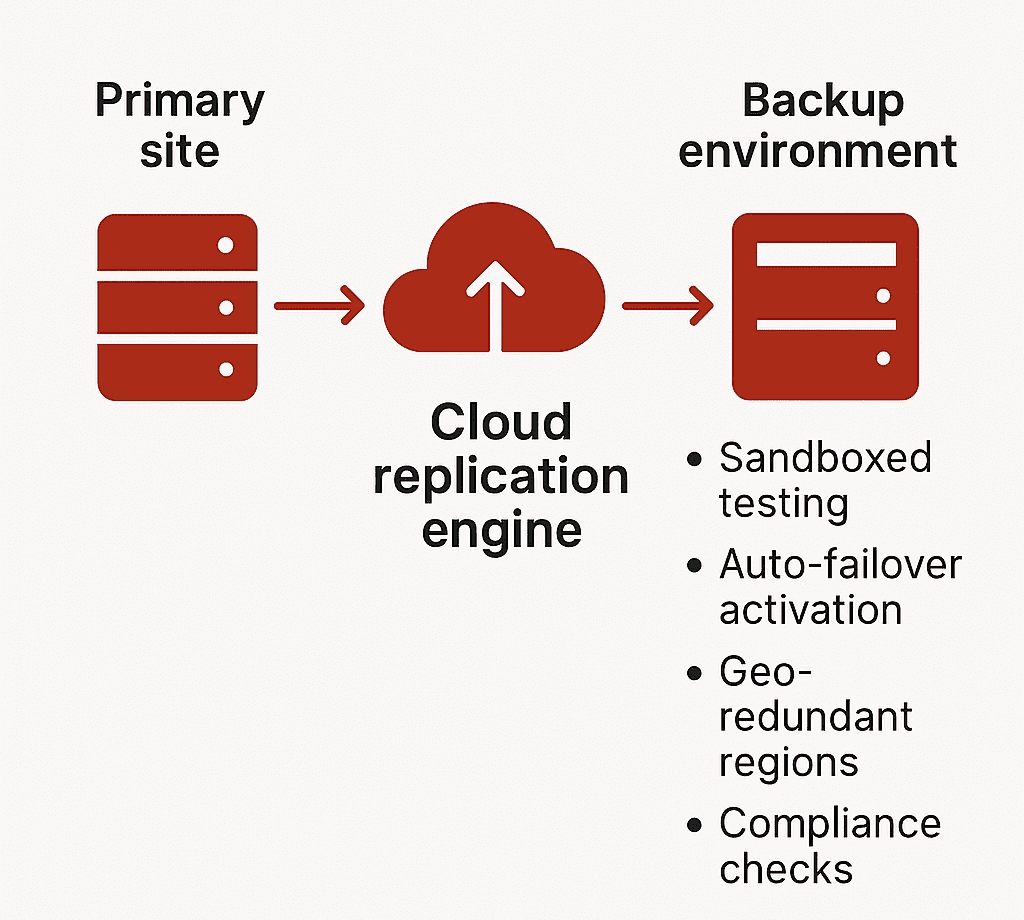
    • Testing: Sandboxed testing environments allow monthly (or even weekly) drills without production downtime

    Zerto, a leading DRaaS provider, offers continuous journal-based replication with sub-10-second RPOs for virtualised workloads. Their DR drills do not affect live environments.

    Many regulated sectors (like BFSI in India) now require documented evidence of tested RTO/RPO per RBI/IRDAI guidelines.

    3. Geo-Redundancy and Compliance: Not Optional, Built-In

    Cloud DR replicates your workloads across availability zones or even continents—something traditional DR setups struggle with.

    Example Setup with AWS:

    • Production in Mumbai (ap-south-1)
    • DR in Singapore (ap-southeast-1)
    • Failover latency: 40–60 ms round-trip (acceptable for most critical workloads)

    Data Residency Considerations: India’s Personal Data Protection Bill (DPDP 2023) and sector-specific mandates (e.g., RBI Circular on IT Framework for NBFCs) require in-country failover for sensitive workloads. Cloud DR allows selective geo-redundancy—regulatory workloads stay in India, others failover globally.

    4. Built for Coexistence, Not Replacement

    You don’t need to migrate 100% to cloud. Cloud DR can plug into your current stack.

    Supported Workloads:

    • VMware, Hyper-V virtual machines
    • Physical servers (Windows/Linux)
    • Microsoft SQL, Oracle, SAP HANA
    • File servers and unstructured storage

    Tools like:

    • Azure Site Recovery: Supports agent-based and agentless options
    • AWS CloudEndure: Full image-based replication across OS types
    • Veeam Backup & Replication: Hybrid environments, integrates with on-prem NAS and S3-compatible storage

    Testing Environments: Cloud DR allows isolated recovery environments for DR testing—without interrupting live operations. This means CIOs can validate RPOs monthly, report it to auditors, and fix configuration drift proactively.

    What Is Cloud-Based Disaster Recovery (Cloud DR)?

    Cloud-based Disaster Recovery is a real-time, policy-driven replication and recovery framework—not a passive backup solution.

    Where traditional backup captures static snapshots of your data, Cloud DR replicates full workloads—including compute, storage, and network configurations—into a cloud-hosted recovery environment that can be activated instantly in the event of disruption.

    This is not just about storing data offsite. It’s about ensuring uninterrupted access to mission-critical systems through orchestrated failover, tested RTO/RPO thresholds, and continuous monitoring.

    Cloud DR enables:

    • Rapid restoration of systems without manual intervention
    • Continuity of business operations during infrastructure-level failures
    • Seamless experience for end users, with no visible downtime

    It delivers recovery with precision, speed, and verifiability—core requirements for compliance-heavy and customer-facing sectors.

    Architecture of a typical Cloud DR solution


    Types of Cloud DR Solutions

    Every cloud-based recovery solution is not created equal. Distinguishing between Backup-as-a-Service (BaaS) and Disaster Recovery-as-a-Service (DRaaS) is critical when evaluating protection for production workloads.

    1. Backup-as-a-Service (BaaS)

    • Offsite storage of files, databases, and VM snapshots
    • Lacks pre-configured compute or networking components
    • Recovery is manual and time-intensive
    • Suitable for non-time-sensitive, archival workloads

    Use cases: Email logs, compliance archives, shared file systems. BaaS is part of a data retention strategy, not a business continuity plan.

    2. Disaster Recovery-as-a-Service (DRaaS)

    • Full replication of production environments including OS, apps, data, and network settings
    • Automated failover and failback with predefined runbooks
    • SLA-backed RTOs and RPOs
    • Integrated monitoring, compliance tracking, and security features

    Use cases: Core applications, ERP, real-time databases, high-availability systems

    Providers like AWS Elastic Disaster Recovery, Azure Site Recovery, and Zerto deliver end-to-end DR capabilities that support both planned migrations and emergency failovers. These platforms aren’t limited to restoring data—they maintain operational continuity at an infrastructure scale.

    Steps to Transition to a Cloud-Based DR Strategy

    Transitioning to cloud DR is not a plug-and-play activity. It requires an integrated strategy, tailored architecture, and disciplined testing cadence. Below is a framework that aligns both IT and business priorities.

    1. Assess Current Infrastructure and Risk

      • Catalog workloads, VM specifications, data volumes, and interdependencies
      • Identify critical systems with zero-tolerance for downtime
      • Evaluate vulnerability points across hardware, power, and connectivity layers. Incorporate insights from early-warning tools or methods to predict natural disasters—such as flood zones, seismic zones, or storm-prone regions—into your risk model.
    • Conduct a Business Impact Analysis (BIA) to quantify recovery cost thresholds

    Without clear downtime impact data, recovery targets will be arbitrary—and likely insufficient.

    2. Define Business-Critical Applications

    • Segment workloads into tiers based on RTO/RPO sensitivity
    • Prioritize applications that generate direct revenue or enable operational throughput
    • Establish technical recovery objectives per workload category

    Focus DR investments on the 10–15% of systems where downtime equates to measurable business loss.

    3. Evaluate Cloud DR Providers

    Assess the technical depth and compliance coverage of each platform. Look beyond cost.

    Evaluation Checklist:

    • Does the platform support your hypervisor, OS, and database stack?
    • Are Indian data residency and sector-specific regulations addressed?
    • Can the provider deliver testable RTO/RPO metrics under simulated load?
    • Is sandboxed DR testing supported for non-intrusive validation?

    Providers should offer reference architectures, not generic templates.

    4. Create a Custom DR Plan

    • Define failover topology: cold, warm, or hot standby
    • Map DNS redirection, network access rules, and IP range failover strategy
    • Automate orchestration using Infrastructure-as-Code (IaC) for replicability
    • Document roles, SOPs, and escalation paths for DR execution

    A DR plan must be auditable, testable, and aligned with ongoing infrastructure updates.

    5. Run DR Drills and Simulations

    • Simulate both full and partial outage scenarios
    • Validate technical execution and team readiness under realistic conditions
    • Monitor deviation from expected RTOs and RPOs
    • Document outcomes and remediate configuration or process gaps

    Testing is not optional—it’s the only reliable way to validate DR readiness.

    6. Monitor, Test, and Update Continuously

    • Integrate DR health checks into your observability stack
    • Track replication lag, failover readiness, and configuration drift
    • Schedule periodic tests (monthly for critical systems, quarterly full-scale)
    • Adjust DR policies as infrastructure, compliance, or business needs evolve

    DR is not a static function. It must evolve with your technology landscape and risk profile.

    Don’t Wait for Disruption to Expose the Gaps

    The cost of downtime isn’t theoretical—it’s measurable, and immediate. While others recover in minutes, delayed action could cost you customers, compliance, and credibility.

    Take the next step:

    • Evaluate your current disaster recovery architecture
    • Identify failure points across compute, storage, and network layers
    • Define RTO/RPO metrics aligned with your most critical systems
    • Leverage AI-powered observability for predictive failure detection—not just for IT, but to integrate methods to predict natural disasters into your broader risk mitigation strategy.

    Connect with SCS Tech India to architect a cloud-based disaster recovery solution that meets your compliance needs, scales with your infrastructure, and delivers rapid, reliable failover when it matters most.

  • How RPA is Redefining Customer Service Operations in 2025

    How RPA is Redefining Customer Service Operations in 2025

    Customer service isn’t broken, but it’s slow.

    Tickets stack up. Agents switch between tools. Small issues turn into delays—not because people aren’t working, but because processes aren’t designed to handle volume.

    By 2025, this is less about headcount and more about removing steps that don’t need humans.

    That’s where the robotic process automation service (RPA) fits. It handles the repeatable parts—status updates, data entry, and routing—so your team can focus on exceptions.

    Deloitte reports that 73% of companies using RPA in service functions saw faster response times and reduced costs for routine tasks by up to 60%.

    Let’s look at how RPA is redefining what great customer service actually looks like—and where smart companies are already ahead of the curve.

    What’s Really Slowing Your Team Down (Even If They’re Performing Well)

    If your team is resolving tickets on time but still falling behind, the issue isn’t talent or effort—it’s workflow design.

    In most mid-sized service operations, over 60% of an agent’s day is spent not resolving customer queries, but navigating disconnected systems, repeating manual inputs, or chasing internal handoffs. That’s not inefficiency—it’s architectural debt.

    Here’s what that looks like in practice:

    • Agents switch between 3–5 tools to close a single case
    • CRM fields require double entry into downstream systems for compliance or reporting
    • Ticket updates rely on batch processing, which delays real-time tracking
    • Status emails, internal escalations, and customer callbacks all follow separate workflows

    Each step seems minor on its own. But at scale, they add up to hours of non-value work—per rep, per day.

    Customer Agent Journey

    A Forrester study commissioned by BMC found a major disconnect between what business teams experience and what IT assumes. The result? Productivity losses and a customer experience that slips, even when your people are doing everything right.

    RPA addresses this head-on—not by redesigning your entire tech stack, but by automating the repeatable steps that shouldn’t need a human in the loop in the first place.

    When deployed correctly, RPA becomes the connective layer between systems, making routine actions invisible to the agent. What they experience instead: is more time on actual support and less time on redundant workflows.

    So, What Is RPA Actually Doing in Customer Service?

    In 2025, RPA in customer service is no longer a proof-of-concept or pilot experiment—it’s a critical operations layer.

    Unlike chatbots or AI agents that face the customer, RPA works behind the scenes, orchestrating tasks that used to require constant agent attention but added no real value.

    And it’s doing this at scale.

    What RPA Is Really Automating

    A recent Everest Group CXM study revealed that nearly 70% of enterprises using RPA in customer experience management (CXM) have moved beyond experimentation and embedded bots as a permanent fixture in their service delivery architecture.

    So, what exactly is RPA doing today in customer service operations?

    Here are the three highest-impact RPA use cases in customer service today, based on current enterprise deployments:

    1. End-to-End Data Coordination Across Systems

    In most service centers—especially those using legacy CRMs, ERPs, and compliance platforms—agents have to manually toggle between tools to view, verify, or update information.

    This is where RPA shines.

    RPA bots integrate with legacy and modern platforms alike, performing tasks like:

    • Pulling customer purchase or support history from ERP systems
    • Verifying eligibility or warranty status across databases
    • Copying ticket information into downstream reporting systems
    • Syncing status changes across CRM and dispatch tools

    In a documented deployment by Infosys, BPM, a Fortune 500 telecom company, faced a high average handle time (AHT) due to system fragmentation. By introducing RPA bots that handled backend lookups and updates across CRM, billing, and field-service systems, the company reduced AHT by 32% and improved first-contact resolution by 22%—all without altering the front-end agent experience.

    2. Automated Case Closure and Wrap-Up Actions

    The hidden drain on service productivity isn’t always the customer interaction—it’s what happens after. Agents are often required to:

    • Update multiple CRM fields
    • Trigger confirmation emails
    • Document case resolutions
    • Notify internal stakeholders
    • Apply classification tags

    These are low-value but necessary. And they add up—2–4 minutes per ticket.

    What RPA does: As soon as a case is resolved, a bot can:

    • Automatically update CRM fields
    • Send templated but personalized confirmation emails
    • Trigger workflows (like refunds or part replacements)
    • Close out tickets and prepare them for analytics
    • Route summaries to quality assurance teams

    In a UiPath case study, a European airline implemented RPA bots across post-interaction workflows. The bots performed tasks like seat change confirmation, fare refund logging, and CRM note entry. Over one quarter, the bots saved over 15,000 agent hours and contributed to a 14% increase in CSAT, due to faster resolution closure and improved response tracking.

    3. Real-Time Ticket Categorization and Routing

    Not all tickets are created equal. A delay in routing a complaint to Tier 2 support or failing to flag a potential SLA breach can cost more than just time—it damages trust.

    Before RPA, ticket routing depended on either agent discretion or hard-coded rules, which often led to misclassification, escalation delays, or manual queues.

    RPA bots now triage tickets in real-time, using conditional logic, keywords, customer history, and even metadata from email or chat submissions.

    This enables:

    • Immediate routing to the correct queue
    • Auto-prioritization based on SLA or customer tier
    • Early alerts for complaints, cancellations, or churn indicators
    • Assignment to the most suitable rep or team

    Deloitte’s 2023 Global Contact Center Survey notes that over 47% of RPA-enabled contact centers use robotic process automation to handle ticket classification, contributing to first-response time improvements between 35–55%, depending on volume and complexity.

    4. Proactive Workflow Monitoring and Error Reduction

    RPA in 2025 goes beyond just triggering actions. With built-in logic and integrations into workflow monitoring tools, bots can now detect anomalies and automatically:

    • Alert supervisors of stalled tickets
    • Escalate SLA risks
    • Retry failed data transfers
    • Initiate fallback workflows

    This transforms RPA from a “task doer” to a workflow sentinel, proactively removing bottlenecks before they affect CX.

    Why Smart Teams Still Delay RPA—Until the Cost Becomes Visible

    Let’s be honest—RPA isn’t new. But the readiness of the ecosystem is.

    Five years ago, automating customer service workflows meant expensive integrations, complex IT lift, and months of change management. Today, vendors offer pre-built bots, cloud deployment, and low-code interfaces that let you go from idea to implementation in weeks.

    So why are so many teams still holding back?

    Because the tipping point isn’t technical. It’s psychological.

    There’s a belief that improving CX means expensive software, new teams, or a full system overhaul. But in reality, some of the biggest gains come from simply taking the repeatable tasks off your team’s plate—and giving them to software that won’t forget, fatigue, or fumble under pressure.

    The longer you wait, the wider the performance gap grows—not just between you and your competitors, but between what your team could be doing and what they’re still stuck with.

    Before You Automate: Do This First

    You don’t need a six-month consulting engagement to begin. Start here:

    • List your 10 most repetitive customer service tasks
      (e.g., ticket tagging, CRM updates, refund processing)
    • Estimate how much time each task eats up daily
      (per agent or team-wide)
    • Ask: What value would it unlock if a bot handled this?
      (Faster SLAs? More capacity for complex issues? Happier agents?)

    This is your first-pass robotic process automation roadmap—not an overhaul, just a smarter delegation plan. And this is where consultative automation makes all the difference.

    Don’t Deploy Bots. Rethink Workflows First.

    You don’t need to automate everything.

    You need to automate the right things—the tasks that:

    • Slow your team down
    • Introduce risk through human error
    • Offer zero value to the customer
    • Scale poorly with volume

    When you get those out of the way, everything else accelerates—without changing your tech stack or budget structure.

    RPA isn’t replacing your service team. It’s protecting them from work that was never meant for humans in the first place.

    Automate the Work That Slows You Down Most

    If you’re even thinking about robotic process automation services in India, you’re already behind companies that are saving hours per day through precise robotic process automation.

    At SCS Tech India, we don’t just deploy bots—we help you:

    • Identify the 3–5 highest-impact workflows to automate
    • Integrate seamlessly with your existing systems
    • Launch fast, scale safely, and see results in weeks

    Whether you need help mapping your workflows or you’re ready to deploy, let’s have a conversation that moves you forward.

    FAQs

    What kinds of customer service tasks are actually worth automating first?

    Start with tasks that are rule-based, repetitive, and time-consuming—but don’t require judgment or empathy. For example:

    • Pulling and syncing customer data across tools
    • Categorizing and routing tickets
    • Sending follow-up messages or escalations
    • Updating CRM fields after resolution

    If your agents say “I do this 20 times a day and it never changes,” that’s a green light for robotic process automation.

    Will my team need to learn how to code or maintain these bots?

    No. Most modern RPA solutions come with low-code or no-code interfaces. Once the initial setup is done by your robotic process automation partner, ongoing management is simple—often handled by your internal ops or IT team with minimal training.

    And if you work with a vendor like SCS Tech, ongoing support is part of the package, so you’re not left troubleshooting on your own.

    What happens if our processes change? Will we need to rebuild everything?

    Good question—and no, not usually. One of the advantages of mature RPA platforms is that they’re modular and adaptable. If a field moves in your CRM or a step changes in your workflow, the bot logic can be updated without rebuilding from scratch.

    That’s why starting with a well-structured automation roadmap matters—it sets you up to scale and adapt with ease.

  • How Digital Twins Transform Asset & Infrastructure Management in Oil and Gas Technology Solutions

    How Digital Twins Transform Asset & Infrastructure Management in Oil and Gas Technology Solutions

    What if breakdowns could be predicted before they become expensive shutdowns? In an age where reliability is everything, avoiding failures before they occur can prevent millions of dollars in losses. With real-time visibility, digital twin technology can make it happen to guarantee seamless operations even in the most demanding environments.

    Based on industry reports, organizations that utilize digital twins have seen their equipment downtime decrease by as much as 20% and overall equipment effectiveness increase by as much as 15%. In cost terms, that translates to more than millions annually. These kinds of figures are what make the application of digital twins today a strategic imperative.

    In this blog, let us understand how digital twins redefine bare operational spaces in oil and gas technology solutions: predictive maintenance, asset performance, and sustainability.

    How Digital Twins Improve Asset and Infrastructure Management in Oil and Gas Technology Solutions?

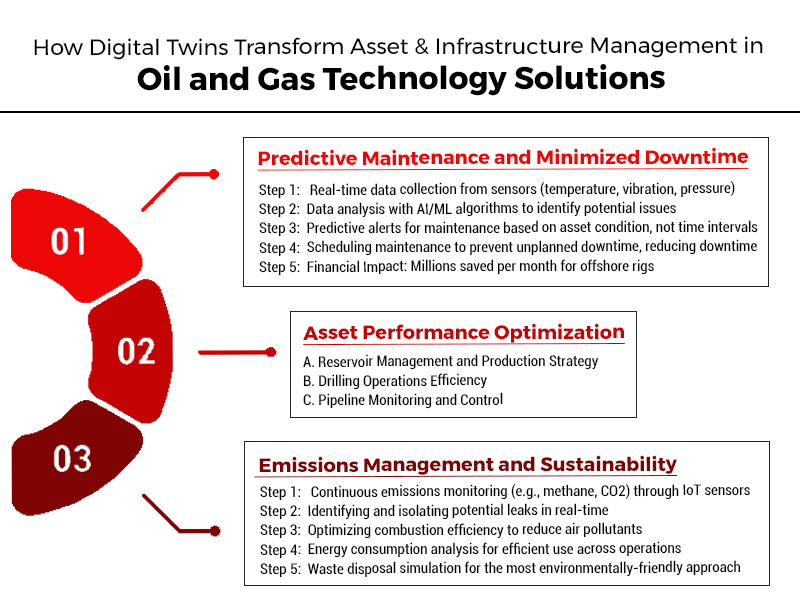
    1. Predictive Maintenance and Minimized Downtime

    Digital twins ensure intelligent maintenance by transitioning from time-based to condition-based maintenance, using real-time analysis to foretell equipment issues before they are severe.

    • Real-Time Health Monitoring: Digital twins also gather real-time data from sensors installed on pumps, compressors, turbines, and drilling equipment. Among the parameters constantly monitored are the vibration rates, pressure waves, and thermal trends, which may be used in monitoring for indicators of wear and impending failure.
    • Predictive Failure Detection: With machine learning and past failure patterns, digital twins can identify slight deviations that can lead to component failures. This enables teams to correct the problem before the problem leads to system-scale disruption.
    • Optimized Maintenance Scheduling: Rather than depending on strict maintenance schedules, digital twins suggest maintenance based on the actual condition of the assets. This avoids unnecessary work, minimizes labour costs, and maintains only when necessary, saving maintenance expenses.
    • Financial Impact: The cost savings in operations are directly obtained from the decrease in unplanned downtime. Predictive maintenance with digital twins can save millions per month for a single offshore rig alone.

    how Digital Twins enable Predictive Maintenance

    2. Asset Performance Optimization

    Asset performance optimization is not so much about getting the assets up and running as it is about getting every possible value from each asset at each stage in its operational lifecycle. Digital twins are key to this:

    A. Reservoir Management and Production Strategy

    Digital twins simulate oil reservoir behaviour by integrating geologic models with real-time operating data. This enables engineers to simulate different extraction methods—like water flooding or injecting gas—and select the one that will maximize recovery rates with the minimum amount of environmental damage.

    Operators receive insight into reservoir pressure, fluid contents, and temperature behaviour. Such data-driven insight assists in determining where and when to drill, optimize field development strategy, and maximize long-term asset use.

    B. Drilling Operations Efficiency

    Digital twin real-time modelling helps adapt quickly to altering conditions underground during drilling. Integrating drilling rig information, seismic information, and historical performance metrics, operators can select optimal drilling paths, skip danger areas, and ensure wellbore stability.

    Workflow simulations also minimize uncertainty and inefficiencies during planning, minimising well construction time. This enhances safety, minimizes non-productive time (NPT), and minimizes total drilling cost.

    C. Pipeline Monitoring and Control

    Digital twins are also applied in midstream operations, such as pipelines. They track internal pressure, flow rate, and corrosion data. By tracking anomalies such as imputed leaks or pipeline fatigue in real time, operators can perform preventive measures to ensure system integrity.

    Predictive pressure control and flow optimization also enhance energy efficiency by lowering the load on pump equipment, which results in operational efficiencies and environmental performance.

    3. Emissions Management and Sustainability

    Sustainability and environmental compliance are central to the technology solutions for oil and gas today. Digital twins offer the data infrastructure for tracking, managing, and optimizing environmental performance throughout operations.

    • Continuous Emission Monitoring: Digital twins are connected to IoT sensors deployed across production units and refineries to track emissions continuously. The systems monitor methane levels, flaring efficiency, and air quality in general. Preleak detection ensures immediate action to contain noxious emissions. On-site real-time combustion analysis can also help ensure maximum efficiency for processes by keeping pollutant production during flaring or burning down to the least.
    • Energy Use Insights: Plant operators use digital twins to point out inefficiency in energy usage in specific areas. With instantaneous comparisons between the input energy and the output from processes, operators recognize energy loss patterns and propose changes for lesser usage—greener and more efficient operation.
    • Simulation for Waste Handling: Digital twins model and analyze a variety of waste disposal plans in a bid to ascertain the most cost-effective and environmentally friendly approach. Whether dealing with drilling waste or refinery residues, operators are made transparent to minimize, reuse, or dispose of waste as per legislation.
    • Carbon Capture Optimization: As carbon capture and storage (CCS) emerges as a hot topic in the energy industry, digital twins help maximize these systems to their best. They mimic the behaviour of injected CO₂ in subsurface reservoirs, detect leakage risks, and maximize injection strategy for enhanced storage reliability. This helps companies achieve corporate sustainability objectives and aids global decarbonization goals.

    What is the Strategic Role of Digital Twins in Oil and Gas Technology Solutions?

    Digital twins are no longer pilot technologies—they are starting to become the basis for the digital transformation of oil and gas production. From upstream to downstream, they deliver unique visibility, responsiveness, and management of physical assets.

    Their capacity to integrate real-time operational data with sophisticated analytics enables companies to:

    • Improve equipment reliability and lower failures
    • Enhance decision-making on complicated operations
    • Reduce operating expenses with predictive models
    • Comply with environmental regulations and sustainability goals

    With oil and gas operators under mounting pressure to extract margins, keep humans safe, and show environmental responsibility, digital twins provide a measurable and scalable solution.

    Conclusion

    Digital twins are transforming asset and infrastructure management throughout the oil and gas value chain. They influence predictive maintenance, asset optimization, and sustainability—the three pillars of operational excellence in today’s energy sector.

    By enabling data-informed decision-making, reducing risk, and maximizing asset value, digital twins are a stunning leap in oil and gas technology solutions. Companies implementing this technology with support from SCS Tech will be better poised to run efficiently, meet regulatory demands, and dominate a globally competitive market.

  • How GIS Companies in India Use Satellites and Drones to Improve Land Records & Property Management?

    How GIS Companies in India Use Satellites and Drones to Improve Land Records & Property Management?

    India, occupying just 2.4% of the world’s entire land area, accommodates 18% of the world’s population, resulting in congested land resources, high-speed urbanization, and loss of productive land. For sustainable land management, reliable land records, effective land use planning, and better property management are essential.

    To meet the demand, Geographic Information System (GIS) companies use satellite technology and drones to establish precise, transparent, and current land records while facilitating effective property management. The latest technologies are revolutionizing land surveying, cadastral mapping, property valuation, and land administration, enhancing decision-making immensely.

    This in-depth blog discussion addresses all steps involved in how GIS companies in India utilize satellites and drones to improve land records and property management.

    How Satellite Technology is Used in Land Records & Property Management

    Satellite imagery is the foundation of contemporary land management, as it allows for exact documentation, analysis, and tracking of land lots over massive regions. In contrast to error-prone, time-consuming ground surveys, satellite-based land mapping provides high-scale, real-time, and highly accurate knowledge.

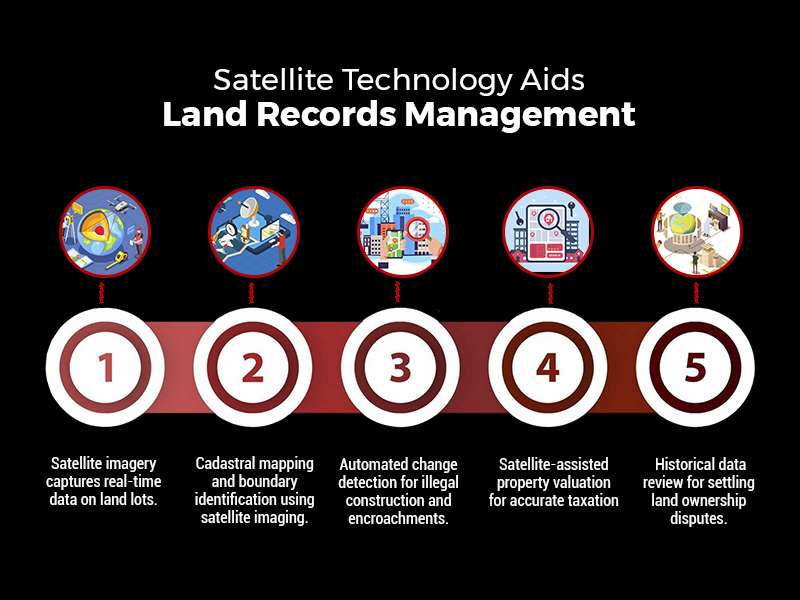
    how satellite technology aids land records management

    The principal benefits of employing satellites in land records management are:

    • Extensive Coverage: Satellites can simultaneously cover entire states or the whole nation, enabling mass-scale mapping.
    • Availability of Historical Data: Satellite images taken decades ago enable monitoring of land-use patterns over decades, facilitating settlement of disputes relating to ownership.
    • Accessibility from Remote Locations: No requirement for physical field visits; the authorities can evaluate land even from remote areas.

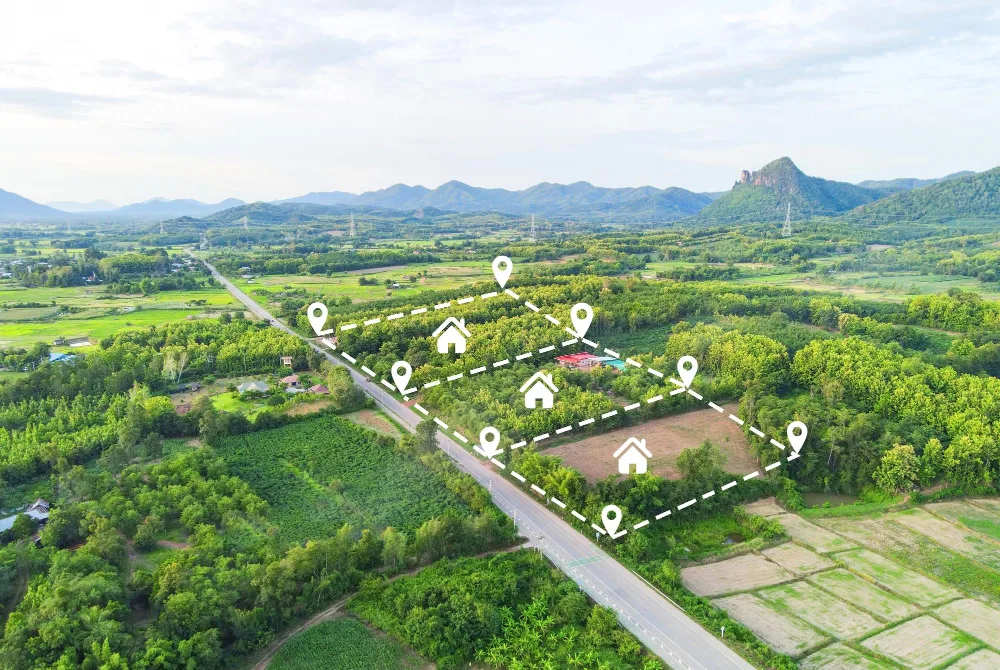
    1. Cadastral Mapping – Determining Accurate Property Boundaries

    Cadastral maps are the legal basis for property ownership. Traditionally, they were manually drafted, with the result that they contained errors, boundary overlap, and owner disputes. Employing satellite imaging, GIS companies in India can now:

    • Map land parcels digitally, depicting boundaries accurately.
    • Cross-check land titles by layering historical data over satellite-derived cadastral data.
    • Identify encroachments by matching old records against new high-resolution imagery.

    For example, a landowner asserting additional land outside their legal boundary can be easily located using satellite-based cadastral mapping, assisting local authorities in correcting such instances.

    2. Land Use and Land Cover Classification (LULC)

    Land use classification is essential for urban, conservation, and infrastructure planning. GIS companies in India examine satellite images to classify land, including:

    • Agricultural land
    • Forests and protected areas
    • Residential, commercial, and industrial areas
    • Water bodies and wetlands
    • Barren land

    Such a classification aids the government in regulating zoning laws, tracking illegal land conversions, and enforcing environmental rules.

    For instance, the illegal conversion of agricultural land into residential areas can be easily identified using satellite imagery, allowing regulatory agencies to act against unlawful real estate development simultaneously.

    3. Automated Change Detection – Tracking Illegal Construction & Encroachments

    One of the biggest challenges in land administration is the proliferation of illegal constructions and unauthorized encroachments. Satellite-based GIS systems offer automated change detection, wherein:

    • Regular satellite scans detect new structures that do not match approved plans.
    • Illegal mining, deforestation, or land encroachments are flagged in real-time.
    • Land conversion violations (e.g., illegally converting wetlands into commercial zones) are automatically reported to authorities.

    For example, a satellite monitoring system identified the unauthorized expansion of a residential colony into government land in Rajasthan, which prompted timely action and legal proceedings.

    4. Satellite-Based Property Taxation & Valuation

    Correct property valuation is critical for equitable taxation and the generation of revenues. Property valuation traditionally depended on physical surveys, but satellites have made it a streamlined process:

    • Location-based appraisal: Distance to highways, commercial centers, and infrastructure developments is included in the tax calculation.
    • Footprint building analysis: Machine learning-based satellite imaging calculates covered areas, avoiding tax evasion.
    • Market trend comparison: Satellite photos and property sale data enable the government to levy property taxes equitably.

    For example, the municipal government in Bangalore utilized satellite images to spot almost 30,000 properties that had not been appropriately reported in tax returns, and the property tax revenue went up.

    How Drone Technology is Applied to Land Surveys & Property Management

    While satellites give macro-level information, drones collect high-accuracy, real-time, and localized data. Drones are indispensable in regions where extreme precision is required, such as:

    • Urban land surveys with millimeter-level accuracy.
    • Land disputes demanding legally admissible cadastral records.
    • Surveying terrain in hilly, forested, or inaccessible areas.
    • Rural land mapping under government schemes such as SVAMITVA.

    1. Drone-Based Cadastral Mapping & Land Surveys

    Drones with LiDAR sensors, high-resolution cameras, and GPS technology undertake automated cadastral surveys, allowing:

    • Accurate land boundary mapping, dispelling disputes.
    • Faster surveying (weeks rather than months), cutting down administrative delays.
    • Low-cost operations compared to conventional surveying.

    For example, drones are being employed to map rural land digitally under the SVAMITVA Scheme, issuing official property titles to millions of landholders.

    2. 3D Modeling for Urban & Infrastructure Planning

    Drones produce precise 3D maps that offer:

    • Correct visualization of cityscapes for planning infrastructure projects.
    • Topography models that facilitate flood control and disaster management.
    • Better land valuation insights based on elevation, terrain, and proximity to amenities.

    For example, Mumbai’s urban planning department used drone-based 3D mapping to assess redevelopment projects, ensuring efficient use of land resources.

    3. AI-Powered Analysis of Drone Data

    Modern GIS software integrates Artificial Intelligence (AI) and Machine Learning (ML) to:

    • Detect unauthorized construction automatically.
    • Analyze terrain data for thoughtful city planning.
    • Classify land parcels for taxation and valuation purposes.

    For instance, a Hyderabad-based drone-based AI system identified illegal constructions and ensured compliance with urban planning regulations.

    Integration of GIS, Satellites & Drones into Land Information Systems

    Satellite and drone data are integrated into Intelligent Land Information Systems (ILIS) by GIS companies in India that encompass:

    A. System of Record (Digital Land Registry)

    • Geospatial database correlating land ownership, taxation, and legal titles.
    • Blockchain-based digital land records resistant to tampering.
    • Uninterrupted connectivity with legal and financial organizations.

    B. System of Insight (Automated Land Valuation & Analytics)

    • Artificial intelligence-based property valuation models based on geography, land topology, and urbanization.
    • Automated taxation ensures equitable revenue collection.

    C. System of Engagement (Public Access & Governance)

    • Internet-based GIS portals enable citizens to confirm property ownership electronically.
    • Live dashboards monitor land transactions, conflicts, and valuation patterns.

    Conclusion

    GIS, satellite imagery, and drones have transformed India’s land records and property management by making accurate mapping, real-time tracking, and valuation efficient. Satellites give high-level insights, while drones provide high-precision surveys, lowering conflicts and enhancing taxation.

    GIS companies in India like SCS Tech, with their high-end GIS strength, facilitate such data-based land administration, propelling India towards a transparent, efficient, and digitally integrated system of governance, guaranteeing equitable property rights, sustainable planning, and economic development.

  • What IT Infrastructure Solutions Do Businesses Need to Support Edge Computing Expansion?

    What IT Infrastructure Solutions Do Businesses Need to Support Edge Computing Expansion?

    Did you know that by 2025, global data volumes are expected to reach an astonishing 175 zettabytes? This will create huge challenges for businesses trying to manage the growing amount of data. So how do businesses manage such vast amounts of data instantly without relying entirely on cloud servers?

    What happens when your data grows faster than your IT infrastructure can handle? As businesses generate more data than ever before, the pressure to process, analyze, and act on that data in real time continues to rise. Traditional cloud setups can’t always keep pace, especially when speed, low latency, and instant insights are critical to business success.

    That’s where edge computing addresses such limitations. By bringing computation closer to where data is generated, it eliminates delays, reduces bandwidth use, and enhances security.

    Therefore, with local processing, and reducing reliance on cloud infrastructure, organizations are allowed to make faster decisions, improve efficiency, and stay competitive in an increasingly data-driven world.

    Read further to understand why edge computing matters and how IT infrastructure solutions help support the same.

    Why do Business Organizations need Edge Computing?

    Regarding business benefits, edge computing is a strategic benefit, not merely a technical upgrade. While edge computing allows organizations to attain better operational efficiencies through reduced latency and improve real-time decision-making to deliver continuous, seamless experiences for customers, mission-critical applications involve processing data on time to enhance reliability and safety – financial services, smart cities.

    As the Internet of Things expands its reach, scaling and decentralized infrastructure solutions become necessary for competing in an aggressively data-driven and rapidly evolving new world. Edge computing has many savings, enabling any company to stretch resources to great lengths and scale costs across operations and edge computing services into a new reality.

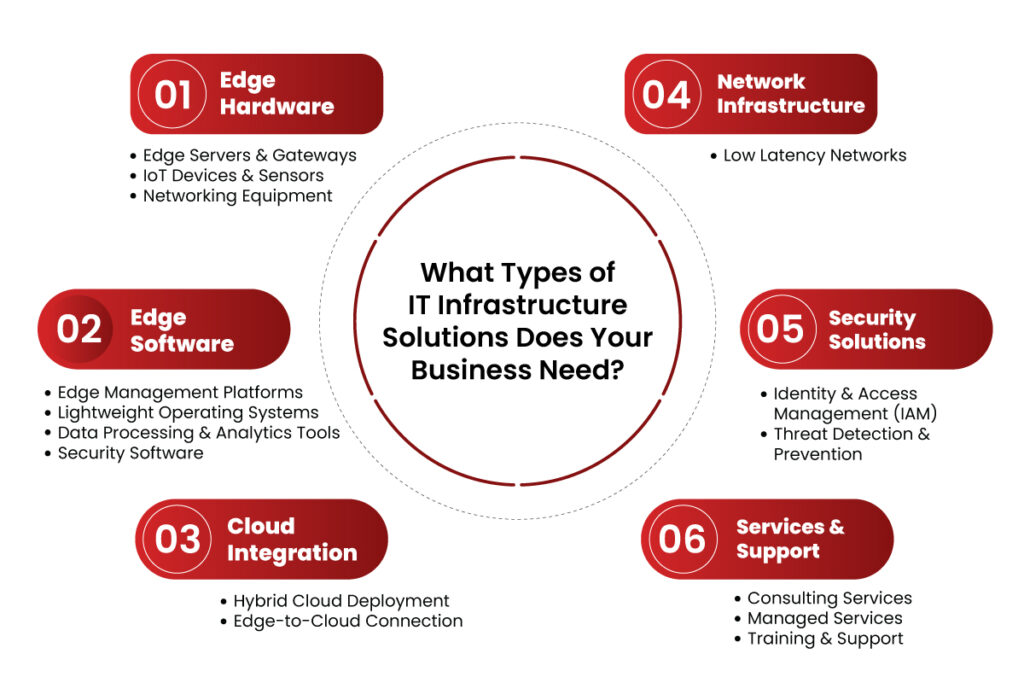
    What Types of IT Infrastructure Solutions Does Your Business Need?

    1. Edge Hardware

    Hardware is the core of any IT infrastructure solutions. For a business to benefit from the advantages of edge computing, the following are needed:

    Edge Servers & Gateways

    Edge servers compute the data at the location, thus avoiding communication back and forth between the centralized data centers. Gateways act as an interface middle layer aggregating and filtering IoT device data before forwarding it to the cloud or edge servers.

    IoT Devices & Sensors

    These are the primary data collectors in an edge computing architecture. Cameras, motion sensors, and environmental monitors collect and process data at the edge to support real-time analytics and instant response.

    Networking Equipment

    A network infrastructure is very important for a seamless communication system. High-speed routers and switches enable fast data transfer between the edge devices and cloud or on-premise servers.

    2. Edge Software

    The core requirement to make data processing effective is that a business must install edge computing feature-supporting software.

    Edge Management Platforms

    Controlling various edge nodes spread over different locations becomes quite complex. Platforms such as Digi Remote Manager enable the remote configuration, deployment, and monitoring of edge devices.

    Lightweight Operating Systems

    Standard OSs consume many resources. Businesses must install OS solutions designed especially for edge devices to utilize available resources effectively.

    Data Processing & Analytics Tools

    Real-time decision-making is imperative at the edge. AI-driven tools allow immediate analysis of data coming in and reduce reliance on cloud processing to enhance operational efficiency.

    Security Software

    Data on the edge is highly susceptible to cyber threats. Security measures like firewalls, encryption, and intrusion detection keep the edge computing environment safe.

    3. Cloud Integration

    While edge computing advises processing near data sources, it does not do away with cloud dependency for extensive storage and analytical functions.

    Hybrid Cloud Deployment

    Business enterprises must accept hybrid clouds, combining seamless integration with the edge and the cloud platform. Services in AWS, Azure, and Google Cloud enable proper data synchronization that an option for a central control panel can replicate.

    Edge-to-Cloud Connection

    Reliable and safe communication between edge devices and cloud data centres is fundamental. 5G, fiber-optic networking, and software-defined networking offer low-latency networking.

    4. Network Infrastructure

    Edge computing involves a robust network delivering low-latency, high-speed data transfer.

    Low Latency Networks

    The technologies, including 5G, provide for lower latency real-time communication. Those organizations that depend on edge computing will require high-speed networking solutions optimized for all their operations. SD-WAN stands for Software-Defined Wide Area Network.

    SD-WAN optimizes the network performance while ensuring data routes remain efficient and secure, even in highly distributed edge environments.

    5. Security Solutions

    Security is one of the biggest concerns with edge computing, as distributed data processing introduces more potential attack points.

    Identity & Access Management (IAM)

    The IAM solutions ensure that only authorized personnel access sensitive edge data. MFA and role-based access controls can be used to reduce security risks.

    Threat Detection & Prevention

    Businesses must deploy real-time intrusion detection and endpoint security at the edge. Cisco Edge Computing Solutions advocates trust-based security models to prevent cyberattacks and unauthorized access.

    6. Services & Support

    Deploying and managing edge infrastructure requires ongoing support and expertise.

    Consulting Services

    Businesses should seek guidance from edge computing experts to design customized solutions that align with industry needs.

    Managed Services

    Managed services for businesses lacking in-house expertise provide end-to-end support for edge computing deployments.

    Training & Support

    Ensuring IT teams understand edge management, security protocols, and troubleshooting is crucial for operational success.

    What Types of IT Infrastructure Solutions Does Your Business Need?

    Conclusion

    As businesses embrace edge computing, they must invest in scalable, secure, and efficient IT infrastructure solutions. The right combination of hardware, software, cloud integration, and security solutions ensures organizations can leverage edge computing benefits for operational efficiency and business growth.

    With infrastructure investment aligned to meet business needs, companies will come out with the best of opportunities in a very competitive, evolving digital landscape. That’s where SCS Tech comes in as an IT infrastructure solution provider, helping businesses with cutting-edge solutions that seamlessly integrate edge computing into their operations. This ensures they stay ahead in the future of computing—right at the edge.

  • How Do Digital Oilfields Improve Oil and Gas Technology Solutions?

    How Do Digital Oilfields Improve Oil and Gas Technology Solutions?

    Are you aware of the oil and gas technology that is transforming the industry? There’s an operation so bright that it reduces costs by 25%, increases production rates by 4%, and enhances recovery by 7%, all within just a few years. This is, says CERA, the actual effect of applying digital oilfield technologies. The digital oilfield applies advanced tools to transform oilfield operations’ efficiency, cost-effectiveness, and sustainability.

    Read further to understand how digital oilfields change oil and gas industry solutions.

    What Are Digital Oilfields?

    Digital oilfields are a technological revolution in oil and gas operations. Using IoT, AI, and ML, they make processes more efficient and cost-effective and provide better decision-making capabilities. From real-time data collection to advanced analytics and automation, digital oilfields integrate every operational aspect into a seamless, optimized ecosystem.

    Key Components of Digital Oilfields

    1. Data Gathering and Surveillance

    Digital oilfields start with collecting enormous volumes of real-time data:

    • IoT Sensors: Scattered across drilling locations, these sensors track pressure, temperature, flow rates, and equipment status. For instance, sudden changes in sound pressure may alert operators to take corrective actions immediately.
    • Remote Monitoring: Operators can control geographically dispersed assets from centralized control rooms or remote locations. Telemetry systems ensure smooth data transmission for quick decision-making.
    1. Advanced Analytics

    The gathered data is processed and analyzed for actionable insights:

    • Machine Learning and AI: Predictive AI analytics identifies possible equipment failures and optimizes the maintenance schedule. For example, an AI system can predict when a pump will fail so proactive maintenance can be scheduled.
    • Data Integration: Advanced analytics combines geological surveys, production logs, and market trends to give a holistic view, which is helpful in strategic decisions.
    1. Automation

    Automation minimizes human intervention in repetitive tasks:

    • Automated Workflows: Drill rigs do real-time optimizations depending on sensor feedback to improve performance and reduce errors.
    • Robotics and Remote Operations: Robotics and ROVs execute tasks like underwater surveys, which can be executed safely without losing efficiency.
    1. Collaboration Tools

    Digital Oilfield streamlines communication and Teamwork.

    • Integrated Communication Platforms: Real-time information sharing between the teams, video conferencing tools, and centralized platforms facilitate efficient collaboration.
    • Cloud-Based Solutions: Geologists, engineers, and managers can access data from anywhere, which leads to better coordination.
    1. Visualization Technologies

    Visualization tools turn data into actionable insights:

    • Dashboards: KPIs are displayed in digestible formats, which enables operators to spot and address issues quickly.
    • Digital Twins: Virtual replicas of the physical assets enable simulations, which allow operators to test scenarios and implement improvements without risking real-world operations.

    How Digital Oilfields Improve Oil and Gas Technology Solutions

    Digital oilfields utilize modern technologies to make the oil and gas technology solutions operational landscape more efficient. This results in efficiency, improved safety, cost-effectiveness, and optimized production with better sustainability. The explanation below elaborates on how digital oilfields enhance technology solutions in the oil and gas industry.

    1. Improved Operative Efficiency

    Digital oilfields improve operational efficiency through the following:

    • Real-Time Data Monitoring: IoT sensors deployed across oilfield assets such as wells, pipelines, and drilling rigs collect real-time data on various parameters (pressure, temperature, flow rates). This data is transmitted to centralized systems for immediate analysis, allowing operators to detect anomalies quickly and optimize operations accordingly.
    • Predictive Maintenance: With the help of AI and machine learning algorithms, the digital oilfield can predict equipment failures before they happen. For instance, Shell’s predictive maintenance has resulted in a timely intervention that saves the company from costly downtimes. These systems could predict when maintenance should be performed based on historical performance data and current operating conditions by extending equipment lifespan and reducing operational interruptions.
    • Workflow Automation: Technologies automate workflow and reduce people’s manual interfaces with routine items like equipment checking and data typing, which conserve time and lead to fewer possible errors. Example: an automated system for drilling optimizes the entire process as sensors provide feedback from which it sets parameters for continuous drilling in the well.

    2. Improved Reservoir Management

    Digital oilfields add to reservoir management with superior analytical techniques.

    • AI-Driven Reservoir Modeling: Digital oilfields utilize high-end AI models to analyze geology data to predict the reservoir’s behavior. These models can provide insight into subsurface conditions, enabling better decisions about the location of a well and the method of extraction for operators. Thus, it makes hydrocarbon recovery more efficient while reducing the environmental footprint.
    • Improve Recovery Techniques: With a better characterization of reservoirs, these digital oilfields are set up to implement enhanced oil recovery techniques suited for specific reservoir conditions. For instance, real-time data analytics can allow data-driven optimization techniques in water flooding or gas injection strategies to recover maximum amounts.

    3. Cost Cut

    The financial benefits of digital oilfields are tremendous:

    • Lower Capital Expenditures: Companies can avoid the high costs of maintaining on-premises data centers by using cloud computing for data storage and processing. This shift allows for scalable operations without significant upfront investment.
    • Operational Cost Savings: Digital technologies have shown a high ROI by bringing down capital and operating expenses. For instance, automating mundane activities will reduce labor costs but enhance production quantity. According to research, companies have seen an operative cost reduction of as much as 25% within the first year after deploying digital solutions.

    4. Improved Production Rates

    Digital oilfields increase production rates through:

    • Optimized Drilling Operations: Real-time analytics allow operators to adjust drilling parameters based on immediate feedback from sensors dynamically. This capability helps avoid issues such as drill bit wear or unexpected geological formations that can slow down operations.
    • Data-Driven Decision Making: With big data analytics, companies can quickly process vast volumes of operational data. These analyses underpin strategic decisions to improve production performance along the value chain from exploration through extraction.

    5. Sustainability Benefits

    Digital oilfield technologies are essential contributors to sustainability.

    • Environmental Monitoring: Modern monitoring systems can sense the leakage or emission, enabling solutions to be implemented immediately. AI-based advanced predictive analytics can identify where environmental risk has the potential to arise before it becomes a significant problem.
    • Resource Optimization: Digital oilfields optimize resource extraction processes and minimize waste; this process reduces the ecological footprint of oil production. For example, optimized energy management practices reduce energy consumption during extraction processes.

    6. Improved Safety Standards

    Safety is improved through various digital technologies:

    • Remote Operations: Digital oilfields allow for the remote monitoring and control of operations, thus allowing less personnel exposure to hazardous conditions. This enables one to reduce exposure to risks associated with drilling activities.
    • Wearable Technology: Wearable devices equipped with biosensors enable real-time monitoring of workers in the field and their health status. The wearable devices can notify the management of a potential health risk or unsafe conditions that may cause an accident.

    Conclusion

    The digital oilfield is a revolutionary innovation introduced into the oil and gas industry, combining the latest technologies to improve operational efficiency, better manage a reservoir, cut costs, enhance production rates, foster sustainability, and raise safety levels. The comprehensive implementation of IoT sensors, AI-driven analytics, automated tools, and cloud computing not only optimizes existing operations but projects an industry toward a position of success for future challenges.

    As digital transformation continues to unfold within this sector, the implications for efficiency and sustainability will grow more profoundly. SCS Tech, with its expertise in advanced oil and gas technology solutions, stands as a trusted partner in enabling this transformation and helping businesses embrace the potential of digital oilfield technologies.

  • Tech enabled workplace – The futuristic view

    Tech enabled workplace – The futuristic view

    As we consider the future of the workplace, and more especially, the post-pandemic office experience, it is obvious that technology will play a key role in what these spaces provide, how they appear, and how they operate. Workspaces provide more than just a place to sit and work; they also foster a sense of belonging to the organisation. Sitting alongside co-workers and brainstorming new ideas develops a sense of belonging, which leads to increased productivity and commitment.

    In this article, we explore the future of the workplace and what it means for tech-enabled spaces.

    Exploring the Concept of the “Office of the Future”

    The future of work is heavily influenced by technology. With tech-enabled workspaces, offices are becoming more advanced and secure. After a prolonged period of remote work, technology has been utilized for everything from communication to work to shopping to emergency commutes. As a result, a whole new world of possibilities has opened up regarding where people work and new methods of working that we hadn’t foreseen before. It’s no longer enough to simply show up, do your job, go home, and repeat the process.

    A Glimpse into the Future of Technology-Driven Workspaces

    The introduction of tech-enabled workspaces is disrupting the traditional workplace, bringing about a significant shift in work culture. With technological advancements, the possibilities are endless, and it’s easy to see how they can positively impact various areas of business emphasis. These areas include productivity, sustainability, cost efficiency, employee satisfaction, and overall well-being.

    Technological Advancements and Their Influence on Future Workspaces

    According to a study by Harvard Business Review, up to 65% of tasks are expected to be automated by 2025. As a result, technology will have a significant impact on the future of workspaces. Here are some key areas where technology is expected to revolutionize workspaces:

    • Augmented Reality (AR) and Virtual Reality (VR): These technologies will facilitate virtual meetings, training sessions, and simulations, making it easier for teams to collaborate and learn together, regardless of their physical locations.
    • Internet of Things (IoT) Integration: The integration of IoT devices into workspaces will enable better automation, data collection, and analysis. Smart office systems will optimize energy consumption, monitor equipment performance, and enhance employee comfort.
    • Artificial Intelligence (AI) and Automation: AI will increasingly take over repetitive and mundane tasks, freeing up employees to focus on more creative and strategic aspects of their jobs. Robotic process automation (RPA) will become more prevalent in various industries, streamlining workflows and improving efficiency.
    • Flexible and Modular Workspaces: Office designs will become more flexible, with modular furniture and adaptable layouts. Technology will play a role in creating versatile spaces that can be easily reconfigured to suit different work styles and needs.
    • Collaboration and Communication Tools: Communication and collaboration tools will become even more sophisticated, enabling seamless information sharing, real-time collaboration, and project management across distributed teams.
    • Cloud Computing: Cloud-based services will continue to dominate the workplace, offering secure storage, accessibility, and scalability. This will facilitate remote work and allow teams to access data and applications from anywhere with an internet connection.
    • Remote Monitoring and Surveillance: With the increasing adoption of remote work, companies may rely more on monitoring and surveillance technologies. These may include tracking employee performance, attendance, and behaviour, raising concerns about privacy and ethics.
    • Enhanced Cyber security Measures: As workspaces become more digital and distributed, cyber security will be of paramount importance. Advanced security measures will be implemented to protect sensitive data and networks from cyber threats.
    • Data-Driven Decision Making: Technology will enable better data collection and analysis, empowering businesses to make informed decisions based on real-time insights and trends.


  • Digitization – the future of energy generation

    Digitization – the future of energy generation

    The world is going through a massive shift in the ways things used to be done. Now accomplishing set goals is not only a man’s job but is integrated with a fair amount of technology. Digital transformation in every industry is quite evident and can be seen in the power sector as well. From power plant management to consumer services, basically, now every step in the process utilizes digital resources.

    Post-Covid, power production is currently embracing digitization in its work process which includes production, dissemination, and consumption of energy. Some of the promising tech tools helping this sector are:

    MACHINE LEARNING

    Digital technology is establishing its roots right from the start of the process. In power plants, nowadays, management has become automated in terms of turbines, ranches, windmills, solar parks, and even in old hydroelectric systems. Here, sensors are installed which makes it feasible to gather data from a turbine, dam, or line continuously and send it to a unified control room. Here the utilization of imaginative programming empowers administrators to recognize odd information and this analysis helps in distinguishing threats, differences, and performance. This is known as predictive maintenance.

    This data-driven approach not only engages a particular plant but the other power-producing resources along with it and the client’s power system if involved in the business. These machine learning algorithms and advanced software rely on big data coming from all the sources put to compassion which results in better management of the system and efficient production.

    ARTIFICIAL INTELLIGENCE

    A possibility is the most valuable gift technology gave to mankind. AI has been a promising contributor which continuously works on the sighting of likely anomalies and shortcomings that, while not compromising the working of a plant, can decrease its efficiency. Therefore, actions can be advised to improve and handle the plant’s performance thus, fulfilling every short-term and long-term project goal.

    In field operations, instruments like robots and drones can establish assessments, decrease the required time, and expand precision and productivity while disposing of the dangers to individuals, who used to carry out these tasks themselves. Using digital simulations, technicians can receive comparable training which will enable them to tackle field situations with more tools made available to them.

    SMART GRIDS

    The most evident change and effect of digital transformation are seen on the grids which are utilized to distribute power. Electronic meters enable smart grids, which makes it possible to manage and balance the electricity system efficiently. Power circulation networks are open, adaptable, and comprehensive playing an important part in energy efficacy. In addition, a savvy board of the organization helps effectiveness and decreases wastage, and benefits the environment.

    The energy transition is a phenomenon that goes beyond the simple generation of clean electricity. Digitization, involves everyone, producers and consumers. A completely digitized power plant will focus on upgrading execution progressively and working in a protected and stable way — upheld via automated reporting, guided issue resolution, and digitized control strolls. Top-notch dependability can be kept up with while diminishing arranged blackout time and support costs. Data analytics and digital-process support are the actual keys.

    ROBOTICS PROCESS AUTOMATION

    RPA adoption lies at the center of many enterprises’ digital transformation efforts. Today, RPA is driving new efficiencies and freeing people from repetitive tedium across a broad swath of industries and processes. It streamlines workflows, which makes organizations more profitable, flexible, and responsive. It also increases employee satisfaction, engagement, and productivity by removing mundane tasks from their workdays. Even though there is still a skeptical opinion about digitization and automation in the Energy and Utility industry, automation front-runners and leading companies see the benefits of implementing RPA just in a few months and are expecting more promising results.