Tag: #internet #technology #data

  • How to Audit Your Existing Tech Stack Before Starting a Digital Transformation Project

    How to Audit Your Existing Tech Stack Before Starting a Digital Transformation Project

    Before you begin any digital transformations, you need to see what you’ve got. Most teams are using dozens of tools throughout their departments, and for the most part, they are underutilized, do not connect with one another, or are not in alignment with the current objectives. 

    The tech stack audit is what helps you identify your tools, how they fit together, and where you have gaps or threats. If you haven’t done this process, even the best digital plans can wilt due to slowdowns, increased expenses, or breaches of security.

    This guide guides you step-by-step in how to do an audit of your stack properly, so your digital transformation starts from a good foundation, not with new software.

    What Is a Tech Stack Audit?

    A tech stack audit reviews all the software, platforms, and integrations being used in your business. It checks how well these components integrate, how well they execute, and how they align with your digital transformation goals.

    A fragmented or outdated stack can slow progress and increase risk. According to Struto, outdated or incompatible tools “can hinder performance, compromise security, and impede the ability to scale.”

    Poor data, redundant tools, and technical debt are common issues. Poor team morale and inefficiencies ensue, according to Brightdials, as stacks become unstructured or unmaintained.
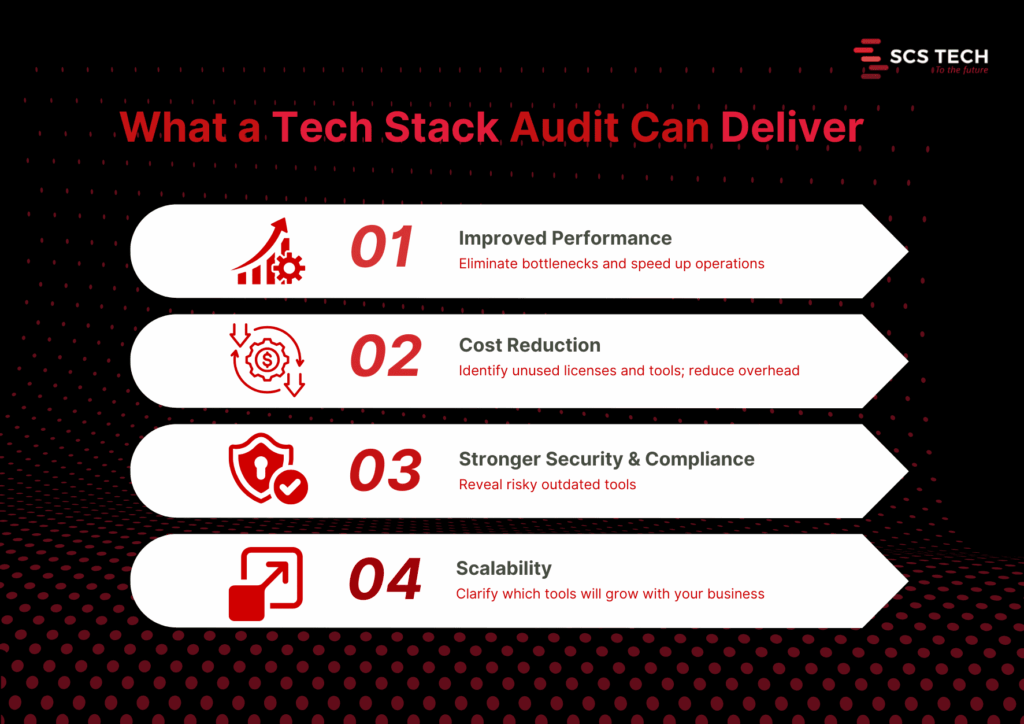
    Core benefits of a thorough audit

    1. Improved performance. Audits reveal system slowdowns and bottlenecks. Fixing them can lead to faster response times and higher user satisfaction. Streamlining outdated systems through tech digital solutions can unlock performance gains that weren’t previously possible.
    2. Cost reduction. You may discover unneeded licenses, redundant software, or shadow IT. One firm saved $20,000 annually after it discovered a few unused tools.
    3. Improved security and compliance. Auditing reveals stale or exposed pieces. It avoids compliance mistakes and reduces the attack surface.
    4. Better scalability and future-proofing. An audit shows what tools will be scalable with growth or need to be replaced before new needs drive them beyond their usefulness.

    Step-by-Step Process to Conduct a Tech Stack Audit

    It is only logical to understand what you already have and how well it is working before you begin any digital transformation program. The majority of organizations go in for new tools and platforms without checking their current systems properly. That leads to problems later on.

    A systematic tech stack review makes sense. It will inform you about what to keep, what to phase out, and what to upgrade. More importantly, it ensures your transformation isn’t based on outdated, replicated, or fragmented systems.

    The following is the step-by-step approach we suggest, in the way that we assist teams in getting ready for effective, low-risk digital transformation.

    Step 1: Create a Complete Inventory of Your Tech Stack

    Start by listing every tool, platform, and integration your organization currently uses. This includes everything from your core infrastructure (servers, databases, CRMs, ERPs) to communication tools, collaboration apps, third-party integrations, and internal utilities developed in-house.

    And it needs to be complete, not skimpy.

    Go by department or function. So:

    • Marketing may be employing an email automation tool, a customer data platform, social scheduling apps, and analytics dashboards.
    • Sales can have CRM, proposal tools, contract administration, and billing integration.
    • Operations can have inventory platforms, scheduling tools, and reporting tools.
    • IT will deal with infrastructure, security, endpoint management, identity access, and monitoring tools.

    Also account for:

    • Licensing details: Is the tool actively paid for or in trial phase?
    • Usage level: Is the team using it daily, occasionally, or not at all?
    • Ownership: Who’s responsible for managing the tool internally?
    • Integration points: Does this tool connect with other systems or stand alone?

    Be careful to include tools that are rarely talked about, like those used by one specific team, or tools procured by individual managers outside of central IT (also known as shadow IT).

    A good inventory gives you visibility. Without it, you will probably go about attempting to modernize against tools that you didn’t know were still running or lose the opportunity to consolidate where it makes sense.

    We recommend keeping this inventory in a shared spreadsheet or software auditing tool. Keep it up to date with all stakeholders before progressing to the next stage of the audit. This is often where a digital transformation consultancy can provide a clear-eyed perspective and structured direction.

    Step 2: Evaluate Usage, Cost, and ROI of Each Tool

    Having now made a list of all tools, the next thing is to evaluate if each one is worth retaining. This involves evaluating three things: how much it is being used, its cost, and what real value it provides.

    Start with usage. Talk to the teams who are using each one. Is it part of their regular workflow? Do they use one specific feature or the whole thing? If adoption is low or spotty, it’s a flag to go deeper. Teams tend to stick with a tool just because they know it, more than because it’s the best option.

    Then consider the price. That is the direct cost, such as subscription, license, and renewal. But don’t leave it at that. Add concealed costs: support, training, and the time wasted on troubleshooting. Two resources might have equal initial costs, but the resource that delays or requires constant aid has a higher cost.

    Last but not least, emphasize ROI. This is usually the neglected section. A tool might be used extensively and cheaply, yet it does not automatically mean it performs well. Ask:

    • Does it help your team accomplish objectives faster?
    • Has efficiency or manual labor improved?
    • Has an impact been made that can be measured, e.g., faster onboarding, better customer response time, or cleaner data?

    You don’t need complex math for this—just simple answers. If a tool is costing more than it returns or if a better alternative exists, it must be tagged for replacement, consolidation, or elimination.

    A digital transformation consultant can help you assess ROI with fresh objectivity and prevent emotional attachment from skewing decisions. This ensures that your transformation starts with tools that make progress and not just occupy budget space.

    Step 3: Map Data Flow and System Integrations

    Start by charting how data moves through your systems. How does it begin? Where does it go next? What devices send or receive data, and in what format? This is to pull out the form behind your operations, customer journey, reporting, collaboration, automation, etc.

    Break it up by function:

    • Is your CRM feeding back to your email system?
    • Is your ERP pumping data into inventory or logistics software?
    • How is data from customer support synced with billing or account teams?

    Map these flows visually or in a shared document. List each tool, the data it shares, where it goes, and how (manual export, API, middleware, webhook, etc.).

    While doing this, ask the following:

    • Are there any manual handoffs that slow things down or increase errors?
    • Do any of your tools depend on redundant data entry?
    • Are there any places where data needs to flow but does not?
    • Are your APIs solid, or are they perpetually patch-pending to keep working?

    This step tends to reveal some underlying problems. For instance, a tool might seem valuable when viewed in a vacuum but fails to integrate properly with the remainder of your stack, slowing teams down or building data silos.

    You’ll also likely find tools doing similar jobs in parallel, but not communicating. In those cases, either consolidate them or build better integration paths.

    The point here isn’t merely to view your tech stack; it’s to view how integrated it is. Uncluttered, reliable data flows are one of the best indications that your company is transformation-ready.

    Step 4: Identify Redundancies, Risks, and Outdated Systems

    With your tools and data flow mapped out, look at what is stopping you.

    • Start with redundancies. Do you have more than one tool to fix the same problem? If two systems are processing customer data or reporting, check to see if both are needed or if it is just a relic of an old process.
    • Scan for threats second. Tools that are outdated or tools that are no longer supported by their vendors can leave vulnerabilities. So can systems that use manual operations to function. When a tool fails and there is no defined failover, it’s a threat.
    • Then, assess for outdated systems. These are platforms that don’t integrate well, slow down teams, or can’t scale with your growth plans. Sometimes, you’ll find legacy tools still in use just because they haven’t been replaced, yet they cost more time and money to maintain.

    All of these duplicative, risky, or outdated, demands a decision: sunset it, replace it, or redefine its use. It is done now to avoid complexity in future transformation.

    Step 5: Prioritize Tools to Keep, Replace, or Retire

    With your results from the audit in front of you, sort each tool into three boxes:

    • Keep: In current use, fits well, aids current and future goals.
    • Misaligned, too narrow in scope, or outrun by better alternatives.
    • Retire: Redundant, unused, or imposes unnecessary cost or risk.

    Make decisions based on usage, ROI, integration, and team input. The simplicity of this method will allow you to build a lean, focused stack to power digital transformation without bringing legacy baggage into the future. Choosing the right tech digital solutions ensures your modernization plan aligns with both technical capability and long-term growth.

    Step 6: Build an Action Plan for Tech Stack Modernization

    Use your audit findings to give clear direction. Enumerate what must be implemented, replaced, or phased out with responsibility, timeline, and cost.

    Split it into short- and long-term considerations.

    • Short-term: purge unused tools, eliminate security vulnerabilities, and build useful integrations.
    • Long-term: timeline for new platforms, large migrations, or re-architected markets.

    This is often the phase where a digital transformation consultant can clarify priorities and keep execution grounded in ROI.

    Make sure all stakeholders are aligned by sharing the plan, assigning the work, and tracking progress. This step will turn your audit into a real upgrade roadmap ready to drive your digital transformation.

    Step 7: Set Up a Recurring Tech Stack Audit Process

    An initial audit is useful, but it’s not enough. Your tools will change. Your needs will too.

    Creating a recurring schedule to examine your stack every 6 or 12 months is suitable for most teams. Use the same checklist: usage, cost, integration, performance, and alignment with business goals.

    Make someone in charge of it. Whether it is IT, operations, or a cross-functional lead, consistency is the key.

    This allows you to catch issues sooner, and waste less, while always being prepared for future change, even if it’s not the change you’re currently designing for.

    Conclusion

    A digital transformation project can’t succeed if it’s built on top of disconnected, outdated, or unnecessary systems. That’s why a tech stack audit isn’t a nice-to-have; it’s the starting point. It helps you see what’s working, what’s getting in the way, and what needs to change before you move forward.

    Many companies turn to digital transformation consultancy at this stage to validate their findings and guide the next steps.

    By following a structured audit process, inventorying tools, evaluating usage, mapping data flows, and identifying gaps, you give your team a clear foundation for smarter decisions and smoother execution.

    If you need help assessing your current stack, a digital transformation consultant from SCSTech can guide you through a modernization plan. We work with companies to align technology with real business needs, so tools don’t just sit in your stack; they deliver measurable value. With SCSTech’s expertise in tech digital solutions, your systems evolve into assets that drive efficiency, not just cost.

  • How IT Consultancy Helps Replace Legacy Monoliths Without Risking Downtime

    How IT Consultancy Helps Replace Legacy Monoliths Without Risking Downtime

    Most businesses continue to use monolithic systems to support key operations such as billing, inventory, and customer management.

    However, as business requirements change, these systems become more and more cumbersome to renew, expand, or interoperate with emerging technologies. This not only holds back digital transformation but also increases IT expenditures, frequently gobbling up a significant portion of the technology budget just for maintaining the systems.

    But replacing them completely has its own risks: downtime, data loss, and business disruption. That’s where IT consultancies come in—providing phased, risk-managed modernization strategies that maintain the business up and running while systems are redeveloped below.

    What Are Legacy Monoliths

    Legacy monolith software is big, tightly coupled software applications developed prior to the current cloud-native or microservices architecture becoming commonplace. They typically combine several business functions—e.g., inventory management, billing, and customer service—into a single code base, where even relatively minor changes are problematic and take time.

    Since all elements are interdependent, alterations in one component will unwittingly destabilize another and need massive regression testing. Such rigidity contributes to lengthy development times, decreased feature delivery rates, and growing operational expenses.

    Where Legacy Monolithic Systems Fall Back?

    Monolithic systems offered stability and centralised control, and they couldn’t be ignored. However, as technology evolves, it becomes faster and more integrated. This is where legacy monolithic applications struggle to keep up. One key example of this is their architectural rigidity.

    Because all business logic, UI, and data access layers are bundled into a single executable or deployable unit, making updates or scaling individual components becomes nearly impossible without redeploying the entire system.

    Take, for instance, a retail management system that handles inventory, point-of-sale, and customer loyalty in one monolithic application. If developers need to update only the loyalty module—for example, to integrate with a third-party CRM—they must test and redeploy the entire application, risking downtime for unrelated features.

    Here’s where they specifically fall short, apart from architectural rigidity:

    • Limited scalability. You can’t scale high-demand services (like order processing during peak sales) independently.
    • Tight hardware and infrastructure coupling. This limits cloud adoption, containerisation, and elasticity.
    • Poor integration capabilities. Integration with third-party tools requires invasive code changes or custom adapters.
    • Slow development and deployment cycles. This slows down feature rollouts and increases risk with every update.

    This gap in scalability and integration is one reason why AI technology companies have fully transitioned to modular, flexible architectures that support real-time analytics and intelligent automation.

    Can Microservices Be Used as a Replacement for Monoliths?

    Microservices are usually regarded as the default choice when reengineering a legacy monolithic application. By decomposing a complex application into independent, smaller services, microservices enable businesses to update, scale, and maintain components of an application without impacting the overall system. This makes them an excellent choice for businesses seeking flexibility and quicker deployments.

    But microservices aren’t the only option for replacing monoliths. Based on your business goals, needs, and existing configuration, other contemporary architecture options could be more appropriate:

    • Modular cloud-native platforms provide a mechanism to recreate legacy systems as individual, independent modules that execute in the cloud. These don’t need complete microservices, but they do deliver some of the same advantages such as scalability and flexibility.
    • Decoupled service-based architectures offer a framework in which various services communicate via specified APIs, providing a middle ground between monolithic and microservices.
    • Composable enterprise systems enable companies to choose and put together various elements such as CRM or ERP systems, usually tying them together via APIs. This provides companies with flexibility without entirely disassembling their systems.
    • Microservices-driven infrastructure is a more evolved choice that enables scaling and fault isolation by concentrating on discrete services. But it does need strong expertise in DevOps practices and well-defined service boundaries.

    Ultimately, microservices are a potent tool, but they’re not the only one. What’s key is picking the right approach depending on your existing requirements, your team’s ability, and your goals over time.

    If you’re not sure what the best approach is to replacing your legacy monolith, IT consultancies can provide more than mere advice—they contribute structure, technical expertise, and risk-mitigation approaches. They can assist you in overcoming the challenges of moving from a monolithic system, applying clear-cut strategies and tested methods to deliver a smooth and effective modernization process.

    How IT Consultancies Manage Risk in Legacy Replacement?

    IT Consultancies Manage Risk in Legacy Replacement

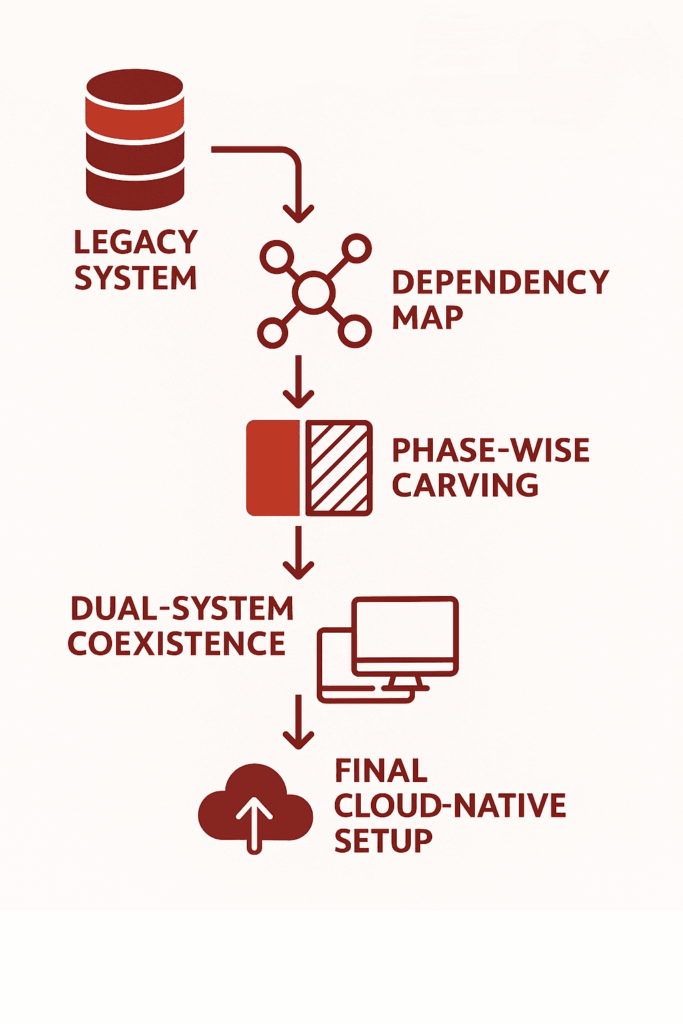
    1. Assessment & Mapping:

    1.1 Legacy Code Audit:

    Legacy code audit is one of the initial steps taken for modernization. IT consultancies perform an exhaustive analysis of the current codebase to determine what code is outdated, where there are bottlenecks, and where it is more likely to fail.

    A 2021 report by McKinsey found that 75% of cloud migrations took longer than planned and 37% were behind schedule, which was usually due to unexpected intricacies in the legacy codebase. This review finds old libraries, unstructured code, and poorly documented functions, all which are potential issues in the process of migration.

    1.2 Dependency Mapping

    Mapping out dependencies is important to guarantee that no key services are disrupted during the move. IT advisors employ sophisticated software such as SonarQube and Structure101 to develop visual maps of program dependencies, where it is transparently indicated that interactions exist among various components of the system.

    Mapping dependencies serves to establish in what order systems can be safely migrated, avoiding the possibility of disrupting critical business functions.

    1.3 Business Process Alignment

    Aligning the technical solution to business processes is critical to avoiding disruption of operational workflows during migration.

    During the evaluation, IT consultancies work with business leaders to determine primary workflows and areas of pain. They utilize tools such as BPMN (Business Process Model and Notation) to ensure that the migration honors and improves on these processes.

    2. Phased Migration Strategy

    IT consultancies use staged migration to minimize downtime, preserve data integrity, and maintain business continuity. Each of these stages are designed to uncover blind spots, reduce operational risk, and accelerate time-to-value without compromising business continuity.

    • Strangler pattern or microservice carving
    • Hybrid coexistence (old + new systems live together during transition)
    • Failover strategies and rollback plans

    2.1 Strangler Pattern or Microservice Carving

    A migration strategy where parts of the legacy system are incrementally replaced with modern services, while the rest of the monolith continues to operate. Here is how it works: 

    • Identify a specific business function in the monolith (e.g., order processing).
    • Rebuild it as an independent microservice with its own deployment pipeline.
    • Redirect only the relevant traffic to the new service using API gateways or routing rules.
    • Gradually expand this pattern to other parts of the system until the legacy core is fully replaced.

    2.2 Hybrid Coexistence

    A transitional architecture where legacy systems and modern components operate in parallel, sharing data and functionality without full replacement at once.

    • Legacy and modern systems are connected via APIs, event streams, or middleware.
    • Certain business functions (like customer login or billing) remain on the monolith, while others (like notifications or analytics) are handled by new components.
    • Data synchronization mechanisms (such as Change Data Capture or message brokers like Kafka) keep both systems aligned in near real-time.

    2.3 Failover Strategies and Rollback Plans

    Structured recovery mechanisms that ensure system continuity and data integrity if something goes wrong during migration or after deployment. How it works:

    • Failover strategies involve automatic redirection to backup systems, such as load-balanced clusters or redundant databases, when the primary system fails.
    • Rollback plans allow systems to revert to a previous stable state if the new deployment causes issues—achieved through versioned deployments, container snapshots, or database point-in-time recovery.
    • These are supported by blue-green or canary deployment patterns, where changes are introduced gradually and can be rolled back without downtime.

    3. Tooling & Automation

    To maintain control, speed, and stability during legacy system modernization, IT consultancies rely on a well-integrated toolchain designed to automate and monitor every step of the transition. These tools are selected not just for their capabilities, but for how well they align with the client’s infrastructure and development culture.

    Key tooling includes:

    • CI/CD pipelines: Automate testing, integration, and deployment using tools like Jenkins, GitLab CI, or ArgoCD.
    • Monitoring & observability: Real-time visibility into system performance using Prometheus, Grafana, ELK Stack, or Datadog.
    • Cloud-native migration tech: Tools like AWS Migration Hub, Azure Migrate, or Google Migrate for Compute help facilitate phased cloud adoption and infrastructure reconfiguration.

    These solutions enable teams to deploy changes incrementally, detect regressions early, and keep legacy and modernized components in sync. Automation reduces human error, while monitoring ensures any risk-prone behavior is flagged before it affects production.

    Bottom Line

    Legacy monoliths are brittle, tightly coupled, and resistant to change, making modern development, scaling, and integration nearly impossible. Their complexity hides critical dependencies that break under pressure during transformation. Replacing them demands more than code rewrites—it requires systematic deconstruction, staged cutovers, and architecture that can absorb change without failure. That’s why AI technology companies treat modernisation not just as a technical upgrade, but as a foundation for long-term adaptability

    SCS Tech delivers precision-led modernisation. From dependency tracing and code audits to phased rollouts using strangler patterns and modular cloud-native replacements, we engineer low-risk transitions backed by CI/CD, observability, and rollback safety.

    If your legacy systems are blocking progress, consult with SCS Tech. We architect replacements that perform under pressure—and evolve as your business does.

    FAQs

    1. Why should businesses replace legacy monolithic applications?

    Replacing legacy monolithic applications is crucial for improving scalability, agility, and overall performance. Monolithic systems are rigid, making it difficult to adapt to changing business needs or integrate with modern technologies. By transitioning to more flexible architectures like microservices, businesses can improve operational efficiency, reduce downtime, and drive innovation.

    1. What is the ‘strangler pattern’ in software modernization?

    The ‘strangler pattern’ is a gradual approach to replacing legacy systems. It involves incrementally replacing parts of a monolithic application with new, modular components (often microservices) while keeping the legacy system running. Over time, the new system “strangles” the old one, until the legacy application is fully replaced.

    1. Is cloud migration always necessary when replacing a legacy monolith?

    No, cloud migration is not always necessary when replacing a legacy monolith, but it often provides significant advantages. Moving to the cloud can improve scalability, enhance resource utilization, and lower infrastructure costs. However, if a business already has a robust on-premise infrastructure or specific regulatory requirements, replacing the monolith without a full cloud migration may be more feasible.

  • How Real-Time Data and AI are Revolutionizing Emergency Response?

    How Real-Time Data and AI are Revolutionizing Emergency Response?

    Imagine this: you’re stuck in traffic when suddenly, an ambulance appears in your rearview mirror. The siren’s blaring. You want to move—but the road is jammed. Every second counts. Lives are at stake.

    Now imagine this: what if AI could clear a path for that ambulance before it even gets close to you?

    Sounds futuristic? Not anymore.

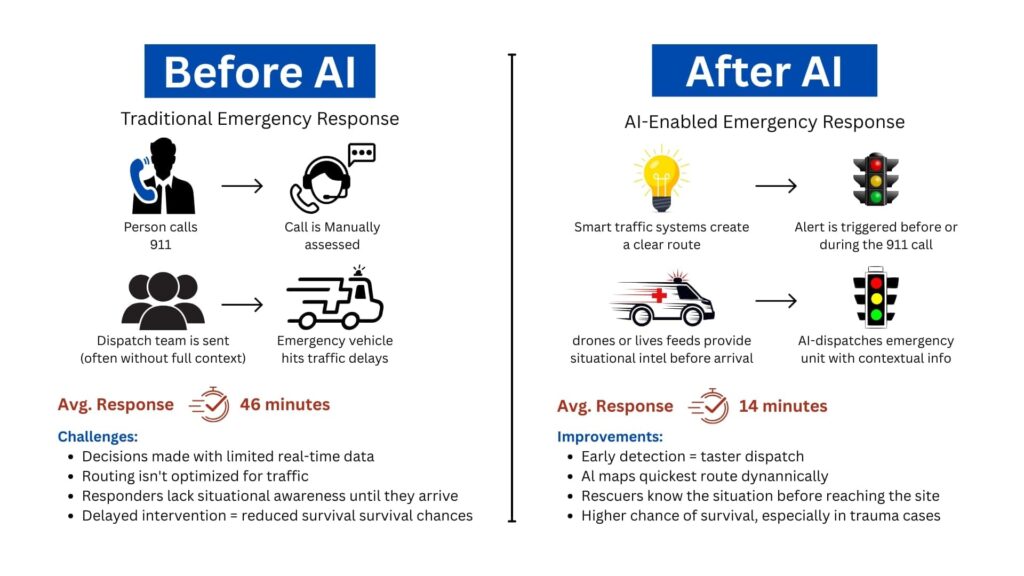
    A city in California recently cut ambulance response times from 46 minutes to just 14 minutes using real-time traffic management powered by AI. That’s 32 minutes shaved off—minutes that could mean the difference between life and death.

    That’s the power of real-time data and AI in emergency response.

    And it’s not just about traffic. From predicting wildfires to automating 911 dispatches and identifying survivors in collapsed buildings—AI is quietly becoming the fastest responder we have. These innovations also highlight advanced methods to predict natural disasters long before they escalate.

    So the real question is:

    Are you ready to understand how tech is reshaping the way we handle emergencies—and how your organization can benefit?

    Let’s dive in.

    The Problem With Traditional Emergency Response

    Let’s not sugarcoat it—our emergency response systems were never built for speed or precision. They were designed in an era when landlines were the only lifeline and responders relied on intuition more than information.

    Even today, the process often follows this outdated chain:

    A call comes in → Dispatch makes judgment calls → Teams are deployed → Assessment happens on site.

    Before Before and After AI

    Here’s why that model is collapsing under pressure:

    1. Delayed Decision-Making in a High-Stakes Window

    Every emergency has a golden hour—a short window when intervention can dramatically increase survival rates. According to a study published in BMJ Open, a delay of even 5 minutes in ambulance arrival is associated with a 10% decrease in survival rate in cases like cardiac arrest or major trauma.

    But that’s what’s happening—because the system depends on humans making snap decisions with incomplete or outdated information. And while responders are trained, they’re not clairvoyants.

    2. One Size Fits None: Poor Resource Allocation

    A report by McKinsey & Company found that over 20% of emergency deployments in urban areas were either over-responded or under-resourced, often due to dispatchers lacking real-time visibility into resource availability or incident severity.

    That’s not just inefficient—it’s dangerous.

    3. Siloed Systems = Slower Reactions

    Police, fire, EMS—even weather and utility teams—operate on different digital platforms. In a disaster, that means manual handoffs, missed updates, or even duplicate efforts.

    And in events like hurricanes, chemical spills, or industrial fires, inter-agency coordination isn’t optional—it’s survival.

    A case study from Houston’s response to Hurricane Harvey found that agencies using interoperable data-sharing platforms responded 40% faster than those using siloed systems.

    Real-Time Data and AI: Your Digital First Responders

    Now imagine a different model—one that doesn’t wait for a call. One that acts the moment data shows a red flag.

    We’re talking about real-time data, gathered from dozens of touchpoints across your environment—and processed instantly by AI systems.

    But before we dive into what AI does, let’s first understand where this data comes from.

    Traditional data systems tell you what just happened.

    Predictive analytics powered by AI tells you what’s about to happen, offering reliable methods to predict natural disasters in real-time.

    And that gives responders something they’ve never had before: lead time.

    Let’s break it down:

    • Machine learning models, trained on thousands of past incidents, can identify the early signs of a wildfire before a human even notices smoke.
    • In flood-prone cities, predictive AI now uses rainfall, soil absorption, and river flow data to estimate overflow risks hours in advance. Such forecasting techniques are among the most effective methods to predict natural disasters like flash floods and landslides.
    • Some 911 centers now use natural language processing to analyze caller voice patterns, tone, and choice of words to detect hidden signs of a heart attack or panic disorder—often before the patient is even aware.

    What Exactly Is AI Doing in Emergencies?

    Think of AI as your 24/7 digital analyst that never sleeps. It does the hard work behind the scenes—sorting through mountains of data to find the one insight that saves lives.

    Here’s how AI is helping:

    • Spotting patterns before humans can: Whether it’s the early signs of a wildfire or crowd movement indicating a possible riot, AI detects red flags fast.
    • Predicting disasters: With enough historical and environmental data, AI applies advanced methods to predict natural disasters such as floods, earthquakes, and infrastructure collapse.
    • Understanding voice and language: Natural Language Processing (NLP) helps AI interpret 911 calls, tweets, and distress messages in real time—even identifying keywords like “gunshot,” “collapsed,” or “help.”
    • Interpreting images and video: Computer vision lets drones and cameras analyze real-time visuals—detecting injuries, structural damage, or fire spread.
    • Recommending actions instantly: Based on location, severity, and available resources, AI can recommend the best emergency response route in seconds.

    What Happens When AI Takes the Lead in Emergencies

    Let’s walk through real-world examples that show how this tech is actively saving lives, cutting costs, and changing how we prepare for disasters.

    But more importantly, let’s understand why these wins matter—and what they reveal about the future of emergency management.

    1. AI-powered Dispatch Cuts Response Time by 70%

    In Fremont, California, officials implemented a smart traffic management system powered by real-time data and AI. Here’s what it does: it pulls live input from GPS, traffic lights, and cameras—and automatically clears routes for emergency vehicles.

    Result? Average ambulance travel time dropped from 46 minutes to just 14 minutes.

    Why it matters: This isn’t just faster—it’s life-saving. The American Heart Association notes that survival drops by 7-10% for every minute delay in treating cardiac arrest. AI routing means minutes reclaimed = lives saved.

    It also means fewer traffic accidents involving emergency vehicles—a cost-saving and safety win.

    2. Predicting Wildfires Before They Spread

    NASA and IBM teamed up to build AI tools that analyze satellite data, terrain elevation, and meteorological patterns—pioneering new methods to predict natural disasters like wildfire spread. These models detect subtle signs—like vegetation dryness and wind shifts, well before a human observer could act.

    Authorities now get alerts hours or even days before the fires reach populated zones.

    Why it matters: Early detection means time to evacuate, mobilize resources, and prevent large-scale destruction. And as climate change pushes wildfire frequency higher, predictive tools like this could be the frontline defense in vulnerable regions like California, Greece, and Australia.

    3. Using Drones to Save Survivors

    The Robotics Institute at Carnegie Mellon University built autonomous drones that scan disaster zones using thermal imaging, AI-based shape recognition, and 3D mapping.

    These drones detect human forms under rubble, assess structural damage, and map the safest access routes—all without risking responder lives.

    Why it matters: In disasters like earthquakes or building collapses, every second counts—and so does responder safety. Autonomous aerial support means faster search and rescue, especially in areas unsafe for human entry.

    This also reduces search costs and prevents secondary injuries to rescue personnel.

    What all these applications have in common:

    • They don’t wait for a 911 call.
    • They reduce dependency on guesswork.
    • They turn data into decisions—instantly.

    These aren’t isolated wins. They signal a shift toward intelligent infrastructure, where public safety is proactive, not reactive.

    Why This Tech is Essential for Your Organization?

    Understanding and applying modern methods to predict natural disasters is no longer optional—it’s a strategic advantage. Whether you’re in public safety, municipal planning, disaster management, or healthcare, this shift toward AI-enhanced emergency response offers major wins:

    • Faster response times: The right help reaches the right place—instantly.
    • Fewer false alarms: AI helps distinguish serious emergencies from minor incidents.
    • Better coordination: Connected systems allow fire, EMS, and police to work from the same real-time playbook.
    • More lives saved: Ultimately, everything leads to fewer injuries, less damage, and more lives protected.

    If so, Where Do You Start?

    You don’t have to reinvent the wheel. But you do need to modernize how you respond to crises. And that starts with a strategy:

    1. Assess your current response tech: Are your systems integrated? Can they talk to each other in real time?
    2. Explore data sources: What real-time data can you tap into—IoT, social media, GIS, wearables?
    3. Partner with the right experts: You need a team that understands AI, knows public safety, and can integrate solutions seamlessly.

    Final Thought

    Emergencies will always demand fast action. But in today’s world, speed alone isn’t enough—you need systems built on proven methods to predict natural disasters, allowing them to anticipate, adapt, and act before the crisis escalates.

    This is where data steps in. And when combined with AI, it transforms emergency response from a reactive scramble to a coordinated, intelligent operation.

    The siren still matters. But now, it’s backed by a brain—a system quietly working behind the scenes to reroute traffic, flag danger, alert responders, and even predict the next move.

    At SCS Tech India, we help forward-thinking organizations turn that possibility into reality. Whether it’s AI-powered dispatch, predictive analytics, or drone-assisted search and rescue—we build custom solutions that turn seconds into lifesavers.

    Because in an emergency, every moment counts. And with the right technology, you won’t just respond faster. You’ll respond smarter.

    FAQs

    What kind of data should we start collecting right now to prepare for AI deployment in the future?

    Start with what’s already within reach:

    • Response times (from dispatch to on-site arrival)
    • Resource logs (who was sent, where, and how many)
    • Incident types and outcomes
    • Environmental factors (location, time of day, traffic patterns)

    This foundational data helps build patterns. The more consistent and clean your data, the more accurate and useful your AI models will be later. Don’t wait for the “perfect platform” to start collecting—it’s the habit of logging that pays off.

    Will AI replace human decision-making in emergencies?

    No—and it shouldn’t. AI augments, not replaces. What it does is compress time: surfacing the right information, highlighting anomalies, recommending actions—all faster than a human ever could. But the final decision still rests with the trained responder. Think of AI as your co-pilot, not your replacement.

    How can we ensure data privacy and security when using real-time AI systems?

    Great question—and a critical one. The systems you deploy must adhere to:

    • End-to-end encryption for data in transit
    • Role-based access for sensitive information
    • Audit trails to monitor every data interaction
    • Compliance with local and global regulations (HIPAA, GDPR, etc.)

    Also, work with vendors who build privacy into the architecture—not as an afterthought. Transparency in how data is used, stored, and trained is non-negotiable when lives and trust are on the line.

  • The Future of Disaster Recovery: Leveraging Cloud Solutions for Business Continuity

    The Future of Disaster Recovery: Leveraging Cloud Solutions for Business Continuity

    Because “It Won’t Happen to Us” Is No Longer a Strategy

    Let’s face it—most businesses don’t think about disaster recovery until it’s already too late.

    A single ransomware attack, server crash, or regional outage can halt operations in seconds. And when that happens, the clock starts ticking on your company’s survival.

    According to FEMA, over 90% of businesses without a disaster recovery plan shut down within a year of a major disruption.

    That’s not just a stat—it’s a risk you can’t afford to ignore.

    Today’s threats are faster, more complex, and less predictable than ever. From ransomware attacks to cyclones, unpredictability is the new normal—despite advancements in methods to predict natural disasters, business continuity still hinges on how quickly systems recover.

    This article breaks down:

    • What’s broken in traditional DR
    • Why cloud solutions offer a smarter path forward
    • How to future-proof your business with a partner like SCS Tech India

    If you’re responsible for keeping your systems resilient, this is what you need to know—before the next disaster strikes.

    Why Traditional Disaster Recovery Fails Modern Businesses

    Even the best disaster prediction models can’t prevent outages. Whether it’s an unanticipated flood, power grid failure, or cyberattack, traditional DR struggles to recover systems in time.

    Disaster recovery used to mean racks of hardware, magnetic tapes, and periodic backup drills that were more hopeful than reliable. But that model was built for a slower world.

    Today, business moves faster than ever—and so do disasters.

    Here’s why traditional DR simply doesn’t keep up:

    • High CapEx, Low ROI: Hardware, licenses, and maintenance costs pile up, even when systems are idle 99% of the time.
    • Painfully Long Recovery Windows: When recovery takes hours or days, every minute of downtime costs real money. According to IDC, Indian enterprises lose up to ₹3.5 lakh per hour of IT downtime.
    • Single Point of Failure: On-prem infrastructure is vulnerable to floods, fire, and power loss. If your backup’s in the building—it’s going down with it.

    The Cloud DR Advantage: Real-Time, Real Resilience

    Cloud-based Disaster Recovery (Cloud DR) flips the traditional playbook. It decentralises your risk, shortens your downtime, and builds a smarter failover system that doesn’t collapse under pressure.

    Let’s dig into the core advantages, not just as bullet points—but as strategic pillars for modern businesses.

    1. No CapEx Drain — Shift to a Fully Utilized OPEX Model

    Capital-intensive. You pre-purchase backup servers, storage arrays, and co-location agreements that remain idle 95% of the time. Average CapEx for a traditional DR site in India? ₹15–25 lakhs upfront for a mid-sized enterprise (IDC, 2023).

    Everything is usage-based. Compute, storage, replication, failover—you pay for what you use. Platforms like AWS Elastic Disaster Recovery (AWS DRS) or Azure Site Recovery (ASR) offer DR as a service, fully managed, without owning any physical infrastructure.

    According to TechTarget (2022), organisations switching to cloud DR reported up to 64% cost reduction in year-one DR operations.

    2. Recovery Time (RTO) and Data Loss (RPO): Quantifiable, Testable, Guaranteed

    Forget ambiguous promises.

    With traditional DR:

    • Average RTO: 4–8 hours (often manual)
    • RPO: Last backup—can be 12 to 24 hours behind
    • Test frequency: Once a year (if ever), with high risk of false confidence

    With Cloud DR:

    • RTO: As low as <15 minutes, depending on setup (continuous replication vs. scheduled snapshots)
    • RPO: Often <5 minutes with real-time sync engines
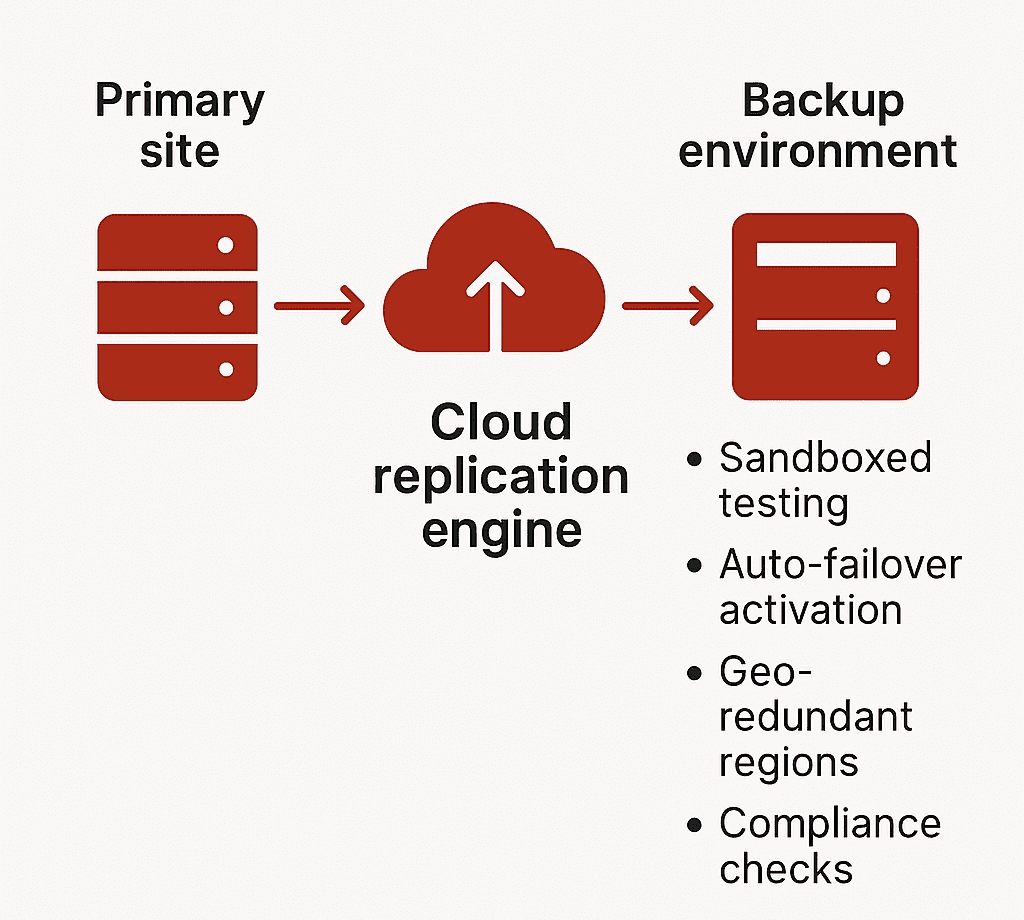
    • Testing: Sandboxed testing environments allow monthly (or even weekly) drills without production downtime

    Zerto, a leading DRaaS provider, offers continuous journal-based replication with sub-10-second RPOs for virtualised workloads. Their DR drills do not affect live environments.

    Many regulated sectors (like BFSI in India) now require documented evidence of tested RTO/RPO per RBI/IRDAI guidelines.

    3. Geo-Redundancy and Compliance: Not Optional, Built-In

    Cloud DR replicates your workloads across availability zones or even continents—something traditional DR setups struggle with.

    Example Setup with AWS:

    • Production in Mumbai (ap-south-1)
    • DR in Singapore (ap-southeast-1)
    • Failover latency: 40–60 ms round-trip (acceptable for most critical workloads)

    Data Residency Considerations: India’s Personal Data Protection Bill (DPDP 2023) and sector-specific mandates (e.g., RBI Circular on IT Framework for NBFCs) require in-country failover for sensitive workloads. Cloud DR allows selective geo-redundancy—regulatory workloads stay in India, others failover globally.

    4. Built for Coexistence, Not Replacement

    You don’t need to migrate 100% to cloud. Cloud DR can plug into your current stack.

    Supported Workloads:

    • VMware, Hyper-V virtual machines
    • Physical servers (Windows/Linux)
    • Microsoft SQL, Oracle, SAP HANA
    • File servers and unstructured storage

    Tools like:

    • Azure Site Recovery: Supports agent-based and agentless options
    • AWS CloudEndure: Full image-based replication across OS types
    • Veeam Backup & Replication: Hybrid environments, integrates with on-prem NAS and S3-compatible storage

    Testing Environments: Cloud DR allows isolated recovery environments for DR testing—without interrupting live operations. This means CIOs can validate RPOs monthly, report it to auditors, and fix configuration drift proactively.

    What Is Cloud-Based Disaster Recovery (Cloud DR)?

    Cloud-based Disaster Recovery is a real-time, policy-driven replication and recovery framework—not a passive backup solution.

    Where traditional backup captures static snapshots of your data, Cloud DR replicates full workloads—including compute, storage, and network configurations—into a cloud-hosted recovery environment that can be activated instantly in the event of disruption.

    This is not just about storing data offsite. It’s about ensuring uninterrupted access to mission-critical systems through orchestrated failover, tested RTO/RPO thresholds, and continuous monitoring.

    Cloud DR enables:

    • Rapid restoration of systems without manual intervention
    • Continuity of business operations during infrastructure-level failures
    • Seamless experience for end users, with no visible downtime

    It delivers recovery with precision, speed, and verifiability—core requirements for compliance-heavy and customer-facing sectors.

    Architecture of a typical Cloud DR solution


    Types of Cloud DR Solutions

    Every cloud-based recovery solution is not created equal. Distinguishing between Backup-as-a-Service (BaaS) and Disaster Recovery-as-a-Service (DRaaS) is critical when evaluating protection for production workloads.

    1. Backup-as-a-Service (BaaS)

    • Offsite storage of files, databases, and VM snapshots
    • Lacks pre-configured compute or networking components
    • Recovery is manual and time-intensive
    • Suitable for non-time-sensitive, archival workloads

    Use cases: Email logs, compliance archives, shared file systems. BaaS is part of a data retention strategy, not a business continuity plan.

    2. Disaster Recovery-as-a-Service (DRaaS)

    • Full replication of production environments including OS, apps, data, and network settings
    • Automated failover and failback with predefined runbooks
    • SLA-backed RTOs and RPOs
    • Integrated monitoring, compliance tracking, and security features

    Use cases: Core applications, ERP, real-time databases, high-availability systems

    Providers like AWS Elastic Disaster Recovery, Azure Site Recovery, and Zerto deliver end-to-end DR capabilities that support both planned migrations and emergency failovers. These platforms aren’t limited to restoring data—they maintain operational continuity at an infrastructure scale.

    Steps to Transition to a Cloud-Based DR Strategy

    Transitioning to cloud DR is not a plug-and-play activity. It requires an integrated strategy, tailored architecture, and disciplined testing cadence. Below is a framework that aligns both IT and business priorities.

    1. Assess Current Infrastructure and Risk

      • Catalog workloads, VM specifications, data volumes, and interdependencies
      • Identify critical systems with zero-tolerance for downtime
      • Evaluate vulnerability points across hardware, power, and connectivity layers. Incorporate insights from early-warning tools or methods to predict natural disasters—such as flood zones, seismic zones, or storm-prone regions—into your risk model.
    • Conduct a Business Impact Analysis (BIA) to quantify recovery cost thresholds

    Without clear downtime impact data, recovery targets will be arbitrary—and likely insufficient.

    2. Define Business-Critical Applications

    • Segment workloads into tiers based on RTO/RPO sensitivity
    • Prioritize applications that generate direct revenue or enable operational throughput
    • Establish technical recovery objectives per workload category

    Focus DR investments on the 10–15% of systems where downtime equates to measurable business loss.

    3. Evaluate Cloud DR Providers

    Assess the technical depth and compliance coverage of each platform. Look beyond cost.

    Evaluation Checklist:

    • Does the platform support your hypervisor, OS, and database stack?
    • Are Indian data residency and sector-specific regulations addressed?
    • Can the provider deliver testable RTO/RPO metrics under simulated load?
    • Is sandboxed DR testing supported for non-intrusive validation?

    Providers should offer reference architectures, not generic templates.

    4. Create a Custom DR Plan

    • Define failover topology: cold, warm, or hot standby
    • Map DNS redirection, network access rules, and IP range failover strategy
    • Automate orchestration using Infrastructure-as-Code (IaC) for replicability
    • Document roles, SOPs, and escalation paths for DR execution

    A DR plan must be auditable, testable, and aligned with ongoing infrastructure updates.

    5. Run DR Drills and Simulations

    • Simulate both full and partial outage scenarios
    • Validate technical execution and team readiness under realistic conditions
    • Monitor deviation from expected RTOs and RPOs
    • Document outcomes and remediate configuration or process gaps

    Testing is not optional—it’s the only reliable way to validate DR readiness.

    6. Monitor, Test, and Update Continuously

    • Integrate DR health checks into your observability stack
    • Track replication lag, failover readiness, and configuration drift
    • Schedule periodic tests (monthly for critical systems, quarterly full-scale)
    • Adjust DR policies as infrastructure, compliance, or business needs evolve

    DR is not a static function. It must evolve with your technology landscape and risk profile.

    Don’t Wait for Disruption to Expose the Gaps

    The cost of downtime isn’t theoretical—it’s measurable, and immediate. While others recover in minutes, delayed action could cost you customers, compliance, and credibility.

    Take the next step:

    • Evaluate your current disaster recovery architecture
    • Identify failure points across compute, storage, and network layers
    • Define RTO/RPO metrics aligned with your most critical systems
    • Leverage AI-powered observability for predictive failure detection—not just for IT, but to integrate methods to predict natural disasters into your broader risk mitigation strategy.

    Connect with SCS Tech India to architect a cloud-based disaster recovery solution that meets your compliance needs, scales with your infrastructure, and delivers rapid, reliable failover when it matters most.

  • How RPA is Redefining Customer Service Operations in 2025

    How RPA is Redefining Customer Service Operations in 2025

    Customer service isn’t broken, but it’s slow.

    Tickets stack up. Agents switch between tools. Small issues turn into delays—not because people aren’t working, but because processes aren’t designed to handle volume.

    By 2025, this is less about headcount and more about removing steps that don’t need humans.

    That’s where the robotic process automation service (RPA) fits. It handles the repeatable parts—status updates, data entry, and routing—so your team can focus on exceptions.

    Deloitte reports that 73% of companies using RPA in service functions saw faster response times and reduced costs for routine tasks by up to 60%.

    Let’s look at how RPA is redefining what great customer service actually looks like—and where smart companies are already ahead of the curve.

    What’s Really Slowing Your Team Down (Even If They’re Performing Well)

    If your team is resolving tickets on time but still falling behind, the issue isn’t talent or effort—it’s workflow design.

    In most mid-sized service operations, over 60% of an agent’s day is spent not resolving customer queries, but navigating disconnected systems, repeating manual inputs, or chasing internal handoffs. That’s not inefficiency—it’s architectural debt.

    Here’s what that looks like in practice:

    • Agents switch between 3–5 tools to close a single case
    • CRM fields require double entry into downstream systems for compliance or reporting
    • Ticket updates rely on batch processing, which delays real-time tracking
    • Status emails, internal escalations, and customer callbacks all follow separate workflows

    Each step seems minor on its own. But at scale, they add up to hours of non-value work—per rep, per day.

    Customer Agent Journey

    A Forrester study commissioned by BMC found a major disconnect between what business teams experience and what IT assumes. The result? Productivity losses and a customer experience that slips, even when your people are doing everything right.

    RPA addresses this head-on—not by redesigning your entire tech stack, but by automating the repeatable steps that shouldn’t need a human in the loop in the first place.

    When deployed correctly, RPA becomes the connective layer between systems, making routine actions invisible to the agent. What they experience instead: is more time on actual support and less time on redundant workflows.

    So, What Is RPA Actually Doing in Customer Service?

    In 2025, RPA in customer service is no longer a proof-of-concept or pilot experiment—it’s a critical operations layer.

    Unlike chatbots or AI agents that face the customer, RPA works behind the scenes, orchestrating tasks that used to require constant agent attention but added no real value.

    And it’s doing this at scale.

    What RPA Is Really Automating

    A recent Everest Group CXM study revealed that nearly 70% of enterprises using RPA in customer experience management (CXM) have moved beyond experimentation and embedded bots as a permanent fixture in their service delivery architecture.

    So, what exactly is RPA doing today in customer service operations?

    Here are the three highest-impact RPA use cases in customer service today, based on current enterprise deployments:

    1. End-to-End Data Coordination Across Systems

    In most service centers—especially those using legacy CRMs, ERPs, and compliance platforms—agents have to manually toggle between tools to view, verify, or update information.

    This is where RPA shines.

    RPA bots integrate with legacy and modern platforms alike, performing tasks like:

    • Pulling customer purchase or support history from ERP systems
    • Verifying eligibility or warranty status across databases
    • Copying ticket information into downstream reporting systems
    • Syncing status changes across CRM and dispatch tools

    In a documented deployment by Infosys, BPM, a Fortune 500 telecom company, faced a high average handle time (AHT) due to system fragmentation. By introducing RPA bots that handled backend lookups and updates across CRM, billing, and field-service systems, the company reduced AHT by 32% and improved first-contact resolution by 22%—all without altering the front-end agent experience.

    2. Automated Case Closure and Wrap-Up Actions

    The hidden drain on service productivity isn’t always the customer interaction—it’s what happens after. Agents are often required to:

    • Update multiple CRM fields
    • Trigger confirmation emails
    • Document case resolutions
    • Notify internal stakeholders
    • Apply classification tags

    These are low-value but necessary. And they add up—2–4 minutes per ticket.

    What RPA does: As soon as a case is resolved, a bot can:

    • Automatically update CRM fields
    • Send templated but personalized confirmation emails
    • Trigger workflows (like refunds or part replacements)
    • Close out tickets and prepare them for analytics
    • Route summaries to quality assurance teams

    In a UiPath case study, a European airline implemented RPA bots across post-interaction workflows. The bots performed tasks like seat change confirmation, fare refund logging, and CRM note entry. Over one quarter, the bots saved over 15,000 agent hours and contributed to a 14% increase in CSAT, due to faster resolution closure and improved response tracking.

    3. Real-Time Ticket Categorization and Routing

    Not all tickets are created equal. A delay in routing a complaint to Tier 2 support or failing to flag a potential SLA breach can cost more than just time—it damages trust.

    Before RPA, ticket routing depended on either agent discretion or hard-coded rules, which often led to misclassification, escalation delays, or manual queues.

    RPA bots now triage tickets in real-time, using conditional logic, keywords, customer history, and even metadata from email or chat submissions.

    This enables:

    • Immediate routing to the correct queue
    • Auto-prioritization based on SLA or customer tier
    • Early alerts for complaints, cancellations, or churn indicators
    • Assignment to the most suitable rep or team

    Deloitte’s 2023 Global Contact Center Survey notes that over 47% of RPA-enabled contact centers use robotic process automation to handle ticket classification, contributing to first-response time improvements between 35–55%, depending on volume and complexity.

    4. Proactive Workflow Monitoring and Error Reduction

    RPA in 2025 goes beyond just triggering actions. With built-in logic and integrations into workflow monitoring tools, bots can now detect anomalies and automatically:

    • Alert supervisors of stalled tickets
    • Escalate SLA risks
    • Retry failed data transfers
    • Initiate fallback workflows

    This transforms RPA from a “task doer” to a workflow sentinel, proactively removing bottlenecks before they affect CX.

    Why Smart Teams Still Delay RPA—Until the Cost Becomes Visible

    Let’s be honest—RPA isn’t new. But the readiness of the ecosystem is.

    Five years ago, automating customer service workflows meant expensive integrations, complex IT lift, and months of change management. Today, vendors offer pre-built bots, cloud deployment, and low-code interfaces that let you go from idea to implementation in weeks.

    So why are so many teams still holding back?

    Because the tipping point isn’t technical. It’s psychological.

    There’s a belief that improving CX means expensive software, new teams, or a full system overhaul. But in reality, some of the biggest gains come from simply taking the repeatable tasks off your team’s plate—and giving them to software that won’t forget, fatigue, or fumble under pressure.

    The longer you wait, the wider the performance gap grows—not just between you and your competitors, but between what your team could be doing and what they’re still stuck with.

    Before You Automate: Do This First

    You don’t need a six-month consulting engagement to begin. Start here:

    • List your 10 most repetitive customer service tasks
      (e.g., ticket tagging, CRM updates, refund processing)
    • Estimate how much time each task eats up daily
      (per agent or team-wide)
    • Ask: What value would it unlock if a bot handled this?
      (Faster SLAs? More capacity for complex issues? Happier agents?)

    This is your first-pass robotic process automation roadmap—not an overhaul, just a smarter delegation plan. And this is where consultative automation makes all the difference.

    Don’t Deploy Bots. Rethink Workflows First.

    You don’t need to automate everything.

    You need to automate the right things—the tasks that:

    • Slow your team down
    • Introduce risk through human error
    • Offer zero value to the customer
    • Scale poorly with volume

    When you get those out of the way, everything else accelerates—without changing your tech stack or budget structure.

    RPA isn’t replacing your service team. It’s protecting them from work that was never meant for humans in the first place.

    Automate the Work That Slows You Down Most

    If you’re even thinking about robotic process automation services in India, you’re already behind companies that are saving hours per day through precise robotic process automation.

    At SCS Tech India, we don’t just deploy bots—we help you:

    • Identify the 3–5 highest-impact workflows to automate
    • Integrate seamlessly with your existing systems
    • Launch fast, scale safely, and see results in weeks

    Whether you need help mapping your workflows or you’re ready to deploy, let’s have a conversation that moves you forward.

    FAQs

    What kinds of customer service tasks are actually worth automating first?

    Start with tasks that are rule-based, repetitive, and time-consuming—but don’t require judgment or empathy. For example:

    • Pulling and syncing customer data across tools
    • Categorizing and routing tickets
    • Sending follow-up messages or escalations
    • Updating CRM fields after resolution

    If your agents say “I do this 20 times a day and it never changes,” that’s a green light for robotic process automation.

    Will my team need to learn how to code or maintain these bots?

    No. Most modern RPA solutions come with low-code or no-code interfaces. Once the initial setup is done by your robotic process automation partner, ongoing management is simple—often handled by your internal ops or IT team with minimal training.

    And if you work with a vendor like SCS Tech, ongoing support is part of the package, so you’re not left troubleshooting on your own.

    What happens if our processes change? Will we need to rebuild everything?

    Good question—and no, not usually. One of the advantages of mature RPA platforms is that they’re modular and adaptable. If a field moves in your CRM or a step changes in your workflow, the bot logic can be updated without rebuilding from scratch.

    That’s why starting with a well-structured automation roadmap matters—it sets you up to scale and adapt with ease.

  • How Custom Cybersecurity Solutions Protect Cloud, Mobile, and On-Site Systems?

    How Custom Cybersecurity Solutions Protect Cloud, Mobile, and On-Site Systems?

    Just 39 seconds—that’s all it takes for a cyberattack to strike, faster than you can reply to your emails.

    This alarming frequency indicates the urgent need for cybersecurity solutions. With every company relying on cloud computing, mobile devices, and on-site infrastructure, the demand for robust protection has never been greater. While each environment has its own unique vulnerabilities, cyber security consulting services help organizations identify and address these gaps effectively. General security measures may cover major threats, but expert consulting ensures even the less obvious vulnerabilities are not overlooked.

    That is where custom cybersecurity solutions come in for each system, which are different, specified according to their needs, and used to counter specific threats.

    Let’s discuss, in detail, each of the challenges presented by cloud, mobile, and on-site systems. Understand how custom cybersecurity solutions overcome those challenges, and improve security in each.

    Security of Cloud Systems: Overcoming Unique Security Challenges

    With the advent of cloud computing, tremendous flexibility and scalability emerged for businesses, but they differ through unique risks. With various users sharing cloud environments and being managed by third parties, they pose unique security issues that vary from traditional systems.

    What Are the Challenges in Cloud Security?

    • Data Breach: When sensitive information is stored in the cloud, it is most vulnerable to unauthorized access, especially if it has weak credentials or is not configured correctly.
    • Account Hijacking: Compromise from phishing leads to allowing attackers access to valuable information.
    • Insecure API: An insecure API control can be equated to an open door for an attacker with services in the cloud.
    • Compliance Complexities: These are the complexities of the compliance cloud configurations that must be put into strict regulatory standards like GDPR or HIPAA. This is challenging to implement effectively.

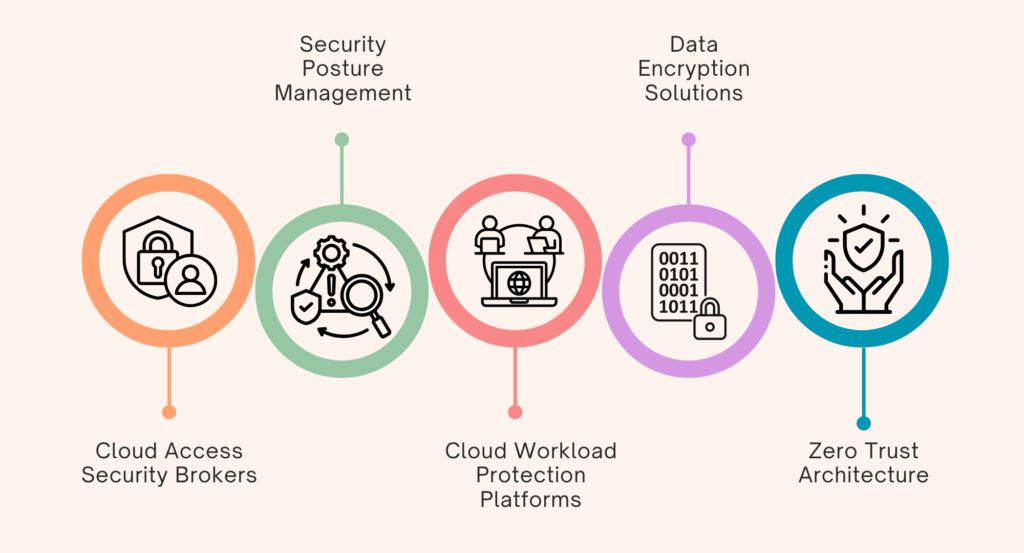
    How Do Custom Cybersecurity Solutions Enhance Cloud Security?

    Discover how custom cybersecurity solutions provide tailored protection for secure cloud environments

    1. Cloud Access Security Brokers (CASBs): CASBs serve as security layers between the cloud provider and the user base. It provides
      1. Data Protection: CASBs enforce data-loss-prevention policies through enforcing DLP policies by monitoring how data is transferred and blocking unauthorized access to sensitive information.
      2. Threat Detection: They use behavioral analytics to detect anomalies in user behavior that might suggest a breach.
      3. Compliance Management: CASBs help keep organizations compliant with all the appropriate industry regulations based on audit trails and reporting.
    2. Security Posture Management (SPM): SPM tools continuously watch for identifying vulnerabilities and misconfigurations in the cloud environments. This is done through:
      1. Vulnerability Scanning: Scanner tools that scan for all misconfigurations and known vulnerabilities in cloud resources.
      2. Compliance Audits: Periodic audits that the configurations adhere to best security practices and the appropriate regulations from the mandate.
    3. Cloud Workload Protection Platforms (CWPP): They protect the applications running in the cloud by analyzing activity in real-time and blocking unauthorized access attempts.
      1. Runtime Protection: The CWPP can detect real-time threats by protecting applications against malicious activity.
      2. Intrusion Prevention: The CWPP prevents any unauthorized access attempt and reduces the attack’s impact on workloads.
    4. Data Encryption Solutions: Encryption at rest, associated with the storage of data, and in motion, associated with the transfer of data utilise strong algorithms such as Advanced Encryption Standard (AES) coupled with Rivest-Shamir-Adleman (RSA) ensuring the integrity of data as it flows through all its stages of the life cycle.
      1. Encryption at Rest: With strong encryption algorithms such as AES-256, data is encrypted to secure those at rest in the cloud.
      2. Encryption in Transit: Encryption protocols, such as TLS/SSL, consist of specific ones that encrypt data between users and cloud services.
    5. Zero Trust Architecture: Zero Trust continuously verifies users and devices, limits network access, and controls lateral movement. This architectural model is designed so that not a single user or device should be trusted by default, regardless of whether they are inside or outside the network perimeter.
      1. Identity Verification: MFA ensures only the proper users can access cloud resources.
      2. Micro-Segmentation: This involves limiting lateral movement as the workload is segmented so multiple attack vectors remain inaccessible to the hackers if one resource is compromised.

    Mobile Systems: Unique Risks and Custom Solutions for Security

    The increasing use of mobile devices in the workplace has become a meaningful way to access company information. Still, they also pose vulnerabilities due to their portability and high connectivity. Among mobile security threats are malware attacks, phishing scams, and accidental data leaks in cases where information is mishandled.

    What Are the Issues in Mobile Security?

    • Threats of Malware: The mobile phone is highly vulnerable to malware that can steal away information or compromise system operations.
    • Phishing Attacks: Mobile phishing attacks target mobile users with fake messages that compel the victims to unveil sensitive information.
    • Leakage of Data: The leakage of data is facilitated by mishandling and storing some applications without appropriate security, thereby making them vulnerable.

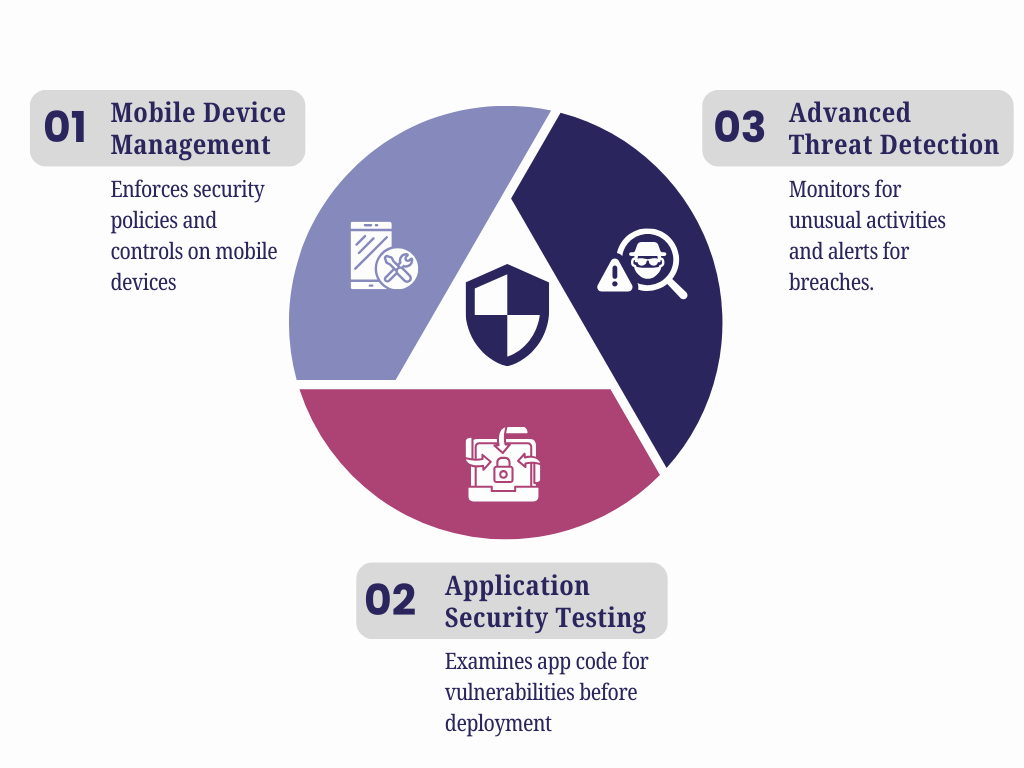
    How Do Custom Cybersecurity Solutions Improve Mobile Security?

    How to Improve Mobile Security with Custom Cybersecurity Solutions

    1. Mobile Device Management (MDM): MDM will help enforce security policies across mobile devices and controls preventing the installation of unauthorized applications. This is done by:
      1. Wipe Remotely Ability: IT administrators can remotely wipe the data off lost or stolen devices so sensitive information cannot be accessed.
      2. Application Control: MDM enables organizations to mark applications as white lists or black lists depending on security policies to prevent malicious applications from being installed.
    2. Application Security Testing: This examines the code of a mobile application for potential vulnerabilities while simulating attacks to determine hidden weaknesses before deploying the app.
      1. Static Application Security Testing (SAST): It scans for possible weaknesses in the source code that may occur when executed.
      2. Dynamic Application Security Testing (DAST): Running applications are tested for vulnerability through simulated attacks that could reveal the exploits.
    3. Advanced Threat Detection: Behavioral analytics monitor mobile devices for unusual activities and enable an immediate response to potential breaches.
      1. Behavioral Analytics: These systems monitor patterns in the user behavior that signify a potential compromise.
      2. Real-Time Alerts: Instant alerting of suspicious events to allow for prompt investigation and action.

    On-Site Systems: Controlling Internal and Physical Threats through Custom Cybersecurity Solutions

    As businesses continue their digital transformation, on-site systems form the backbone of most organizations, since they provide a direct source of access to data coupled with control.

    They are always vulnerable to internal threats and intrusion by physical persons. Insiders and unauthorized physical intrusion are the main risks to on-site systems.

    What Are the Security Problems in On-Site Systems?

    • Insider Threat: The insiders compromised the security since those authorized to privilege access may misuse their rights.
    • Physical Violations: Unauthorized physical entities entering critical areas directly result in hardware or data exposure.

    How Do Custom Cybersecurity Solutions Improve On-Site Security?

    Learn how custom cybersecurity solutions enhance on-site security by addressing unique vulnerabilities.

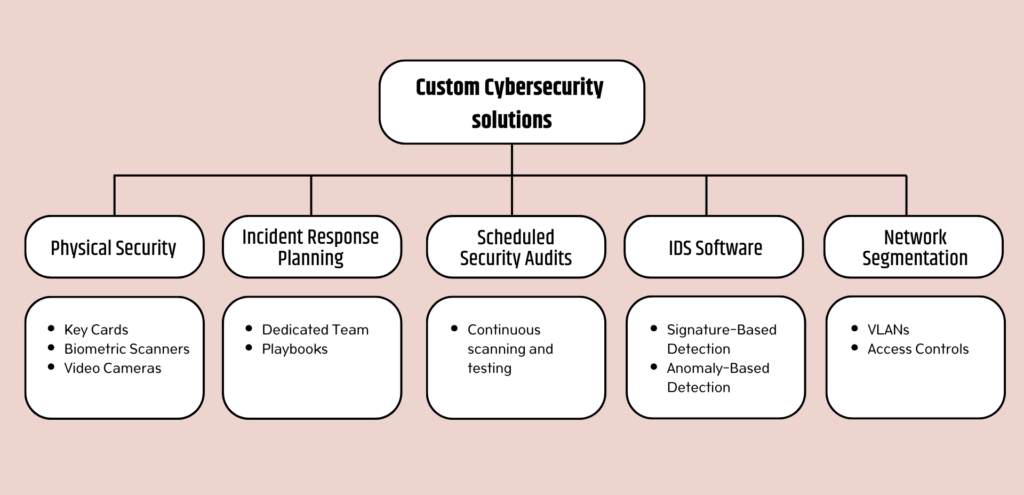
    1. Network Segmentation: Division of the network into sub-divisions. Segmentation limits the movement of attackers and restricts access to sensitive data. This format helps isolate breaches, thus protecting the rest of the network.
      1. Virtual Local Area Networks (VLANs): Separation of the different network-level departments reduces the likelihood of lateral movement by an attacker.
      2. Access Controls Between Segments: Strict access controls make sure that only authorized persons gain access to the sensitive segments.
    2. IDS Software: Intrusion Detection Systems (IDS) software keeps track of network traffic by detecting signatures and anomalies, which will notify of a threat in real-time.
      1. Signature-Based Detection: Predefined signatures of known threats are recognized and provide immediate responses to familiar attacks.
      2. Anomaly-Based Detection: This form of detection involves scanning for patterns that don’t fall under the usual traffic profile within the network. The method finds new threats that do not match existing signatures.
    3. Scheduled Security Audit: Periodic scanning for weaknesses and penetration testing will discover and remove all the possible vulnerabilities within the system before hackers take advantage of them.
    4. Incident Response Planning: A dedicated incident response team and a few playbooks for common scenarios ensure that breaches are fast and efficient and the eventual damage is reduced.
    5. Physical Security: Restrict access to building parts using key cards, biometric scanners, and video cameras.

    Conclusion

    Present-day generic solutions fail when unique challenges exist in cloud, mobile, and on-site systems. SCS Tech, a trusted name among the cybersecurity solutions group, provides targeted protection needed to keep data and operations safe.

    Whether planning a new security strategy or seeking to build upon and enhance the existing one, investing in custom cybersecurity solutions is paramount in these times of constant global changes and cyber threats.


  • Why Is Incident Management Software Vital for Homeland Security and Defence Operations?

    Why Is Incident Management Software Vital for Homeland Security and Defence Operations?

    Are you aware that India ranks as the world’s second most flood-affected country?

    Facing an average of 17 floods each year, these flood events annually affect about 345 million people every year. With these frequent natural disasters, along with threats like terrorism and cyberattacks, India faces constant challenges. Therefore, now more than ever it is crucial to protect people and resources.

    To tackle this, having an effective incident management software (IMS) system is very important. It helps teams coordinate effectively and plan ahead, ensuring rapid action in critical situations.

    So how exactly does incident management software support homeland security and defense operations in managing these complex crises?

    Why Is Incident Management Software Vital for Homeland Security and Defence Operations?

    why incident management software for homeland security and defence?

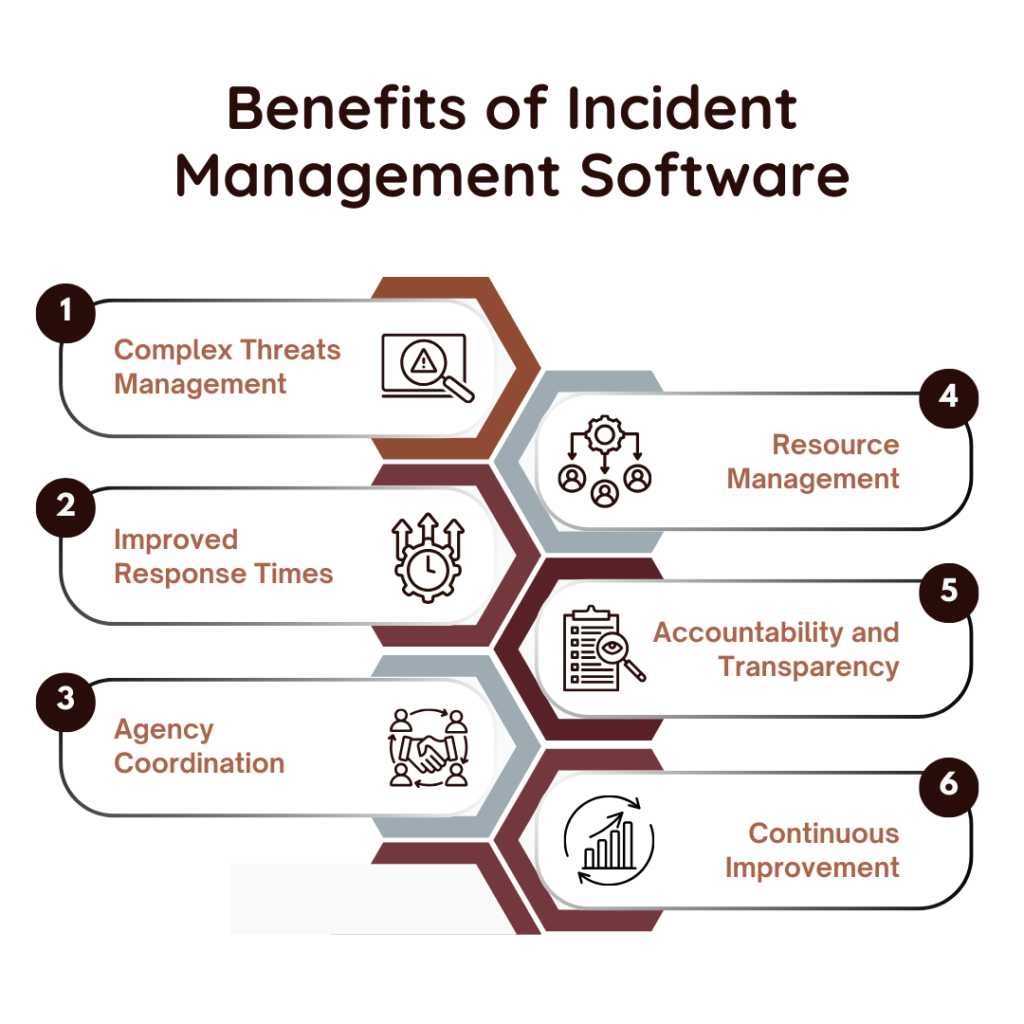
    #1. Tackling the Complexity of Security Threats

    India’s diverse threats- from natural disasters to public health emergencies- call for special and flexible response strategies. This is where incident management software makes an all-important difference.

    • Multi-Dimensional Threat Landscape: India’s threats are multi-dimensional and heterogeneous, so different agencies are called to work together. IMS centralizes the platform for police, medical teams, fire services, and defense forces to share data and communicate closely to ensure all responders are in sync.
    • Evolving Threats: The threats are diverse and cannot be predicted. Incident management software is designed to respond to unanticipated crisis changes, whereas traditional responses are often left behind. It enables on-site changes based on fresh information, creating agility in response efforts.

    #2. Response Time Improvement

    When disasters strike, every second counts. Delayed response translates to more deaths or more significant property damage. Incident management software drastically cuts down response times by standardizing procedures for critical activities.

    • Access to Information in Real Time: IMS offers decision-makers instant information about the status of incidents, resource utilization, and current operations. With rapid access to the correct information, mobilization of resources is quicker and certainly does not result in delays that may augment the crisis condition.
    • Automated Processes: Some of the core processes in an IMS are automated, such as reporting and tracking, which eliminates more human errors and lets the information flow faster. At times of high pressure, such automation is instrumental in transmitting responses fast enough for loss of life and further damage.

    #3. Coordination between Agencies

    A coordinated response involving multiple agencies is fundamental during crisis management. Incident management software helps coordinate unified action by creating a central communication hub for all the responders.

    • Unified Communication Channels: IMS presents a common communication channel to all agencies. This saves the agency from confusion and misunderstanding, which may lead to errors in response and thus present hazards to the public.
    • Standard protocols: IMS places agencies into parallel response frameworks at the national level, similar to the National Disaster Management Act. That way, they will work from the same protocols, and accountability can be easily known and understood.

    #4. Enable Resource Management

    Resources are always scarce at any given moment of a disaster. The effectiveness of response is often related to the way resources are managed. Incident management software provides an essential function in resource allocation so that it reaches precisely where and when it is needed.

    • Resource Availability Visibility: IMS provides real-time situational awareness concerning available resources, people, equipment, and supplies. Agencies can rapidly deploy resources to the point of need.
    • Dynamic Resource Allocation: The demand for resources changes sharply in more significant incidents. IMS enables the responder to promptly make dynamic resource allocations to fulfill urgent needs.

    #5. Enabling Accountability and Transparency

    Transparency and accountability are essential for any democratic country such as India. Public trust must be there, and incident management software supports this and lays the foundation for the trust of people in crisis management by the government.

    • Detailed Documentation: IMS offers an audit trail of everything done during the incident. It is crucial for accountability, with every agency responding accountable for every piece of action.
    • Public Trust: Incident management transparency will build the trust of the public. More people will feel confident and trusting that the government can be there for them if they realize there is evidence of successful crisis management. IMS helps illustrate that it is not only responsive but prepared and organized.

    #6. Enabling Continuous Improvement

    One of the greatest strengths of incident management software lies in its support for continuous improvement. Through lessons learned from past events, the agencies improve their strategies in preparation for other challenges.

    • Data-Driven Insights: IMS collects data from each incident, based on which analysis of response effectiveness is conducted to identify what areas need improvements. The insights drawn from such data guide training programs, resource planning, and policy adjustments. The system thus becomes more resilient in the face of future challenges.
    • Adaptation to New Challenges: Constant adaptation is necessary, from the emergence of cyberattacks and climate-related disasters to others yet to emerge. Through historical data analysis, the central agencies are better placed to stay ahead of rising challenges and refine their responses based on lessons learned.

    Conclusion

    Incident management software has become essential in a world where evolving security threats and natural disasters constantly challenge a nation’s resilience. This is especially true for countries like India. Companies like SCS Tech develop the most sophisticated incident management software solutions, boosting response time and coordinating and managing resources accordingly.

    Such investment is bound to be operational and goes beyond that to enhance national resilience and public trust, equipping India’s security forces to respond to emerging challenges effectively.

  • How Can Custom Cybersecurity Solutions Protect Finance from Fraud and Cybercrime?

    How Can Custom Cybersecurity Solutions Protect Finance from Fraud and Cybercrime?

    It was recently reported that the financial sector faced a staggering 3,348 reported cyber attacks in 2023—a sharp 83% increase from the 1,829 attacks in 2022. This alarming trend highlights the growing vulnerability of financial institutions to sophisticated cyber threats. As these attacks become more relentless, it’s evident that traditional security systems are no longer sufficient, underscoring the urgent need for advanced computer security services to safeguard critical financial data and infrastructure.

    To counter these rising threats, the financial industry must join hands with cybersecurity solutions group that offer a stronger, more adaptive defence. The question is no longer if but how quickly organizations can upgrade their security frameworks to safeguard their digital assets.

    Custom cybersecurity solutions specific to the finance sector provide advanced threat detection, real-time monitoring, and incident response strategies designed to protect finance from these frauds and cybercrimes in the constantly changing threat landscape. Read on further to understand how custom cybersecurity solutions protect finance from cybercrimes.

    Why do Custom Cybersecurity Solutions Matter to Financial Institutions?

    High-value targets for cybercriminals are financial institutions because of the sensitivity of their data and the volumes of money involved. Cybersecurity breaches can cause enormous financial fallout, damage to customer trust, and penalties due to regulatory noncompliance.

    Custom cybersecurity solutions provide tailored protection based on the unique vulnerabilities prevailing in financial operations. These solutions cater to specific needs and requirements toward regulatory compliance, operational challenges, and information security, which the institution faces.

    Another critical benefit custom solutions provide is the ability to keep up with emerging threats. As cyberattacks become even more complex, banks and financial organizations demand defences that grow just as intense. By integrating proactive risk management, threat detection, and incident response planning, custom solutions arm financial organizations with the capabilities to mitigate risks before they climax into costly incidents.

    How Custom Cybersecurity Solutions Help Protect Finance from Fraud and Cybercrime?

    Custom cybersecurity solutions are crucial because they involve dealing with very high-risk and sensitive information and transactions. Some areas that make the solutions effective in the finance sector include:

    Custom Cybersecurity Solutions for Fraud and Cybercrime Protection

    1. Risk Assessment and Management

    In this case, the risk types refer to phishing attacks, ransomware, and insider threats, among others. Custom cybersecurity solutions imply starting with a comprehensive risk assessment.

    • Vulnerability scanning: To identify weaknesses in IT infrastructure that might be attacked.
    • Threat modelling: To predict threats that are unique to financial operations so the institution can prepare and defend itself.

    Effective risk management is the basis for preventing costly breaches and fraud, helping financial institutions receive a ranked list of their most critical vulnerabilities.

    2. Advanced Threat Detection

    Due to the volume of transactions and complexity, institutions must detect threats in real time. Advanced threat detection tools utilize:

    • Real-Time Monitoring: For networks and systems to capture suspicious activities as soon as they occur. A minute’s delay in financial institutions translates into losses at unprecedented levels.
    • AI and ML Services: The services and algorithms are used in behavioural and pattern analytics to detect possible intrusion as soon as possible before damage takes place. They draw anomalies, which otherwise might go unnoticed by traditional systems, with this controlling fraud and other kinds of breaches.

    3. Incident Response Planning

    A well-coordinated response to security breaches minimizes damage and restores normal operations promptly. Incident response planning incorporates:

    • Customised Response Strategies: Ensure that detail specific measures taken during a breach, such as isolating affected systems and protecting transactions.
    • Post-Incident Analysis: For what went wrong, how to improve future responses, and how to strengthen overall security.

    4. Mechanisms for Data Protection

    The protection of sensitive financial data is the prime focus. Two fundamental mechanisms are:

    • Encrypt: For encrypting data in rest and transit modes so that any sensitive information, including customer details and transaction records, remains secure.
    • Protect Data Backup Solutions: To help bring back critical financial data in case of a cyberattack or system crash and, therefore, help reduce downtime.

    5. Compliance with Financial Regulations

    All financial institutions should adhere to data protection and transaction regulations such as PCI DSS and GDPR. The custom-made cybersecurity solution ensures that adherence is followed.

    • Compliance monitoring and reporting: These tools are used to generate all documents required by the regulatory bodies.
    • Auditing mechanisms: Custom cybersecurity solutions can help identify and rectify compliance deficiencies before the imposition of penalties.

    6. Integration with Existing IT Systems

    Cybersecurity solutions should be built to fit into a financial institution’s infrastructure seamlessly, ensuring that operations run smoothly for the organization. Such integration will result in:

    • Least Disruption to Operations: Such measures should allow the routine activities of the day.
    • Scalability: Scale with growth or introduce new services like mobile banking without compromising on effectiveness in terms of security and without sacrificing performance.

    7. Threat Intelligence and Real-Time Alerts.

    Financial institutions can remain competitive through threat intelligence platforms which are present in custom cybersecurity solutions, which give:

    • Real-time updates: Custom cybersecurity solutions send updates on new vulnerabilities and cybercriminal tactics
    • Proactive monitoring of external sources: Scanning of external sources like dark web forums to catch threats when they happen.

    Few Methodologies for Efficient Cybersecurity in Finance

    Custom security solutions for financial institutions employ a variety of methodologies to guarantee complete security. Such methodologies are essential factors while dealing with the dynamic threat environment:

    1. Proactive Security Measures

    Cyber threats should be prevented before they occur. Key proactive measures include:

    • Penetration Testing: This emulates real-world attacks to find vulnerabilities in the system. This would make the defences of an institution strong ahead of any attack.
    • Continuous Threat Intelligence: Helps in gathering, and monitoring dark web forums for compromised credentials or other indicators of compromise, thus providing early intervention before breaches happen.

    2. Multi-Layered Defense Strategies

    Multi-layered defence provides extensive coverage across different types of cyber threats, including:

    • Layered Security Controls: This should be present across different levels of IT infrastructure to ensure that if one layer is breached, others will continue to protect the network.
    • Targeted Protection Solutions: This encompasses solutions that address identified emerging threats, such as phishing, ransomware, and insider threats, in a way that avoids a single point of failure.

    3. Compatibility with Current Systems

    To be most effective, custom cybersecurity solutions need to integrate with an institution’s current infrastructure, which means:

    • Seamless Implementation: Installations should be as smooth as possible not to disrupt continuing operations. Security deployment will in no way interfere with the daily running of the institution, nor affect customer service.
    • Interoperability: Custom cybersecurity solutions have to be compatible with current security tools and technologies. This compatibility enhances a harmonious ecosystem, which is centered on strengthening security posture as well as monitoring and response capabilities.

    Key Takeaways

    The rise of cyber-attacks like supply chain attacks, zero-day exploits, and credential stuffing makes custom cybersecurity solutions vital for financial institutions to protect their digital assets and operations. SCS Tech addresses these challenges by offering comprehensive services, including risk assessments, advanced threat detection, incident response planning, and compliance support.

    By implementing these solutions, financial institutions can protect their sensitive data, maintain client trust, and ensure the continuity of their operations. With SCS Tech, financial organizations can stay ahead of evolving cyber threats, paving the way for secure digital transformation.

  • Leveraging AI and ML Services to Enhance Business Efficiency

    Leveraging AI and ML Services to Enhance Business Efficiency

    In an environment where market conditions are volatile and customer preferences are ever-changing, AI and ML services offer advanced automation, predictive analytics, and enhanced customer experiences. 

    These technologies improve decision-making, operational efficiency, and customer satisfaction. As the AI and ML market continues to grow, choosing the right service provider becomes critical. Future trends in AI and ML, such as edge technology, collaborative learning, and ethical AI, promise to further drive innovation and resilience in the market.

    In this blog, we will discuss the benefits, future implications, and the role of AI and ML services in business operations in detail.

    Understanding AI and ML

    Artificial Intelligence (AI) involves creating smart systems capable of performing tasks that typically require human intelligence, such as problem-solving, learning, decision-making, and understanding language. Machine Learning (ML), a subset of AI, focuses on developing algorithms that enable systems to learn from data and improve over time without explicit programming.

    Understanding the distinction between AI and ML is crucial for appreciating their unique contributions to business operations. Machine learning applications span various sectors, with customer-centric use cases being particularly prevalent. According to a study, 57% of respondents identify customer experience as the primary use case for AI and ML.

    Source

    Below are the differences between Artificial Intelligence (AI) and Machine Learning (ML) in the context of business operations:

    Aspect Artificial Intelligence (AI) Machine Learning (ML)
    Scope Encompasses a wide range of technologies including ML, natural language processing, robotic process automation, and more. Specifically focused on using data to train models and make predictions or decisions without explicit programming.
    Application in Business Can automate complex tasks, provide advanced analytics, enhance decision-making processes, and improve customer interactions. Primarily used for predictive analytics, customer segmentation, recommendation systems, and anomaly detection.
    Data Dependency Can operate with rules-based systems and logical operations, not always data-dependent. Highly dependent on large datasets for training and improving model accuracy.
    Example Use Cases Chatbots, autonomous vehicles, fraud detection, virtual assistants, and personalized marketing. Sales forecasting, customer churn prediction, recommendation engines, and image recognition.
    Implementation Complexity Often more complex to implement, requiring integration of multiple technologies and larger computational resources. Typically involves implementing specific algorithms and models, which can be simpler in scope compared to full AI systems.
    Human Intervention Can function with less human intervention once fully developed, especially in autonomous systems. Requires ongoing human oversight for model training, tuning, and validation.
    Output Interpretation Can provide more comprehensive and context-aware outputs, often mimicking human-like understanding. Outputs are generally predictions or classifications, often requiring human interpretation.
    Adaptability Designed to adapt to a wide range of scenarios and environments, often with built-in learning mechanisms. Adaptability is limited to the scope of the trained data; new scenarios require re-training or additional data.
    Ethical Considerations Broader ethical implications including job displacement, decision transparency, and bias. Primarily concerns around data privacy, algorithmic bias, and the integrity of the training data.

    Benefits of AI and ML on Business Operations

    The adoption of AI and ML services brings numerous benefits to businesses-

    Enhanced Decision-Making

    AI and ML enable organizations to analyze vast datasets in real-time, uncovering patterns and trends that would otherwise remain unnoticed. This capability empowers businesses to make more informed decisions, fostering proactive planning rather than reactive responses.

    Improved Customer Experiences

    Personalization is paramount in today’s customer-centric landscape. Advanced AI algorithms enable businesses to understand customer preferences and behaviors, facilitating tailored recommendations and support. This personalized approach enhances customer satisfaction, loyalty, and ultimately, profitability.

    Operational Efficiency

    AI-driven automation streamlines workflows, ensuring timely delivery of goods and services, predicting potential failures, and detecting fraudulent activities. Such efficiencies minimize costs, reduce errors, and optimize overall business performance.

    Facilitating Innovation

    AI ML technologies facilitate rapid prototyping and market prediction, enabling businesses to identify new opportunities and develop innovative products and services that resonate with dynamic market demands.

    Factors To Consider While Selecting the Right AI ML Services Provider

    The global machine learning market has exhibited robust growth, valued at $15.44 billion in 2021 and projected to reach $209.91 billion by 2029, reflecting a notable compound annual growth rate (CAGR) of 38.8%, as reported by Fortune Business Insights. Additionally, the machine learning platforms market is expected to hit $31.36 billion by 2028, according to Proficient Market Insights.

    Businesses aiming to enhance their operations and productivity must carefully choose their AI ML services provider. Several key factors must be considered:

    • Skills and Knowledge

    Businesses should prioritize providers with deep expertise in their industry and relevant use cases. Experience in executing successful projects can provide valuable insights and customized solutions.

    • Flexibility and Adaptability

    Providers must demonstrate the ability to scale AI and Machine Learning solutions effectively, accommodating future growth and adapting to evolving business needs seamlessly.

    • Maintaining Compliance with Safety

    Ensuring data security and compliance with industry regulations are paramount. Businesses should verify that prospective providers adhere strictly to safety protocols and privacy laws.

    Future implications of AI and ML

    AI and ML have transcended futuristic concepts to become integral in everyday applications, offering solutions to diverse challenges. Yet, the evolution of AI ML services continues, with several future implications:

    • Edge Tech

    Edge technology processes data closer to its source, revolutionizing AI and ML applications by minimizing latency, enhancing real-time analysis, and facilitating decentralized AI and IoT solutions. The global market for Edge AI Tech is valued at approximately $20.39 billion as of 2023.

    • Group Learning

    Collaborative learning methodologies enable teams to train models using decentralized data sources while maintaining privacy and security, fostering innovation in AI model development.

    • Improving AI Ethics

    The growing prominence of AI necessitates a heightened focus on ethical considerations. Organizations must prioritize transparency, accountability, fairness, and bias reduction in AI development and deployment to build public trust and ensure responsible usage of AI services.

    Initiatives like AlgorithmWatch exemplify efforts in promoting explainable and ethical AI practices, ensuring accountable algorithmic decision-making.

    Conclusion

    AI ML services help businesses succeed. They are not just tools but change how businesses work. AI & ML can open new doors and create better things for customers.  At SCS Tech India Pvt, we provide effective AI ML solutions and consultations. We also offer ML development, AI-led applications, and Data support. With our top-notch AI ML services, businesses can expect process automation, improved customer interactions, and enhanced analytics. Contact us to make your business stand out and withstand the impacts of a dynamic market.

  • Digital Transformation and Cybersecurity: Mitigating Risks in the Digital Era

    Digital Transformation and Cybersecurity: Mitigating Risks in the Digital Era

    The digital transformation is in full swing, and the pace at which companies are moving to the age of automation, cloud services, and smart things seems unstoppable. As we have seen, this digital transformation, which propels efficiency, superior customer experiences, and competitive advantage, has given birth to a vast digital landscape teeming with opportunities for exploitation.

    Cyber criminals come up with more sophisticated modes of attack as new technologies emerge, this increases new avenues of attack. To adapt to such an environment, there is a clear need for organizations to focus on and uphold strong cybersecurity. 

    By employing carefully devised measures to manage risks and prevent adverse occurrences, companies can safely preserve vital information needed to sustainably advance digital transformation initiatives. Effective risk mitigation demands a holistic approach to cybersecurity, embedding robust security practices into every facet of digital transformation. 

    This blog offers insights into the critical interplay between digital transformation and cybersecurity, highlighting strategies to protect organizational assets and ensure a secure, resilient digital future.

    The Risks of Digital Transformation

    Digital transformation often involves:

    Cloud adoption

    This resulted in new considerations to data and application security when migrating them to the cloud since the cloud provides scalability and agility.

    Increased reliance on interconnected devices

    The use of IoT increases risks, as the number of connections and points of attack possibilities increases.

    Integration with third-party applications

     When using extensions one can also create loopholes through which unauthorized persons can access the network in case adequate measures have not been taken.

    Evolving business models

    New digital initiatives can bring new and unforeseen security threats to the floors which need to be addressed based on the current security measures.

    These factors contribute to a vast and dynamic landscape of potential targets for hackers and cyber attackers. Cybersecurity threats such as stolen data, malicious software invasions, and ransomware threats are a risk for business entities that participate in the digital transformation.

    Strategies for Mitigating Cybersecurity Risks

    Altogether despite these challenges, they are not challenges that cannot be overcome. Therefore, with an effective proactive cybersecurity plan in place, organizations can deal effectively with the challenges present in the connected business world. 

    Security by Design

    To mitigate risk in the context of digitalization, it is crucial to apply security concerns to every step of the process of transformation. Ensure an adequate level of security before integrating solutions and technologies into an organization.

    Zero Trust Architecture

    Adopt a Zero-Trust approach concerning the IT environment, thereby requiring the validation of every user and endpoint attempting to connect to the network no matter their location.

    Continuous Monitoring and Threat Detection

    Take cybersecurity to another level by employing security solutions for permanent vigilance of systems and networks. Invest in threat intelligence to keep up with emerging different threats that are common nowadays.

    Data Security and Encryption

     Formulate strong data security measures such as data encryption and proper access control measures. Always backup your important data and the company should have a disaster recovery plan.

    Employee Awareness and Training

     Most organizations must train employees as initial responders in case of a cyber threat. Ensure that the employees undergo constant security awareness training to inform them about the existing security hazards and how to prevent them from happening.

    Prioritize Patch Management

     It is also important to always update software and firmware on all the devices and systems to cover for the several cracks that the hackers may be liable for.

    Incident Response Planning

    Explain the guidelines of the incident response programs that consist of steps of how to detect, respond to, and deal with cyber incidents.

    To learn more about the security tips to avoid cyber breaches, visit this link.

    The Future of Digital Transformation: Security as a Competitive Advantage

    When cybersecurity is being given due consideration during the process of digital business transformation, companies not only protect themselves from more dangers but also gain an edge. Here’s how:

    Enhanced Brand Reputation

    Establishing and practicing a strong cybersecurity ethic from a company helps establish customer and partnering trust.

    Improved Business Continuity

    A good cybersecurity positioning keeps an organization from experiencing disruptions in business due to cyber incidents.

    Compliance with Regulations

    Various types of industries have some specifics regarding the protection of data privacy. Adopting sound cybersecurity controls can play a significant role in enabling organizations to address these regulations.

    Innovation and Growth

    Practical security solutions create the right environment that enables organizations to adapt to emerging technologies and foster digital transformation.

    Investing in a Secure Future

    The opportunities of the digital environment are vast and the world has not yet witnessed the full potential of the digital environment but, as we know it, along with these opportunities there are prevailing and growing threats of cyber security threats. Therefore, in undertaking the digital transformation journey, businesses have to be aware of these risks and then design a strong cybersecurity approach to counter them.

    Stay ahead in the digital era by prioritizing cybersecurity in your digital transformation journey. We offer digital transformation services and expert solutions to safeguard your organization against emerging threats. Contact us today to learn how we can help you build a secure and resilient digital future.