Because “It Won’t Happen to Us” Is No Longer a Strategy
Let’s face it—most businesses don’t think about disaster recovery until it’s already too late.
A single ransomware attack, server crash, or regional outage can halt operations in seconds. And when that happens, the clock starts ticking on your company’s survival.
According to FEMA, over 90% of businesses without a disaster recovery plan shut down within a year of a major disruption.
That’s not just a stat—it’s a risk you can’t afford to ignore.
Today’s threats are faster, more complex, and less predictable than ever. From ransomware attacks to cyclones, unpredictability is the new normal—despite advancements in methods to predict natural disasters, business continuity still hinges on how quickly systems recover.
This article breaks down:
- What’s broken in traditional DR
- Why cloud solutions offer a smarter path forward
- How to future-proof your business with a partner like SCS Tech India
If you’re responsible for keeping your systems resilient, this is what you need to know—before the next disaster strikes.
Why Traditional Disaster Recovery Fails Modern Businesses
Even the best disaster prediction models can’t prevent outages. Whether it’s an unanticipated flood, power grid failure, or cyberattack, traditional DR struggles to recover systems in time.
Disaster recovery used to mean racks of hardware, magnetic tapes, and periodic backup drills that were more hopeful than reliable. But that model was built for a slower world.
Today, business moves faster than ever—and so do disasters.
Here’s why traditional DR simply doesn’t keep up:
- High CapEx, Low ROI: Hardware, licenses, and maintenance costs pile up, even when systems are idle 99% of the time.
- Painfully Long Recovery Windows: When recovery takes hours or days, every minute of downtime costs real money. According to IDC, Indian enterprises lose up to ₹3.5 lakh per hour of IT downtime.
- Single Point of Failure: On-prem infrastructure is vulnerable to floods, fire, and power loss. If your backup’s in the building—it’s going down with it.
The Cloud DR Advantage: Real-Time, Real Resilience
Cloud-based Disaster Recovery (Cloud DR) flips the traditional playbook. It decentralises your risk, shortens your downtime, and builds a smarter failover system that doesn’t collapse under pressure.
Let’s dig into the core advantages, not just as bullet points—but as strategic pillars for modern businesses.
1. No CapEx Drain — Shift to a Fully Utilized OPEX Model
Capital-intensive. You pre-purchase backup servers, storage arrays, and co-location agreements that remain idle 95% of the time. Average CapEx for a traditional DR site in India? ₹15–25 lakhs upfront for a mid-sized enterprise (IDC, 2023).
Everything is usage-based. Compute, storage, replication, failover—you pay for what you use. Platforms like AWS Elastic Disaster Recovery (AWS DRS) or Azure Site Recovery (ASR) offer DR as a service, fully managed, without owning any physical infrastructure.
According to TechTarget (2022), organisations switching to cloud DR reported up to 64% cost reduction in year-one DR operations.
2. Recovery Time (RTO) and Data Loss (RPO): Quantifiable, Testable, Guaranteed
Forget ambiguous promises.
With traditional DR:
- Average RTO: 4–8 hours (often manual)
- RPO: Last backup—can be 12 to 24 hours behind
- Test frequency: Once a year (if ever), with high risk of false confidence
With Cloud DR:
- RTO: As low as <15 minutes, depending on setup (continuous replication vs. scheduled snapshots)
- RPO: Often <5 minutes with real-time sync engines
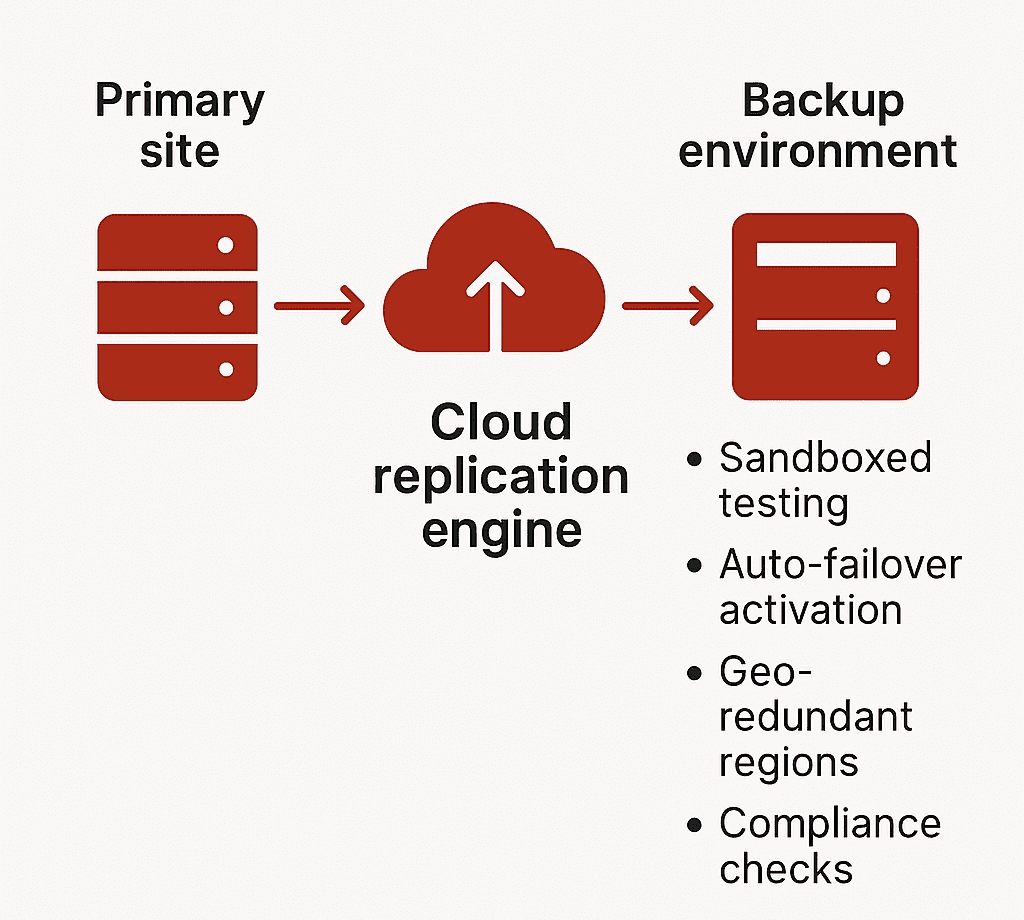
- Testing: Sandboxed testing environments allow monthly (or even weekly) drills without production downtime
Zerto, a leading DRaaS provider, offers continuous journal-based replication with sub-10-second RPOs for virtualised workloads. Their DR drills do not affect live environments.
Many regulated sectors (like BFSI in India) now require documented evidence of tested RTO/RPO per RBI/IRDAI guidelines.
3. Geo-Redundancy and Compliance: Not Optional, Built-In
Cloud DR replicates your workloads across availability zones or even continents—something traditional DR setups struggle with.
Example Setup with AWS:
- Production in Mumbai (ap-south-1)
- DR in Singapore (ap-southeast-1)
- Failover latency: 40–60 ms round-trip (acceptable for most critical workloads)
Data Residency Considerations: India’s Personal Data Protection Bill (DPDP 2023) and sector-specific mandates (e.g., RBI Circular on IT Framework for NBFCs) require in-country failover for sensitive workloads. Cloud DR allows selective geo-redundancy—regulatory workloads stay in India, others failover globally.
4. Built for Coexistence, Not Replacement
You don’t need to migrate 100% to cloud. Cloud DR can plug into your current stack.
Supported Workloads:
- VMware, Hyper-V virtual machines
- Physical servers (Windows/Linux)
- Microsoft SQL, Oracle, SAP HANA
- File servers and unstructured storage
Tools like:
- Azure Site Recovery: Supports agent-based and agentless options
- AWS CloudEndure: Full image-based replication across OS types
- Veeam Backup & Replication: Hybrid environments, integrates with on-prem NAS and S3-compatible storage
Testing Environments: Cloud DR allows isolated recovery environments for DR testing—without interrupting live operations. This means CIOs can validate RPOs monthly, report it to auditors, and fix configuration drift proactively.
What Is Cloud-Based Disaster Recovery (Cloud DR)?
Cloud-based Disaster Recovery is a real-time, policy-driven replication and recovery framework—not a passive backup solution.
Where traditional backup captures static snapshots of your data, Cloud DR replicates full workloads—including compute, storage, and network configurations—into a cloud-hosted recovery environment that can be activated instantly in the event of disruption.
This is not just about storing data offsite. It’s about ensuring uninterrupted access to mission-critical systems through orchestrated failover, tested RTO/RPO thresholds, and continuous monitoring.
Cloud DR enables:
- Rapid restoration of systems without manual intervention
- Continuity of business operations during infrastructure-level failures
- Seamless experience for end users, with no visible downtime
It delivers recovery with precision, speed, and verifiability—core requirements for compliance-heavy and customer-facing sectors.
Types of Cloud DR Solutions
Every cloud-based recovery solution is not created equal. Distinguishing between Backup-as-a-Service (BaaS) and Disaster Recovery-as-a-Service (DRaaS) is critical when evaluating protection for production workloads.
1. Backup-as-a-Service (BaaS)
- Offsite storage of files, databases, and VM snapshots
- Lacks pre-configured compute or networking components
- Recovery is manual and time-intensive
- Suitable for non-time-sensitive, archival workloads
Use cases: Email logs, compliance archives, shared file systems. BaaS is part of a data retention strategy, not a business continuity plan.
2. Disaster Recovery-as-a-Service (DRaaS)
- Full replication of production environments including OS, apps, data, and network settings
- Automated failover and failback with predefined runbooks
- SLA-backed RTOs and RPOs
- Integrated monitoring, compliance tracking, and security features
Use cases: Core applications, ERP, real-time databases, high-availability systems
Providers like AWS Elastic Disaster Recovery, Azure Site Recovery, and Zerto deliver end-to-end DR capabilities that support both planned migrations and emergency failovers. These platforms aren’t limited to restoring data—they maintain operational continuity at an infrastructure scale.
Steps to Transition to a Cloud-Based DR Strategy
Transitioning to cloud DR is not a plug-and-play activity. It requires an integrated strategy, tailored architecture, and disciplined testing cadence. Below is a framework that aligns both IT and business priorities.
1. Assess Current Infrastructure and Risk
-
- Catalog workloads, VM specifications, data volumes, and interdependencies
- Identify critical systems with zero-tolerance for downtime
- Evaluate vulnerability points across hardware, power, and connectivity layers. Incorporate insights from early-warning tools or methods to predict natural disasters—such as flood zones, seismic zones, or storm-prone regions—into your risk model.
- Conduct a Business Impact Analysis (BIA) to quantify recovery cost thresholds
Without clear downtime impact data, recovery targets will be arbitrary—and likely insufficient.
2. Define Business-Critical Applications
- Segment workloads into tiers based on RTO/RPO sensitivity
- Prioritize applications that generate direct revenue or enable operational throughput
- Establish technical recovery objectives per workload category
Focus DR investments on the 10–15% of systems where downtime equates to measurable business loss.
3. Evaluate Cloud DR Providers
Assess the technical depth and compliance coverage of each platform. Look beyond cost.
Evaluation Checklist:
- Does the platform support your hypervisor, OS, and database stack?
- Are Indian data residency and sector-specific regulations addressed?
- Can the provider deliver testable RTO/RPO metrics under simulated load?
- Is sandboxed DR testing supported for non-intrusive validation?
Providers should offer reference architectures, not generic templates.
4. Create a Custom DR Plan
- Define failover topology: cold, warm, or hot standby
- Map DNS redirection, network access rules, and IP range failover strategy
- Automate orchestration using Infrastructure-as-Code (IaC) for replicability
- Document roles, SOPs, and escalation paths for DR execution
A DR plan must be auditable, testable, and aligned with ongoing infrastructure updates.
5. Run DR Drills and Simulations
- Simulate both full and partial outage scenarios
- Validate technical execution and team readiness under realistic conditions
- Monitor deviation from expected RTOs and RPOs
- Document outcomes and remediate configuration or process gaps
Testing is not optional—it’s the only reliable way to validate DR readiness.
6. Monitor, Test, and Update Continuously
- Integrate DR health checks into your observability stack
- Track replication lag, failover readiness, and configuration drift
- Schedule periodic tests (monthly for critical systems, quarterly full-scale)
- Adjust DR policies as infrastructure, compliance, or business needs evolve
DR is not a static function. It must evolve with your technology landscape and risk profile.
Don’t Wait for Disruption to Expose the Gaps
The cost of downtime isn’t theoretical—it’s measurable, and immediate. While others recover in minutes, delayed action could cost you customers, compliance, and credibility.
Take the next step:
- Evaluate your current disaster recovery architecture
- Identify failure points across compute, storage, and network layers
- Define RTO/RPO metrics aligned with your most critical systems
- Leverage AI-powered observability for predictive failure detection—not just for IT, but to integrate methods to predict natural disasters into your broader risk mitigation strategy.
Connect with SCS Tech India to architect a cloud-based disaster recovery solution that meets your compliance needs, scales with your infrastructure, and delivers rapid, reliable failover when it matters most.