Blog

  • 5 Ways Digital Twin Technology is Helping Utility Firms Predict and Prevent Failures

    5 Ways Digital Twin Technology is Helping Utility Firms Predict and Prevent Failures

    Utility companies encounter expensive equipment breakdowns that halt service and compromise safety. The greatest challenge is not repairing breakdowns, it’s predicting when they will occur.

    As part of a broader digital transformation strategy, digital twin tech produces virtual, real-time copies of physical assets, fueled by real-time sensor feeds such as temperature, vibration, and load. This dynamic model replicates asset health in real-time as it evolves.

    Utilities identify early warning signs, model stress conditions, and predict failure horizons with digital twins. Maintenance becomes a proactive intervention in response to real conditions instead of reactive repairs.

    The Digital Twin Technology Role in Failure Prediction 

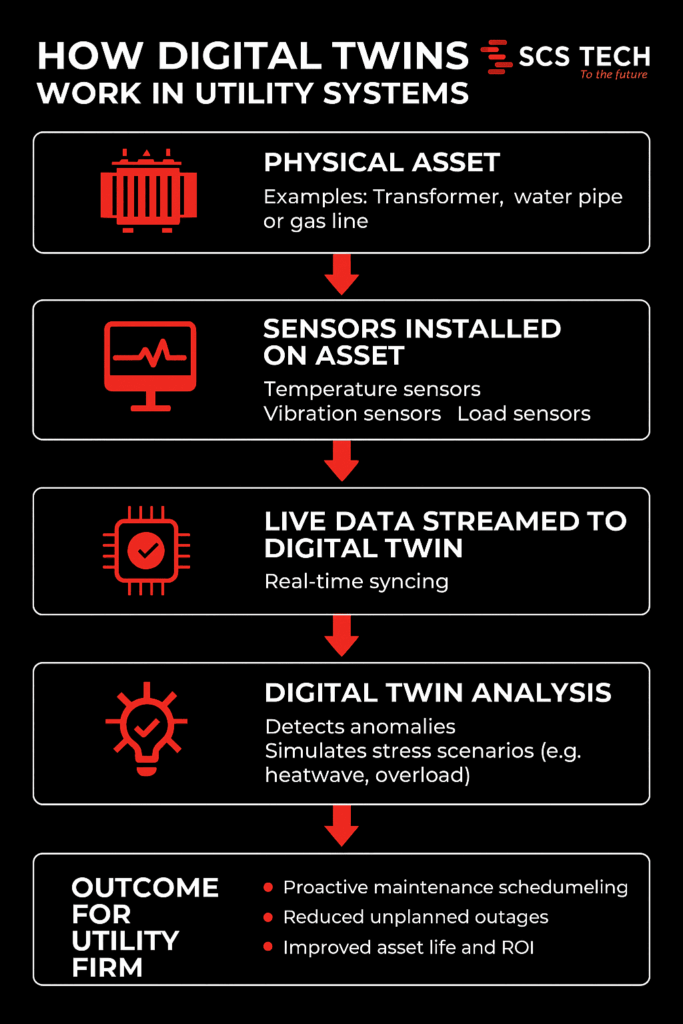
    How Digital Twins work in Utility Systems

    Utility firms run on tight margins for error. A single equipment failure — whether it’s in a substation, water main, or gas line — can trigger costly downtimes, safety risks, and public backlash. The problem isn’t just failure. It’s not knowing when something is about to fail.

    Digital twin technology changes that.

    At its core, a digital twin is a virtual replica of a physical asset or system. But this isn’t just a static model. It’s a dynamic, real-time environment fed by live data from the field.

    • Sensors on physical assets capture metrics like:
      • Temperature
      • Pressure
      • Vibration levels
      • Load fluctuations
    • That data streams into the digital twin, which updates in real time and mirrors the condition of the asset as it evolves.

    This real-time reflection isn’t just about monitoring — it’s about prediction. With enough data history, utility firms can start to:

    • Detect anomalies before alarms go off
    • Simulate how an asset might respond under stress (like heatwaves or load spikes)
    • Forecast the likely time to failure based on wear patterns

    As a result, maintenance shifts from reactive to proactive. You’re no longer waiting for equipment to break or relying on calendar-based checkups. Instead:

    • Assets are serviced based on real-time health
    • Failures are anticipated — and often prevented
    • Resources are allocated based on actual risk, not guesswork

    In high-stakes systems where uptime matters, this shift isn’t just an upgrade — it’s a necessity.

    Ways Digital Twin Technology is Helping Utility Firms Predict and Prevent Failures

    1. Proactive Maintenance Through Real-Time Monitoring

    In a typical utility setup, maintenance is either time-based (like changing oil every 6 months) or event-driven (something breaks, then it gets fixed). Neither approach adapts to how the asset is actually performing.

    Digital twins allow firms to move to condition-based maintenance, using real-time data to catch failure indicators before anything breaks. This shift is a key component of any effective digital transformation strategy that utility firms implement to improve asset management.

    Take this scenario:

    • A substation transformer is fitted with sensors tracking internal oil temperature, moisture levels, and load current.
    • The digital twin uses this live stream to detect subtle trends, like a slow rise in dissolved gas levels, which often points to early insulation breakdown.
    • Based on this insight, engineers know the transformer doesn’t need immediate replacement, but it does need inspection within the next two weeks to prevent cascading failure.

    That level of specificity is what sets digital twins apart from basic SCADA systems.

    Other real-world examples include:

    • Water utilities detecting flow inconsistencies that indicate pipe leakage, before it becomes visible or floods a zone.
    • Wind turbine operators identifying torque fluctuations in gearboxes that predict mechanical fatigue.

    Here’s what this proactive monitoring unlocks:

    • Early detection of failure patterns — long before traditional alarms would trigger.
    • Targeted interventions — send teams to fix assets showing real degradation, not just based on the calendar.
    • Shorter repair windows — because issues are caught earlier and are less severe.
    • Smarter budget use — fewer emergency repairs and lower asset replacement costs.

    This isn’t just monitoring for the sake of data. It’s a way to read the early signals of failure — and act on them before the problem exists in the real world.

    2. Enhanced Vegetation Management and Risk Mitigation

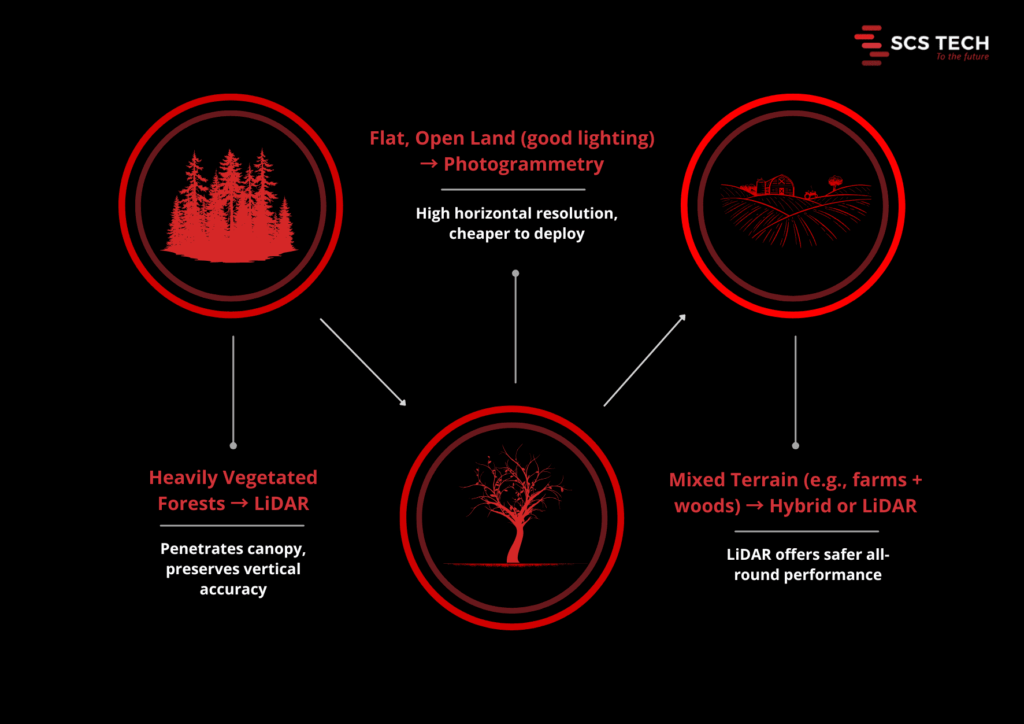
    Vegetation encroachment is a leading cause of power outages and wildfire risks. Traditional inspection methods are often time-consuming and less precise. Digital twins, integrated with LiDAR and AI technologies, offer a more efficient solution. By creating detailed 3D models of utility networks and surrounding vegetation, utilities can predict growth patterns and identify high-risk areas.

    This enables utility firms to:

    • Map the exact proximity of vegetation to assets in real-time
    • Predict growth patterns based on species type, local weather, and terrain
    • Pinpoint high-risk zones before branches become threats or trigger regulatory violations

    Let’s take a real-world example:

    Southern California Edison used Neara’s digital twin platform to overhaul its vegetation management.

    • What used to take months to determine clearance guidance now takes weeks
    • Work execution was completed 50% faster, thanks to precise, data-backed targeting

    Vegetation isn’t going to stop growing. But with a digital twin watching over it, utility firms don’t have to be caught off guard.

    3. Optimized Grid Operations and Load Management

    Balancing supply and demand in real-time is crucial for grid stability. Digital twins facilitate this by simulating various operational scenarios, allowing utilities to optimize energy distribution and manage loads effectively. By analyzing data from smart meters, sensors, and other grid components, potential bottlenecks can be identified and addressed proactively.

    Here’s how it works in practice:

    • Data from smart meters, IoT sensors, and control systems is funnelled into the digital twin.
    • The platform then runs what-if scenarios:
      • What happens if demand spikes in one region?
      • What if a substation goes offline unexpectedly?
      • How do EV charging surges affect residential loads?

    These simulations allow utility firms to:

    • Balance loads dynamically — shifting supply across regions based on actual demand
    • Identify bottlenecks in the grid — before they lead to voltage drops or system trips
    • Test responses to outages or disruptions — without touching the real infrastructure

    One real-world application comes from Siemens, which uses digital twin technology to model substations across its power grid. By creating these virtual replicas, operators can:

    • Detect voltage anomalies or reactive power imbalances quickly
    • Simulate switching operations before pushing them live
    • Reduce fault response time and improve grid reliability overall

    This level of foresight turns grid management from a reactive firefighting role into a strategic, scenario-tested process.

    When energy systems are stretched thin, especially with renewables feeding intermittent loads, a digital twin becomes less of a luxury and more of a grid operator’s control room essential.

    4. Improved Emergency Response and Disaster Preparedness

    When a storm hits, a wildfire spreads, or a substation goes offline unexpectedly, every second counts. Utility firms need more than just a damage report — they need situational awareness and clear action paths.

    Digital twins give operators that clarity, before, during, and after an emergency.

    Unlike traditional models that provide static views, digital twins offer live, geospatially aware environments that evolve in real time based on field inputs. This enables faster, better-coordinated responses across teams.

    Here’s how digital twins strengthen emergency preparedness:

    • Pre-event scenario planning
      • Simulate storm surges, fire paths, or equipment failure to see how the grid will respond
      • Identify weak links in the network (e.g. aging transformers, high-risk lines) and pre-position resources accordingly
    • Real-time situational monitoring
      • Integrate drone feeds, sensor alerts, and field crew updates directly into the twin
      • Track which areas are inaccessible, where outages are expanding, and how restoration efforts are progressing
    • Faster field deployment
      • Dispatch crews with exact asset locations, hazard maps, and work orders tied to real-time conditions
      • Reduce miscommunication and avoid wasted trips during chaotic situations

    For example, during wildfires or hurricanes, digital twins can overlay evacuation zones, line outage maps, and grid stress indicators in one place — helping both operations teams and emergency planners align fast.

    When things go wrong, digital twins don’t just help respond — they help prepare, so the fallout is minimised before it even begins.

    5. Streamlined Regulatory Compliance and Reporting

    For utility firms, compliance isn’t optional, it’s a constant demand. From safety inspections to environmental impact reports, regulators expect accurate documentation, on time, every time. Gathering that data manually is often time-consuming, error-prone, and disconnected across departments.

    Digital twins simplify the entire compliance process by turning operational data into traceable, report-ready insights.

    Here’s what that looks like in practice:

    • Automated data capture
      • Sensors feed real-time operational metrics (e.g., line loads, maintenance history, vegetation clearance) into the digital twin continuously
      • No need to chase logs, cross-check spreadsheets, or manually input field data
    • Built-in audit trails
      • Every change to the system — from a voltage dip to a completed work order — is automatically timestamped and stored
      • Auditors get clear records of what happened, when, and how the utility responded
    • On-demand compliance reports
      • Whether it’s for NERC reliability standards, wildfire mitigation plans, or energy usage disclosures, reports can be generated quickly using accurate, up-to-date data
      • No scrambling before deadlines, no gaps in documentation

    For utilities operating in highly regulated environments — especially those subject to increasing scrutiny over grid safety and climate risk — this level of operational transparency is a game-changer.

    With a digital twin in place, compliance shifts from being a back-office burden to a built-in outcome of how the grid is managed every day.

    Conclusion

    Digital twin technology is revolutionizing the utility sector by enabling predictive maintenance, optimizing operations, enhancing emergency preparedness, and ensuring regulatory compliance. By adopting this technology, utility firms can improve reliability, reduce costs, and better serve their customers in an increasingly complex and demanding environment.

    At SCS Tech, we specialize in delivering comprehensive digital transformation solutions tailored to the unique needs of utility companies. Our expertise in developing and implementing digital twin strategies ensures that your organization stays ahead of the curve, embracing innovation to achieve operational excellence.

    Ready to transform your utility operations with proven digital utility solutions? Contact one of the leading digital transformation companies—SCS Tech—to explore how our tailored digital transformation strategy can help you predict and prevent failures.

  • What Happens When GIS Meets IoT: Real-Time Mapping for Smarter Cities

    What Happens When GIS Meets IoT: Real-Time Mapping for Smarter Cities

    Urban problems like traffic congestion and energy wastage are on the increase as cities get more connected. 

    While the Internet of Things (IoT) generates a great deal of data, it often lacks spatial awareness, so cities cannot respond in an effective manner. In practice, 74% of IoT projects are considered to fail, often due to issues like integration challenges, insufficient skills, and poorly defined business cases. 

    Including Geographic Information Systems (GIS) with IoT offers cities location-based real-time intelligence to make traffic, energy, and safety management decisions more informed. The integration of GIS with IoT is the key to transforming urban data into actionable intelligence that maximizes city operations.

    The Impact of IoT Without GIS Mapping: Why Spatial Context Matters

    In today’s intelligent cities, IoT devices are amassing enormous quantities of data regarding traffic, waste disposal, energy consumption, and others. Yet without the indispensable geographic context of GIS, such data can stay disconnected, rendering cities with siloed, uninterpretable data. 

    IoT data responds to the query of “what” is occurring, yet GIS responds to the all-important question of “where” it is occurring—and spatial awareness is fundamental for informed, timely decision-making.

    Challenges faced by cities without GIS mapping:

    • Limited Understanding of Data Location: IoT sensors can sense problems, such as an increase in traffic jams, but without GIS, one does not know where precisely the issue lies. Is it a concentrating bottleneck or a city-wide problem? Without geospatial context, deciding which routes to upgrade is a shot in the dark.
    • Inefficiency in Response Time: If the whereabouts of a problem are not known, it will take longer to respond to it. For example, waste collection vehicles can receive information about a full bin, but without GIS, it is not known which bin to service first. This can cause inefficiencies and delays.
    • Difficult Pattern Discovery: It’s difficult for urban planners to determine patterns if data isn’t geographically based. For instance, crime areas within a neighborhood won’t reveal themselves until you put crime data on top of traffic flow maps, retail maps, or other IoT maps.
    • Blind Data: Context-less data is worthless. IoT sensors are tracking all sorts of metrics, but without GIS to organize and visualize that data on a geographic basis, it’s often overwhelming and worthless. Cities may be tracking millions of data points with no discernible plan about how to react to them.

    By integrating GIS with IoT, cities can shift from reactive to proactive management, ensuring that urban dynamics are continuously improved in real-time.

    How Real-Time GIS Mapping Enhances Urban Management

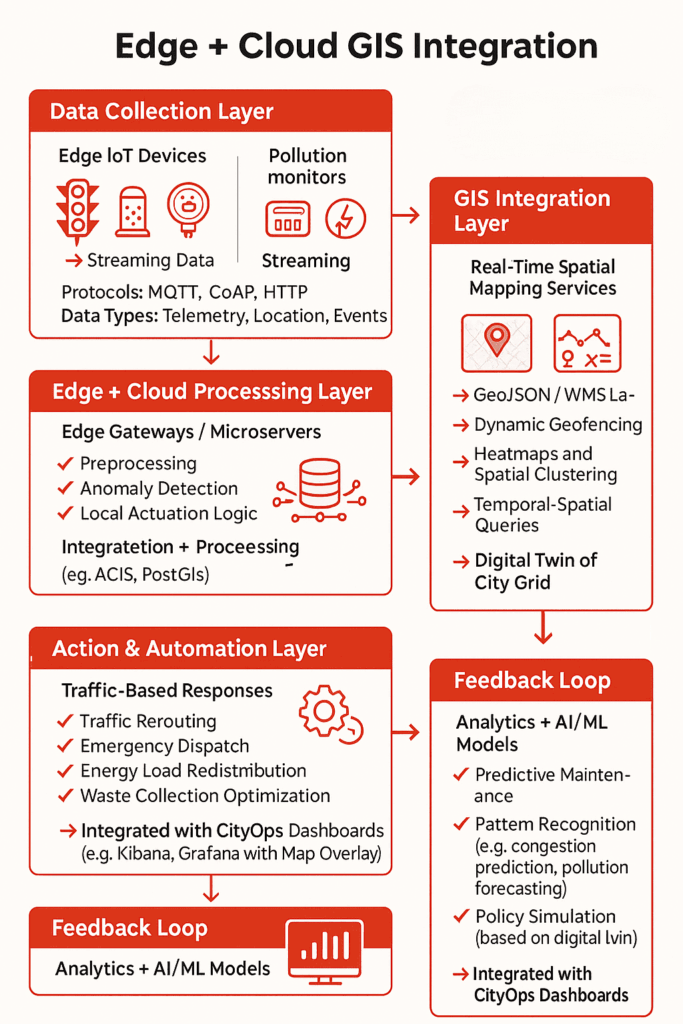
    Edge + GIS Mapping

    IoT devices stream real-time telemetry—air quality levels, traffic flow, water usage—but without GIS, this data lacks geospatial context.

    GIS integrates these telemetry feeds into spatial data layers, enabling dynamic geofencing, hotspot detection, and live mapping directly on the city’s grid infrastructure. This allows city systems to trigger automated responses—such as rerouting traffic when congestion zones are detected via loop sensors, or dispatching waste trucks when fill-level sensors cross geofenced thresholds.

    Instead of sifting through unstructured sensor logs, operators get geospatial dashboards that localize problems instantly, speeding up intervention and reducing operational lag.

    That’s how GIS mapping services transform isolated IoT data points into a unified, location-aware command system for real-time, high-accuracy urban management.

    In detail, here’s how real-time GIS mapping improves urban management efficiency:

    1. Real-Time Decision Making

    With GIS, IoT data can be overlaid on a map, modern GIS mapping services enable cities to make on-the-fly decisions by integrating data streams directly into live, spatial dashboards, making responsiveness a built-in feature of urban operations. Whether it’s adjusting traffic signal timings based on congestion, dispatching emergency services during a crisis, or optimizing waste collection routes, real-time GIS mapping provides the spatial context necessary for precise, quick action.

    • Traffic Management: Real-time traffic data from IoT sensors can be displayed on GIS maps, enabling dynamic route optimization and better flow management. City officials can adjust traffic lights or divert traffic in real time to minimize congestion.
    • Emergency Response: GIS mapping enables emergency responders to access real-time data about traffic, weather conditions, and road closures, allowing them to make faster, more informed decisions.

    2. Enhanced Urban Planning and Resource Optimization

    GIS allows cities to optimize infrastructure and resources by identifying trends and patterns over time. Urban planners can examine data in a spatial context, making it easier to plan for future growth, optimize energy consumption, and reduce costs.

    • Energy Management: GIS can track energy usage patterns across the city, allowing for more efficient allocation of resources. Cities can pinpoint high-energy-demand areas and develop strategies for energy conservation.
    • Waste Management: By combining IoT data on waste levels with GIS, cities can optimize waste collection routes and schedules, reducing costs and improving service efficiency.

    3. Improved Sustainability and Liveability

    Cities can use real-time GIS mapping to make informed decisions that promote sustainability and improve liveability. With a clear view of spatial patterns, cities can address challenges like air pollution, water management, and green space accessibility more effectively.

    • Air Quality Monitoring: With real-time data from IoT sensors, GIS can map pollution hotspots and allow city officials to take corrective actions, like deploying air purifiers or restricting traffic in affected areas.
    • Water Management: GIS can help manage water usage by mapping areas with high consumption or leakage, ensuring that water resources are used efficiently and wastefully high-demand areas are addressed.

    4. Data-Driven Policy Making

    Real-time GIS mapping provides city officials with a clear, data-backed picture of urban dynamics. By analyzing data in a geographic context, cities can create policies and strategies that are better aligned with the actual needs of their communities.

    • Urban Heat Islands: By mapping temperature data in real-time, cities can identify areas with higher temperatures. This enables them to take proactive steps, such as creating more green spaces or installing reflective materials, to cool down the environment.
    • Flood Risk Management: GIS can help cities predict flood risks by mapping elevation data, rainfall patterns, and drainage systems. When IoT sensors detect rising water levels, real-time GIS data can provide immediate insight into which areas are at risk, allowing for faster evacuation or mitigation actions.

    Advancements in GIS-IoT Integration: Powering Smarter Urban Decisions

    The integration of GIS and IoT isn’t just changing urban management—it’s redefining how cities function in real time. At the heart of this transformation lies a crucial capability: spatial intelligence. Rather than treating it as a standalone concept, think of it as the evolved skill set cities gain when GIS and IoT converge.

    Spatial intelligence empowers city systems to interpret massive volumes of geographically referenced data—on the fly. And with today’s advancements, that ability is more real-time, accurate, and actionable than ever before. As this shift continues, GIS companies in India are playing a critical role in enabling municipalities to implement smart city solutions at scale.

    What’s Fueling This Leap in Capability?

    Here’s how recent technological developments are enhancing the impact of real-time GIS in urban management:

    • 5G Connectivity: Ultra-low latency enables IoT sensors—from traffic signals to air quality monitors—to stream data instantly. This dramatically reduces the lag between problem detection and response.
    • Edge Computing: By processing data at or near the source (like a traffic node or waste disposal unit), cities avoid central server delays. This results in faster analysis and quicker decisions at the point of action.
    • Cloud-Enabled GIS Platforms: Cloud integration centralizes spatial data, enabling seamless, scalable access and collaboration across departments.
    • AI and Predictive Analytics in GIS: With machine learning layered into GIS, spatial patterns can be not only observed but predicted. For instance, analyzing pedestrian density can help adjust signal timings before congestion occurs.
    • Digital Twins of Urban Systems: Many cities are now creating real-time digital replicas of their physical infrastructure. These digital twins, powered by GIS-IoT data streams, allow planners to simulate changes before implementing them in the real world.

    Why These Advancements Matter Now

    Urban systems are more complex than ever—rising populations, environmental stress, and infrastructure strain demand faster, smarter decision-making. What once took weeks of reporting and data aggregation now happens in real time. Real-time GIS mapping isn’t just a helpful upgrade—it’s a necessary infrastructure for:

    • Preemptively identifying traffic bottlenecks before they paralyze a city.
    • Monitoring air quality by neighborhood and deploying mobile clean-air units.
    • Allocating energy dynamically based on real-time consumption patterns.

    Rather than being an isolated software tool, GIS is evolving into a live, decision-support system. It is an intelligent layer across the city’s digital and physical ecosystems.

    For businesses involved in urban infrastructure, SCS Tech provides advanced GIS mapping services that take full advantage of these cutting-edge technologies, ensuring smarter, more efficient urban management solutions.

    Conclusion

    Smart cities aren’t built on data alone—they’re built on context. IoT can tell you what’s happening, but without GIS, you won’t know where or why. That’s the gap real-time mapping fills.

    When cities integrate GIS with IoT, they stop reacting blindly and start solving problems with precision. Whether it’s managing congestion, cutting energy waste, or improving emergency response, GIS and IoT are indeed gamechangers.

    At SCS Tech, we help city planners and infrastructure teams make sense of complex data through real-time GIS solutions. If you’re ready to turn scattered data into smart decisions, we’re here to help.

  • How to Structure Tier-1 to Tier-3 Escalation Flows with Incident Software

    How to Structure Tier-1 to Tier-3 Escalation Flows with Incident Software

    When an alert hits your system, there’s a split-second decision that determines how long it lingers: Can Tier-1 handle this—or should we escalate?

    Now multiply that by hundreds of alerts a month, across teams, time zones, and shifts—and you’ve got a pattern of knee-jerk escalations, duplicated effort, and drained senior engineers stuck cleaning up tickets that shouldn’t have reached them in the first place.

    Most companies don’t lack talent—they lack escalation logic. They escalate based on panic, not process.

    Here’s how incident software can help you fix that—by structuring each tier with rules, boundaries, and built-in context, so your team knows who handles what, when, and how—without guessing.

    The Real Problem with Tiered Escalation (And It’s Not What You Think)

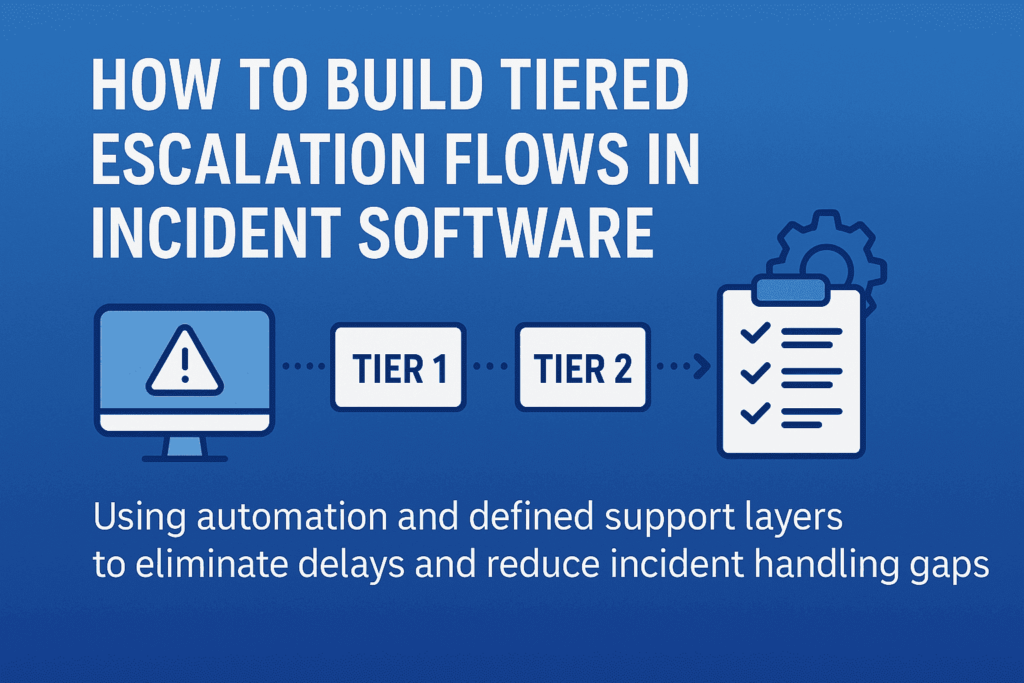
    Tiered Escalation
    Most escalation flows look clean—on slides. In reality? It’s a maze of sticky notes, gut decisions, and “just pass it to Tier-2” habits.

    Here’s what usually goes wrong:

    • Tier-1 holds on too long—hoping to fix it, wasting response time
    • Or escalates too soon—with barely any context
    • Tier-2 gets it, but has to re-diagnose because there’s no trace of what’s been done
    • Tier-3 ends up firefighting issues that were never filtered properly

    Why does this happen? Because escalation is treated like a transfer, not a transition. And without boundary-setting and logic, even the best software ends up becoming a digital dumping ground.

    That’s where structured escalation flows come in—not as static chains, but as decision systems. A well-designed incident management software helps implement these decision systems by aligning every tier’s scope, rules, and responsibilities. Each tier should know:

    • What they’re expected to solve
    • What criteria justifies escalation
    • What information must be attached before passing the baton

    Anything less than that—and escalation just becomes escalation theater.

    Structuring Escalation Logic: What Should Happen at Each Tier (with Boundaries)

    Escalation tiers aren’t ranks—they’re response layers with different scopes of authority, context, and tools. Here’s how to structure them so everyone acts, not just reacts.

    Tier-1: Containment and Categorization—Not Root Cause

    Tier-1 isn’t there to solve deep problems. They’re the first line of control—triaging, logging, and assigning severity. But often they’re blamed for “not solving” what they were never supposed to.

    Here’s what Tier-1 should do:

    • Acknowledge the alert within the SLA window
    • Check for known issues in a predefined knowledge base or past tickets
    • Apply initial containment steps (e.g., restart service, check logs, run diagnostics)
    • Classify and tag the incident: severity, affected system, known symptoms
    • Escalate with structured context (timestamp, steps tried, confidence level)

    Your incident management software should enforce these checkpoints—nothing escalates without it. That’s how you stop Tier-2 from becoming Tier-1 with more tools.

    Tier-2: Deep Dive, Recurrence Detection, Cross-System Insight

    This team investigates why it happened, not just what happened. They work across services, APIs, and dependencies—often comparing live and historical data.

    What should your software enable for Tier-2?

    • Access to full incident history, including diagnostic steps from Tier-1
    • Ability to cross-reference logs across services or clusters
    • Contextual linking to other open or past incidents (if this looks like déjà vu, it probably is)
    • Authority to apply temporary fixes—but flag for deeper RCA (root cause analysis) if needed

    Tier-2 should only escalate if systemic issues are detected, or if business impact requires strategic trade-offs.

    Tier-3: Permanent Fixes and Strategic Prevention

    By the time an incident reaches Tier-3, it’s no longer about restoring function—it’s about preventing it from happening again.

    They need:

    • Full access to code, configuration, and deployment pipelines
    • The authority to roll out permanent fixes (sometimes involving product or architecture changes)
    • Visibility into broader impact: Is this a one-off? A design flaw? A risk to SLAs?

    Tier-3’s involvement should trigger documentation, backlog tickets, and perhaps even blameless postmortems. Escalating to Tier-3 isn’t a failure—it’s an investment in system resilience.

    Building Escalation into Your Incident Management Software (So It’s Not Just a Ticket System)

    Most incident tools act like inboxes—they collect alerts. But to support real escalation, your software needs to behave more like a decision layer, not a passive log.

    Here’s how that looks in practice.

    1. Tier-Based Views

    When a critical alert fires, who sees it? If everyone on-call sees every ticket, it dilutes urgency. Tier-based visibility means:

    • Tier-1 sees only what’s within their response scope
    • Tier-2 gets automatically alerted when severity or affected systems cross thresholds
    • Tier-3 only gets pulled when systemic patterns emerge or human escalation occurs

    This removes alert fatigue and brings sharp clarity to ownership. No more “who’s handling this?”

    2. Escalation Triggers

    Your escalation shouldn’t rely on someone deciding when to escalate. The system should flag it:

    • If Tier-1 exceeds time to resolve
    • If the same alert repeats within X hours
    • If affected services reach a certain business threshold (e.g., customer-facing)

    These triggers can auto-create a Tier-2 task, notify SMEs, or even open an incident war room with pre-set stakeholders. Think: decision trees with automation.

    3. Context-Rich Handoffs 

    Escalation often breaks because Tier-2 or Tier-3 gets raw alerts, not narratives. Your software should automatically pull and attach:

    • Initial diagnostics
    • Steps already taken
    • System health graphs
    • Previous related incidents
    • Logs, screenshots, and even Slack threads

    This isn’t a “notes” field. It’s structured metadata that keeps context alive without relying on the person escalating.

    4. Accountability Logging

    A smooth escalation trail helps teams learn from the incident—not just survive it.

    Your incident software should:

    • Timestamp every handoff
    • Record who escalated, when, and why
    • Show what actions were taken at each tier
    • Auto-generate a timeline for RCA documentation

    This makes postmortems fast, fair, and actionable—not hours of Slack archaeology.

    When escalation logic is embedded, not documented, incident response becomes faster and repeatable—even under pressure.

    Common Pitfalls in Building Escalation Structures (And How to Avoid Them)

    While creating a smooth escalation flow sounds simple, there are a few common traps teams fall into when setting up incident management systems. Avoiding these pitfalls ensures your escalation flows work as they should when the pressure is on.

    1. Overcomplicating Escalation Triggers

    Adding too many layers or overly complex conditions for when an escalation should happen can slow down response times. Overcomplicating escalation rules can lead to delays and miscommunication.

    Keep escalation triggers simple but actionable. Aim for a few critical conditions that must be met before escalating to the next tier. This keeps teams focused on responding, not searching through layers of complexity. For example:

    • If a high-severity incident hasn’t been addressed in 15 minutes, auto-escalate.
    • If a service has reached 80% of capacity for over 5 minutes, escalate to Tier-2.

    2. Lack of Clear Ownership at Each Tier

    When there’s uncertainty about who owns a ticket, or ownership isn’t transferred clearly between teams, things slip through the cracks. This creates chaos and miscommunication when escalation happens.

    Be clear on ownership at each level. Your incident software should make this explicit. Tier-1 should know exactly what they’re accountable for, Tier-2 should know the moment a critical incident is escalated, and Tier-3 should immediately see the complete context for action.

    Set default owners for every tier, with auto-assignment based on workload. This eliminates ambiguity during time-sensitive situations.

    3. Underestimating the Importance of Context

    Escalations often fail because they happen without context. Passing a vague or incomplete incident to the next team creates bottlenecks.

    Ensure context-rich handoffs with every escalation. As mentioned earlier, integrate tools for pulling in logs, diagnostics, service health, and team notes. The team at the next tier should be able to understand the incident as if they’ve been working on it from the start. This also enables smoother collaboration when escalation happens.

    4. Ignoring the Post-Incident Learning Loop

    Once the incident is resolved, many teams close the issue and move on, forgetting to analyze what went wrong and what can be improved in the future.

    Incorporate a feedback loop into your escalation process. Your incident management software should allow teams to mark incidents as “postmortem required” with a direct link to learning resources. Encourage root-cause analysis (RCA) after every major incident, with automated templates to capture key findings from each escalation level.

    By analyzing the incident flow, you’ll uncover bottlenecks or gaps in your escalation structure and refine it over time.

    5. Failing to Test the Escalation Flow

    Thinking the system will work perfectly the first time is a mistake. Incident software can fail when escalations aren’t tested under realistic conditions, leading to inefficiencies during actual events.

    Test your escalation flows regularly. Simulate incidents with different severity levels to see how your system handles real-time escalations. Bring in Tier-1, Tier-2, and Tier-3 teams to practice. Conduct fire drills to identify weak spots in your escalation logic and ensure everyone knows their responsibilities under pressure.

    Wrapping Up

    Effective escalation flows aren’t just about ticket management—they are a strategy for ensuring that your team can respond to critical incidents swiftly and intelligently. By avoiding common pitfalls, maintaining clear ownership, integrating automation, and testing your system regularly, you can build an escalation flow that’s ready to handle any challenge, no matter how urgent. 

    At SCS Tech, we specialize in crafting tailored escalation strategies that help businesses maintain control and efficiency during high-pressure situations. Ready to streamline your escalation process and ensure faster resolutions? Contact SCS Tech today to learn how we can optimize your systems for stability and success.

  • How IT Consultancy Helps Replace Legacy Monoliths Without Risking Downtime

    How IT Consultancy Helps Replace Legacy Monoliths Without Risking Downtime

    Most businesses continue to use monolithic systems to support key operations such as billing, inventory, and customer management.

    However, as business requirements change, these systems become more and more cumbersome to renew, expand, or interoperate with emerging technologies. This not only holds back digital transformation but also increases IT expenditures, frequently gobbling up a significant portion of the technology budget just for maintaining the systems.

    But replacing them completely has its own risks: downtime, data loss, and business disruption. That’s where IT consultancies come in—providing phased, risk-managed modernization strategies that maintain the business up and running while systems are redeveloped below.

    What Are Legacy Monoliths

    Legacy monolith software is big, tightly coupled software applications developed prior to the current cloud-native or microservices architecture becoming commonplace. They typically combine several business functions—e.g., inventory management, billing, and customer service—into a single code base, where even relatively minor changes are problematic and take time.

    Since all elements are interdependent, alterations in one component will unwittingly destabilize another and need massive regression testing. Such rigidity contributes to lengthy development times, decreased feature delivery rates, and growing operational expenses.

    Where Legacy Monolithic Systems Fall Back?

    Monolithic systems offered stability and centralised control, and they couldn’t be ignored. However, as technology evolves, it becomes faster and more integrated. This is where legacy monolithic applications struggle to keep up. One key example of this is their architectural rigidity.

    Because all business logic, UI, and data access layers are bundled into a single executable or deployable unit, making updates or scaling individual components becomes nearly impossible without redeploying the entire system.

    Take, for instance, a retail management system that handles inventory, point-of-sale, and customer loyalty in one monolithic application. If developers need to update only the loyalty module—for example, to integrate with a third-party CRM—they must test and redeploy the entire application, risking downtime for unrelated features.

    Here’s where they specifically fall short, apart from architectural rigidity:

    • Limited scalability. You can’t scale high-demand services (like order processing during peak sales) independently.
    • Tight hardware and infrastructure coupling. This limits cloud adoption, containerisation, and elasticity.
    • Poor integration capabilities. Integration with third-party tools requires invasive code changes or custom adapters.
    • Slow development and deployment cycles. This slows down feature rollouts and increases risk with every update.

    This gap in scalability and integration is one reason why AI technology companies have fully transitioned to modular, flexible architectures that support real-time analytics and intelligent automation.

    Can Microservices Be Used as a Replacement for Monoliths?

    Microservices are usually regarded as the default choice when reengineering a legacy monolithic application. By decomposing a complex application into independent, smaller services, microservices enable businesses to update, scale, and maintain components of an application without impacting the overall system. This makes them an excellent choice for businesses seeking flexibility and quicker deployments.

    But microservices aren’t the only option for replacing monoliths. Based on your business goals, needs, and existing configuration, other contemporary architecture options could be more appropriate:

    • Modular cloud-native platforms provide a mechanism to recreate legacy systems as individual, independent modules that execute in the cloud. These don’t need complete microservices, but they do deliver some of the same advantages such as scalability and flexibility.
    • Decoupled service-based architectures offer a framework in which various services communicate via specified APIs, providing a middle ground between monolithic and microservices.
    • Composable enterprise systems enable companies to choose and put together various elements such as CRM or ERP systems, usually tying them together via APIs. This provides companies with flexibility without entirely disassembling their systems.
    • Microservices-driven infrastructure is a more evolved choice that enables scaling and fault isolation by concentrating on discrete services. But it does need strong expertise in DevOps practices and well-defined service boundaries.

    Ultimately, microservices are a potent tool, but they’re not the only one. What’s key is picking the right approach depending on your existing requirements, your team’s ability, and your goals over time.

    If you’re not sure what the best approach is to replacing your legacy monolith, IT consultancies can provide more than mere advice—they contribute structure, technical expertise, and risk-mitigation approaches. They can assist you in overcoming the challenges of moving from a monolithic system, applying clear-cut strategies and tested methods to deliver a smooth and effective modernization process.

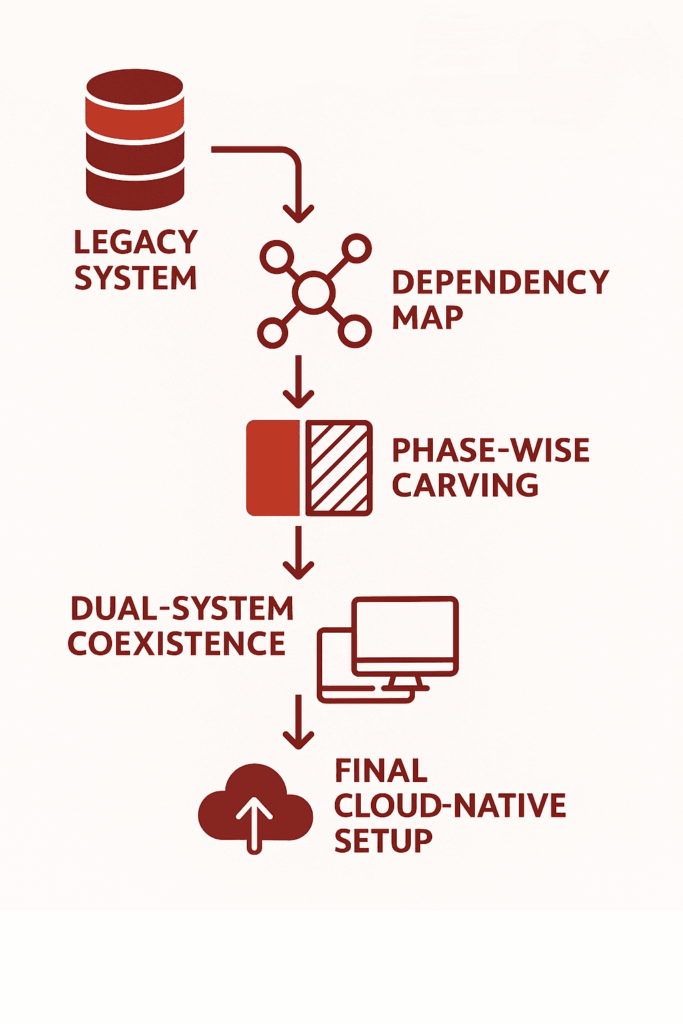
    How IT Consultancies Manage Risk in Legacy Replacement?

    IT Consultancies Manage Risk in Legacy Replacement

    1. Assessment & Mapping:

    1.1 Legacy Code Audit:

    Legacy code audit is one of the initial steps taken for modernization. IT consultancies perform an exhaustive analysis of the current codebase to determine what code is outdated, where there are bottlenecks, and where it is more likely to fail.

    A 2021 report by McKinsey found that 75% of cloud migrations took longer than planned and 37% were behind schedule, which was usually due to unexpected intricacies in the legacy codebase. This review finds old libraries, unstructured code, and poorly documented functions, all which are potential issues in the process of migration.

    1.2 Dependency Mapping

    Mapping out dependencies is important to guarantee that no key services are disrupted during the move. IT advisors employ sophisticated software such as SonarQube and Structure101 to develop visual maps of program dependencies, where it is transparently indicated that interactions exist among various components of the system.

    Mapping dependencies serves to establish in what order systems can be safely migrated, avoiding the possibility of disrupting critical business functions.

    1.3 Business Process Alignment

    Aligning the technical solution to business processes is critical to avoiding disruption of operational workflows during migration.

    During the evaluation, IT consultancies work with business leaders to determine primary workflows and areas of pain. They utilize tools such as BPMN (Business Process Model and Notation) to ensure that the migration honors and improves on these processes.

    2. Phased Migration Strategy

    IT consultancies use staged migration to minimize downtime, preserve data integrity, and maintain business continuity. Each of these stages are designed to uncover blind spots, reduce operational risk, and accelerate time-to-value without compromising business continuity.

    • Strangler pattern or microservice carving
    • Hybrid coexistence (old + new systems live together during transition)
    • Failover strategies and rollback plans

    2.1 Strangler Pattern or Microservice Carving

    A migration strategy where parts of the legacy system are incrementally replaced with modern services, while the rest of the monolith continues to operate. Here is how it works: 

    • Identify a specific business function in the monolith (e.g., order processing).
    • Rebuild it as an independent microservice with its own deployment pipeline.
    • Redirect only the relevant traffic to the new service using API gateways or routing rules.
    • Gradually expand this pattern to other parts of the system until the legacy core is fully replaced.

    2.2 Hybrid Coexistence

    A transitional architecture where legacy systems and modern components operate in parallel, sharing data and functionality without full replacement at once.

    • Legacy and modern systems are connected via APIs, event streams, or middleware.
    • Certain business functions (like customer login or billing) remain on the monolith, while others (like notifications or analytics) are handled by new components.
    • Data synchronization mechanisms (such as Change Data Capture or message brokers like Kafka) keep both systems aligned in near real-time.

    2.3 Failover Strategies and Rollback Plans

    Structured recovery mechanisms that ensure system continuity and data integrity if something goes wrong during migration or after deployment. How it works:

    • Failover strategies involve automatic redirection to backup systems, such as load-balanced clusters or redundant databases, when the primary system fails.
    • Rollback plans allow systems to revert to a previous stable state if the new deployment causes issues—achieved through versioned deployments, container snapshots, or database point-in-time recovery.
    • These are supported by blue-green or canary deployment patterns, where changes are introduced gradually and can be rolled back without downtime.

    3. Tooling & Automation

    To maintain control, speed, and stability during legacy system modernization, IT consultancies rely on a well-integrated toolchain designed to automate and monitor every step of the transition. These tools are selected not just for their capabilities, but for how well they align with the client’s infrastructure and development culture.

    Key tooling includes:

    • CI/CD pipelines: Automate testing, integration, and deployment using tools like Jenkins, GitLab CI, or ArgoCD.
    • Monitoring & observability: Real-time visibility into system performance using Prometheus, Grafana, ELK Stack, or Datadog.
    • Cloud-native migration tech: Tools like AWS Migration Hub, Azure Migrate, or Google Migrate for Compute help facilitate phased cloud adoption and infrastructure reconfiguration.

    These solutions enable teams to deploy changes incrementally, detect regressions early, and keep legacy and modernized components in sync. Automation reduces human error, while monitoring ensures any risk-prone behavior is flagged before it affects production.

    Bottom Line

    Legacy monoliths are brittle, tightly coupled, and resistant to change, making modern development, scaling, and integration nearly impossible. Their complexity hides critical dependencies that break under pressure during transformation. Replacing them demands more than code rewrites—it requires systematic deconstruction, staged cutovers, and architecture that can absorb change without failure. That’s why AI technology companies treat modernisation not just as a technical upgrade, but as a foundation for long-term adaptability

    SCS Tech delivers precision-led modernisation. From dependency tracing and code audits to phased rollouts using strangler patterns and modular cloud-native replacements, we engineer low-risk transitions backed by CI/CD, observability, and rollback safety.

    If your legacy systems are blocking progress, consult with SCS Tech. We architect replacements that perform under pressure—and evolve as your business does.

    FAQs

    1. Why should businesses replace legacy monolithic applications?

    Replacing legacy monolithic applications is crucial for improving scalability, agility, and overall performance. Monolithic systems are rigid, making it difficult to adapt to changing business needs or integrate with modern technologies. By transitioning to more flexible architectures like microservices, businesses can improve operational efficiency, reduce downtime, and drive innovation.

    1. What is the ‘strangler pattern’ in software modernization?

    The ‘strangler pattern’ is a gradual approach to replacing legacy systems. It involves incrementally replacing parts of a monolithic application with new, modular components (often microservices) while keeping the legacy system running. Over time, the new system “strangles” the old one, until the legacy application is fully replaced.

    1. Is cloud migration always necessary when replacing a legacy monolith?

    No, cloud migration is not always necessary when replacing a legacy monolith, but it often provides significant advantages. Moving to the cloud can improve scalability, enhance resource utilization, and lower infrastructure costs. However, if a business already has a robust on-premise infrastructure or specific regulatory requirements, replacing the monolith without a full cloud migration may be more feasible.

  • How Custom Cybersecurity Prevents HIPAA Penalties and Patient Data Leaks?

    How Custom Cybersecurity Prevents HIPAA Penalties and Patient Data Leaks?

    Every healthcare provider today relies on digital systems. 

    But too often, those systems don’t talk to each other in a way that keeps patient data safe. This isn’t just a technical oversight; it’s a risk that shows up in compliance audits, government penalties, and public breaches. In fact, most HIPAA violations aren’t caused by hackers, they stem from poor system integration, generic cybersecurity tools, or overlooked access logs.

    And when those systems fail to catch a misstep, the aftercoming cost can be severe: it will be more than six-figure fines, federal audits, and long-term reputational damage.

    That’s where custom cybersecurity solutions adds more tools to align security with the way your healthcare operations actually run. When security is designed around your clinical workflows, your APIs, and your data-sharing practices, it doesn’t just protect — it prevents.

    In this article, we’ll unpack how integrated, custom-built cybersecurity helps healthcare organizations stay compliant, avoid HIPAA penalties, and defend what matters most: patient trust.

    Understanding HIPAA Compliance and Its Real-World Challenges

    HIPAA isn’t just a legal framework, it’s a daily operational burden for any healthcare provider managing electronic Protected Health Information (ePHI). While the regulation is clear about what must be protected, it’s far less clear about how to do it, especially in systems that weren’t built with healthcare in mind.

    Here’s what makes HIPAA compliance difficult in practice:

    • Ambiguity in Implementation: The security rule requires “reasonable and appropriate safeguards,” but doesn’t define a universal standard. That leaves providers guessing whether their security setup actually meets expectations.
    • Fragmented IT Systems: Most healthcare environments run on a mix of EHR platforms, custom apps, third-party billing systems, and legacy hardware. Stitching all of this together while maintaining consistent data protection is a constant challenge.
    • Hidden Access Points: APIs, internal dashboards, and remote access tools often go unsecured or unaudited. These backdoors are commonly exploited during breaches, not because they’re poorly built, but because they’re not properly configured or monitored.
    • Audit Trail Blind Spots: HIPAA requires full auditability of ePHI, but without custom configurations, many logging systems fail to track who accessed what, when, and why.

    Even good IT teams struggle here, not because they’re negligent, but because most off-the-shelf cybersecurity solutions aren’t designed to speak HIPAA natively. That’s what puts your organization at risk: doing what seems secure, but still falling short of what’s required.

    That’s where custom cybersecurity solutions fill the gap, not by adding complexity, but by aligning every protection with real HIPAA demands.

    How Custom Cybersecurity Adapts to the Realities of Healthcare Environments

    Custom Cybersecurity

    Custom cybersecurity tailors every layer of your digital defense to match your exact workflows, compliance requirements, and system vulnerabilities.

    Here’s how that plays out in real healthcare environments:

    1. Role-Based Access, Not Just Passwords

    In many healthcare systems, user access is still shockingly broad — a receptionist might see billing details, a technician could open clinical histories. Not out of malice, just because default systems weren’t built with healthcare’s sensitivity in mind.

    That’s where custom role-based access control (RBAC) becomes essential. It doesn’t just manage who logs in — it enforces what they see, tied directly to their role, task, and compliance scope.

    For instance, under HIPAA’s “minimum necessary” rule, a front desk employee should only view appointment logs — not lab reports. A pharmacist needs medication orders, not patient billing history.

    And this isn’t just good practice — it’s damage control.

    According to Verizon’s Data Breach Investigations Report, over 29% of breaches stem from internal actors, often unintentionally. Custom RBAC shrinks that risk by removing exposure at the root: too much access, too easily given.

    Even better? It simplifies audits. When regulators ask, “Who accessed what, and why?” — your access map answers for you.

    1. Custom Alert Triggers for Suspicious Activity

    Most off-the-shelf cybersecurity tools flood your system with alerts — dozens or even hundreds a day. But here’s the catch: when everything is an emergency, nothing gets attention. And that’s exactly how threats slip through.

    Custom alert systems work differently. They’re not based on generic templates — they’re trained to recognize how your actual environment behaves.

    Say an EMR account is accessed from an unrecognized device at 3:12 a.m. — that’s flagged. A nurse’s login is used to export 40 patient records in under 30 seconds? That’s blocked. The system isn’t guessing — it’s calibrated to your policies, your team, and your workflow rhythm.

    1. Encryption That Works with Your Workflow

    HIPAA requires encryption, but many providers skip it because it slows down their tools. A custom setup integrates end-to-end encryption that doesn’t disrupt EHR speed or file transfer performance. That means patient files stay secure, without disrupting the care timeline.

    1. Logging That Doesn’t Leave Gaps

    Security failures often escalate due to one simple issue: the absence of complete, actionable logging. When logs are incomplete, fragmented, or siloed across systems, identifying the source of a breach becomes nearly impossible. Incident response slows down. Compliance reporting fails. Liability increases.

    A custom logging framework eliminates this risk. It captures and correlates activity across all touchpoints — not just within core systems, but also legacy infrastructure and third-party integrations. This includes:

    • Access attempts (both successful and failed)
    • File movements and transfers
    • Configuration changes across privileged accounts
    • Vendor interactions that occur outside standard EHR pathways

    The HIMSS survey underscores that inadequate monitoring poses significant risks, including data breaches, highlighting the necessity for robust monitoring strategies.

    Custom logging is designed to meet the audit demands of regulatory agencies while strengthening internal risk postures. It ensures that no security event goes undocumented, and no question goes unanswered during post-incident reviews.

    The Real Cost of HIPAA Violations — and How Custom Security Avoids Them

    HIPAA violations don’t just mean a slap on the wrist. They come with steep financial penalties, brand damage, and in some cases, criminal liability. And most of them? They’re preventable with better-fit security.

    Breakdown of Penalties:

    • Tier 1 (Unaware, could not have avoided): up to $50,000 per violation
    • Tier 4 (Willful neglect, not corrected): up to $1.9 million annually
    • Fines are per violation — not per incident. One breach can trigger dozens or hundreds of violations.

    But penalties are just the surface:

    • Investigation costs: Security audits, data recovery, legal reviews
    • Downtime: Systems may be partially or fully offline during containment
    • Reputation loss: Patients lose trust. Referrals drop. Insurance partners get hesitant.
    • Long-term compliance monitoring: Some organizations are placed under corrective action plans for years

    Where Custom Security Makes the Difference:

    Most breaches stem from misconfigured tools, over-permissive access, or lack of monitoring, all of which can be solved with custom security. Here’s how:

    • Precision-built access control prevents unnecessary exposure, no one gets access they don’t need.
    • Real-time monitoring systems catch and block suspicious behavior before it turns into an incident.
    • Automated compliance logging makes audits faster and proves you took the right steps.

    In short: custom security shifts you from reactive to proactive, and that makes HIPAA penalties exponentially less likely.

    What Healthcare Providers Should Look for in a Custom Cybersecurity Partner

    Off-the-shelf security tools often come with generic settings and limited healthcare expertise. That’s not enough when patient data is on the line, or when HIPAA enforcement is involved. Choosing the right partner for custom cybersecurity solution isn’t just a technical decision; it’s a business-critical one.

    What to prioritize:

    • Healthcare domain knowledge: Vendors should understand not just firewalls and encryption, but how healthcare workflows function, where PHI flows, and what technical blind spots tend to go unnoticed.
    • Experience with HIPAA audits: Look for providers who’ve helped other clients pass audits or recover from investigations — not just talk compliance, but prove it.
    • Custom architecture, not pre-built packages: Your EHR systems, patient portals, and internal communication tools are unique. Your security setup should mirror your actual tech environment, not force it into generic molds.
    • Threat response and simulation capabilities: Good partners don’t just build protections — they help you test, refine, and drill your incident response plan. Because theory isn’t enough when systems are under attack.
    • Built-in scalability: As your organization grows — new clinics, more providers, expanded services — your security architecture should scale with you, not become a roadblock.

    Final Note

    Cybersecurity in healthcare isn’t just about stopping threats, it’s about protecting compliance, patient trust, and uninterrupted care delivery. When HIPAA penalties can hit millions and breaches erode years of reputation, off-the-shelf solutions aren’t enough. Custom cybersecurity solutions allow your organization to build defense systems that align with how you actually operate, not a one-size-fits-all mold.

    At SCS Tech, we specialize in custom security frameworks tailored to the unique workflows of healthcare providers. From HIPAA-focused assessments to system-hardening and real-time monitoring, we help you build a safer, more compliant digital environment.

    FAQs

    1. Isn’t standard HIPAA compliance software enough to prevent penalties?

    Standard tools may cover the basics, but they often miss context-specific risks tied to your unique workflows. Custom cybersecurity maps directly to how your organization handles data, closing gaps generic tools overlook.

    2. What’s the difference between generic and custom cybersecurity for HIPAA?

    Generic solutions are broad and reactive. Custom cybersecurity is tailored, proactive, and built around your specific infrastructure, user behavior, and risk landscape — giving you tighter control over compliance and threat response.

    3. How does custom security help with HIPAA audits?

    It allows you to demonstrate not just compliance, but due diligence. Custom controls create detailed logs, clear risk management protocols, and faster access to proof of safeguards during an audit.


  • Logistics Firms Are Slashing Fuel Costs with AI Route Optimization—Here’s How

    Logistics Firms Are Slashing Fuel Costs with AI Route Optimization—Here’s How

    Route optimization that are based on static data and human choice tend to fall short of possibilities to save money, resulting in inefficiencies and wasted fuel use.

    Artificial intelligence route optimization fills the gap by taking advantage of real-time data, predictive algorithms, and machine learning that dynamically alter routes in response to current conditions, including changes in traffic and weather. Using this technology, logistics companies can not only improve delivery time but also save huge amounts of fuel—lessening costs as well as environmental costs.

    In this article, we’ll dive into how AI-powered route optimization is transforming logistics operations, offering both short-term savings and long-term strategic advantages.

    What’s Really Driving the Fuel Problem in Logistics Today?

    Per gallon of gasoline costs $3.15. But that’s not the problem logistics are dealing with. The problem is the inefficiency at multiple points in the delivery process. 

    Here’s a breakdown of the key contributors to the fuel problem:

    • Traffic and Congestion: Delivery trucks idle almost 30% of the time in traffic conditions in urban regions. Static route plans do not take into consideration real-time traffic congestion, which results in excess fuel consumption and late delivery.
    • Idling and Delays: Cumulative waiting times at the delivery points or loading/unloading stations. Idling raises the fuel consumption level and lowers productivity overall.
    • Inefficient Rerouting: Drivers often have to rely on outdated route plans, which fail to adapt to sudden changes like road closures, accidents, or detours, leading to inefficient rerouting and excess fuel use.
    • Poor Driver Habits: Poor driving habits—like speeding, harsh braking, or rapid acceleration—can reduce fuel efficiency by as much as 30% on highways and 10 – 40% in city driving.
    • Static Route Plans: Classical planning tends to presume that the first route is the optimal route, without considering actual-time environmental changes.

    While traditional route planning focuses solely on distance, the modern logistics challenge is far more complex.

    The problem isn’t just about distance—it’s about the time between decision-making moments. Decision latency—the gap between receiving new information (like traffic updates) and making a change—can have a profound impact on fuel usage. With every second lost, logistics firms burn more fuel.

    Traditional methods simply can’t adapt quickly enough to reduce fuel waste, but with the addition of AI, decisions can be automated in real-time, and routes can be adjusted dynamically to optimize the fuel efficiency.

    The Benefits of AI Route Optimization for Logistic Companies

    AI Route Optimization for Logistics Companies

    1. Reducing Wasted Miles and Excessive Idling

    Fuel consumption is heavily influenced by wasted time. 

    Unlike traditional systems that rely on static waypoints or historical averages, AI models are fed with live inputs from GPS signals, driver telemetry, municipal traffic feeds, and even weather APIs. These models use predictive analytics to detect emerging traffic patterns before they become bottlenecks and reroute deliveries proactively—sometimes before a driver even encounters a slowdown.

    What does this mean for logistics firms?

    • Fuel isn’t wasted reacting to problems—it’s saved by anticipating them.
    • Delivery ETAs stay accurate, which protects SLAs and reduces penalty risks.
    • Idle time is minimized, not just in traffic but at loading docks, thanks to integrations with warehouse management systems that adjust arrival times dynamically.

    The AI chooses the smartest options, prioritizing consistent movement, minimal stops, and smooth terrain. Over hundreds of deliveries per day, these micro-decisions lead to measurable gains: reduced fuel bills, better driver satisfaction, and more predictable operational costs.

    This is how logistics firms are moving from reactive delivery models to intelligent, pre-emptive routing systems—driven by real-time data, and optimized for efficiency from the first mile to the last.

    1. Smarter, Real-Time Adaptability to Traffic Conditions

    AI doesn’t just plan for the “best” route at the start of the day—it adapts in real time. 

    Using a combination of live traffic feeds, vehicle sensor data, and external data sources like weather APIs and accident reports, AI models update delivery routes in real time. But more than that, they prioritize fuel efficiency metrics—evaluating elevation shifts, average stop durations, road gradient, and even left-turn frequency to find the path that burns the least fuel, not just the one that arrives the fastest. This level of contextual optimization is only possible with a robust AI/ML service that can continuously learn and adapt from traffic data and driving conditions.

    The result?

    • Route changes aren’t guesswork—they’re cost-driven.
    • On long-haul routes, fuel burn can be reduced by up to 15% simply by avoiding high-altitude detours or stop-start urban traffic.
    • Over time, the system becomes smarter per region—learning traffic rhythms specific to cities, seasons, and even lanes.

    This level of adaptability is what separates rule-based systems from machine learning models: it’s not just a reroute, it’s a fuel-aware, performance-optimized redirect—one that scales with every mile logged.

    1. Load Optimization for Fuel Efficiency

    Whether a truck is carrying a full load or a partial one, AI adjusts its recommendations to ensure the vehicle isn’t overworking itself, driving fuel consumption up unnecessarily. 

    For instance, AI accounts for vehicle weight, cargo volume, and even the terrain—knowing that a fully loaded truck climbing steep hills will consume more fuel than one carrying a lighter load on flat roads. 

    This leads to more tailored, precise decisions that optimize fuel usage based on load conditions, further reducing costs.

    What Does AI Route Optimization Actually Work?

    AI route optimization is transforming logistics by addressing the inefficiencies that traditional routing methods can’t handle. It moves beyond static plans, offering a dynamic, data-driven approach to reduce fuel consumption and improve overall operational efficiency. Here’s a clear breakdown of how AI does this:

    Predictive vs. Reactive Routing

    Traditional systems are reactive by design: they wait for traffic congestion to appear before recalculating. By then, the vehicle is already delayed, the fuel is already burned, and the opportunity to optimize is gone.

    AI flips this entirely.

    It combines:

    • Historical traffic patterns (think: congestion trends by time-of-day or day-of-week),
    • Live sensor inputs from telematics systems (speed, engine RPM, idle time),
    • External data streams (weather services, construction alerts, accident reports),
    • and driver behavior models (based on past performance and route habits)

    …to generate routes that aren’t just “smart”—they’re anticipatory.

    For example, if a system predicts a 60% chance of a traffic jam on Route A due to a football game starting at 5 PM, and the delivery is scheduled for 4:45 PM, it will reroute the vehicle through a slightly longer but consistently faster highway path—preventing idle time before it starts.

    This kind of proactive rerouting isn’t based on a single event; it’s shaped by millions of data points and fine-tuned by machine learning models that improve with each trip logged. With every dataset processed, an AI/ML service gains more predictive power, enabling it to make even more fuel-efficient decisions in future deliveries. Over time, this allows logistics firms to build an operational strategy around predictable fuel savings, not just reactive cost-cutting.

    Real-Time Data Inputs (Traffic, Weather, Load Data)

    AI systems integrate:

    • Traffic flow data from GPS providers, municipal feeds, and crowdsourced platforms like Waze.
    • Weather intelligence APIs to account for storm patterns, wind resistance, and road friction risks.
    • Vehicle telematics for current load weight, which affects acceleration patterns and optimal speeds.

    Each of these feeds becomes part of a dynamic route scoring model. For example, if a vehicle carrying a heavy load is routed into a hilly region during rainfall, fuel consumption may spike due to increased drag and braking. A well-tuned AI system reroutes that load along a flatter, dryer corridor—even if it’s slightly longer in distance—because fuel efficiency, not just mileage, becomes the optimized metric.

    This data fusion also happens at high frequency—every 5 to 15 seconds in advanced systems. That means as soon as a new traffic bottleneck is detected or a sudden road closure occurs, the algorithm recalculates, reducing decision latency to near-zero and preserving route efficiency with no human intervention.

    Vehicle-Specific Considerations

    Heavy-duty trucks carrying full loads can consume up to 50% more fuel per mile than lighter or empty ones, according to the U.S. Department of Energy. That means sending two different trucks down the same “optimal” route—without factoring in grade, stop frequency, or road surface—can result in major fuel waste.

    AI takes this into account in real time, adjusting:

    • Route incline based on gross vehicle weight and torque efficiency
    • Stop frequency based on vehicle type (e.g., hybrid vs. diesel)
    • Fuel burn curves that shift depending on terrain and traffic

    This level of precision allows fleet managers to assign the right vehicle to the right route—not just any available truck. And when combined with historical performance data, the AI can even learn which vehicles perform best on which corridors, continually improving the match between route and machine.

    Automatic Rerouting Based on Traffic/Data Drift

    AI’s real-time adaptability means that as traffic conditions change, or if new data becomes available (e.g., a road closure), the system automatically reroutes the vehicle to a more efficient path. 

    For example, if a major accident suddenly clogs a key highway, the AI can detect it within seconds and reroute the vehicle through a less congested arterial road—without the driver needing to stop or call dispatch. 

    Machine Learning: Continuous Improvement Over Time

    The most powerful aspect of AI is its machine learning capability. Over time, the system learns from outcomes—whether a route led to a fuel-efficient journey or created unnecessary delays. 

    With this knowledge, it continuously refines its algorithms, becoming better at predicting the most efficient routes and adapting to new challenges. AI doesn’t just optimize based on past data; it evolves and gets smarter with every trip.

    Bottom Line

    AI route optimization is not just a technological upgrade—it’s a strategic investment. 

    Firms that adopt AI-powered planning typically cut fuel expenses by 7–15%, depending on fleet size and operational complexity. But the value doesn’t stop there. Reduced idling, smarter rerouting, and fewer detours also mean less wear on vehicles, better delivery timing, and higher driver output.

    If you’re ready to make your fleet leaner, faster, and more fuel-efficient, SCS Tech’s AI logistics suite is built to deliver exactly that. Whether you need plug-and-play solutions or a fully customised AI/ML service, integrating these technologies into your logistics workflow is the key to sustained cost savings and competitive advantage. Contact us today to learn how we can help you drive smarter logistics and significant cost savings.

  • Why AI/ML Models Are Failing in Business Forecasting—And How to Fix It

    Why AI/ML Models Are Failing in Business Forecasting—And How to Fix It

    You’re planning the next quarter. Your marketing spend is mapped. Hiring discussions are underway. You’re in talks with vendors for inventory.

    Every one of these moves depends on a forecast. Whether it’s revenue, demand, or churn—the numbers you trust are shaping how your business behaves.

    And in many organizations today, those forecasts are being generated—or influenced—by artificial intelligence and machine learning models.

    But here’s the reality most teams uncover too late: 80% of AI-based forecasting projects stall before they deliver meaningful value. The models look sophisticated. They generate charts, confidence intervals, and performance scores. But when tested in the real world—they fall short.

    And when they fail, you’re not just facing technical errors. You’re working with broken assumptions—leading to misaligned budgets, inaccurate demand planning, delayed pivots, and campaigns that miss their moment.

    In this article, we’ll walk you through why most AI/ML forecasting models underdeliver, what mistakes are being made under the hood, and how SCS Tech helps businesses fix this with practical, grounded AI strategies.

    Reasons AI/ML Forecasting Models Fail in Business Environments

    Let’s start where most vendors won’t—with the reasons these models go wrong. It’s not technology. It’s the foundation, the framing, and the way they’re deployed.

    1. Bad Data = Bad Predictions

    Most businesses don’t have AI problems. They have data hygiene problems.

    If your training data is outdated, inconsistent, or missing key variables, no model—no matter how complex—can produce reliable forecasts.

    Look out for these reasons: 

    • Mixing structured and unstructured data without normalization
    • Historical records that are biased, incomplete, or stored in silos
    • Using marketing or sales data that hasn’t been cleaned for seasonality or anomalies

    The result? Your AI isn’t predicting the future. It’s just amplifying your past mistakes.

    2. No Domain Intelligence in the Loop

    A model trained in isolation—without inputs from someone who knows the business context—won’t perform. It might technically be accurate, but operationally useless.

    If your forecast doesn’t consider how regulatory shifts affect your cash flow, or how a supplier issue impacts inventory, it’s just an academic model—not a business tool.

    At SCS Tech, we often inherit models built by external data teams. What’s usually missing? Someone who understands both the business cycle and how AI/ML models work. That bridge is what makes predictions usable.

    3. Overfitting on History, Underreacting to Reality

    Many forecasting engines over-rely on historical data. They assume what happened last year will happen again.

    But real markets are fluid:

    • Consumer behavior shifts post-crisis
    • Policy changes overnight
    • One viral campaign can change your sales trajectory in weeks
    • AI trained only on the past becomes blind to disruption.

    A healthy forecasting model should weigh historical trends alongside real-time indicators—like sales velocity, support tickets, sentiment data, macroeconomic signals, and more.

    4. Black Box Models Break Trust

    If your leadership can’t understand how a forecast was generated, they won’t trust it—no matter how accurate it is.

    Explainability isn’t optional. Especially in finance, operations, or healthcare—where decisions have regulatory or high-cost implications—“the model said so” is not a strategy.

    SCS Tech builds AI/ML services with transparent forecasting logic. You should be able to trace the input factors, know what weighted the prediction, and adjust based on what’s changing in your business.

    5. The Model Works—But No One Uses It

    Even technically sound models can fail because they’re not embedded into the way people work.

    If the forecast lives in a dashboard that no one checks before a pricing decision or reorder call, it’s dead weight.

    True forecasting solutions must:

    • Plug into your systems (CRM, ERP, inventory planning tools)
    • Push recommendations at the right time—not just pull reports
    • Allow for human overrides and inputs—because real-world intuition still matters

    How to Improve AI/ML Forecasting Accuracy in Real Business Conditions

    Let’s shift from diagnosis to solution. Based on our experience building, fixing, and operationalizing AI/ML forecasting for real businesses, here’s what actually works.


    How to Improve AI/ML Forecasting Accuracy

    Focus on Clean, Connected Data First

    Before training a model, get your data streams in order. Standardize formats. Fill the gaps. Identify the outliers. Merge your CRM, ERP, and demand data.

    You don’t need “big” data. You need usable data.

    Pair Data Science with Business Knowledge

    We’ve seen the difference it makes when forecasting teams work side by side with sales heads, finance leads, and ops managers.

    It’s not about guessing what metrics matter. It’s about modeling what actually drives margin, retention, or burn rate—because the people closest to the numbers shape better logic.

    Mix Real-Time Signals with Historical Trends

    Seasonality is useful—but only when paired with present conditions.

    Good forecasting blends:

    • Historical performance
    • Current customer behavior
    • Supply chain signals
    • Marketing campaign performance
    • External economic triggers

    This is how SCS Tech builds forecasting engines—as dynamic systems, not static reports.

    Design for Interpretability

    It’s not just about accuracy. It’s about trust.

    A business leader should be able to look at a forecast and understand:

    • What changed since last quarter
    • Why the forecast shifted
    • Which levers (price, channel, region) are influencing results

    Transparency builds adoption. And adoption builds ROI.

    Embed the Forecast Into the Flow of Work

    If the prediction doesn’t reach the person making the decision—fast—it’s wasted.

    Forecasts should show up inside:

    • Reordering systems
    • Revenue planning dashboards
    • Marketing spend allocation tools

    Don’t ask users to visit your model. Bring the model to where they make decisions.

    How SCS Tech Builds Reliable, Business-Ready AI/ML Forecasting Solutions

    SCS Tech doesn’t sell AI dashboards. We build decision systems. That means:

    • Clean data pipelines
    • Models trained with domain logic
    • Forecasts that update in real time
    • Interfaces that let your people use them—without guessing

    You don’t need a data science team to make this work. You need a partner who understands your operation—and who’s done this before. That’s us.

    Final Thoughts

    If your forecasts feel disconnected from your actual outcomes, you’re not alone. The truth is, most AI/ML models fail in business contexts because they weren’t built for them in the first place.

    You don’t need more complexity. You need clarity, usability, and integration.

    And if you’re ready to rethink how forecasting actually supports business growth, we’re ready to help. Talk to SCS Tech. Let’s start with one recurring decision in your business. We’ll show you how to turn it from a guess into a prediction you can trust.

    FAQs

    1. Can we use AI/ML forecasting without completely changing our current tools or tech stack?

    Absolutely. We never recommend tearing down what’s already working. Our models are designed to integrate with your existing systems—whether it’s ERP, CRM, or custom dashboards.

    We focus on embedding forecasting into your workflow, not creating a separate one. That’s what keeps adoption high and disruption low.

    1. How do I explain the value of AI/ML forecasting to my leadership or board?

    You explain it in terms they care about: risk reduction, speed of decision-making, and resource efficiency.

    Instead of making decisions based on assumptions or outdated reports, forecasting systems give your team early signals to act smarter:

    • Shift budgets before a drop in conversion
    • Adjust production before an oversupply
    • Flag customer churn before it hits revenue

    We help you build a business case backed by numbers, so leadership sees AI not as a cost center, but as a decision accelerator.

    1. How long does it take before we start seeing results from a new forecasting system?

    It depends on your use case and data readiness. But in most client scenarios, we’ve delivered meaningful improvements in decision-making within the first 6–10 weeks.

    We typically begin with one focused use case—like sales forecasting or procurement planning—and show early wins. Once the model proves its value, scaling across departments becomes faster and more strategic.

  • How Real-Time Data and AI are Revolutionizing Emergency Response?

    How Real-Time Data and AI are Revolutionizing Emergency Response?

    Imagine this: you’re stuck in traffic when suddenly, an ambulance appears in your rearview mirror. The siren’s blaring. You want to move—but the road is jammed. Every second counts. Lives are at stake.

    Now imagine this: what if AI could clear a path for that ambulance before it even gets close to you?

    Sounds futuristic? Not anymore.

    A city in California recently cut ambulance response times from 46 minutes to just 14 minutes using real-time traffic management powered by AI. That’s 32 minutes shaved off—minutes that could mean the difference between life and death.

    That’s the power of real-time data and AI in emergency response.

    And it’s not just about traffic. From predicting wildfires to automating 911 dispatches and identifying survivors in collapsed buildings—AI is quietly becoming the fastest responder we have. These innovations also highlight advanced methods to predict natural disasters long before they escalate.

    So the real question is:

    Are you ready to understand how tech is reshaping the way we handle emergencies—and how your organization can benefit?

    Let’s dive in.

    The Problem With Traditional Emergency Response

    Let’s not sugarcoat it—our emergency response systems were never built for speed or precision. They were designed in an era when landlines were the only lifeline and responders relied on intuition more than information.

    Even today, the process often follows this outdated chain:

    A call comes in → Dispatch makes judgment calls → Teams are deployed → Assessment happens on site.

    Before Before and After AI

    Here’s why that model is collapsing under pressure:

    1. Delayed Decision-Making in a High-Stakes Window

    Every emergency has a golden hour—a short window when intervention can dramatically increase survival rates. According to a study published in BMJ Open, a delay of even 5 minutes in ambulance arrival is associated with a 10% decrease in survival rate in cases like cardiac arrest or major trauma.

    But that’s what’s happening—because the system depends on humans making snap decisions with incomplete or outdated information. And while responders are trained, they’re not clairvoyants.

    2. One Size Fits None: Poor Resource Allocation

    A report by McKinsey & Company found that over 20% of emergency deployments in urban areas were either over-responded or under-resourced, often due to dispatchers lacking real-time visibility into resource availability or incident severity.

    That’s not just inefficient—it’s dangerous.

    3. Siloed Systems = Slower Reactions

    Police, fire, EMS—even weather and utility teams—operate on different digital platforms. In a disaster, that means manual handoffs, missed updates, or even duplicate efforts.

    And in events like hurricanes, chemical spills, or industrial fires, inter-agency coordination isn’t optional—it’s survival.

    A case study from Houston’s response to Hurricane Harvey found that agencies using interoperable data-sharing platforms responded 40% faster than those using siloed systems.

    Real-Time Data and AI: Your Digital First Responders

    Now imagine a different model—one that doesn’t wait for a call. One that acts the moment data shows a red flag.

    We’re talking about real-time data, gathered from dozens of touchpoints across your environment—and processed instantly by AI systems.

    But before we dive into what AI does, let’s first understand where this data comes from.

    Traditional data systems tell you what just happened.

    Predictive analytics powered by AI tells you what’s about to happen, offering reliable methods to predict natural disasters in real-time.

    And that gives responders something they’ve never had before: lead time.

    Let’s break it down:

    • Machine learning models, trained on thousands of past incidents, can identify the early signs of a wildfire before a human even notices smoke.
    • In flood-prone cities, predictive AI now uses rainfall, soil absorption, and river flow data to estimate overflow risks hours in advance. Such forecasting techniques are among the most effective methods to predict natural disasters like flash floods and landslides.
    • Some 911 centers now use natural language processing to analyze caller voice patterns, tone, and choice of words to detect hidden signs of a heart attack or panic disorder—often before the patient is even aware.

    What Exactly Is AI Doing in Emergencies?

    Think of AI as your 24/7 digital analyst that never sleeps. It does the hard work behind the scenes—sorting through mountains of data to find the one insight that saves lives.

    Here’s how AI is helping:

    • Spotting patterns before humans can: Whether it’s the early signs of a wildfire or crowd movement indicating a possible riot, AI detects red flags fast.
    • Predicting disasters: With enough historical and environmental data, AI applies advanced methods to predict natural disasters such as floods, earthquakes, and infrastructure collapse.
    • Understanding voice and language: Natural Language Processing (NLP) helps AI interpret 911 calls, tweets, and distress messages in real time—even identifying keywords like “gunshot,” “collapsed,” or “help.”
    • Interpreting images and video: Computer vision lets drones and cameras analyze real-time visuals—detecting injuries, structural damage, or fire spread.
    • Recommending actions instantly: Based on location, severity, and available resources, AI can recommend the best emergency response route in seconds.

    What Happens When AI Takes the Lead in Emergencies

    Let’s walk through real-world examples that show how this tech is actively saving lives, cutting costs, and changing how we prepare for disasters.

    But more importantly, let’s understand why these wins matter—and what they reveal about the future of emergency management.

    1. AI-powered Dispatch Cuts Response Time by 70%

    In Fremont, California, officials implemented a smart traffic management system powered by real-time data and AI. Here’s what it does: it pulls live input from GPS, traffic lights, and cameras—and automatically clears routes for emergency vehicles.

    Result? Average ambulance travel time dropped from 46 minutes to just 14 minutes.

    Why it matters: This isn’t just faster—it’s life-saving. The American Heart Association notes that survival drops by 7-10% for every minute delay in treating cardiac arrest. AI routing means minutes reclaimed = lives saved.

    It also means fewer traffic accidents involving emergency vehicles—a cost-saving and safety win.

    2. Predicting Wildfires Before They Spread

    NASA and IBM teamed up to build AI tools that analyze satellite data, terrain elevation, and meteorological patterns—pioneering new methods to predict natural disasters like wildfire spread. These models detect subtle signs—like vegetation dryness and wind shifts, well before a human observer could act.

    Authorities now get alerts hours or even days before the fires reach populated zones.

    Why it matters: Early detection means time to evacuate, mobilize resources, and prevent large-scale destruction. And as climate change pushes wildfire frequency higher, predictive tools like this could be the frontline defense in vulnerable regions like California, Greece, and Australia.

    3. Using Drones to Save Survivors

    The Robotics Institute at Carnegie Mellon University built autonomous drones that scan disaster zones using thermal imaging, AI-based shape recognition, and 3D mapping.

    These drones detect human forms under rubble, assess structural damage, and map the safest access routes—all without risking responder lives.

    Why it matters: In disasters like earthquakes or building collapses, every second counts—and so does responder safety. Autonomous aerial support means faster search and rescue, especially in areas unsafe for human entry.

    This also reduces search costs and prevents secondary injuries to rescue personnel.

    What all these applications have in common:

    • They don’t wait for a 911 call.
    • They reduce dependency on guesswork.
    • They turn data into decisions—instantly.

    These aren’t isolated wins. They signal a shift toward intelligent infrastructure, where public safety is proactive, not reactive.

    Why This Tech is Essential for Your Organization?

    Understanding and applying modern methods to predict natural disasters is no longer optional—it’s a strategic advantage. Whether you’re in public safety, municipal planning, disaster management, or healthcare, this shift toward AI-enhanced emergency response offers major wins:

    • Faster response times: The right help reaches the right place—instantly.
    • Fewer false alarms: AI helps distinguish serious emergencies from minor incidents.
    • Better coordination: Connected systems allow fire, EMS, and police to work from the same real-time playbook.
    • More lives saved: Ultimately, everything leads to fewer injuries, less damage, and more lives protected.

    If so, Where Do You Start?

    You don’t have to reinvent the wheel. But you do need to modernize how you respond to crises. And that starts with a strategy:

    1. Assess your current response tech: Are your systems integrated? Can they talk to each other in real time?
    2. Explore data sources: What real-time data can you tap into—IoT, social media, GIS, wearables?
    3. Partner with the right experts: You need a team that understands AI, knows public safety, and can integrate solutions seamlessly.

    Final Thought

    Emergencies will always demand fast action. But in today’s world, speed alone isn’t enough—you need systems built on proven methods to predict natural disasters, allowing them to anticipate, adapt, and act before the crisis escalates.

    This is where data steps in. And when combined with AI, it transforms emergency response from a reactive scramble to a coordinated, intelligent operation.

    The siren still matters. But now, it’s backed by a brain—a system quietly working behind the scenes to reroute traffic, flag danger, alert responders, and even predict the next move.

    At SCS Tech India, we help forward-thinking organizations turn that possibility into reality. Whether it’s AI-powered dispatch, predictive analytics, or drone-assisted search and rescue—we build custom solutions that turn seconds into lifesavers.

    Because in an emergency, every moment counts. And with the right technology, you won’t just respond faster. You’ll respond smarter.

    FAQs

    What kind of data should we start collecting right now to prepare for AI deployment in the future?

    Start with what’s already within reach:

    • Response times (from dispatch to on-site arrival)
    • Resource logs (who was sent, where, and how many)
    • Incident types and outcomes
    • Environmental factors (location, time of day, traffic patterns)

    This foundational data helps build patterns. The more consistent and clean your data, the more accurate and useful your AI models will be later. Don’t wait for the “perfect platform” to start collecting—it’s the habit of logging that pays off.

    Will AI replace human decision-making in emergencies?

    No—and it shouldn’t. AI augments, not replaces. What it does is compress time: surfacing the right information, highlighting anomalies, recommending actions—all faster than a human ever could. But the final decision still rests with the trained responder. Think of AI as your co-pilot, not your replacement.

    How can we ensure data privacy and security when using real-time AI systems?

    Great question—and a critical one. The systems you deploy must adhere to:

    • End-to-end encryption for data in transit
    • Role-based access for sensitive information
    • Audit trails to monitor every data interaction
    • Compliance with local and global regulations (HIPAA, GDPR, etc.)

    Also, work with vendors who build privacy into the architecture—not as an afterthought. Transparency in how data is used, stored, and trained is non-negotiable when lives and trust are on the line.

  • The Future of Disaster Recovery: Leveraging Cloud Solutions for Business Continuity

    The Future of Disaster Recovery: Leveraging Cloud Solutions for Business Continuity

    Because “It Won’t Happen to Us” Is No Longer a Strategy

    Let’s face it—most businesses don’t think about disaster recovery until it’s already too late.

    A single ransomware attack, server crash, or regional outage can halt operations in seconds. And when that happens, the clock starts ticking on your company’s survival.

    According to FEMA, over 90% of businesses without a disaster recovery plan shut down within a year of a major disruption.

    That’s not just a stat—it’s a risk you can’t afford to ignore.

    Today’s threats are faster, more complex, and less predictable than ever. From ransomware attacks to cyclones, unpredictability is the new normal—despite advancements in methods to predict natural disasters, business continuity still hinges on how quickly systems recover.

    This article breaks down:

    • What’s broken in traditional DR
    • Why cloud solutions offer a smarter path forward
    • How to future-proof your business with a partner like SCS Tech India

    If you’re responsible for keeping your systems resilient, this is what you need to know—before the next disaster strikes.

    Why Traditional Disaster Recovery Fails Modern Businesses

    Even the best disaster prediction models can’t prevent outages. Whether it’s an unanticipated flood, power grid failure, or cyberattack, traditional DR struggles to recover systems in time.

    Disaster recovery used to mean racks of hardware, magnetic tapes, and periodic backup drills that were more hopeful than reliable. But that model was built for a slower world.

    Today, business moves faster than ever—and so do disasters.

    Here’s why traditional DR simply doesn’t keep up:

    • High CapEx, Low ROI: Hardware, licenses, and maintenance costs pile up, even when systems are idle 99% of the time.
    • Painfully Long Recovery Windows: When recovery takes hours or days, every minute of downtime costs real money. According to IDC, Indian enterprises lose up to ₹3.5 lakh per hour of IT downtime.
    • Single Point of Failure: On-prem infrastructure is vulnerable to floods, fire, and power loss. If your backup’s in the building—it’s going down with it.

    The Cloud DR Advantage: Real-Time, Real Resilience

    Cloud-based Disaster Recovery (Cloud DR) flips the traditional playbook. It decentralises your risk, shortens your downtime, and builds a smarter failover system that doesn’t collapse under pressure.

    Let’s dig into the core advantages, not just as bullet points—but as strategic pillars for modern businesses.

    1. No CapEx Drain — Shift to a Fully Utilized OPEX Model

    Capital-intensive. You pre-purchase backup servers, storage arrays, and co-location agreements that remain idle 95% of the time. Average CapEx for a traditional DR site in India? ₹15–25 lakhs upfront for a mid-sized enterprise (IDC, 2023).

    Everything is usage-based. Compute, storage, replication, failover—you pay for what you use. Platforms like AWS Elastic Disaster Recovery (AWS DRS) or Azure Site Recovery (ASR) offer DR as a service, fully managed, without owning any physical infrastructure.

    According to TechTarget (2022), organisations switching to cloud DR reported up to 64% cost reduction in year-one DR operations.

    2. Recovery Time (RTO) and Data Loss (RPO): Quantifiable, Testable, Guaranteed

    Forget ambiguous promises.

    With traditional DR:

    • Average RTO: 4–8 hours (often manual)
    • RPO: Last backup—can be 12 to 24 hours behind
    • Test frequency: Once a year (if ever), with high risk of false confidence

    With Cloud DR:

    • RTO: As low as <15 minutes, depending on setup (continuous replication vs. scheduled snapshots)
    • RPO: Often <5 minutes with real-time sync engines
    • Testing: Sandboxed testing environments allow monthly (or even weekly) drills without production downtime

    Zerto, a leading DRaaS provider, offers continuous journal-based replication with sub-10-second RPOs for virtualised workloads. Their DR drills do not affect live environments.

    Many regulated sectors (like BFSI in India) now require documented evidence of tested RTO/RPO per RBI/IRDAI guidelines.

    3. Geo-Redundancy and Compliance: Not Optional, Built-In

    Cloud DR replicates your workloads across availability zones or even continents—something traditional DR setups struggle with.

    Example Setup with AWS:

    • Production in Mumbai (ap-south-1)
    • DR in Singapore (ap-southeast-1)
    • Failover latency: 40–60 ms round-trip (acceptable for most critical workloads)

    Data Residency Considerations: India’s Personal Data Protection Bill (DPDP 2023) and sector-specific mandates (e.g., RBI Circular on IT Framework for NBFCs) require in-country failover for sensitive workloads. Cloud DR allows selective geo-redundancy—regulatory workloads stay in India, others failover globally.

    4. Built for Coexistence, Not Replacement

    You don’t need to migrate 100% to cloud. Cloud DR can plug into your current stack.

    Supported Workloads:

    • VMware, Hyper-V virtual machines
    • Physical servers (Windows/Linux)
    • Microsoft SQL, Oracle, SAP HANA
    • File servers and unstructured storage

    Tools like:

    • Azure Site Recovery: Supports agent-based and agentless options
    • AWS CloudEndure: Full image-based replication across OS types
    • Veeam Backup & Replication: Hybrid environments, integrates with on-prem NAS and S3-compatible storage

    Testing Environments: Cloud DR allows isolated recovery environments for DR testing—without interrupting live operations. This means CIOs can validate RPOs monthly, report it to auditors, and fix configuration drift proactively.

    What Is Cloud-Based Disaster Recovery (Cloud DR)?

    Cloud-based Disaster Recovery is a real-time, policy-driven replication and recovery framework—not a passive backup solution.

    Where traditional backup captures static snapshots of your data, Cloud DR replicates full workloads—including compute, storage, and network configurations—into a cloud-hosted recovery environment that can be activated instantly in the event of disruption.

    This is not just about storing data offsite. It’s about ensuring uninterrupted access to mission-critical systems through orchestrated failover, tested RTO/RPO thresholds, and continuous monitoring.

    Cloud DR enables:

    • Rapid restoration of systems without manual intervention
    • Continuity of business operations during infrastructure-level failures
    • Seamless experience for end users, with no visible downtime

    It delivers recovery with precision, speed, and verifiability—core requirements for compliance-heavy and customer-facing sectors.

    Architecture of a typical Cloud DR solution


    Types of Cloud DR Solutions

    Every cloud-based recovery solution is not created equal. Distinguishing between Backup-as-a-Service (BaaS) and Disaster Recovery-as-a-Service (DRaaS) is critical when evaluating protection for production workloads.

    1. Backup-as-a-Service (BaaS)

    • Offsite storage of files, databases, and VM snapshots
    • Lacks pre-configured compute or networking components
    • Recovery is manual and time-intensive
    • Suitable for non-time-sensitive, archival workloads

    Use cases: Email logs, compliance archives, shared file systems. BaaS is part of a data retention strategy, not a business continuity plan.

    2. Disaster Recovery-as-a-Service (DRaaS)

    • Full replication of production environments including OS, apps, data, and network settings
    • Automated failover and failback with predefined runbooks
    • SLA-backed RTOs and RPOs
    • Integrated monitoring, compliance tracking, and security features

    Use cases: Core applications, ERP, real-time databases, high-availability systems

    Providers like AWS Elastic Disaster Recovery, Azure Site Recovery, and Zerto deliver end-to-end DR capabilities that support both planned migrations and emergency failovers. These platforms aren’t limited to restoring data—they maintain operational continuity at an infrastructure scale.

    Steps to Transition to a Cloud-Based DR Strategy

    Transitioning to cloud DR is not a plug-and-play activity. It requires an integrated strategy, tailored architecture, and disciplined testing cadence. Below is a framework that aligns both IT and business priorities.

    1. Assess Current Infrastructure and Risk

      • Catalog workloads, VM specifications, data volumes, and interdependencies
      • Identify critical systems with zero-tolerance for downtime
      • Evaluate vulnerability points across hardware, power, and connectivity layers. Incorporate insights from early-warning tools or methods to predict natural disasters—such as flood zones, seismic zones, or storm-prone regions—into your risk model.
    • Conduct a Business Impact Analysis (BIA) to quantify recovery cost thresholds

    Without clear downtime impact data, recovery targets will be arbitrary—and likely insufficient.

    2. Define Business-Critical Applications

    • Segment workloads into tiers based on RTO/RPO sensitivity
    • Prioritize applications that generate direct revenue or enable operational throughput
    • Establish technical recovery objectives per workload category

    Focus DR investments on the 10–15% of systems where downtime equates to measurable business loss.

    3. Evaluate Cloud DR Providers

    Assess the technical depth and compliance coverage of each platform. Look beyond cost.

    Evaluation Checklist:

    • Does the platform support your hypervisor, OS, and database stack?
    • Are Indian data residency and sector-specific regulations addressed?
    • Can the provider deliver testable RTO/RPO metrics under simulated load?
    • Is sandboxed DR testing supported for non-intrusive validation?

    Providers should offer reference architectures, not generic templates.

    4. Create a Custom DR Plan

    • Define failover topology: cold, warm, or hot standby
    • Map DNS redirection, network access rules, and IP range failover strategy
    • Automate orchestration using Infrastructure-as-Code (IaC) for replicability
    • Document roles, SOPs, and escalation paths for DR execution

    A DR plan must be auditable, testable, and aligned with ongoing infrastructure updates.

    5. Run DR Drills and Simulations

    • Simulate both full and partial outage scenarios
    • Validate technical execution and team readiness under realistic conditions
    • Monitor deviation from expected RTOs and RPOs
    • Document outcomes and remediate configuration or process gaps

    Testing is not optional—it’s the only reliable way to validate DR readiness.

    6. Monitor, Test, and Update Continuously

    • Integrate DR health checks into your observability stack
    • Track replication lag, failover readiness, and configuration drift
    • Schedule periodic tests (monthly for critical systems, quarterly full-scale)
    • Adjust DR policies as infrastructure, compliance, or business needs evolve

    DR is not a static function. It must evolve with your technology landscape and risk profile.

    Don’t Wait for Disruption to Expose the Gaps

    The cost of downtime isn’t theoretical—it’s measurable, and immediate. While others recover in minutes, delayed action could cost you customers, compliance, and credibility.

    Take the next step:

    • Evaluate your current disaster recovery architecture
    • Identify failure points across compute, storage, and network layers
    • Define RTO/RPO metrics aligned with your most critical systems
    • Leverage AI-powered observability for predictive failure detection—not just for IT, but to integrate methods to predict natural disasters into your broader risk mitigation strategy.

    Connect with SCS Tech India to architect a cloud-based disaster recovery solution that meets your compliance needs, scales with your infrastructure, and delivers rapid, reliable failover when it matters most.

  • How RPA is Redefining Customer Service Operations in 2025

    How RPA is Redefining Customer Service Operations in 2025

    Customer service isn’t broken, but it’s slow.

    Tickets stack up. Agents switch between tools. Small issues turn into delays—not because people aren’t working, but because processes aren’t designed to handle volume.

    By 2025, this is less about headcount and more about removing steps that don’t need humans.

    That’s where the robotic process automation service (RPA) fits. It handles the repeatable parts—status updates, data entry, and routing—so your team can focus on exceptions.

    Deloitte reports that 73% of companies using RPA in service functions saw faster response times and reduced costs for routine tasks by up to 60%.

    Let’s look at how RPA is redefining what great customer service actually looks like—and where smart companies are already ahead of the curve.

    What’s Really Slowing Your Team Down (Even If They’re Performing Well)

    If your team is resolving tickets on time but still falling behind, the issue isn’t talent or effort—it’s workflow design.

    In most mid-sized service operations, over 60% of an agent’s day is spent not resolving customer queries, but navigating disconnected systems, repeating manual inputs, or chasing internal handoffs. That’s not inefficiency—it’s architectural debt.

    Here’s what that looks like in practice:

    • Agents switch between 3–5 tools to close a single case
    • CRM fields require double entry into downstream systems for compliance or reporting
    • Ticket updates rely on batch processing, which delays real-time tracking
    • Status emails, internal escalations, and customer callbacks all follow separate workflows

    Each step seems minor on its own. But at scale, they add up to hours of non-value work—per rep, per day.

    Customer Agent Journey

    A Forrester study commissioned by BMC found a major disconnect between what business teams experience and what IT assumes. The result? Productivity losses and a customer experience that slips, even when your people are doing everything right.

    RPA addresses this head-on—not by redesigning your entire tech stack, but by automating the repeatable steps that shouldn’t need a human in the loop in the first place.

    When deployed correctly, RPA becomes the connective layer between systems, making routine actions invisible to the agent. What they experience instead: is more time on actual support and less time on redundant workflows.

    So, What Is RPA Actually Doing in Customer Service?

    In 2025, RPA in customer service is no longer a proof-of-concept or pilot experiment—it’s a critical operations layer.

    Unlike chatbots or AI agents that face the customer, RPA works behind the scenes, orchestrating tasks that used to require constant agent attention but added no real value.

    And it’s doing this at scale.

    What RPA Is Really Automating

    A recent Everest Group CXM study revealed that nearly 70% of enterprises using RPA in customer experience management (CXM) have moved beyond experimentation and embedded bots as a permanent fixture in their service delivery architecture.

    So, what exactly is RPA doing today in customer service operations?

    Here are the three highest-impact RPA use cases in customer service today, based on current enterprise deployments:

    1. End-to-End Data Coordination Across Systems

    In most service centers—especially those using legacy CRMs, ERPs, and compliance platforms—agents have to manually toggle between tools to view, verify, or update information.

    This is where RPA shines.

    RPA bots integrate with legacy and modern platforms alike, performing tasks like:

    • Pulling customer purchase or support history from ERP systems
    • Verifying eligibility or warranty status across databases
    • Copying ticket information into downstream reporting systems
    • Syncing status changes across CRM and dispatch tools

    In a documented deployment by Infosys, BPM, a Fortune 500 telecom company, faced a high average handle time (AHT) due to system fragmentation. By introducing RPA bots that handled backend lookups and updates across CRM, billing, and field-service systems, the company reduced AHT by 32% and improved first-contact resolution by 22%—all without altering the front-end agent experience.

    2. Automated Case Closure and Wrap-Up Actions

    The hidden drain on service productivity isn’t always the customer interaction—it’s what happens after. Agents are often required to:

    • Update multiple CRM fields
    • Trigger confirmation emails
    • Document case resolutions
    • Notify internal stakeholders
    • Apply classification tags

    These are low-value but necessary. And they add up—2–4 minutes per ticket.

    What RPA does: As soon as a case is resolved, a bot can:

    • Automatically update CRM fields
    • Send templated but personalized confirmation emails
    • Trigger workflows (like refunds or part replacements)
    • Close out tickets and prepare them for analytics
    • Route summaries to quality assurance teams

    In a UiPath case study, a European airline implemented RPA bots across post-interaction workflows. The bots performed tasks like seat change confirmation, fare refund logging, and CRM note entry. Over one quarter, the bots saved over 15,000 agent hours and contributed to a 14% increase in CSAT, due to faster resolution closure and improved response tracking.

    3. Real-Time Ticket Categorization and Routing

    Not all tickets are created equal. A delay in routing a complaint to Tier 2 support or failing to flag a potential SLA breach can cost more than just time—it damages trust.

    Before RPA, ticket routing depended on either agent discretion or hard-coded rules, which often led to misclassification, escalation delays, or manual queues.

    RPA bots now triage tickets in real-time, using conditional logic, keywords, customer history, and even metadata from email or chat submissions.

    This enables:

    • Immediate routing to the correct queue
    • Auto-prioritization based on SLA or customer tier
    • Early alerts for complaints, cancellations, or churn indicators
    • Assignment to the most suitable rep or team

    Deloitte’s 2023 Global Contact Center Survey notes that over 47% of RPA-enabled contact centers use robotic process automation to handle ticket classification, contributing to first-response time improvements between 35–55%, depending on volume and complexity.

    4. Proactive Workflow Monitoring and Error Reduction

    RPA in 2025 goes beyond just triggering actions. With built-in logic and integrations into workflow monitoring tools, bots can now detect anomalies and automatically:

    • Alert supervisors of stalled tickets
    • Escalate SLA risks
    • Retry failed data transfers
    • Initiate fallback workflows

    This transforms RPA from a “task doer” to a workflow sentinel, proactively removing bottlenecks before they affect CX.

    Why Smart Teams Still Delay RPA—Until the Cost Becomes Visible

    Let’s be honest—RPA isn’t new. But the readiness of the ecosystem is.

    Five years ago, automating customer service workflows meant expensive integrations, complex IT lift, and months of change management. Today, vendors offer pre-built bots, cloud deployment, and low-code interfaces that let you go from idea to implementation in weeks.

    So why are so many teams still holding back?

    Because the tipping point isn’t technical. It’s psychological.

    There’s a belief that improving CX means expensive software, new teams, or a full system overhaul. But in reality, some of the biggest gains come from simply taking the repeatable tasks off your team’s plate—and giving them to software that won’t forget, fatigue, or fumble under pressure.

    The longer you wait, the wider the performance gap grows—not just between you and your competitors, but between what your team could be doing and what they’re still stuck with.

    Before You Automate: Do This First

    You don’t need a six-month consulting engagement to begin. Start here:

    • List your 10 most repetitive customer service tasks
      (e.g., ticket tagging, CRM updates, refund processing)
    • Estimate how much time each task eats up daily
      (per agent or team-wide)
    • Ask: What value would it unlock if a bot handled this?
      (Faster SLAs? More capacity for complex issues? Happier agents?)

    This is your first-pass robotic process automation roadmap—not an overhaul, just a smarter delegation plan. And this is where consultative automation makes all the difference.

    Don’t Deploy Bots. Rethink Workflows First.

    You don’t need to automate everything.

    You need to automate the right things—the tasks that:

    • Slow your team down
    • Introduce risk through human error
    • Offer zero value to the customer
    • Scale poorly with volume

    When you get those out of the way, everything else accelerates—without changing your tech stack or budget structure.

    RPA isn’t replacing your service team. It’s protecting them from work that was never meant for humans in the first place.

    Automate the Work That Slows You Down Most

    If you’re even thinking about robotic process automation services in India, you’re already behind companies that are saving hours per day through precise robotic process automation.

    At SCS Tech India, we don’t just deploy bots—we help you:

    • Identify the 3–5 highest-impact workflows to automate
    • Integrate seamlessly with your existing systems
    • Launch fast, scale safely, and see results in weeks

    Whether you need help mapping your workflows or you’re ready to deploy, let’s have a conversation that moves you forward.

    FAQs

    What kinds of customer service tasks are actually worth automating first?

    Start with tasks that are rule-based, repetitive, and time-consuming—but don’t require judgment or empathy. For example:

    • Pulling and syncing customer data across tools
    • Categorizing and routing tickets
    • Sending follow-up messages or escalations
    • Updating CRM fields after resolution

    If your agents say “I do this 20 times a day and it never changes,” that’s a green light for robotic process automation.

    Will my team need to learn how to code or maintain these bots?

    No. Most modern RPA solutions come with low-code or no-code interfaces. Once the initial setup is done by your robotic process automation partner, ongoing management is simple—often handled by your internal ops or IT team with minimal training.

    And if you work with a vendor like SCS Tech, ongoing support is part of the package, so you’re not left troubleshooting on your own.

    What happens if our processes change? Will we need to rebuild everything?

    Good question—and no, not usually. One of the advantages of mature RPA platforms is that they’re modular and adaptable. If a field moves in your CRM or a step changes in your workflow, the bot logic can be updated without rebuilding from scratch.

    That’s why starting with a well-structured automation roadmap matters—it sets you up to scale and adapt with ease.